
Ievads
Paldies par pirkumuasing the Optimus F-1760 16-inch Wave Oscillating Stand Fan. This manual provides important information regarding the safe operation, assembly, maintenance, and troubleshooting of your fan. Please read these instructions thoroughly before use and retain them for future reference.

Image: The Optimus F-1760 stand fan positioned in a bedroom, showcasing its design and size relative to furniture.
Svarīgi drošības norādījumi
Izmantojot elektroierīces, vienmēr ir jāievēro pamata piesardzības pasākumi, lai samazinātu ugunsgrēka, elektriskās strāvas trieciena un cilvēku savainojumu risku, tostarp:
- Pirms ventilatora lietošanas izlasiet visus norādījumus.
- Izmantojiet šo ventilatoru tikai tā, kā aprakstīts šajā rokasgrāmatā. Citi lietošanas veidi, kas nav ieteicami, var izraisīt ugunsgrēku, elektriskās strāvas triecienu vai traumas.
- Lai izvairītos no elektriskās strāvas trieciena, nenovietojiet ventilatoru logā, neiegremdējiet ierīci, kontaktdakšu vai vadu ūdenī un neapsmidziniet ar šķidrumiem.
- Stingra uzraudzība ir nepieciešama, ja ierīci lieto bērni vai to tuvumā izmanto bērni.
- Atvienojiet ventilatoru no kontaktligzdas, kad to nelietojat, pārvietojot ventilatoru no vienas vietas uz citu un pirms tīrīšanas.
- Do not operate fan in the presence of explosive and/or flammable fumes.
- Nenovietojiet ventilatoru vai citas detaļas atklātas liesmas, ēdiena gatavošanas vai citas sildīšanas ierīces tuvumā.
- Do not operate fan with a damaged cord or plug, or after the fan malfunctions or has been dropped or damaged in any manner.
- Izvairieties no saskares ar kustīgām daļām.
- Lai atvienotu, satveriet kontaktdakšu un izvelciet to no sienas kontaktligzdas. Nekad neraujiet aiz vada.
- Vienmēr lietojiet uz sausas, līdzenas virsmas.
- Nekariniet un nemontējiet ventilatoru pie sienas vai griestiem.
- Nedarbiniet, ja ventilatora restes nav pareizi novietotas.
- This product employs overload protection (fuse). A blown fuse indicates an overload or short-circuit situation. If the fuse blows, unplug the product from the outlet. Replace the fuse as per the servicing instructions (follow product marking for proper fuse rating) and check the product. If the replacement fuse blows, a short-circuit may be present and the product should be discarded or returned to an authorized service facility for examination and/or repair.
Uzstādīšana un montāža
The Optimus F-1760 fan requires minimal assembly. Ensure all components are present and undamaged before proceeding.
- Pamatnes montāža: Attach the weighted base legs to the main pole. Ensure they are securely fastened to provide stability. The base is designed to be sturdy, with weights at the ends of the feet.
- Augstuma regulēšana: The fan's height can be adjusted. Loosen the height adjustment knob on the pole, extend or retract the pole to the desired height, and then securely tighten the knob.
- Ventilatora galvas stiprinājums: Ensure the fan head is securely attached to the top of the pole. The motor housing and fan blade are plastic, while the grill is metal.
- Izvietojums: Place the fan on a dry, level surface. Ensure there is adequate space around the fan for proper air circulation and oscillation.
Lietošanas instrukcijas
The Optimus F-1760 fan offers multiple control options and features for customized comfort.
Vadības panelis
The fan features a 4-position push-button switch on the pole for basic operation.
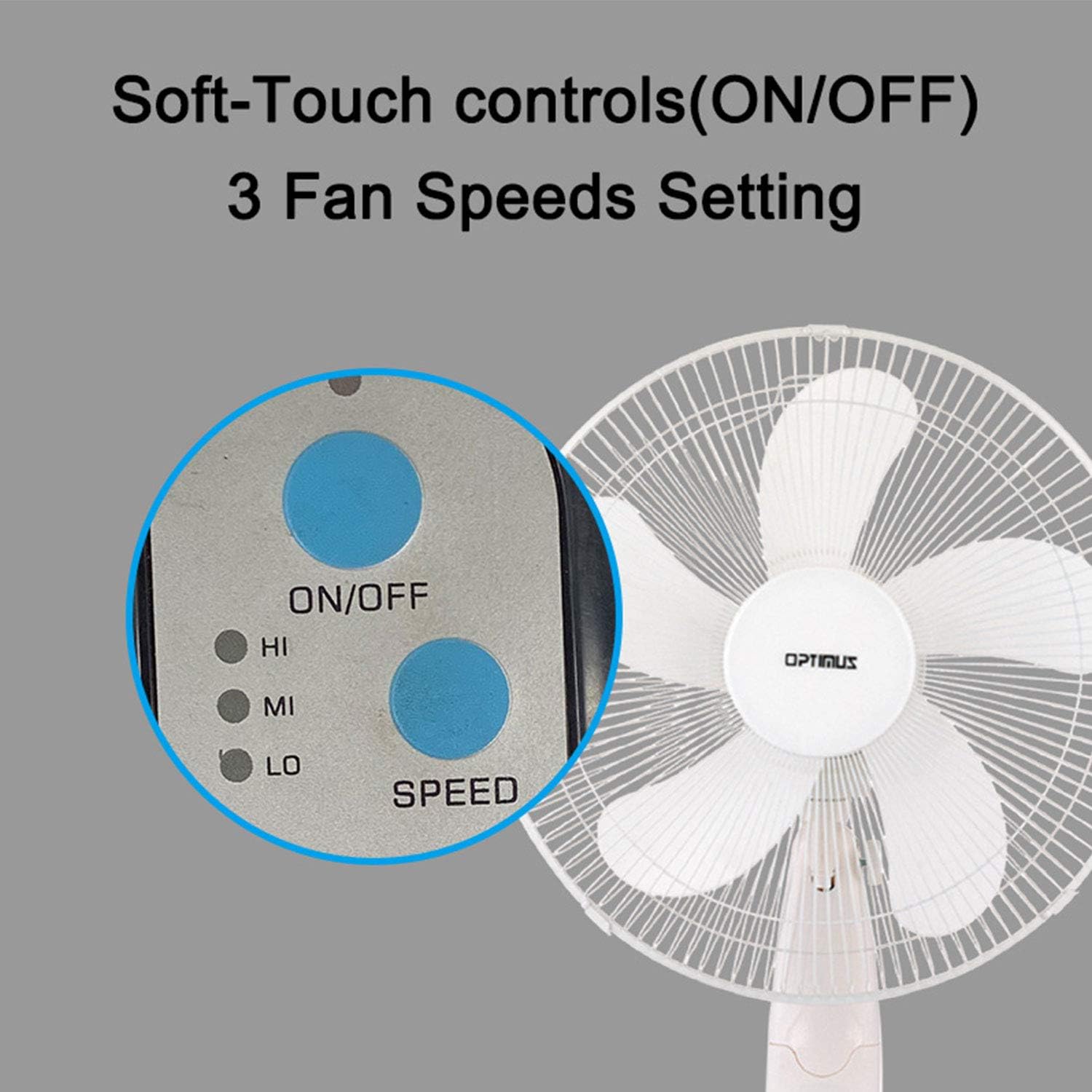
Image: The fan's soft-touch control panel, showing buttons for ON/OFF and SPEED, with indicators for High (HI), Medium (MI), and Low (LO) fan speeds.
- IESLĒGTS/IZSLĒGTS: Nospiediet, lai ieslēgtu vai izslēgtu ventilatoru.
- Ātruma iestatījumi: Select from Low, Medium, or High speeds. The 3-speed, energy-saving, whisper-quiet operation motor provides efficient airflow.
Tālvadības pults
The fan comes with a remote control for convenient operation from a distance. (Batteries not included).

Image: The remote control for the fan, featuring buttons for Mode, Time, Speed, and ON/OFF functions.
- IESLĒGTS/IZSLĒGTS: Ieslēdz vai izslēdz ventilatoru.
- ĀTRUMS: Cycles through the three fan speeds (Low, Medium, High).
- REŽĪMS: Selects between different wind modes.
- LAIKS: Activates and sets the shut-off timer.
Vēja režīmi
The fan offers three distinct wind modes to suit your preference:

Image: The fan's control panel highlighting the MODE button and indicators for Normal, Natural, and Sleep wind modes.
- Parastais režīms: The fan blows at a constant speed based on your selected setting.
- Dabiskais režīms: The fan speed fluctuates to mimic a natural breeze.
- Miega režīms: The fan operates at a lower, quieter speed, ideal for sleeping, with gentle speed variations.
Svārstības
The F-1760 features unique wave oscillation for comprehensive air distribution.

Image: A diagram illustrating the fan's capability for both vertical (up/down) and horizontal (left/right) wave oscillation, providing wider air coverage.
- Up/Down & Left/Right Wave Oscillating: Activates a unique oscillation pattern that moves the fan head both horizontally and vertically, distributing air throughout the room.
- Lai apturētu svārstības, vēlreiz nospiediet svārstību pogu.
Taimera funkcija
Iestatiet ventilatoru tā, lai tas automātiski izslēgtos pēc noteikta laika perioda.

Image: The fan's control panel showing the TIME button and indicators for 1 hour (1H), 2 hours (2H), and 4 hours (4H) timer settings. The fan can be programmed for up to 7 hours.
- The timer can be set for 1, 2, 4, or up to 7 hours. Press the TIME button repeatedly to cycle through the desired duration.
Apkope un tīrīšana
Regulāra tīrīšana palīdz uzturēt ventilatora veiktspēju un pagarina tā kalpošanas laiku.
- Pirms tīrīšanas: Pirms tīrīšanas vienmēr atvienojiet ventilatoru no elektrotīkla.
- Ārpuses tīrīšana: Izmantojiet mīkstu, damp drānu, lai noslaucītu ventilatora ārējās virsmas. Nelietojiet abrazīvus tīrīšanas līdzekļus vai šķīdinātājus.
- Grila tīrīšana: The metal grill can be cleaned with a soft brush or vacuum cleaner to remove dust. For thorough cleaning, the grill may need to be carefully removed.
- Asmeņu tīrīšana: If necessary, the fan blades can be cleaned. Ensure the fan is completely off and unplugged. The care instructions specify "Hand Wash" for components.
- Uzglabāšana: Ja ventilators ilgstoši netiek lietots, uzglabājiet to vēsā, sausā vietā, vēlams, oriģinālajā iepakojumā.
Problēmu novēršana
| Problēma | Iespējamais cēlonis | Risinājums |
|---|---|---|
| Ventilators neieslēdzas. | No power supply. Blown fuse. | Ensure the fan is plugged into a working outlet. Check the fuse in the plug and replace if necessary (refer to safety instructions for fuse replacement). |
| Fan operates but air movement is weak. | Low speed setting. Dust accumulation on blades/grill. | Increase the fan speed. Clean the fan blades and grills as per maintenance instructions. |
| Tālvadības pults nedarbojas. | Dead batteries. Obstruction between remote and fan. | Replace batteries in the remote control. Ensure a clear line of sight between the remote and the fan's receiver. |
| Fan changes speed automatically or unexpectedly. | Traucējumi no citām tālvadības pultīm (piemēram, televizora tālvadības pults). | This fan may respond to frequencies from other remote controls. Try operating the fan manually or repositioning the fan/other devices to minimize interference. |
| Fan makes clicking noises during oscillation. | Normal operation of oscillation gears. | A slight clicking noise from the oscillation gears can occur during normal operation. If the noise is excessive or new, ensure the fan head is securely attached. |
| Fan feels unstable. | Base not properly assembled or tightened. Uneven surface. | Ensure all base components are securely fastened and the fan is placed on a firm, level surface. |
Specifikācijas
- Modeļa nosaukums: F-1760
- Zīmols: Optimus
- Ventilatora diametrs: 16 collas
- Elektriskā ventilatora dizains: Stāvu ventilators
- Barošanas avots: Elektrība ar vadu
- Wattage: 60 vati
- Voltage: 6 volts
- Asmeņu skaits: 3
- Ātruma iestatījumi: 3 apgr./min (zems, vidējs, augsts)
- Kontroles metode: Tālvadības pults, spiedpoga
- Īpašas funkcijas: Up/Down & Left/Right Wave Oscillating, Adjustable Height, Timer Function (up to 7 hours), Wind Modes (Normal, Natural, Sleep)
- Lietošana iekštelpās/ārā: Iekštelpās
- Preces svars: 9.9 mārciņas
- Iekļautie komponenti: Produkts, rokasgrāmata
Garantijas informācija
This Optimus F-1760 fan comes with a 1 gads ierobežota garantija from the date of purchase. This warranty covers defects in materials and workmanship under normal use. It does not cover damage resulting from misuse, accident, alteration, or unauthorized repair. Please retain your proof of purchase for warranty claims.
Klientu atbalsts
For technical assistance, warranty claims, or questions regarding your Optimus F-1760 fan, please contact Optimus customer service. Refer to the product packaging or the official Optimus webvietne, kurā atrodama visjaunākā kontaktinformācija.