
1. Ievads
The Magellan RoadMate 2230T-LM is a portable GPS navigation device designed to provide reliable guidance for your journeys. It features lifetime map updates and lifetime traffic alerts, ensuring you have the most current road information and can avoid congestion. This manual provides essential information for setting up, operating, and maintaining your device.

1.1. attēls. Priekšpuse view of the Magellan RoadMate 2230T-LM GPS Navigator.
2. Drošības informācija
Please read and understand all safety information before using your Magellan RoadMate 2230T-LM. Failure to follow these instructions could result in injury or damage.
- Braukšanas drošība: Always prioritize safe driving. Do not operate the device or input data while driving. Pull over to a safe location before making any adjustments or entering information.
- Satiksmes likumi: Always obey all traffic laws and regulations. The GPS device is a navigational aid and should not supersede actual road signs or traffic conditions.
- Montāža: Pārliecinieties, vai ierīce ir droši nostiprināta un netraucē jūsu view no ceļa vai traucēt transportlīdzekļa vadību.
- Barošanas avots: Izmantojiet tikai komplektācijā iekļauto strāvas adapteri un kabeļus. Neatļautu piederumu lietošana var sabojāt ierīci un anulēt garantiju.
- Temperatūra: Nepakļaujiet ierīci ekstremālām temperatūrām, ilgstošai tiešai saules gaismai vai pārmērīgam mitrumam.
3. Iepakojuma saturs
Pārliecinieties, vai produkta iepakojumā ir visi nepieciešamie priekšmeti:
- Magellan RoadMate 2230T-LM GPS Navigator
- Vējstikla stiprinājums
- USB kabelis
- Transportlīdzekļa strāvas adapteris
- Litija jonu akumulators (iepriekš uzstādīts)
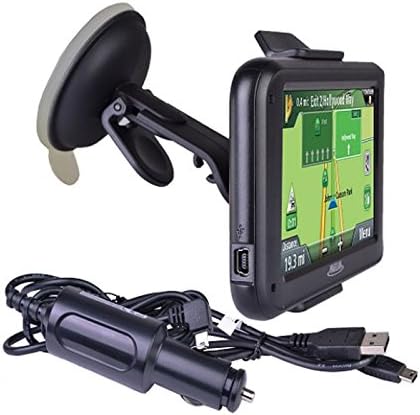
Figure 3.1: Included accessories: GPS unit, windshield mount, and charging cables.
4. Iestatīšana
4.1. Ierīces uzlāde
Before first use, fully charge your RoadMate 2230T-LM. Connect the USB cable to the device and then to the vehicle power adapter or a computer USB port. The battery indicator on the screen will show charging status. A full charge typically takes approximately 2 hours.
4.2 Ierīces uzstādīšana
The RoadMate 2230T-LM comes with a windshield mount for secure placement in your vehicle.
- Clean the desired area on your windshield with a non-abrasive cleaner.
- Attach the mounting bracket to the back of the GPS unit until it clicks into place.
- Press the suction cup firmly against the clean windshield surface and flip the lever to secure it.
- Pielāgojiet ierīces leņķi optimālam viewnetraucējot braukšanu view.
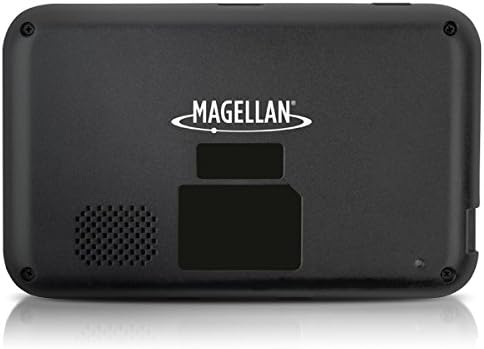
4.1. attēls. Aizmugure view of the GPS unit, showing the speaker and mounting area.
5. Lietošanas instrukcijas
5.1 Ieslēgšana/izslēgšana
Press and hold the power button located on the device's top edge to turn it on or off. A short press will put the device into sleep mode.
5.2. Pamata navigācija
The RoadMate 2230T-LM features a touchscreen interface for all operations.
- Enter Destination: From the main menu, tap 'Go To' or 'New Destination'. You can enter an address, point of interest (POI), or select from recent destinations.
- Route Calculation: After entering your destination, the device will calculate the fastest or shortest route based on your preferences.
- Izpildiet norādījumus: Follow the spoken turn-by-turn directions and on-screen map guidance. The device will display upcoming turns, speed limits, and estimated arrival times.
5.3 Lifetime Map Updates
Your device includes lifetime map updates. To ensure you have the latest maps, connect your device to a computer with internet access and use the Magellan Content Manager software (available for download from the Magellan website). Follow the on-screen instructions to download and install map updates. Regular updates are recommended for optimal navigation accuracy.
5.4 Lifetime Traffic Alerts
The RoadMate 2230T-LM provides real-time traffic information to help you avoid delays. Traffic alerts are automatically received and displayed on the map. The device may suggest alternative routes to bypass heavy traffic or incidents.
5.5 Īpašas funkcijas
- Traffic Camera Alerts: Receive audible and visual warnings for upcoming traffic cameras.
- Best Parking: Find nearby parking options at your destination.
- Ātruma ierobežojumi: The device displays the current speed limit for the road you are on.
6. Apkope
6.1. Ierīces tīrīšana
Use a soft, lint-free cloth to clean the screen and exterior of the device. Do not use abrasive cleaners or solvents, as they may damage the surfaces.
6.2 Programmatūras un karšu atjauninājumi
Regularly check for software and map updates via the Magellan website. Keeping your device updated ensures optimal performance and the most accurate navigation data.
6.3 Akumulatora kopšana
Lai paildzinātu akumulatora darbības laiku, izvairieties no biežas akumulatora pilnīgas izlādes. Ja ierīci ilgstoši nelietojat, glabājiet to vēsā, sausā vietā.
7. Traucējummeklēšana
If you encounter issues with your Magellan RoadMate 2230T-LM, refer to the following common problems and solutions:
- Nav GPS signāla: Pārliecinieties, vai ierīcei ir skaidra view of the sky. Move away from tall buildings or dense foliage. Allow several minutes for the device to acquire satellites.
- Ierīce sasalst vai pārstartējas: Try performing a soft reset by pressing and holding the power button for 10-15 seconds until the device restarts. If the issue persists, ensure the software is up to date.
- Inaccurate Routing/Voice Prompts: Verify that your maps are up to date. Check your navigation settings for route preferences (e.g., fastest, shortest, avoid tolls). Ensure the device's time and date settings are correct.
- Slikta audio kvalitāte: Check the volume settings on the device. Ensure the speaker is not obstructed.
- Akumulators netiek uzlādēts: Ensure the USB cable and power adapter are securely connected. Try a different USB port or power source.
For further assistance, visit the official Magellan support webvietni vai sazinieties ar klientu apkalpošanas dienestu.
8. Specifikācijas
| Modeļa nosaukums | RoadMate 2230T-LM |
| Preces modeļa numurs | RM2230SGLUC |
| Produkta izmēri | 13 x 6.1 x 7.1 collas |
| Preces svars | 5 unces |
| Ekrāna izmērs | 4.3 collas |
| Cilvēka saskarnes ievade | Skārienekrāns |
| Savienojamības tehnoloģija | USB |
| Akumulatora tips | 1 litija jonu akumulators (iekļauts) |
| Akumulatora darbības laiks | Līdz 2 stundām |
| Kartes veids | Ziemeļamerika |
| Montāžas veids | Vējstikla stiprinājums |
| Īpašas funkcijas | Traffic Camera Alerts, Best Parking, Touchscreen |
9. Garantija un atbalsts
For information regarding your product's warranty, please refer to the warranty card included in your original packaging or visit the official Magellan webvietni. Lai saņemtu tehnisko atbalstu, bieži uzdotos jautājumus un papildu resursus, lūdzu, apmeklējiet Magellan Support.