
1. Ievads
This manual provides essential information for the safe and efficient use of your Lenovo IdeaPad Miix 510-12ISK 2-in-1 Tablet. The Miix 510 is a versatile device designed to function as both a laptop and a tablet, adapting to various tasks with its detachable keyboard and integrated kickstand. Please read this manual thoroughly before operating your device.
2. Iepakojuma saturs
Pārliecinieties, vai produkta iepakojumā ir visi nepieciešamie priekšmeti:
- Lenovo IdeaPad Miix 510-12ISK Tablet
- Noņemama tastatūra
- Websadales vārpsta (integrēta)
- Strāvas adapteris
- Īsā lietošanas pamācība (ja iekļauta)
3. Iestatīšana
3.1. Sākotnējā uzlāde
Before first use, connect the tablet to a power outlet using the provided power adapter. Allow the device to charge fully. The charging indicator light will typically change color or turn off when charging is complete.
3.2 Tastatūras pievienošana
Align the magnetic connectors on the bottom edge of the tablet with the corresponding connectors on the keyboard. The keyboard will snap into place securely. To detach, gently pull the tablet away from the keyboard.

Image: The Lenovo IdeaPad Miix 510-12ISK in laptop mode, showing the tablet connected to its detachable keyboard. The screen displays the Windows 10 operating system interface.
3.3 Pirmā ieslēgšana
Press and hold the power button (usually located on the side or top edge of the tablet) until the Lenovo logo appears. Follow the on-screen instructions to complete the initial Windows 10 Pro setup, including language selection, network connection, and user account creation.
4. Lietošanas instrukcijas
4.1 Ieslēgšana/izslēgšana un miega režīms
- Ieslēgšana: Nospiediet un turiet barošanas pogu.
- Izslēgt: From the Windows Start menu, select Power > Shut down.
- Miega režīms: Briefly press the power button, or select Power > Sleep from the Start menu.
4.2 Using Tablet and Laptop Modes
The Miix 510 automatically switches between tablet and laptop modes when the keyboard is attached or detached. You can also manually switch modes via the Action Center in Windows 10.
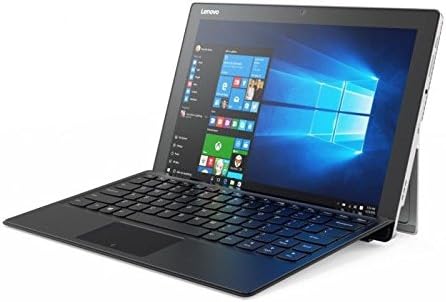
Attēls: Leņķis view of the Lenovo IdeaPad Miix 510-12ISK, showcasing its kickstand functionality when used with the detachable keyboard in laptop configuration.
4.3 Touch Screen and Keyboard Usage
- Skārienekrāns: Use gestures such as tap, swipe, pinch-to-zoom, and long-press for navigation and interaction.
- Tastatūra: The detachable keyboard provides a full QWERTY layout and a touchpad for precise input.
4.4 Savienojamība
Your device supports Wi-Fi and Bluetooth for wireless connectivity. Access network settings via the Windows Action Center or Settings app to connect to available networks and pair Bluetooth devices.
5. Apkope
5.1. Tīrīšana
- Izmantojiet mīkstu, neplūksnu drānu nedaudz dampsamitriniet displeju ar ūdeni vai ekrāna tīrīšanas līdzekli.
- Noslaukiet ārējās virsmas ar mīkstu, sausu drānu. Izvairieties no spēcīgām ķīmiskām vielām vai abrazīviem materiāliem.
5.2. Programmatūras atjauninājumi
Regularly check for and install Windows updates to ensure optimal performance, security, and compatibility. Access updates via Windows Settings > Update & Security.
5.3 Akumulatora kopšana
To prolong battery life, avoid extreme temperatures and allow the battery to discharge partially before recharging. For long-term storage, charge the battery to approximately 50%.
6. Traucējummeklēšana
6.1 Ierīce neieslēdzas
- Ensure the device is charged. Connect the power adapter and wait a few minutes before attempting to power on.
- Lai veiktu atiestatīšanu, mēģiniet turēt nospiestu ieslēgšanas/izslēgšanas pogu 10–15 sekundes.
6.2 Ekrāna problēmas
- If the screen is blank, ensure the device is powered on and not in sleep mode.
- Pielāgojiet ekrāna spilgtuma iestatījumus.
6.3 Tastatūra vai skārienpaliktnis nereaģē
- Ensure the keyboard is securely attached to the tablet.
- Restartējiet planšetdatoru.
- Check for updated drivers in Windows Device Manager.
6.4 Wi-Fi vai Bluetooth savienojamības problēmas
- Toggle Wi-Fi or Bluetooth off and on in Windows settings.
- Restartējiet maršrutētāju/modemu, lai risinātu Wi-Fi problēmas.
- Ensure devices are within range and properly paired for Bluetooth.
For persistent issues, refer to the Lenovo support webvietni vai sazinieties ar klientu apkalpošanas dienestu.
7. Specifikācijas
| Zīmols | Lenovo |
| Modeļa nosaukums | 80U1006EUS |
| Ekrāna izmērs | 12.2 collas |
| Ekrāna izšķirtspēja | 1920x1080 pikseļi |
| Procesors | 2.3 GHz Intel Core i5-6200U |
| RAM | 8 GB |
| Cietais disks | 256 GB cietvielu disks (SSD) |
| Grafikas kopprocesors | Intel HD Graphics 520 |
| Operētājsistēma | Windows 10 Pro |
| Bezvadu tips | Bluetooth |
| Preces svars | 2.78 mārciņas |
| Produkta izmēri | 4.48 x 5.8 x 0.6 collas |
| Aizmugure Webcam izšķirtspēja | 5 MP |
8. Garantija un atbalsts
This product is covered by Lenovo's standard warranty. For detailed warranty terms, registration, and technical support, please visit the official Lenovo support webvietnē vai sazinieties ar klientu apkalpošanas dienestu. Saglabājiet pirkuma apliecinājumu garantijas prasību iesniegšanai.
No official product videos were provided by the seller for this model.