
1. Ievads
The Samsung QMR series provides 4K UHD non-glare picture quality with up to a billion colors, delivering crystal clear, lifelike color and exceptional detail. Featuring an elegant, slim design and a clean cable management solution, these displays are designed for easy installation in various environments. The integrated Samsung Smart Signage Platform 6.0 and embedded MagicInfo player S6 media player facilitate efficient content management and playback, eliminating the need for an external set-back box or PC.
2. Galvenās iezīmes
- Displejs: 75-inch, 4K UHD (3840 x 2160 resolution), 500 nits brightness, non-glare panel, rated for 24/7 operation, IP5X rating.
- Savienojamība: HDMI, DVI, DisplayPort 1.2; built-in Wi-Fi and Bluetooth for remote control and content sharing.
- Attēla uzlabošana: Intelligent UHD upscaling for standard and high-definition content, intelligent HDR+ to convert SDR to HDR.
- Dizains: Slim, elegant design for easy mounting, clean cable management, 9.2 mm bezel width, VESA 200 x 200 wall mountable in portrait or landscape mode.
- Sadarbība: Cisco WebEx room kit compatible for conferencing solutions.
- Smart Signage: System-on-chip (SoC) technology and embedded media player for an all-in-one digital signage solution.

2.1. attēls. Priekšpuse view of the Samsung QM75R display, showcasing its slim bezel and vibrant picture quality.
3. Iestatīšana
3.1 Izpakošana un sākotnējā pārbaude
Carefully remove the display from its packaging. Inspect the unit for any signs of damage. Ensure all components listed in the packing list are present.
3.2 Displeja uzstādīšana
The QM75R display supports VESA 200 x 200 wall mounting, allowing for installation in both portrait and landscape orientations. Its slim design and 9.2 mm bezel facilitate easy integration into various spaces. For optimal aesthetics, utilize the integrated cable management system to keep connections tidy.

3.1. attēls: sāni view of the Samsung QM75R, illustrating its slim profile and accessible ports for easy installation.

Figure 3.2: The QMR series features a clean cable management system, ensuring a tidy installation by routing cables discreetly.
3.3 Perifērijas ierīču pievienošana
Connect your source devices (e.g., media players, computers) to the display using the available HDMI, DVI, or DisplayPort 1.2 inputs. The built-in Wi-Fi and Bluetooth allow for wireless connectivity and content sharing.
4. Lietošanas instrukcijas
4.1 Ieslēgšana/izslēgšana
Press the power button on the remote control or the display to turn the unit on or off. The display is rated for 24/7 operation, making it suitable for continuous commercial use.
4.2 Content Management and Playback
The integrated Samsung Smart Signage Platform 6.0 and embedded MagicInfo player S6 media player provide comprehensive tools for content creation, scheduling, and playback. Utilize the built-in Wi-Fi and Bluetooth for remote content updates and control via compatible devices.
Video 4.1: Samsung UHD Commercial Signage. This video demonstrates the advanced features of Samsung's UHD commercial displays, including intelligent upscaling, color accuracy, and design elements.
4.3 Attēla kvalitātes uzlabojumi
The display features intelligent UHD upscaling, which automatically converts lower-resolution content to stunning 4K quality. Intelligent HDR+ technology enhances standard dynamic range (SDR) content to high dynamic range (HDR), revealing greater detail in both bright and dark scenes.

Figure 4.2: Intelligent UHD Upscaling processes content to deliver enhanced 4K resolution, improving clarity and detail.

Figure 4.3: UHD Noise Reduction minimizes visual noise in content, resulting in a cleaner and sharper image.
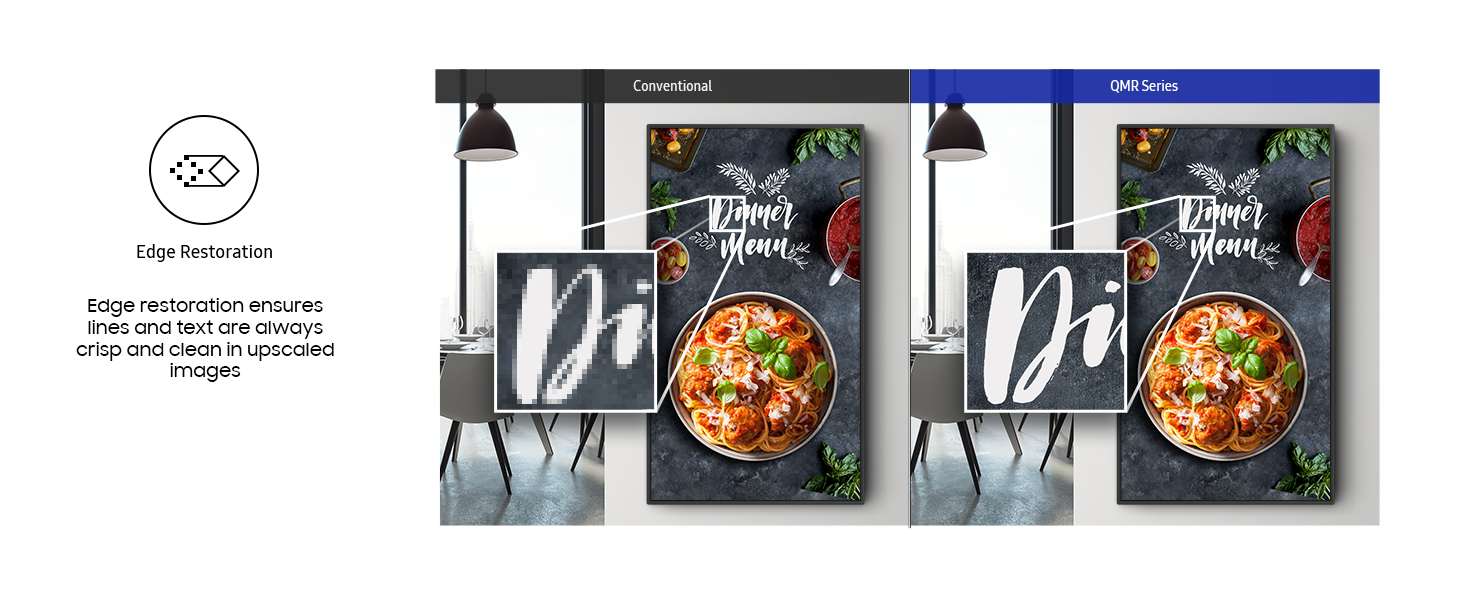
Figure 4.4: UHD Edge Restoration enhances the sharpness of image edges, making details more pronounced.
4.4 Cisco WebEx Compatibility
The QM75R is compatible with Cisco WebEx room kits, offering a powerful solution for seamless video conferencing and collaboration in business environments.
Video 4.5: Seamless Integration with Samsung Display Solutions and Cisco Webex. This video highlights the collaborative capabilities when integrating Samsung displays with Cisco Webex for enhanced meeting experiences.
5. Apkope
5.1 Displeja tīrīšana
To clean the display screen, gently wipe it with a soft, lint-free cloth. For stubborn marks, lightly dampen the cloth with water or a non-abrasive screen cleaner. Avoid using harsh chemicals or abrasive materials that could damage the screen surface. Ensure the display is powered off before cleaning.
5.2 Vispārēja aprūpe
Avoid placing objects on top of the display or blocking ventilation openings. Ensure the display is installed in a well-ventilated area to prevent overheating. Protect the display from direct sunlight and extreme temperatures.
6. Traucējummeklēšana
6.1 Nav jaudas
- Pārbaudiet, vai strāvas kabelis ir droši pievienots gan displejam, gan strāvas kontaktligzdai.
- Pārliecinieties, vai strāvas kontaktligzda darbojas, pievienojot tai citu ierīci.
- Ensure the power switch on the display (if present) is in the 'On' position.
6.2 No Picture/Signal
- Confirm that the correct input source is selected on the display.
- Check all video cables (HDMI, DVI, DisplayPort) for secure connections at both the display and the source device.
- Test with a different video cable or source device to rule out cable or device issues.
6.3 Slikta attēla kvalitāte
- Pielāgojiet displeja iestatījumus, piemēram, spilgtumu, kontrastu un asumu.
- Ensure the source content is of high quality (e.g., 4K content for optimal 4K display).
- Disable or adjust any picture enhancement features if they appear to be causing undesirable effects.
7. Specifikācijas
| Funkcija | Specifikācija |
|---|---|
| Zīmols | Samsung |
| Modeļa numurs | QM75R |
| Ekrāna izmērs | 75 collas |
| Ekrāna izšķirtspēja | 3840 x 2160 pikseļi (4K UHD) |
| Spilgtums | 500 niti |
| Paneļa veids | Bez atspīduma |
| Darbības vērtējums | 24/7 |
| IP reitings | IP5X |
| Savienojamība | HDMI, DVI, DisplayPort 1.2, 2x USB 2.0 Ports, Wi-Fi, Bluetooth |
| VESA kalns | 200 x 200 mm |
| Produkta izmēri (LxWxH) | 66.2 x 1.8 x 37.8 collas |
| Preces svars | 107.8 mārciņas |
| Krāsa | Melns |
| Malu attiecība | 16:9 |
| Ekrāna virsmas apraksts | Dzīvoklis |
8. Garantija un atbalsts
8.1 Produkta garantija
This Samsung Business QM75R display comes with a 3-Year Warranty, covering manufacturing defects and ensuring reliable performance. Please refer to the warranty card included with your product for full terms and conditions.
8.2 Tehniskais atbalsts
Lai saņemtu tehnisku palīdzību, novērstu problēmas vai saņemtu informāciju par pakalpojumiem, lūdzu, sazinieties ar Samsung klientu atbalsta dienestu. Kontaktinformāciju varat atrast oficiālajā Samsung tīmekļa vietnē. webvietnē vai produkta dokumentācijā.