
1. Ievads
Welcome to the user manual for your Google Pixel 4 XL smartphone. This guide provides essential information to help you get started, understand its features, and maintain your device. The Google Pixel 4 XL is designed to offer a seamless Android experience with advanced camera capabilities, intuitive gesture controls, and the integrated Google Assistant.

Figure 1.1: Google Pixel 4 XL (Oh So Orange)
2. Iestatīšana
2.1 Kas ir kastē
- Google Pixel 4 XL Smartphone
- Maiņstrāvas adapteris
- USB kabelis (USB-C uz USB-C)
- OTG Dongle (USB-A to USB-C adapter)
- SIM kartes paliktņa izņemšanas rīks
- Īsā lietošanas pamācība
2.2 SIM kartes ievietošana
- Locate the SIM card tray on the side of your Pixel 4 XL.
- Ievietojiet SIM kartes paliktņa izņemšanas rīku mazajā caurumā blakus paliktnim un stingri piespiediet, līdz paliktnis iznirst.
- Place your Nano SIM card into the tray with the gold contacts facing down. Ensure it fits securely.
- Uzmanīgi iebīdiet SIM kartes paliktni atpakaļ tālrunī, līdz tā noklikšķ savā vietā.

2.1. attēls: SIM kartes paliktņa atrašanās vieta
2.3 Sākotnējā ieslēgšana un iestatīšana
- Nospiediet un turiet ieslēgšanas/izslēgšanas pogu (atrodas labajā pusē), līdz parādās Google logotips.
- Follow the on-screen instructions to select your language, connect to Wi-Fi, and transfer data from an old device if desired.
- Pierakstieties ar savu Google kontu vai izveidojiet jaunu.
- Set up security features such as Face Unlock.
2.4. Ierīces uzlāde
Connect the USB cable to the AC adapter and plug it into a power outlet. Connect the other end of the USB cable to the USB-C port at the bottom of your Pixel 4 XL. The device supports fast charging. For optimal battery health, avoid fully discharging the battery frequently.
3. Lietošanas instrukcijas
3.1. Pamata navigācija
The Pixel 4 XL uses a touchscreen interface for navigation. Swipe up from the bottom to go to the home screen, swipe from the left or right edge to go back, and swipe up and hold to view jaunākās lietotnes.

Figure 3.1: Pixel 4 XL Front Display
3.2 Google asistents
The new Google Assistant is integrated into the Pixel 4 XL. You can activate it by squeezing the sides of your phone or by saying "Hey Google." Use your voice to send texts, share photos, get directions, and more.
3.3 Kameras funkcijas
The Pixel 4 XL camera offers advanced photography capabilities:
- Point and Shoot: Capture brilliant color and control exposure balance.
- Nakts redzamība: Take clear photos in low-light conditions, including astrophotography for capturing the Milky Way.
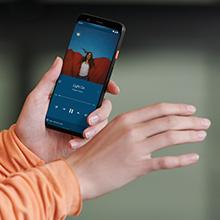
Figure 3.2: Using the Pixel 4 XL Camera
3.4 Motion Sense (Quick Gestures)
Utilize Quick Gestures to control your phone without touching it. Wave your hand above the screen to skip songs, silence calls, and more. Motion Sense functionality is available in specific regions including the US, Canada, Singapore, Australia, Taiwan, and most European countries.
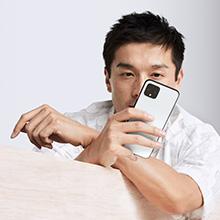
Figure 3.3: Motion Sense in Action
3.5 Call Screen
The Google Assistant's Call Screen feature helps filter out spam calls. It can proactively screen unknown callers and provide a transcript of the conversation, allowing you to decide whether to answer.
3.6 Oficiālais produkta video
Video 3.1: An official video from Google Inc showcasing the features of the Google Pixel 4, including Google Assistant and Motion Sense. This video provides a visual overview of key functionalities.
4. Apkope
4.1 Ierīces tīrīšana
To clean your Pixel 4 XL, use a soft, lint-free cloth. Avoid abrasive materials, solvents, or aerosol sprays. For stubborn marks, slightly dampen the cloth with water. Do not submerge the device in water.
4.2. Programmatūras atjauninājumi
Google regularly releases software updates to improve performance, add features, and enhance security. Ensure your device is connected to Wi-Fi and has sufficient battery life before installing updates. You can check for updates in Settings > System > System update.
4.3 Akumulatora kopšana
Lai pagarinātu akumulatora darbības laiku:
- Izvairieties no ekstremālām temperatūrām.
- Use the provided charger or a compatible Qi-certified wireless charger.
- Enable Adaptive Battery in settings to optimize app usage.
- Disable features like Motion Sense and Always-on Display if not actively needed to conserve power.
4.4. Datu dublēšana
Regularly back up your data to your Google Account. This includes photos, videos, contacts, and app data. Go to Settings > System > Backup to manage your backup settings.
5. Traucējummeklēšana
5.1. Bieži sastopamās problēmas un risinājumi
- Ierīce nereaģē: Nospiediet un apmēram 30 sekundes turiet ieslēgšanas/izslēgšanas pogu, lai piespiedu kārtā restartētu ierīci.
- Lietotņu avarē: Clear the cache and data for the problematic app in Settings > Apps & notifications > See all apps > [App Name] > Storage & cache.
- Savienojamības problēmas (Wi-Fi/Bluetooth): Try toggling Wi-Fi or Bluetooth off and on. If the issue persists, reset network settings in Settings > System > Reset options > Reset Wi-Fi, mobile & Bluetooth.
- Slikts akumulatora darbības laiks: Review battery usage in Settings > Battery to identify apps consuming excessive power. Adjust screen brightness and disable unnecessary features.
5.2 Rūpnīcas atiestatīšana
Rūpnīcas datu atiestatīšana izdzēsīs visus datus no jūsu tālruņa un atjaunos tā sākotnējos rūpnīcas iestatījumus. Tas var atrisināt pastāvīgas programmatūras problēmas. Warning: Back up all important data before proceeding.
- Dodieties uz Iestatījumi > Sistēma > Atiestatīšanas opcijas.
- Pieskarieties pogai “Dzēst visus datus (rūpnīcas datu atiestatīšana)”.
- Apstipriniet savu lēmumu un izpildiet ekrānā redzamos norādījumus.
6. Specifikācijas
Key technical specifications for the Google Pixel 4 XL:
| Funkcija | Specifikācija |
|---|---|
| Zīmols | |
| Modeļa nosaukums | Pixel 4 XL |
| Operētājsistēma | Android |
| Atmiņas krātuves ietilpība | 64 GB |
| Instalētās RAM atmiņas apjoms | 6 GB |
| Ekrāna izmērs | 6.3 collas |
| Izšķirtspēja | 1440 x 2960 |
| Atsvaidzināšanas biežums | 120 Hz |
| CPU modelis | Snapdragon S3 |
| CPU ātrums | 2.84 GHz |
| Krāsa | Oh So Orange |
| SIM kartes slotu skaits | Viena SIM karte |
| Savienotāja veids | USB tips C |
| Biometriskā drošības funkcija | Sejas atpazīšana |
| Ūdensizturības līmenis | Ūdens izturīgs |
| Austiņas Džeks | Nav austiņu ligzdas |
| Front Photo Sensor Resolution | 8 MP |
| Video uzņemšanas izšķirtspēja | 4k (30fps) |
| Displeja veids | OLED |
| Bezvadu pakalpojumu sniedzējs | Atbloķēts |
| Vidējais akumulatora darbības laiks | 12 stundas |
7. Informācija par garantiju
Your Google Pixel 4 XL comes with a 2 gada ražotāja garantija. This warranty covers defects in materials and workmanship under normal use. It does not cover damage caused by accidents, misuse, unauthorized repairs, or normal wear and tear.
For detailed terms and conditions, please refer to the warranty card included with your product or visit the official Google support webvietne.
8. Atbalsts
If you require further assistance or encounter issues not covered in this manual, please utilize the following resources:
- Tiešsaistes palīdzība: Visit the official Google Pixel Help Center for comprehensive articles, FAQs, and troubleshooting guides.
- Kopienas forumi: Engage with other Pixel users and experts in Google's official product forums.
- Sazinieties ar atbalsta dienestu: Access direct support options (chat, phone, email) through the Google Pixel Help Center.
Always ensure you are referring to official Google support channels for accurate and up-to-date information.