1. Ievads
This instruction manual provides comprehensive guidance for the setup, operation, maintenance, and troubleshooting of your new Generic replacement remote control. This remote is designed to be compatible with various Hitachi television models, offering a convenient and functional replacement for your original remote.
2. Produkts beidziesview
The Generic replacement remote control is engineered to replicate the functions of several Hitachi TV remote models, ensuring seamless integration with your television.
2.1. Saderīgi modeļi
- Hitachi RM-D626
- Hitachi CLE-860A
- Hitachi CLE-865B
- Hitachi CLE-865A
- Hitachi CLE-866B
- Hitachi P6-P1
- Hitachi V2-U2
- Hitachi VS141
- Hitachi VM-102
- Hitachi RC-225
2.2 Tālvadības pults izkārtojums
Familiarize yourself with the buttons and their corresponding functions on the remote control.

This image displays the front of the remote control, highlighting the power button, input selection, number pad, channel and volume controls, menu navigation, and special function buttons.

Detalizēts view of the remote control's front face, providing a clearer look at the button labels and layout, including the 'HUAYU RM-D626' branding.
3. Iestatīšana
3.1 Akumulatora uzstādīšana
Follow these steps to install batteries into your remote control:
- Atrodiet bateriju nodalījumu tālvadības pults aizmugurē.
- Pabīdiet akumulatora vāciņu uz leju, lai to atvērtu.
- Ievietojiet divas 1.5 V AA baterijas, nodrošinot pareizu polaritāti (+ un -), kā norādīts nodalījuma iekšpusē.
- Bīdiet atpakaļ akumulatora vāciņu vietā, līdz tas droši noklikšķ.

This image illustrates the process of installing batteries. The back cover is removed, revealing the two AA battery slots with polarity indicators.
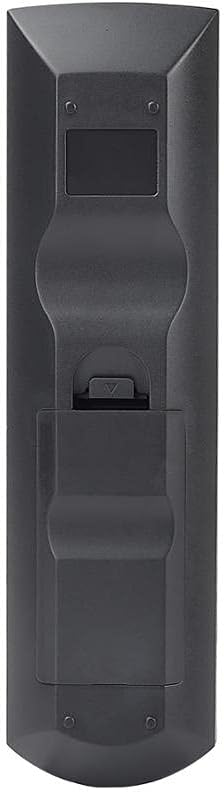
The rear side of the remote control, showing the ergonomic design and the battery compartment cover.
4. Lietošanas instrukcijas
Once batteries are installed, the remote control is ready for use. Point the remote directly at your Hitachi TV.
4.1 Pamatfunkcijas
- Barošana (sarkanā poga): Ieslēdz vai izslēdz televizoru.
- Input (HDMI1, HDMI2, AV1-AV4, RGB): Selects the desired video input source (e.g., DVD player, game console).
- Ciparu tastatūra (0–9): Directly enters channel numbers for television viewing.
- Kanālu pārslēgšana uz augšu/leju (CH+/CH-): Navigates through television channels sequentially.
- Skaļuma palielināšana/samazināšana (VOL+/VOL-): Adjusts the audio output level of the television.
- Mute (Speaker with X): Toggles the television sound on or off.
- Izvēlne: Accesses the television's on-screen menu for settings and adjustments.
- Navigation (Arrow Buttons & OK): Used to move through menu options and confirm selections.
- Iziet/atgriezties: Exits current menus or returns to the previous screen.
4.2 Papildu funkcijas
- S. MODE: Selects various sound modes (e.g., Standard, Music, Movie).
- P.MODE: Selects various picture modes (e.g., Standard, Dynamic, Cinema).
- SWIVEL: If your TV supports it, this button may control a motorized swivel stand.
- FOTO: Accesses the TV's photo viewer function, if available.
- SEL: A general select button, often used in conjunction with other functions or within specific menus.
5. Apkope
5.1. Tīrīšana
To clean your remote control, gently wipe the surface with a soft, dry cloth. Avoid using liquid cleaners, abrasive materials, or chemical solvents, as these can damage the remote's finish or internal components.
5.2 Akumulatora kopšana
If the remote control will not be used for an extended period (e.g., one month or more), remove the batteries to prevent potential leakage, which can damage the remote. Replace old batteries promptly when the remote's performance diminishes.
6. Traucējummeklēšana
If you encounter issues with your remote control, refer to the following table for common problems and solutions:
| Problēma | Iespējamais risinājums |
|---|---|
| Tālvadības pults nereaģē. |
|
| Atsevišķas pogas nedarbojas. |
|
7. Specifikācijas
- Zīmols: Vispārējs
- Modelis: RM-D626
- Barošanas avots: Battery (2 x AA 1.5V)
- Saderība: Designed for various Hitachi TV models (refer to Section 2.1 for a complete list).
8. Svarīga drošības informācija
- Nejauciet vecas un jaunas baterijas.
- Nelietojiet kopā sārma, standarta (oglekļa-cinka) vai uzlādējamās (niķeļa-kadmija) baterijas.
- Atbrīvojieties no izlietotajām baterijām atbilstoši vietējiem noteikumiem.
- Keep the remote control and batteries out of reach of small children to prevent choking hazards.
- Nepakļaujiet tālvadības pulti tiešiem saules stariem, siltuma avotiem vai pārmērīgam mitrumam.


