
1. Ievads
This manual provides essential information for the installation, operation, and maintenance of your Montech Titan Gold 850W ATX 3.0 Power Supply. This high-end power supply is designed for gaming systems, featuring 80 Plus Gold and Cybenetics Gold certifications, fully modular cabling, and readiness for PCIe 5.0 with a new 12VHPWR connector. Please read this manual thoroughly before installation and use to ensure proper functionality and safety.

Figure 1: Montech Titan Gold 850W Power Supply and its retail packaging.
2. Drošības informācija
Always observe the following safety precautions to prevent injury or damage to your power supply and system components:
- Pirms uzstādīšanas vai apstrādes pārliecinieties, vai barošanas avots ir atvienots no maiņstrāvas kontaktligzdas.
- Neatveriet barošanas bloku casing. Augsts tilpumstagIekšpusē ir detaļas, un nav lietotājam apkalpojamu detaļu.
- Uzstādiet barošanas bloku labi vēdināmā vietā, prom no siltuma avotiem, tiešiem saules stariem un mitruma.
- Izmantojiet tikai šim barošanas blokam komplektā iekļautos modulāros kabeļus. Nesaderīgu kabeļu lietošana var radīt bojājumus.
- Pirms sistēmas ieslēgšanas pārliecinieties, vai visi savienotāji ir droši pievienoti.
3. Iepakojuma saturs
Pārliecinieties, vai iepakojumā ir visi priekšmeti:
- Montech Titan Gold 850W Power Supply Unit
- Modular Cable Set (including 12VHPWR cable)
- Maiņstrāvas vads
- Montāžas Skrūves
- Kabeļu saites/Velcro siksnas
- Lietotāja rokasgrāmata (šis dokuments)

Figure 2: Included modular cables and accessories for the power supply.
4. Iestatīšana un instalēšana
Lai uzstādītu barošanas bloku, veiciet tālāk norādītās darbības.
- Sagatavojiet datora korpusu: Ensure your PC case is compatible with ATX power supplies.
- Uzstādiet barošanas bloku: Secure the power supply into the designated PSU bay in your PC case using the provided mounting screws. Ensure the fan is oriented correctly for optimal airflow (typically facing downwards if your case has a bottom vent).
- Pievienojiet modulāros kabeļus: Identify the necessary cables for your motherboard, CPU, graphics card(s), and storage devices. Connect these cables to the corresponding ports on the power supply. The fully modular design allows you to connect only the cables you need, reducing clutter.
- Savienojums ar komponentiem: Route the connected cables through your case's cable management channels and connect them to your motherboard (24-pin ATX, 8-pin EPS/CPU), graphics card(s) (PCIe, including the 12VHPWR for compatible GPUs), and storage drives (SATA, Molex).
- Droši savienojumi: Double-check all connections to ensure they are firm and properly seated.

3. Attēls: beidziesview of the modular cable connection ports on the power supply.
5. Lietošanas instrukcijas
After installation, follow these steps to operate your power supply:
- Pievienojiet maiņstrāvu: Plug the AC power cord into the power supply's AC inlet and then into a wall outlet or surge protector.
- Strāvas slēdzis: Locate the main power switch on the rear of the power supply and flip it to the 'ON' (I) position.
- Sistēmas ieslēgšana: Press the power button on your PC case to start your computer.
- Viedā nulles ventilatora funkcija: This power supply includes a 'Smart Zero Fan' switch. When enabled (ON), the fan will remain off under low load conditions for silent operation. The fan will automatically activate when the load increases to maintain optimal temperatures. If disabled (OFF), the fan will operate continuously.

Figure 4: Rear panel with main power switch and Smart Zero Fan control.
6. Apkope
To ensure the longevity and optimal performance of your power supply, periodic maintenance is recommended:
- Putekļu tīrīšana: Regularly clean dust from the power supply's fan intake and exhaust vents using compressed air. Ensure the power supply is turned off and unplugged before cleaning.
- Kabeļa pārbaude: Periodically check all modular cable connections for looseness or damage. Re-seat any loose cables.
- Vides apstākļi: Maintain a clean, dry, and cool environment for your PC to prevent excessive heat and dust buildup.

5. attēls: augšdaļa view of the power supply, highlighting the fan grill for cleaning.
7. Traucējummeklēšana
Ja rodas problēmas ar barošanas avotu, skatiet tālāk norādītās bieži sastopamās problēmas un risinājumus.
- Nav jaudas:
- Pārliecinieties, vai maiņstrāvas vads ir droši pievienots gan barošanas avotam, gan sienas kontaktligzdai.
- Verify the main power switch on the PSU is in the 'ON' (I) position.
- Check all modular cable connections, especially the 24-pin ATX and 8-pin EPS/CPU cables, for secure seating.
- Pārbaudiet sienas kontaktligzdu ar citu ierīci, lai pārliecinātos, ka tai ir strāva.
- Sistēma negaidīti izslēdzas:
- This could indicate an overload or overheating. Ensure your system's power consumption does not exceed the PSU's 850W capacity.
- Check for proper ventilation around the PSU and inside the PC case. Clean any dust buildup.
- Ensure the 'Smart Zero Fan' is functioning correctly or try disabling it to force continuous fan operation.
- Fan Not Spinning (under low load):
- If the 'Smart Zero Fan' feature is enabled, the fan will not spin under low loads. This is normal operation. The fan will activate when the system load increases.
- If the fan never spins even under high load with 'Smart Zero Fan' disabled, contact customer support.
8. Specifikācijas
Detailed technical specifications for the Montech Titan Gold 850W Power Supply:
| Funkcija | Specifikācija |
|---|---|
| Zīmols | Montehs |
| Modeļa nosaukums | Titan Gold 850W (TIS0124) |
| Wattage | 850 vati |
| Izvades vattage | 750 Watts (Note: Product title states 850W, specifications list 750W. Please verify with manufacturer if discrepancy is critical.) |
| Efektivitātes sertifikācija | 80 Plus Gold, Cybenetics Gold |
| Formas faktors | ATX |
| Barošanas avota dizains | Pilns modulārs |
| Savienotāja veids | ATX, PCIe 5.0 (12VHPWR) |
| Dzesēšanas metode | Air (1 Fan) |
| Preces svars | 7.52 mārciņas |
| Datums pirmais pieejams | 13. gada 2022. decembris |
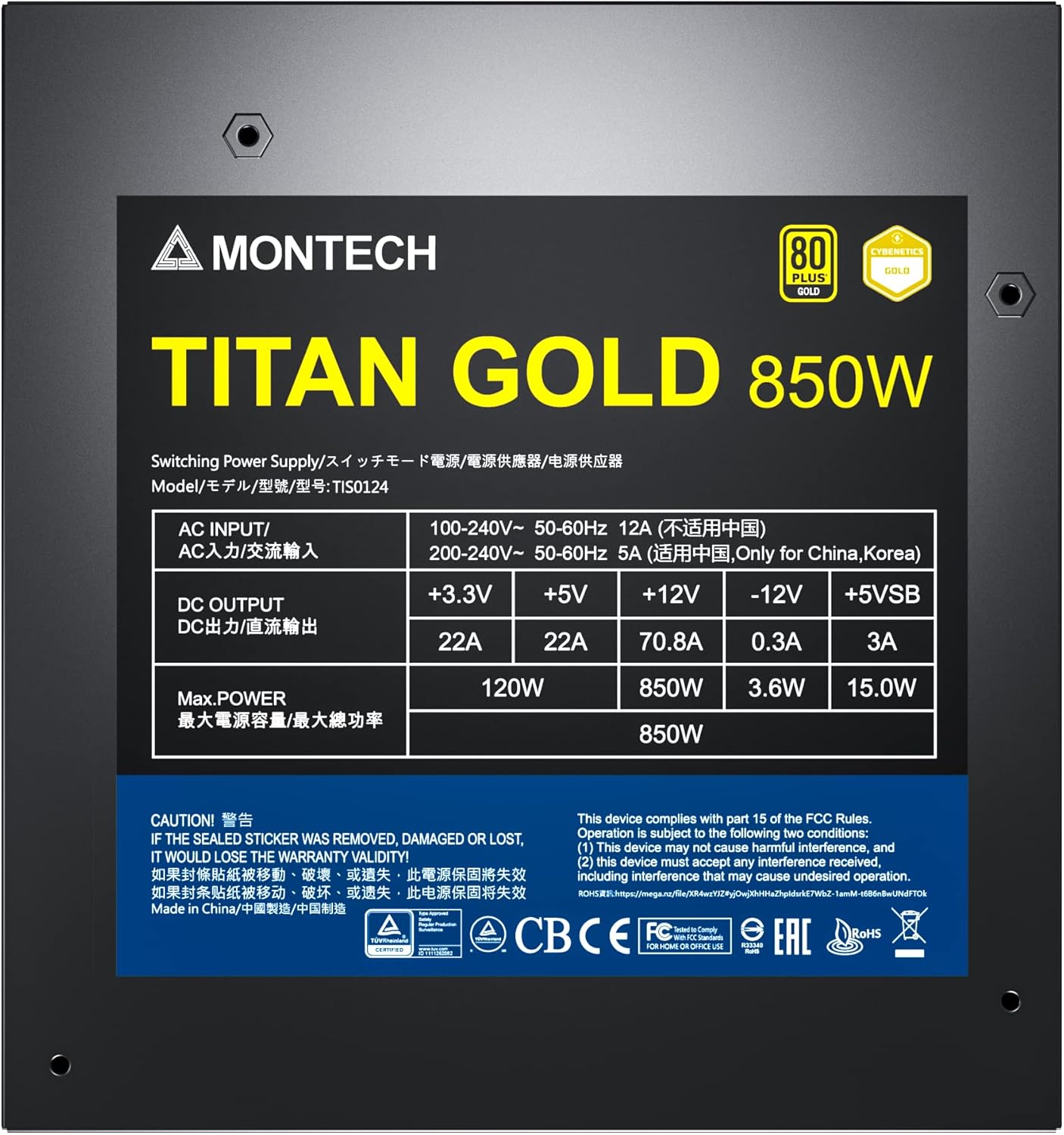
Figure 6: Product label displaying electrical specifications and certifications.
9. Garantija un atbalsts
The Montech Titan Gold 850W Power Supply comes with a 10 gada garantija, ensuring long-term reliability and peace of mind. For technical support, warranty claims, or further assistance, please visit the official Montech webvietnē vai sazinieties ar klientu apkalpošanas nodaļu.
Lūdzu, saglabājiet pirkuma apliecinājumu garantijas apstiprināšanai.