
Qolsys IQP4004
Qolsys IQ Panel 4 lietotāja rokasgrāmata
Modelis: IQP4004
1. Ievads
This manual provides essential information for the installation, operation, and maintenance of your Qolsys IQ Panel 4. The IQ Panel 4 is an all-in-one touchscreen security and smart home control panel designed for comprehensive connectivity and reliability.
It features a 7-inch HD touchscreen, an 8-megapixel panel camera with Flex-Tilt, and a QuadSound speaker system. The panel supports various wireless technologies including LTE, Wi-Fi, Z-Wave, Bluetooth, PowerG, and legacy security wireless protocols.
2. Drošības informācija
- Barošanas avots: Only use the specified power adapter provided with the device. Using an incorrect power source may damage the unit and void the warranty.
- Izvietojums: Install the panel in a dry, indoor location away from direct sunlight, extreme temperatures, and high humidity. Ensure proper ventilation around the device.
- Tīrīšana: Pirms tīrīšanas atvienojiet strāvas padevi. Izmantojiet mīkstu, sausu drānu. Nelietojiet šķidrus tīrīšanas līdzekļus vai aerosola aerosolus.
- Apkope: Nemēģiniet apkalpot šo produktu pats. Visu apkopi uzticiet kvalificētam servisa personālam.
- Kamera: The integrated camera is for security and monitoring purposes. Ensure privacy settings are configured according to your preferences.
3. Iepakojuma saturs
Pārliecinieties, vai iepakojumā ir visi priekšmeti:
- Qolsys IQ Panel 4 (IQP4004)
- Barošanas avots
- Stiprinājuma aparatūra (skrūves, enkuri)
- Quick Guide (if applicable)
4. Iestatīšana
4.1 Paneļa uzstādīšana
The IQ Panel 4 can be wall-mounted or placed on a table using the SmartMount installation system. For wall mounting, ensure the chosen location is central and within Wi-Fi range.
- Identify a suitable location for the panel.
- Use the mounting bracket (if included) as a template to mark drill holes.
- Urbiet piloncaurumus un, ja nepieciešams, ievietojiet sienas enkurus.
- Piestipriniet montāžas kronšteinu pie sienas, izmantojot komplektā iekļautās skrūves.
- Carefully attach the IQ Panel 4 to the mounting bracket.
4.2. Ieslēgšanās
Connect the power supply to the panel's power input port and then plug it into a standard electrical outlet. The panel will automatically power on and begin its boot sequence.
4.3. Sākotnējā konfigurācija
Follow the on-screen prompts to complete the initial setup, which typically includes:
- Valodas izvēle.
- Savienojuma izveide ar Wi-Fi tīklu.
- Datuma un laika iestatīšana.
- Creating a master user code.
5. Operating the IQ Panel 4
The 7-inch touchscreen provides intuitive control over your security system and smart home devices.
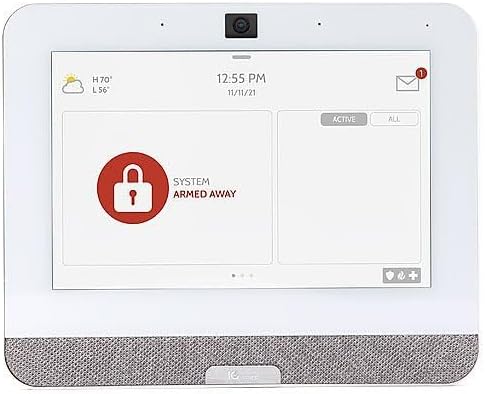
Figure 5.1: The IQ Panel 4 display when the system is armed in 'Away' mode, indicated by a red padlock icon and corresponding text.
5.1. Ieslēgšanās un atbruņošana
- Rokas palikšana: Arms the perimeter sensors while allowing movement inside. Tap the "Arm Stay" icon and enter your code.
- Roku prom: Arms all sensors, including interior motion detectors. Tap the "Arm Away" icon and enter your code.
- Atbruņot: To disarm the system, tap the "Disarm" icon and enter your master code.
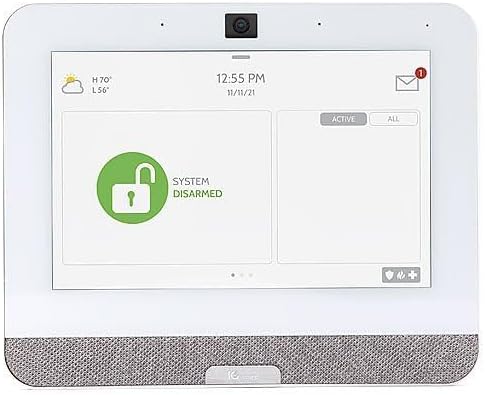
Figure 5.2: The IQ Panel 4 display when the system is disarmed, indicated by a green unlocked padlock icon and corresponding text.
5.2 Kameras funkcijas
The 8-megapixel panel camera supports various functions:
- Atbruņot fotogrāfijas: The camera can capture an image when the system is disarmed.
- Ieskats: Allows remote viewing of the panel's camera feed.
- Trauksmes video: Records video clips during alarm events.
- Flex-Tilt: Pielāgojiet kameras leņķi optimālam viewing.
5.3 Viedās mājas vadība
The IQ Panel 4 integrates with Z-Wave devices, allowing control of lights, locks, thermostats, and more directly from the panel or a connected smartphone app.
5.4 Bluetooth Touchless Disarming
Enable Bluetooth Touchless Disarming in settings to automatically disarm your system when your paired smartphone is detected within range.
6. Apkope
- Ekrāna tīrīšana: Skārienekrāna tīrīšanai izmantojiet mīkstu, nepūkošu drānu. Noturīgus traipus var viegli notīrīt.ampSamitriniet drānu ar ūdeni. Neizsmidziniet tīrīšanas līdzekļus tieši uz ekrāna.
- Programmatūras atjauninājumi: IQ Panel 4 saņem programmatūras atjauninājumus bezvadu režīmā (OTA). Lai saņemtu šos atjauninājumus, kas nodrošina jaunas funkcijas un drošības uzlabojumus, pārliecinieties, vai panelis ir savienots ar Wi-Fi.
- Akumulatora dublējums: The panel includes a backup battery. Periodically check the battery status in the system settings. If the battery needs replacement, contact qualified service personnel.
7. Traucējummeklēšana
| Problēma | Iespējamais cēlonis | Risinājums |
|---|---|---|
| Panelis neieslēdzas | No power from outlet; power supply disconnected or faulty. | Check power outlet; ensure power supply is securely connected to panel and outlet. |
| Nevar izveidot savienojumu ar Wi-Fi | Incorrect Wi-Fi password; out of range; router issue. | Verify password; move panel closer to router; restart router. |
| Sistēma netiek aktivizēta | Open sensor (door/window); system error. | Check all sensors are closed; review system messages for errors. |
| Skārienekrāns nereaģē | Pagaidu programmatūras kļūme. | Perform a soft reboot (refer to system settings for option) or power cycle the device. |
8. Specifikācijas
- Modelis: IQP4004
- Ekrāna izmērs: 7 Inches (HD, Capacitive glass multi-touch)
- Kamera: 8 megapikseļu paneļa kamera ar Flex-Tilt funkciju
- Uzglabāšana: 16 GB NAND zibatmiņa
- Audio: QuadSound 4x front-facing 4W speakers, 85-decibel siren
- Bezvadu savienojamība: LTE, Wi-Fi, Z-Wave, Bluetooth, PowerG, 319.5MHz
- Izmēri (iepakojumā): 12.32 x 7.24 x 2.13 collas
- Svars (prece): 1.72 mārciņas
- Krāsa: Balts
- Saderīgas ierīces: Smartphone (for app control)
9. Garantija un atbalsts
Qolsys products are covered by a limited warranty. For specific warranty terms and conditions, please refer to the warranty card included with your product or visit the official Qolsys webvietne.
For technical support, troubleshooting assistance, or service inquiries, please contact your authorized Qolsys dealer or installer. You may also find additional resources, FAQs, and support documentation on the Qolsys official webvietne.
Note: Unauthorized modifications or repairs to the device will void the warranty.
Ask a question about this manual
Ask about setup, troubleshooting, compatibility, parts, safety, or missing instructions. Manuals+ will review the question and use this page’s manual context to help answer it.