1. Ievads
Thank you for choosing the Dexnor Keyboard Case. This manual provides essential information for setting up, operating, and maintaining your new keyboard case. Designed to enhance your Samsung Galaxy Tab experience, this case features a magnetic attachment, a precise multi-touch trackpad, a 7-color backlit QWERTZ keyboard, and convenient S Pen storage. Please read this manual thoroughly before use to ensure optimal performance and longevity of your device.
2. Saderība
This keyboard case is exclusively designed for the following Samsung Galaxy Tab models:
- Samsung Galaxy Tab S10 Lite (Model SM-X400, SM-X406B)
- Samsung Galaxy Tab S10 FE 10.9" 2025 (Model SM-X520, SM-X526, SM-X526B)
- Samsung Galaxy Tab S9 FE 10.9" 2023 (Model SM-X510/SM-X516B/SM-X518U)
- Samsung Galaxy Tab S9 11" 2023 (Model SM-X710/SM-X716B/SM-X718U)
Note: This case is NOT compatible with Samsung Galaxy Tab S9+/S9 FE+ 12.4" or Samsung Galaxy Tab S11 (2025) 11". Please verify your tablet model before purchase.

Figure 2.1: Compatible and incompatible tablet models.
3. Iepakojuma saturs
Lūdzu, pārbaudiet, vai iepakojumā nav šādu priekšmetu:
- Dexnor Keyboard Case
- USB-C uzlādes kabelis
- Īsā lietošanas pamācība
- Lietotāja rokasgrāmata (šis dokuments)
4. Iestatīšana
4.1 Planšetdatora pievienošana
The keyboard case features a strong magnetic hinge for secure attachment. Simply align your Samsung Galaxy Tab with the magnetic area on the case. The tablet will snap into place, transforming your device into a laptop-like setup.

Figure 4.1: Magnetic attachment and adjustable viewleņķis.
4.2 Pairing the Keyboard via Bluetooth
- Pārliecinieties, vai tastatūra ir pietiekami uzlādēta.
- Turn on the keyboard by pressing the power button (usually located on the side or top edge of the keyboard). The indicator light will flash, indicating it's in pairing mode.
- Savā Samsung Galaxy Tab planšetdatorā dodieties uz Iestatījumi > Pievienotās ierīces > Bluetooth un ieslēdziet Bluetooth.
- Your tablet will search for available devices. Select "Dexnor Keyboard" (or similar name) from the list.
- Izpildiet visus ekrānā redzamos norādījumus, lai pabeigtu savienošanas pārī procesu. Kad pārī savienošana ir pabeigta, indikatora lampiņa uz tastatūras pārtrauks mirgot.
5. Lietošanas instrukcijas
5.1 Regulēšana Viewleņķi
The robust aluminum alloy hinge allows for flexible viewing angles, transforming your tablet into a versatile workstation. Adjust the tablet's position to your preferred angle for typing, reading, or viewsaturam.

Figure 5.1: Tablet in floating cantilever position for optimal viewing.
5.2 Daudzskārienu skārienpaliktnis
The integrated high-precision multi-touch trackpad supports various gestures for seamless navigation. Use multi-finger gestures for actions such as scrolling, swiping, and zooming, enhancing your productivity.

Figure 5.2: Multi-touch trackpad for precise control.
5.3 Apgaismota tastatūra
The keyboard features 7 different backlight colors and 3 adjustable brightness levels for comfortable typing in any lighting condition. Use the dedicated backlight key (often a sun icon or Fn + light key combination) to cycle through colors and adjust brightness.

Figure 5.3: Backlit QWERTZ keyboard with adjustable colors.
5.4 S pildspalvas turētājs
The case provides two convenient locations for your S Pen: an integrated magnetic holder within the keyboard for secure storage and a cutout slot at the rear of the case for charging and additional storage. This design ensures quick access and prevents loss.
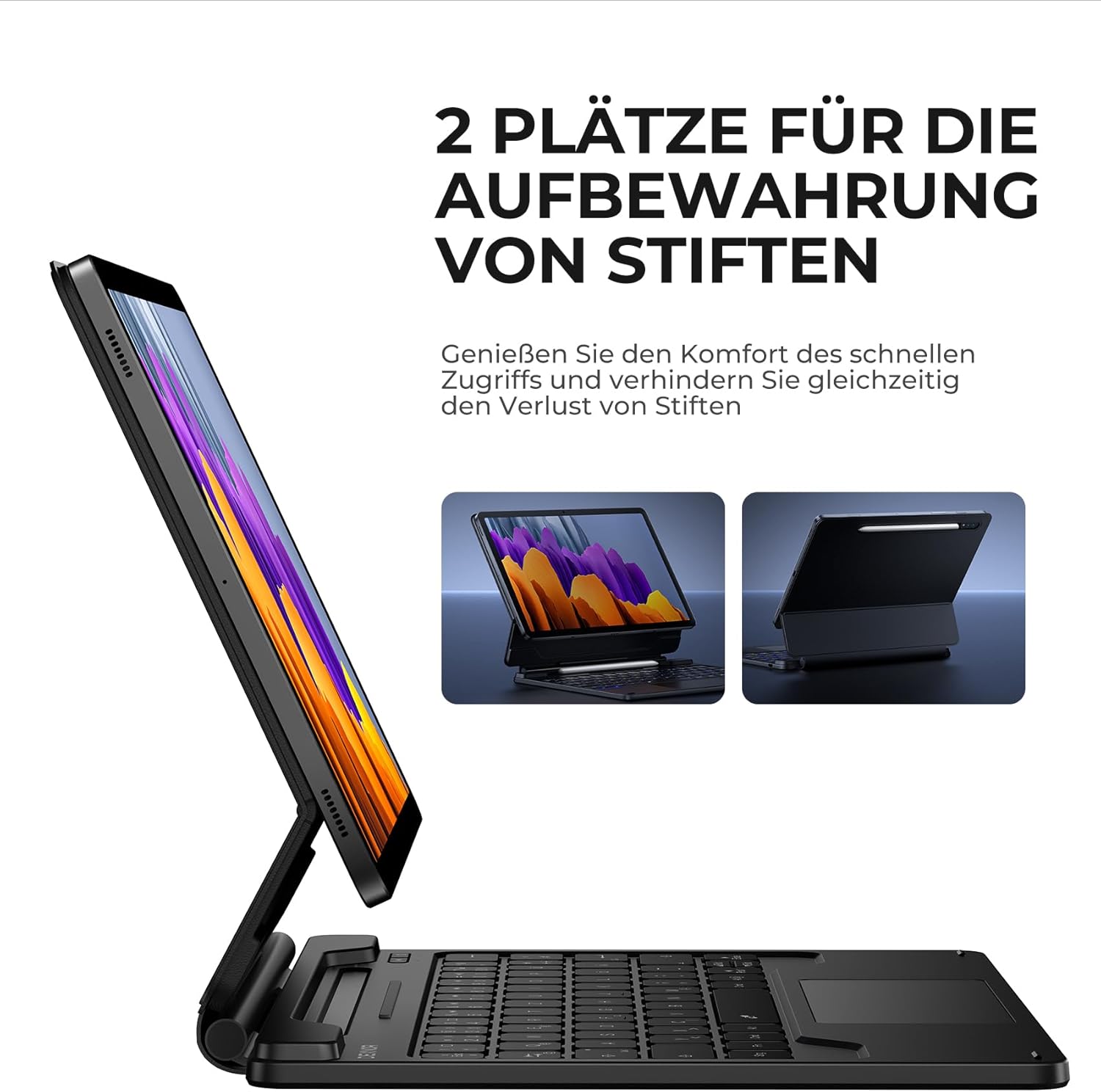
Figure 5.4: Dual S Pen storage options.
5.5 DEX Mode
Combine your tablet with the keyboard case and activate Samsung DEX mode to transform your tablet into a desktop-like experience. This allows for enhanced multitasking and productivity, similar to a traditional laptop setup.
5.6 īsinājumtaustiņi
The keyboard includes a series of convenient shortcut keys for quick control over media playback, volume, and other tablet functions. Refer to the keyboard layout for specific key functions.

Figure 5.5: Keyboard layout with shortcut keys.
5.7 Automātiskās miega/pamošanās funkcija
The case supports automatic sleep/wake functionality. Closing the case will put your tablet to sleep, and opening it will wake it up, conserving battery life for both your tablet and the keyboard.
6. Tastatūras uzlādēšana
The keyboard is equipped with a long-lasting 650 mAh battery. To charge the keyboard:
- Connect the provided USB-C charging cable to the charging port on the keyboard.
- Pievienojiet kabeļa otru galu USB strāvas adapterim (nav iekļauts komplektā) vai datora USB portam.
- The charging indicator light will illuminate during charging and turn off once fully charged. A full charge takes approximately 3.5 hours.
A single charge provides up to 200 hours of working time and 1200 hours of standby time.

Figure 6.1: USB-C charging port.
7. Apkope
To ensure the longevity and optimal performance of your Dexnor Keyboard Case:
- Tīrīšana: Izmantojiet mīkstu, damp cloth to wipe the exterior of the case. For the keyboard keys, use a soft, dry cloth or a specialized keyboard cleaner. Avoid harsh chemicals or abrasive materials.
- Uzglabāšana: When not in use for extended periods, store the keyboard case in a cool, dry place. Ensure the case is closed to protect the tablet and keyboard.
- Izvairieties no šķidrumiem: Lai novērstu iekšējo komponentu bojājumus, turiet tastatūru prom no šķidrumiem.
- Rīkojieties uzmanīgi: While durable, avoid dropping the case or subjecting it to excessive force.
8. Traucējummeklēšana
8.1 Tastatūra neizveido savienojumu
- Pārbaudiet akumulatoru: Pārliecinieties, vai tastatūra ir uzlādēta.
- Atkārtoti savienot pārī: Delete the keyboard from your tablet's Bluetooth device list and attempt to pair it again (refer to Section 4.2).
- Restartējiet ierīces: Restartējiet gan planšetdatoru, gan tastatūru.
- Traucējumi: Pārvietojieties tālāk no citām bezvadu ierīcēm, kas var izraisīt traucējumus.
8.2 Skārienpaliktnis nereaģē
- Pārbaudiet savienojumu: Pārliecinieties, vai tastatūra ir pareizi pievienota, izmantojot Bluetooth.
- Tīrs skārienpaliktnis: Pārliecinieties, vai skārienpaliktņa virsma ir tīra un bez gružiem.
- Restartēt: Restartējiet tastatūru un planšetdatoru.
8.3 Fona apgaismojums nedarbojas
- Pārbaudiet akumulatoru: Zems akumulatora uzlādes līmenis var ietekmēt fona apgaismojuma funkcionalitāti. Uzlādējiet tastatūru.
- Pārslēgt fona apgaismojumu: Press the backlight key (or Fn + backlight key) to ensure it's not turned off or at the lowest brightness setting.
8.4. Lādēšanas problēmas
- Pārbaudiet kabeli: Ensure the USB-C cable is securely connected to both the keyboard and the power source. Try a different USB-C cable if available.
- Barošanas avots: Izmēģiniet citu USB strāvas adapteri vai portu.
9. Specifikācijas
| Zīmols | Deksnors |
| Modeļa numurs | DK005 |
| Savienojamības tehnoloģija | Bluetooth |
| Īpašas funkcijas | Multi-Touch Trackpad, Backlit Keyboard, S Pen Holder |
| Saderīgas ierīces | Samsung Galaxy Tab S10 Lite 10.9", Samsung Galaxy Tab S9 11", Samsung Galaxy Tab S9 FE/S10 FE 10.9" |
| Akumulatora sastāvs | Litija jonu |
| Akumulatora ietilpība | 650 mAh |
| Uzlādes laiks | Apm. 3.5 stundas |
| Darba laiks | Līdz 200 stundām |
| Gaidīšanas laiks | Līdz 1200 stundām |
| Tastatūras izkārtojums | QWERTZ (vācu) |
| Produkta izmēri | 25.9 L x 20.5 W x 1.9 H cm |
10. Garantija un atbalsts
Dexnor provides a 1-year manufacturer's warranty for this product. Additionally, lifetime technical support is available.
For warranty claims, technical assistance, or any product-related inquiries, please contact Dexnor customer support through the retailer's platform or visit the official Dexnor webvietne kontaktinformācijai.