
1. Ievads
Thank you for choosing an Aveek Professional Audio Mixer. This manual provides detailed instructions for the setup, operation, and maintenance of your Aveek F-5A Professional Audio Mixer and Aveek MIX400 4-Channel Low Noise Mini Line Audio Mixer. Please read this manual thoroughly before using your device to ensure proper functionality and to prevent damage.
The Aveek audio mixer series is designed to provide high-quality audio mixing solutions for various applications, from home studios to live performances. Both models offer distinct features tailored to different user needs.

Image 1.1: Aveek F-5A (left) and Aveek MIX400 (right) Audio Mixers. The F-5A is a multi-channel mixer with XLR inputs and USB connectivity, while the MIX400 is a compact 4-channel line mixer.
2. Svarīgi drošības norādījumi
- Read these instructions carefully before operation.
- Saglabājiet šos norādījumus turpmākai uzziņai.
- Ievērojiet visus brīdinājumus uz izstrādājuma un lietošanas instrukcijā.
- Neizmantojiet šo ierīci ūdens tuvumā.
- Tīriet tikai ar sausu drānu.
- Neaizbloķējiet ventilācijas atveres. Uzstādiet saskaņā ar ražotāja norādījumiem.
- Neuzstādiet tuvu siltuma avotiem, piemēram, radiatoriem, siltuma reģistriem, krāsnīm vai citām ierīcēm (tostarp amppacēlāji), kas ražo siltumu.
- Nepārkāpiet polarizētā vai zemējuma spraudņa drošības mērķi. Polarizētam spraudnim ir divi asmeņi, no kuriem viens ir platāks par otru. Zemējuma tipa kontaktdakšai ir divi lāpstiņas un trešais zemējuma dakšas. Jūsu drošībai ir paredzēts platais asmens vai trešais zars. Ja komplektā iekļautā kontaktdakša neietilpst jūsu kontaktligzdā, konsultējieties ar elektriķi, lai nomainītu novecojušo kontaktligzdu.
- Aizsargājiet strāvas vadu no uzkāpšanas vai saspiešanas, jo īpaši pie kontaktdakšām, kontaktligzdām un vietā, kur tie iziet no ierīces.
- Izmantojiet tikai ražotāja norādītos piederumus/piederumus.
- Atvienojiet šo ierīci zibens negaisa laikā vai tad, ja tā netiek lietota ilgu laiku.
- Visus apkopes darbus nododiet kvalificētam apkopes personālam. Apkope ir nepieciešama, ja ierīce ir jebkādā veidā bojāta, piemēram, ir bojāts barošanas vads vai kontaktdakša, aparātā ir izlijis šķidrums vai iekrituši priekšmeti, ierīce ir bijusi pakļauta lietus vai mitruma iedarbībai, nedarbojas normāli. , vai ir nomests.
3. Iepakojuma saturs
Please check the package contents upon unboxing. If any items are missing or damaged, contact Aveek customer support.
- Aveek Audio Mixer (F-5A or MIX400, depending on model purchased)
- Power Adapter (5V-2A Type-C for F-5A, 5V for MIX400)
- USB Type-C to USB Cable (for F-5A)
- Lietotāja rokasgrāmata (šis dokuments)
4. Produkts beidziesview un funkcijas
4.1 Aveek F-5A Professional Audio Mixer
The Aveek F-5A is a versatile professional audio mixer designed for comprehensive sound control and recording. It features multiple input options and advanced functionalities.
- Mikrofona/līnijas ieejas: 3 XLR/TRS combo jacks for microphones or line-level instruments.
- Stereo līnijas ieejas: L/R 6.35mm and L/R RCA stereo inputs for connecting CD players, keyboards, or computers.
- USB-B Interface: Built-in sound card for direct connection to computers, mobile phones, or tablets for mixing and recording. Requires a USB to Phone OTG Adapter for mobile devices.
- USB-A Interface: For MP3 music playback from a USB stick or recording audio output to a USB stick.
- Īpaši zema trokšņa līmeņa dizains: Utilizes a 5V-2A (Type-C) adapter power supply and six ROHM low-noise operational amplifiers for superior sound quality.
- Izvades: L/R RCA output and L/R 6.35mm Main output for active speakers, power amplifiers, or active sound systems.
- Fantoma jauda: +48V phantom power for condenser microphones.
- Efekti: Built-in digital effects processor (Reverb, Delay).

Image 4.1: Front panel overview of the Aveek F-5A mixer, detailing input jacks, control knobs (gain, treble, bass, effect, volume), USB ports, and output connections.
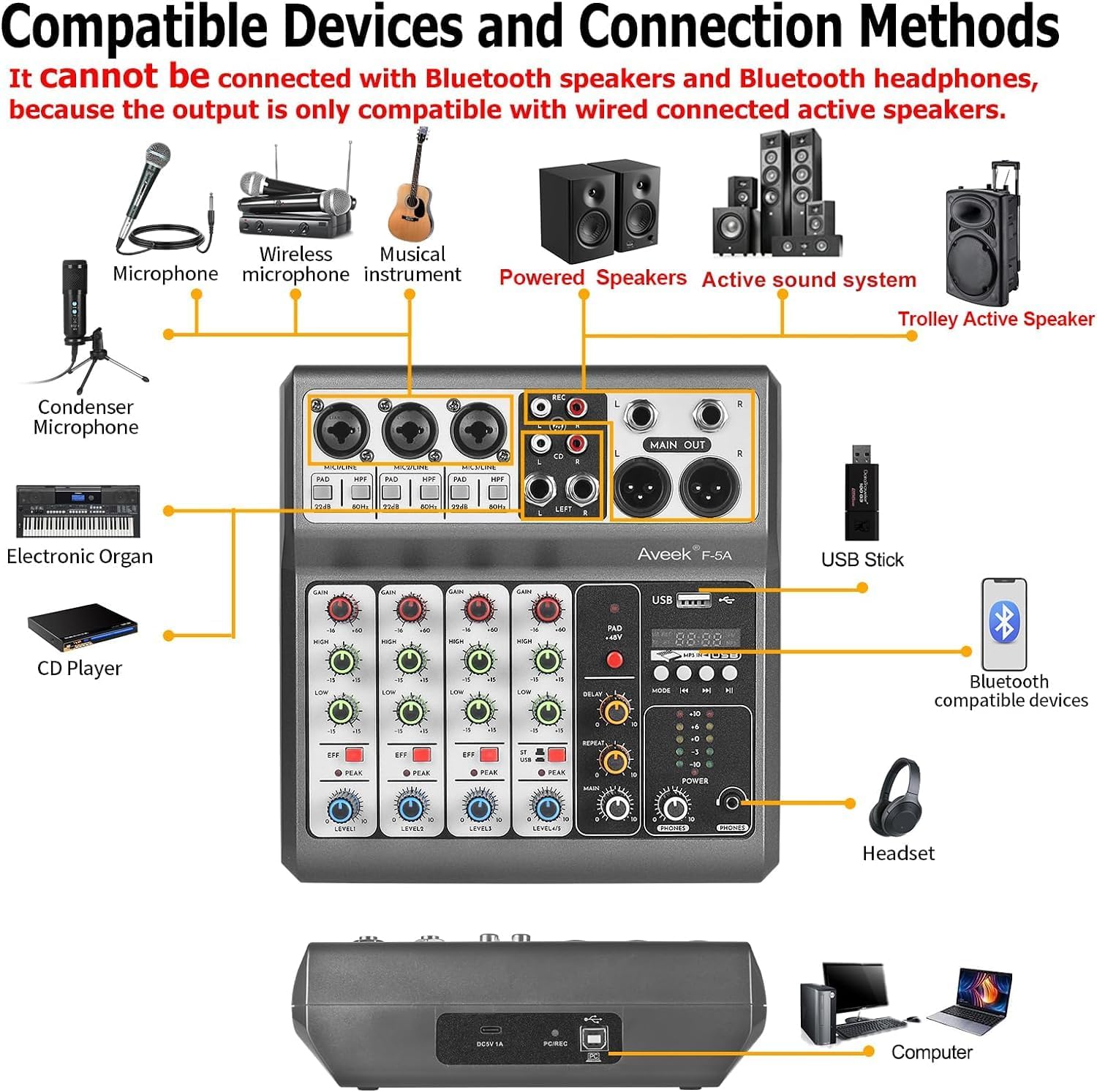
Image 4.2: Diagram illustrating compatible devices and connection methods for the Aveek F-5A mixer, including microphones, instruments, speakers, and computers. Note: Bluetooth output devices are not supported.
4.2 Aveek MIX400 4-Channel Low Noise Mini Line Audio Mixer
The Aveek MIX400 is a compact and efficient 4-channel stereo line mixer, ideal for combining multiple audio sources into a single output with minimal noise.
- 4-Inputs 1-Output: Four independent stereo/mono input channels combining into one stereo output.
- Ievades saderība: Suitable for dynamic microphones, electronic instruments, CDs, and computers.
- Īpaši zems trokšņu līmenis: Designed for superior sound quality with low noise and minimal distortion.
- Kompakts dizains: Small footprint for easy integration into any setup.

Image 4.3: Front panel of the Aveek MIX400, showing four input channels with individual volume controls, mono/stereo switches, and a master output volume control.
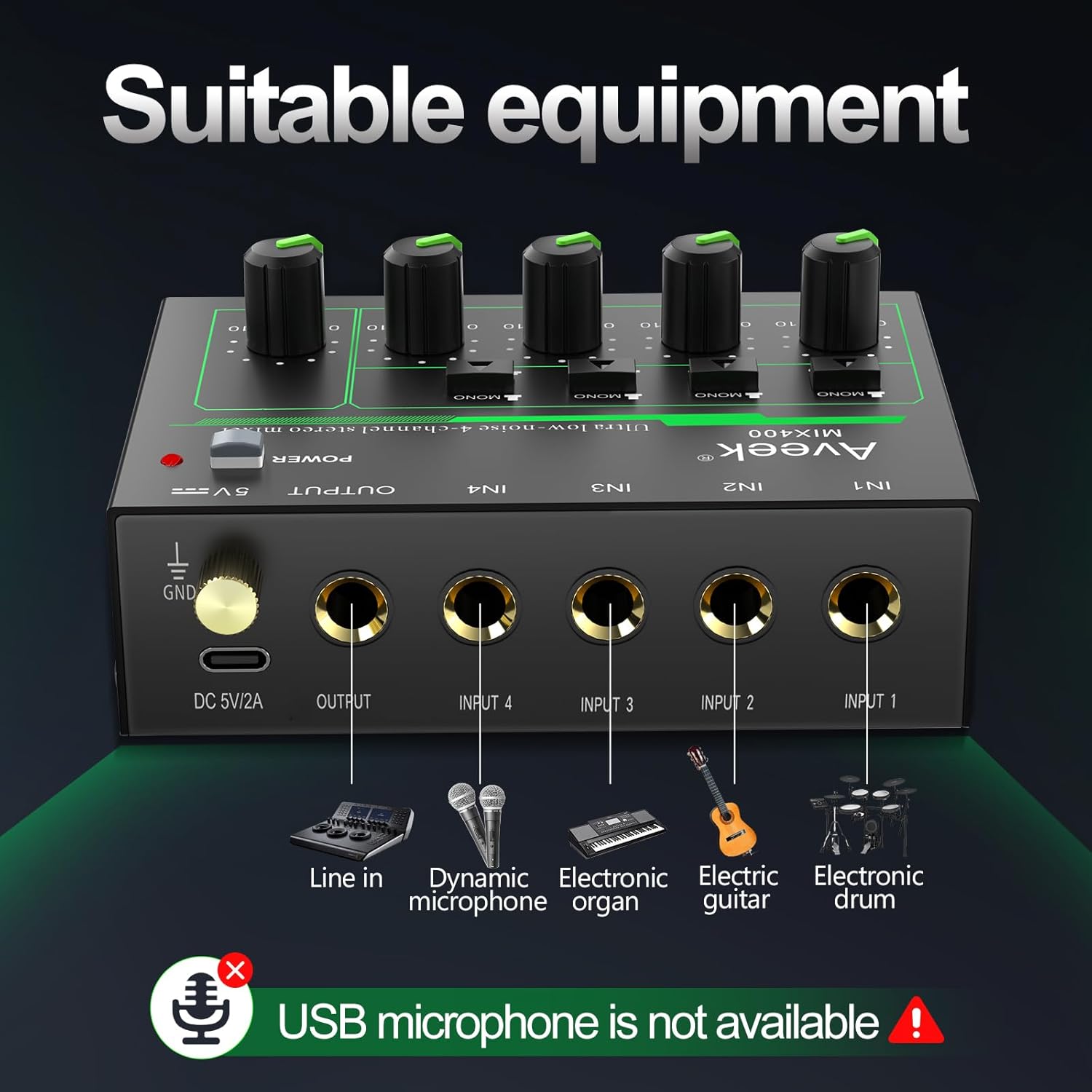
Image 4.4: Diagram illustrating suitable equipment for the Aveek MIX400, including line-in devices, dynamic microphones, electronic organs, electric guitars, and electronic drums. USB microphones are not supported.
5. Uzstādīšana un savienojumi
5.1 Miksera ieslēgšana/izslēgšana
Both Aveek mixers require external power. Ensure the mixer is turned off before connecting the power supply.
- Aveek F-5A: Connect the provided USB Type-C to USB cable to the mixer's Type-C power port and then to the 5V-2A power adapter. Plug the adapter into a standard wall outlet. The F-5A can also be powered by a power bank or a computer's USB port.
- Aveek MIX400: Connect the provided 5V power adapter to the mixer's DC 5V/2A port and then to a standard wall outlet.
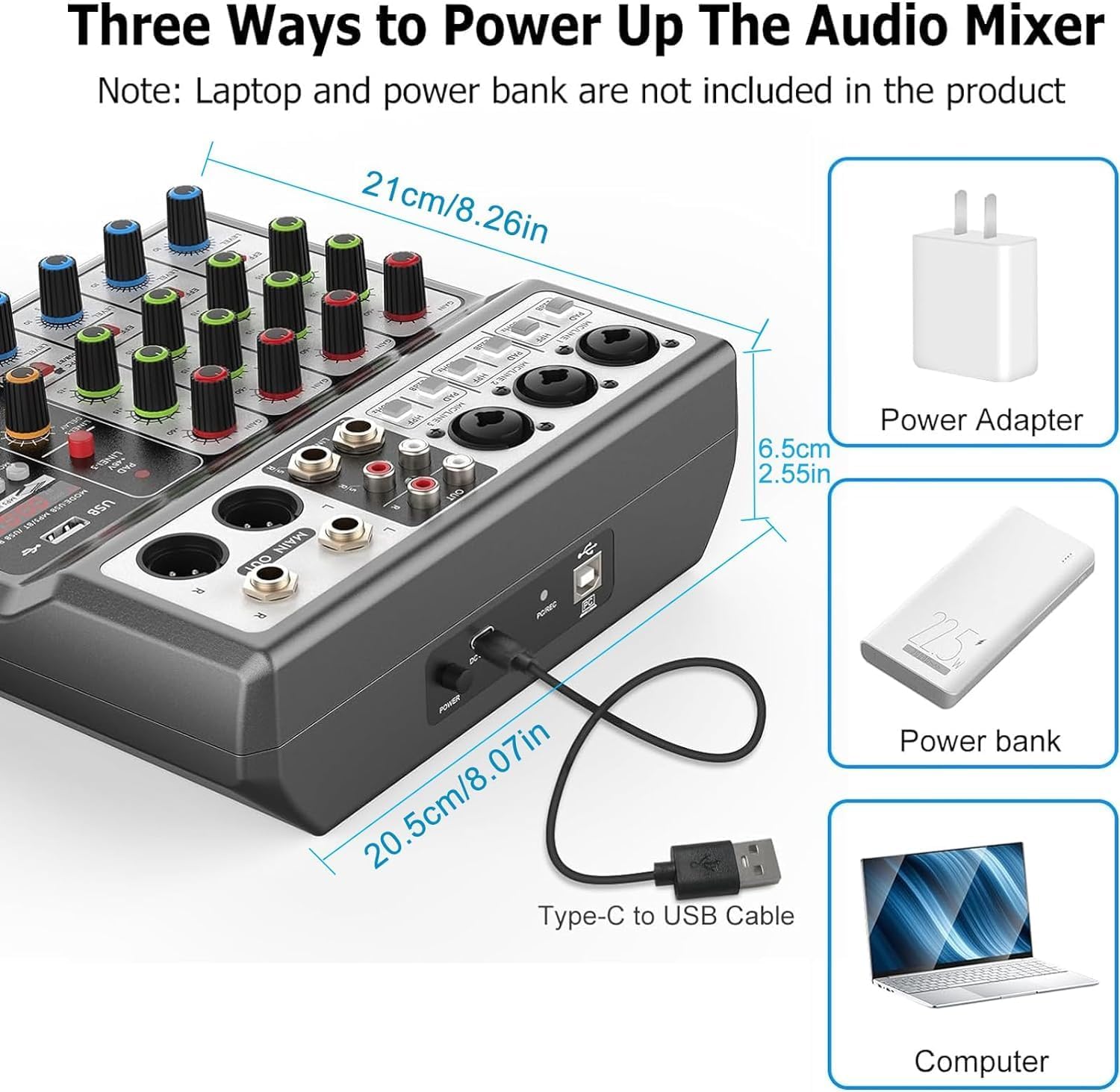
Image 5.1: Powering options for the Aveek F-5A mixer, including a power adapter, power bank, or computer USB port via a Type-C to USB cable.
5.2 Connecting Audio Devices (Aveek F-5A)
Refer to Image 4.1 and 4.2 for visual guidance.
- Mikrofoni: Connect dynamic or condenser microphones to the XLR/TRS combo jacks (MIC1, MIC2, MIC3). For condenser microphones, activate the +48V phantom power switch if required.
- Instrumenti/līnijas ierīces: Connect instruments (e.g., guitar, keyboard) or other line-level devices to the TRS inputs or the L/R RCA stereo inputs.
- Computer/Mobile Device (USB-B): Use a USB-B cable to connect the mixer to your computer for recording or playback. For mobile phones/tablets, an OTG adapter is required for data transfer.
- USB Stick (USB-A): Insert a USB stick into the USB-A port for MP3 playback or recording.
- Izvades: Connect your active speakers, power amplifier, or active sound system to the MAIN OUT (6.35mm TRS) or RCA OUT jacks.
- Austiņas: Pievienojiet austiņas PHONES ligzdai monitoringam.
5.3 Connecting Audio Devices (Aveek MIX400)
Refer to Image 4.3 and 4.4 for visual guidance.
- Ievades: Connect your audio sources (e.g., dynamic microphone, electronic organ, electric guitar, electronic drum, CD player) to the IN1, IN2, IN3, IN4 jacks. These are 1/4" TS/TRS inputs.
- Izvade: Connect the mixer's OUTPUT jack to your active speakers or ampdzīvāks.

5.2. attēls: Detalizēts view of the Aveek MIX400 input and output jacks, illustrating the use of TRS for stereo and TS for mono connections.

Image 5.3: The Aveek MIX400 connected to a dynamic microphone, demonstrating a typical input setup. USB microphones are not compatible.
6. Darbība
6.1 Aveek F-5A Operation
- Ieslēgšana: After connecting all devices and power, press the POWER switch to turn on the mixer.
- Ievades pastiprinājums: Adjust the GAIN knob for each channel to set the input level. Ensure the PEAK indicator does not light up consistently, which indicates clipping.
- Izlīdzināšana: Use the TREBLE and BASS knobs to adjust the high and low frequencies for each channel.
- Efekti: Use the EFF knob to send a portion of the channel signal to the internal effects processor. Adjust the MP3 playback adjustment and Reverb/Delay controls for desired effect.
- Kanāla skaļums: Adjust the CHANNEL VOLUME knob for each input to balance the mix.
- Galvenais skaļums: Use the MASTER VOLUME knob to control the overall output level.
- Uzraudzība: Adjust the MONITOR VOLUME knob for headphone output.
- USB funkcijas:
- USB-B (PC/Mobile): When connected to a computer, the mixer acts as an audio interface. Select it as your input/output device in your operating system's sound settings.
- USB-A (Playback/Record): Insert a USB stick. Use the MODE/USB/MP3/BT/REC controls to play MP3 files or record the main mix directly to the USB stick.
6.2 Aveek MIX400 Operation
- Ieslēgšana: After connecting all devices and power, press the POWER switch to turn on the mixer. The power indicator light will illuminate.
- Ievades režīms: For each input channel (IN1-IN4), select either MONO (TS input) or STEREO (TRS input) using the switch.
- MONO Mode: Recommended for mono sound input. Mono sound uses one channel output in Stereo mode.
- STEREO Mode: Stereo sound uses two channels output in any mode.
- Ievades skaļums: Adjust the individual volume control knob for each input channel (IN1-IN4) to balance the levels of your audio sources.
- Master Output Volume: Adjust the OUTPUT volume control knob to set the overall output level of the mixed audio.
Image 6.1: Front panel of the Aveek MIX400, highlighting the power switch, mono/stereo input mode selectors, individual input volume controls, and master output volume control.
7. Apkope
- Tīrīšana: Miksera ārpuses tīrīšanai izmantojiet mīkstu, sausu drānu. Nelietojiet šķidrus tīrīšanas līdzekļus vai šķīdinātājus.
- Uzglabāšana: Ja mikseris netiek lietots ilgstoši, uzglabājiet to vēsā, sausā vietā, pasargājot no tiešiem saules stariem un ekstremālām temperatūrām.
- Ventilācija: Nodrošiniet atbilstošu ventilāciju ap mikseri, lai novērstu pārkaršanu. Neaizbloķējiet ventilācijas atveres.
- Kabeļu vadība: Avoid bending or pinching cables, especially power cords, to prevent damage.
8. Traucējummeklēšana
| Problēma | Iespējamais cēlonis | Risinājums |
|---|---|---|
| Nav jaudas | Power cable not connected; power adapter faulty; power outlet not working. | Check power connections; try a different power outlet; ensure correct power adapter is used. |
| Nav skaņas izvades | Output cables not connected; output volume too low; incorrect input selection; connected to passive speakers. | Verify output cable connections; increase MASTER VOLUME; ensure input devices are active; connect to active speakers or an ampdzīvāks. |
| Izkropļota skaņa | Input gain too high (clipping); faulty cables; impedance mismatch. | Reduce input GAIN (F-5A) or individual channel volume (MIX400); replace cables; ensure compatible devices are connected. |
| Microphone not working (F-5A) | +48V phantom power not enabled for condenser mic; mic cable faulty; mic gain too low. | Activate +48V switch; check/replace mic cable; increase GAIN. |
| USB recording/playback issues (F-5A) | Incorrect USB mode selected; USB stick not formatted correctly; USB to OTG adapter not working (for mobile). | Ensure correct USB mode; format USB stick to FAT32; verify OTG adapter functionality. |
If you encounter issues not listed here or if the problem persists, please contact Aveek customer support for assistance.
9. Specifikācijas
General Specifications (Applicable to both models where relevant)
- Zīmols: Aveek
- Barošanas avots: Elektrība ar vadu
- Savienojamības tehnoloģija: USB (F-5A), Line (MIX400)
- Izvades savienotāja tips: RCA, TRS
Aveek F-5A profesionālais audio mikseris
- Ievades kanāli: 3 x XLR/TRS Combo, 1 x Stereo 6.35mm, 1 x Stereo RCA
- Izejas kanāli: 1 x Stereo 6.35mm Main Out, 1 x Stereo RCA Out, 1 x Headphone Out
- USB interfeiss: USB-B (PC/Mobile), USB-A (Playback/Record)
- Fantoma jauda: +48V
- Barošanas avots: 5 V – 2 A (C tips)
- Izmēri (aptuveni): 21 cm (platums) x 20.5 cm (dziļums) x 6.5 cm (augstums) / 8.26 collas (platums) x 8.07 collas (dziļums) x 2.55 collas (augstums)
Image 9.1: Approximate dimensions of the Aveek F-5A mixer.
Aveek MIX400 4-Channel Low Noise Mini Line Audio Mixer
- Kanālu skaits: 4 ieeja, 1 izeja
- Ievades tips: 1/4" TS/TRS (Mono/Stereo selectable)
- Izvades veids: 1/4" TRS
- Barošanas avots: 5V DC
10. Garantija un atbalsts
Aveek products are designed for reliability and performance. For information regarding warranty coverage, technical support, or service inquiries, please refer to the warranty card included with your product or visit the official Aveek webvietne.
For direct assistance, you may contact Aveek customer support through the retailer where the product was purchased or via the contact information provided on the Aveek brand store page on Amazon: Aveek Store.


