
1. Ievads
This user manual provides comprehensive instructions for the assembly, operation, maintenance, and troubleshooting of your WLIVE TV Stand. Designed to accommodate TVs up to 65 inches, this 59-inch entertainment center features integrated LED lighting and versatile storage solutions, perfect for living rooms and bedrooms.

Figure 1.1: WLIVE TV Stand with LED and Storage
The WLIVE TV Stand is crafted from high-grade engineered wood, ensuring durability and stability. Its farmhouse style seamlessly blends with various interior decors, making it a functional and aesthetic addition to your home.
2. Drošības informācija
Your safety is paramount. Please adhere to the following safety guidelines during assembly and use:
- Always secure the TV stand to the wall using the provided anti-tipping device. This prevents accidents caused by the TV stand tipping over, especially in households with children or pets.
- Exercise caution while handling tools and components during assembly to avoid injury.
- Do not overload the TV stand beyond its stated weight capacity (Tabletop: 150 lbs, Shelves: 50 lbs).
- Lai novērstu aizrīšanās risku, turiet visas mazās detaļas un iepakojuma materiālus bērniem nepieejamā vietā.
- Ensure the TV stand is placed on a flat, stable surface.
3. Uzstādīšana un montāža
Your WLIVE TV Stand is designed for straightforward assembly. Please follow the steps below carefully. The package includes a detailed instruction manual, necessary tools, and each component is clearly labeled. Assembly can typically be completed within 1.5 hours.
3.1. Izpakošana un sastāvdaļu identificēšana
Carefully unbox all components and verify them against the parts list in your included manual. Ensure all pieces are present and undamaged before beginning assembly.

Figure 3.1: Unboxed components of the TV Stand
3.2. Montāžas soļi
Follow the numbered steps in your physical instruction manual. For a visual guide, please refer to the assembly video below:
Video 3.1: WLIVE Tall Farmhouse TV Stand Assembly Guide
This video demonstrates the step-by-step assembly process for the WLIVE TV Stand, including attaching panels and securing hardware. Pay close attention to the orientation of each piece and the proper use of fasteners.

Figure 3.2: TV Stand during assembly
- Begin by attaching the main support panels to the base using the provided screws and cam locks.
- Assemble the top section, ensuring it aligns correctly with the main frame.
- Install the adjustable shelves into the desired positions within the cabinets. The shelves offer three different height options for flexible storage.
- Attach the metal mesh cabinet doors using the hinges, ensuring they open and close smoothly.
- Connect the LED light strip to the designated area and plug it into a power source.
- Secure the anti-tipping device to the back of the TV stand and to a wall stud using appropriate wall anchors (not always included, check your local hardware store for suitable anchors for your wall type).
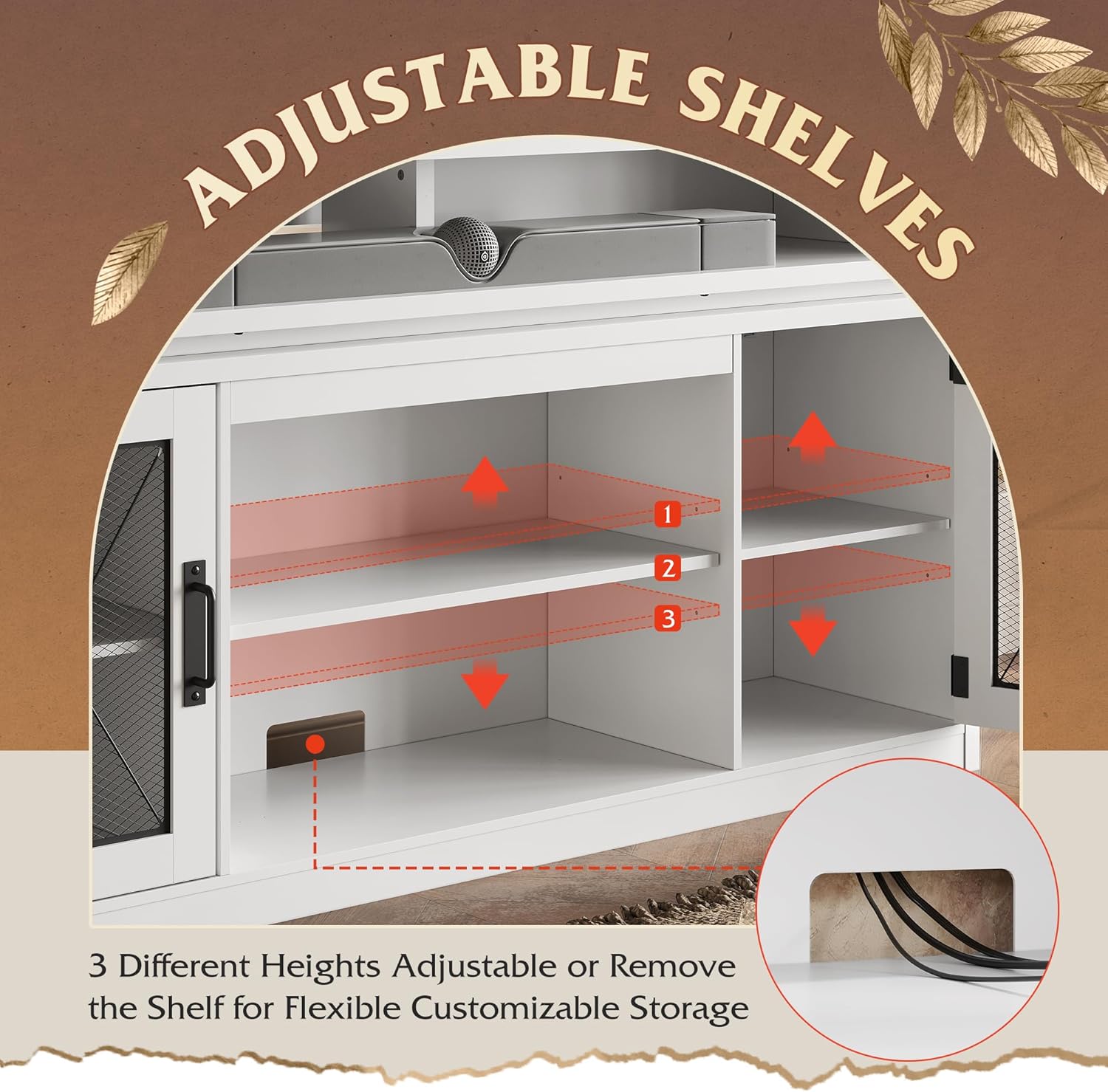
3.3. attēls: Regulējama plauktu konfigurācija
4. Lietošanas instrukcijas
4.1. LED apgaismojuma sistēma
The integrated LED lights offer 9 color options and can be controlled via a dedicated mobile application. This feature enhances your viewing or gaming experience by creating an ambient atmosphere.
Video 4.1: WLIVE Farmhouse TV Stand LED Features
This video showcases the dynamic LED lighting features of the TV stand, demonstrating color changes and atmospheric effects controlled via the app.
- Download the specified control application (check your physical manual for app name/QR code) from your device's app store.
- Follow the app's instructions to pair it with your TV stand's LED system via Bluetooth.
- Use the app to select from various colors, adjust brightness, and choose different lighting modes.

Figure 4.1: Controlling LED Lights with Smartphone App
4.2. Uzglabāšana un organizācija
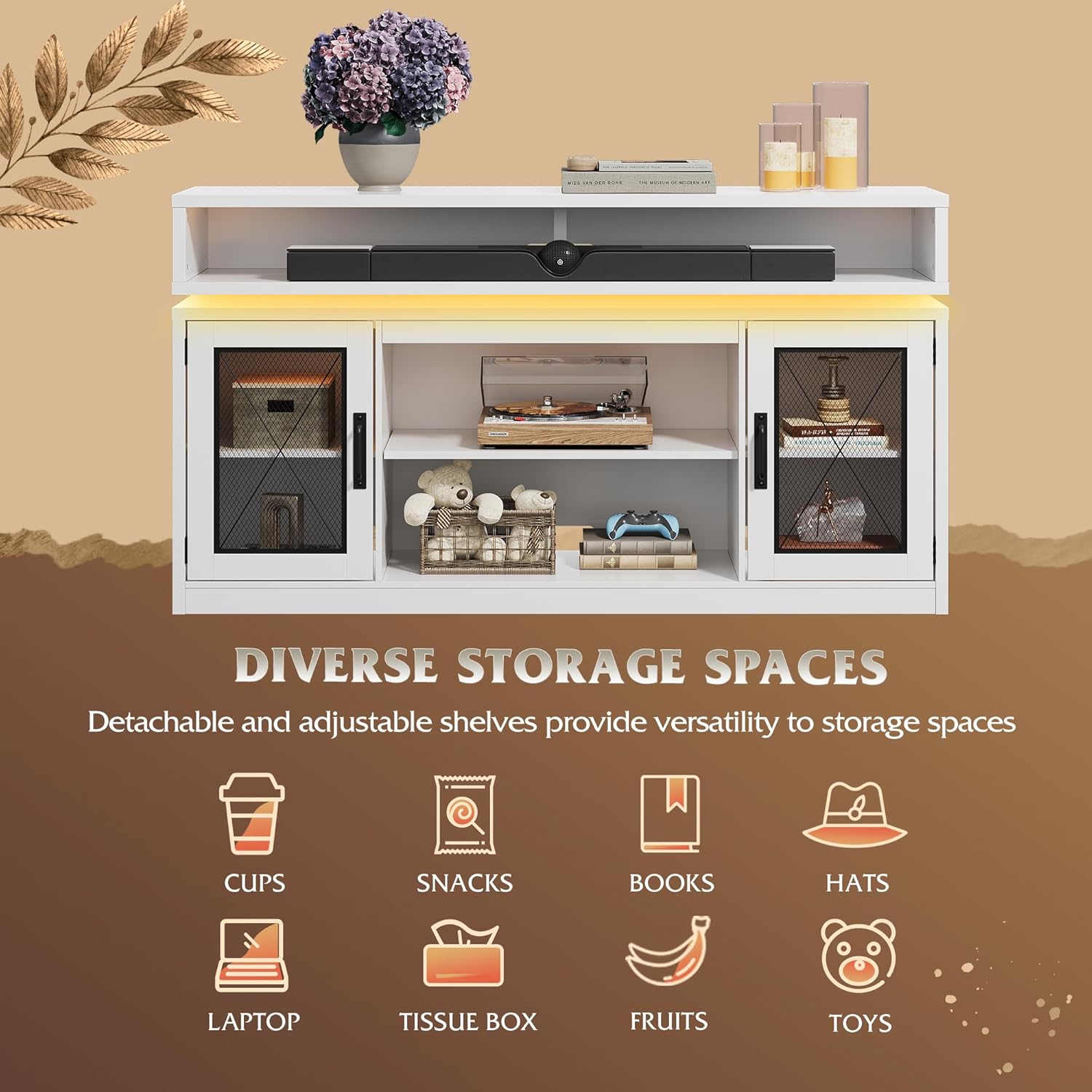
The entertainment center provides flexible storage with three height-adjustable shelves and dual metal cabinet doors. Shelves can be adjusted or removed to accommodate various media equipment and other items, ensuring a tidy and organized space.
Video 4.2: WLIVE TV Stand Storage Features
This video provides a detailed look at the storage compartments and features of the TV stand, including the mesh doors and adjustable shelves, demonstrating how to maximize space.

Figure 4.2: Diverse Storage Spaces
5. Apkope
To ensure the longevity and appearance of your WLIVE TV Stand, follow these simple maintenance guidelines:
- Tīrīšana: Noslaukiet virsmas ar mīkstu, damp cloth. Avoid abrasive cleaners or harsh chemicals that may damage the finish. The high-quality textured surface is scratch-resistant and easy to clean.
- Putekļu noņemšana: Regulāri notīriet putekļus no visām virsmām, lai novērstu putekļu uzkrāšanos.
- Stabilitātes pārbaude: Periodiski pārbaudiet visas skrūves un savienojumus, lai pārliecinātos, ka tie ir cieši pievilkti. Ja nepieciešams, pievelciet tos atkārtoti, lai saglabātu konstrukcijas integritāti.
- LED gaismas: If the LED lights dim or malfunction, check the power connection and ensure the control app is updated.
5.1. attēls: Izturīga un viegli tīrāma virsma
6. Traucējummeklēšana
If you encounter any issues with your WLIVE TV Stand, please refer to the following troubleshooting table:
| Problēma | Iespējamais cēlonis | Risinājums |
|---|---|---|
| TV Stand feels wobbly or unstable. | Loose connections or not secured to wall. | Ensure all screws are tightened. Verify the anti-tipping device is properly installed and secured to a wall stud. |
| LED lights are not working or not sticking. | Power connection issue, app not connected, or adhesive failure. | Check if the LED strip is properly plugged in. Re-pair with the mobile app. If adhesive fails, consider using stronger adhesive strips or clips to secure the lights. |
| Grūtības montāžas laikā. | Nepareiza detaļas orientācija vai trūkstoši soļi. | Refer to the detailed instruction manual provided in the package. Ensure each component is correctly identified and oriented as per the diagrams. Do not force parts together. |
7. Specifikācijas
Detailed specifications for your WLIVE TV Stand:
- Produkta izmēri: 59.06 x 13.88 x 31.89 collas (garums x platums x augstums)
- Materiāls: Engineered Wood
- Preces svars: 116.6 mārciņas
- Krāsa: Balts
- Televizora izmēru saderība: Līdz 65 collām
- Galda virsmas slodzes izturība: 150 mārciņas
- Plaukta svara izturība: 50 mārciņas
- Uzglabāšana: 3 height-adjustable shelves, dual metal cabinet doors
- Apgaismojums: APP-controlled LED lights with 9 color options
- Ražotājs: WLIVE
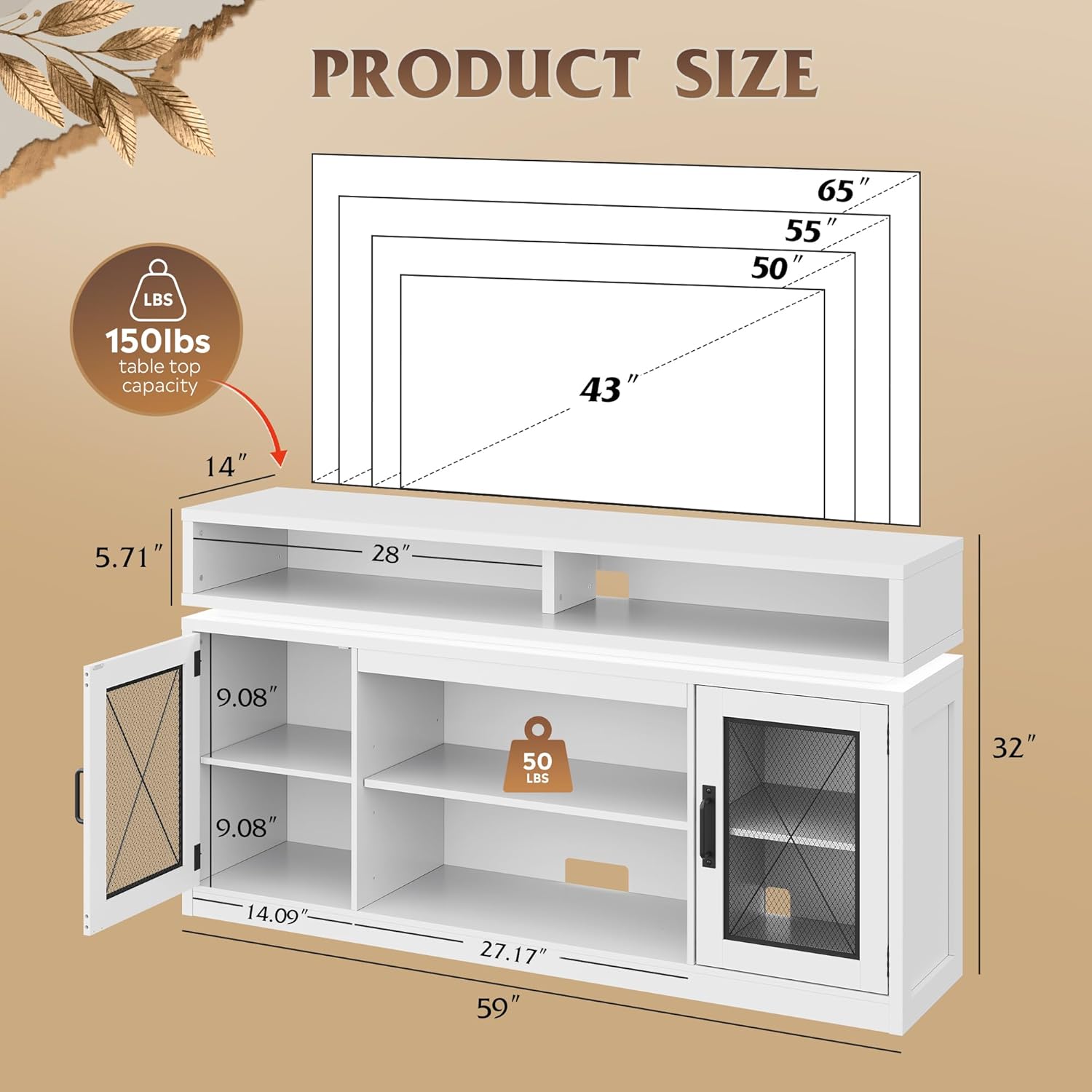
7.1. attēls: Produkta izmēri un televizora saderība
8. Garantija un atbalsts
For any questions, concerns, or support regarding your WLIVE TV Stand, please contact WLIVE customer service. Information regarding specific warranty periods can be found with your purchase documentation.
WLIVE offers dedicated customer support and a 30-day easy returns policy for your convenience.
Varat arī apsvērt iegādiasing paplašinātie aizsardzības plāni jūsu produktam:
- 2 gadu aizsardzības plāns: Pieejams pagarinātam segumam.
- 3 gadu aizsardzības plāns: Pieejams pagarinātam segumam.
- Pilnīga aizsardzība: Mēneša plāns, kas aptver visus atbilstošos iepriekšējos un turpmākos pirkumus.
Lai saņemtu tiešu atbalstu, lūdzu, apmeklējiet WLIVE Store on Amazon vai skatiet kontaktinformāciju, kas norādīta jūsu produkta iepakojumā.