1. Ievads
This instruction manual provides essential information for the proper installation and operation of the Generic HD-RZ-01 Android Canbus Box Adaptor and its associated wiring harness. This product is designed to facilitate the integration of an aftermarket Android car radio with the existing electrical system of a 2014 Honda Fit, enabling functions such as steering wheel controls and vehicle data communication.
Please read this manual thoroughly before attempting installation to ensure correct setup and to prevent damage to the product or your vehicle.
2. Produkts beidziesview
The HD-RZ-01 Canbus Box Adaptor system typically includes the Canbus decoder box and a specific wiring harness designed for the Honda Fit 2014. These components work together to translate vehicle communication protocols into a format compatible with aftermarket Android head units.
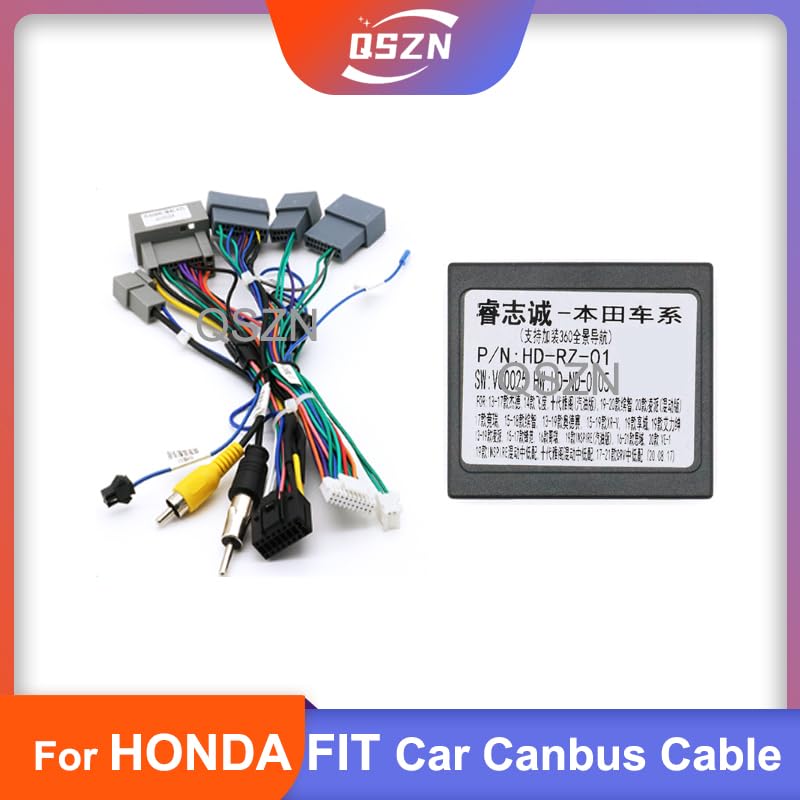
Figure 2.1: Complete HD-RZ-01 Canbus Box and Wiring Harness Set. This image displays the main Canbus box connected to a comprehensive wiring harness with various connectors for vehicle integration.
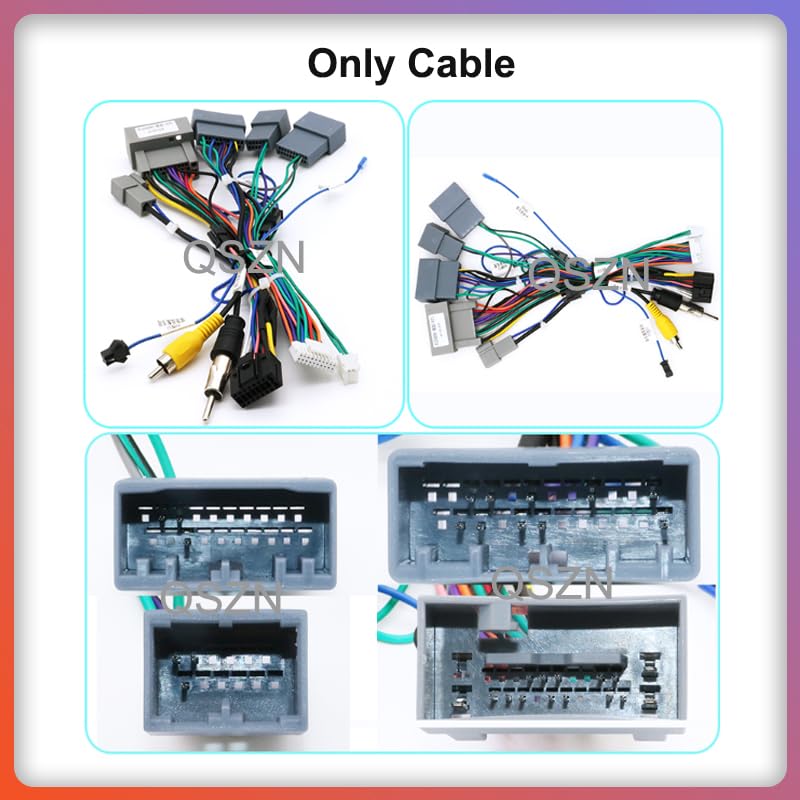
2.2. attēls: detalizēti view of wiring harness connectors. This image shows different types of connectors and cables that form part of the wiring harness, designed to interface with the Honda Fit's electrical system.

Figure 2.3: Close-up of the HD-RZ-01 Canbus Box. This image highlights the main Canbus decoder module, which processes vehicle data for the aftermarket radio.
3. Iestatīšana un instalēšana
Installation of the HD-RZ-01 Canbus Box and wiring harness requires basic automotive electrical knowledge. If you are unsure about any steps, it is recommended to seek professional installation.
3.1. Drošības pasākumi
- Pirms jebkādu elektroinstalācijas darbu uzsākšanas atvienojiet transportlīdzekļa akumulatora negatīvo spaili.
- Pārliecinieties, vai visi savienojumi ir droši un pareizi izolēti, lai novērstu īssavienojumus.
- Refer to your vehicle's service manual for specific dashboard removal procedures.
3.2. Uzstādīšanas soļi
- Remove the Factory Radio: Carefully remove the trim panels and screws securing the factory radio in your 2014 Honda Fit. Disconnect all existing wiring harnesses from the factory radio.
- Connect the Canbus Box: Connect the HD-RZ-01 Canbus Box to the provided wiring harness. Ensure the connection is firm.
- Savienojums ar transportlīdzekļa elektroinstalāciju: Connect the vehicle-specific end of the wiring harness to the corresponding connectors in your Honda Fit's dashboard. These connectors typically match the ones previously connected to your factory radio.
- Savienojuma izveide ar pēcpārdošanas radio: Connect the other end of the wiring harness to your aftermarket Android car radio. This harness will provide power, speaker connections, and Canbus data lines.
- Testa savienojumi: Before fully reassembling the dashboard, reconnect the vehicle's battery and power on the aftermarket radio. Test all functions, including audio, steering wheel controls, and any other integrated features.
- Nostipriniet un salieciet atpakaļ: Once all functions are verified, securely mount the Canbus box in a safe location behind the dashboard, away from moving parts or heat sources. Reassemble the dashboard panels.
4. Lietošanas instrukcijas
The HD-RZ-01 Canbus Box operates automatically once correctly installed. Its primary function is to translate vehicle data (such as steering wheel control signals, ignition status, illumination, and reverse gear signals) into a format that your aftermarket Android head unit can understand and utilize.
- Stūres vadības ierīces: After installation, your aftermarket radio should recognize and allow configuration of your vehicle's steering wheel control buttons. Refer to your Android radio's manual for specific instructions on mapping these controls.
- Transportlīdzekļa dati: The Canbus box provides essential vehicle data to the radio, which may include speed pulse, reverse signal, parking brake status, and illumination signals, depending on the radio's capabilities and vehicle's Canbus system.
5. Apkope
The HD-RZ-01 Canbus Box and wiring harness are designed for long-term, maintenance-free operation. No routine maintenance is required.
- Ensure all connections remain secure. Loose connections can lead to intermittent functionality.
- Avoid exposing the Canbus box or wiring to excessive moisture or extreme temperatures.
- Do not attempt to open or modify the Canbus box, as this will void any potential warranty and may damage the unit.
6. Traucējummeklēšana
Ja pēc instalēšanas rodas problēmas, skatiet šo problēmu novēršanas rokasgrāmatu:
| Problēma | Iespējamais cēlonis | Risinājums |
|---|---|---|
| No power to aftermarket radio | Vaļīgs strāvas savienojums, izdedzis drošinātājs, nepareiza elektroinstalācija. | Check all power connections. Verify vehicle fuses. Ensure the wiring harness is correctly connected to both the vehicle and the radio. |
| Stūres vadības ierīces nedarbojas | Canbus bloks nav pievienots, nepareizi radio iestatījumi, nesaderīgs radio. | Ensure the Canbus box is properly connected. Check your aftermarket radio's settings for steering wheel control configuration. Some radios may require specific Canbus settings. |
| Nav skaņas no skaļruņiem | Vaļīgi skaļruņu savienojumi, nepareiza skaļruņu elektroinstalācija. | Verify all speaker wire connections between the harness and the radio. Ensure no wires are shorting. |
| Vehicle data (e.g., reverse signal) not detected | Canbus box not communicating, radio not configured. | Confirm the Canbus box is receiving power and data. Check your radio's settings for proper Canbus protocol selection if available. |
If problems persist after following these steps, contact the seller or a qualified automotive electronics technician for assistance.
7. Specifikācijas
- Produkta veids: Android Canbus Box Adaptor and Wiring Harness
- Modelis: HD-RZ-01
- Saderība: Honda Fit 2014
- Materiāls: Plastic (Canbus Box), Copper/PVC (Cables)
- Ražotājs: HUNTAN
- Daļas numurs: HUNT6F83BDE65398ED7A12D22306B6EA69A0
8. Garantija un atbalsts
Specific warranty information for the Generic HD-RZ-01 Canbus Box Adaptor is typically provided by the seller at the time of purchase. Please retain your proof of purchase for any warranty claims.
For technical support or assistance with installation, please contact the retailer or manufacturer directly. Provide your product model (HD-RZ-01) and purchase details when seeking support.


