
1. Produkts beidziesview
The VCOROS VR1 Motorcycle Helmet Bluetooth Headset is designed to provide clear audio communication, music playback, and voice assistant functionality for motorcyclists. It features a slim design, robust connectivity, and durable construction suitable for various riding conditions.

Figure 1: VCOROS VR1 Main Unit and Speaker/Microphone Assembly

2. attēls: Produkta pārpalikumsview ar marķētām sastāvdaļām
- Poga "+": Palielināt skaļumu / Nākamā dziesma
- Poga "-": Samazināt skaļumu / Iepriekšējā dziesma
- Atskaņošanas/pauzes poga: Answer/Hangup/Call Back/Reject, Play/Pause Music
- AI Assistant Button: Aktivizējiet balss palīgu
- Barošanas poga: Ieslēgšana/izslēgšana
- Uzlādes indikators: Sarkana gaismas diode
- Bluetooth Working Indicator: Zilā gaismas diode
- Speaker/Microphone Interface: Connects headset components
- C tipa uzlādes ports: Ierīces uzlādēšanai
2. Iepakojuma saturs
Lūdzu, pārliecinieties, ka jūsu iepakojumā ir iekļautas visas tālāk norādītās preces:

3. attēls: Komplektā iekļautie piederumi
- 1 x Bluetooth Headset Unit
- 1 x Set of Earphones with Soft Microphone
- 1 x Lietotāja rokasgrāmata
- 1 x Installation Clip Base
- 5 x Velcro Pads for Installation
- 1 C tipa uzlādes kabelis
3. Uzstādīšana
The VCOROS VR1 headset offers two primary installation methods: clip-on and velcro. For enhanced stability, it is recommended to use both the clip base and velcro pads together.
3.1. Preparing Your Helmet
Ensure the inner lining of your helmet is clean and dry where the headset and speakers will be mounted.
3.2. Skaļruņu uzstādīšana
- Identify suitable locations inside your helmet for the speakers, typically within the ear pockets.
- Attach the velcro pads to the back of the speakers.
- Securely press the speakers into the helmet's ear pockets.
- Route the speaker wires discreetly under the helmet's padding to the desired location for the main unit.
3.3. Mikrofona uzstādīšana
The VR1 comes with a soft microphone, suitable for most full-face helmets. Position the microphone close to your mouth for optimal voice clarity, typically along the cheek pad or chin bar.
3.4. Galvenās ierīces uzstādīšana
- Clip-on Method: Slide the clip base between the helmet shell and the inner padding on the left side of the helmet. Ensure it is firmly secured.
- Velcro Method: Attach the adhesive velcro pad to the exterior of the helmet where you wish to mount the main unit.
- Slide the main unit onto the clip base or press it firmly onto the velcro pad until it is securely attached.
- Connect the speaker/microphone cable to the interface port on the main unit.
4. attēls: uzstādīšanas shēma
Note: For optimal stability, it is recommended to use both the clip base and the velcro pads together for mounting the main unit.
4. Darbība
4.1. Ieslēgšana/izslēgšana
- Ieslēgšana: Press and hold the Power button until the blue indicator light flashes and you hear a "Power On" voice prompt.
- Izslēgt: Press and hold the Power button until the red indicator light flashes and you hear a "Power Off" voice prompt.
4.2. Bluetooth savienošana pārī
- Pārliecinieties, vai austiņas ir izslēgtas.
- Press and hold the Power button for approximately 5-7 seconds until the blue and red indicator lights flash alternately, indicating pairing mode. You will hear a "Pairing" voice prompt.
- On your mobile device, enable Bluetooth and search for "VR1".
- Select "VR1" to connect. Once connected, the blue indicator light will flash slowly, and you will hear a "Connected" voice prompt.
4.3. Mūzikas kontrole
- Atskaņot/pauzēt: Īsi nospiediet atskaņošanas/pauzes pogu.
- Nākamā dziesma: Īsi nospiediet pogu "+".
- Iepriekšējā dziesma: Īsi nospiediet pogu "-".
- Skaļāk: Ilgi nospiediet pogu "+".
- Skaļums uz leju: Ilgi nospiediet pogu "-".
4.4. Zvanu pārvaldība
- Atbildēt uz zvanu: Kad zvana ienākošais zvans, īsi nospiediet pogu Atskaņot/Pauze.
- Beigt zvanu: Zvana laikā īsi nospiediet atskaņošanas/pauzes pogu.
- Noraidīt zvanu: Kad zvana ienākošais zvans, turiet nospiestu pogu Atskaņot/Pauze.
- Atkārtoti sastādīt pēdējo numuru: Divreiz nospiediet atskaņošanas/pauzes pogu.
4.5. Mākslīgā intelekta balss asistents
The VR1 supports AI voice control for both Android and Apple systems.
- Balss palīga aktivizēšana: Short press the AI Assistant button (microphone icon) to wake up your device's voice assistant (e.g., Siri, Google Assistant).

Figure 5: AI Voice Assistant in Use
5. Uzlāde un akumulatora darbības laiks
The VCOROS VR1 headset is equipped with a rechargeable lithium-ion battery, providing extended usage times.
- Uzlādes laiks: Apmēram 2.5 stundas pilnai uzlādei.
- Nepārtraukts darba laiks: Up to 25 hours (music playback).
- Continuous Call Time: Līdz 20 stundām.
- Gaidīšanas laiks: Līdz 270 stundām.
5.1. Uzlādes instrukcijas
- Pievienojiet komplektā iekļauto C tipa uzlādes kabeli austiņu uzlādes portam.
- Pievienojiet otru kabeļa galu USB barošanas avotam (piem., datoram, sienas adapterim).
- The charging indicator (red LED) will illuminate during charging and turn off once fully charged.

6. attēls: Akumulatora darbības laiks beidziesview
6. Waterproof and Dustproof Features
The VCOROS VR1 headset boasts an IPX6 waterproof rating, ensuring reliable performance even in challenging weather conditions.
- IPX6 vērtējums: Protected against powerful water jets. This means the device can withstand heavy rain and splashes, making it suitable for use during motorcycle rides in various weather.
- The tightly structured and solid waterproof design effectively blocks dust and rain from invading the internal components, allowing for worry-free travel.

Figure 7: IPX6 Waterproof Demonstration
7. Audio kvalitāte un trokšņu slāpēšana
Experience high-definition sound with the VCOROS VR1, featuring advanced audio technologies for clear communication and immersive music.
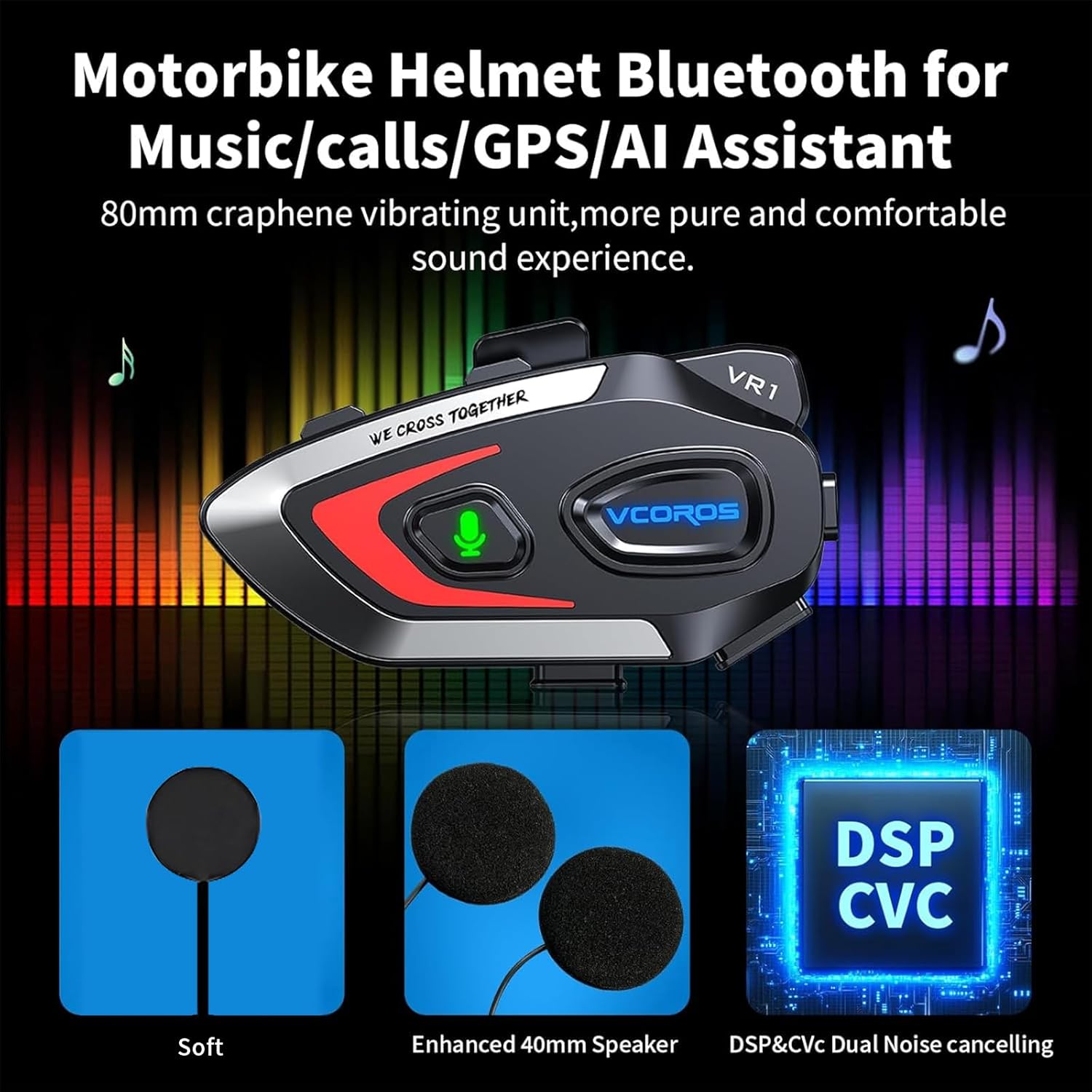
- High-Definition Sound Quality: Equipped with an 80mm graphene vibrating unit for a pure and comfortable sound experience.
- Divkārša trokšņu samazināšana: Adopts intelligent CVC and DSP dual filter noise reduction technology, effectively reducing ambient noise for clear audio transmission and reception, even at high speeds.
- Enhanced 40mm Speakers: Provides robust and clear audio output.

Figure 8: Audio Technology Details
8. Saderība
The VCOROS VR1 headset is designed for broad compatibility with various helmet types and smart devices.
- Ķiveres saderība: Suitable for all types of helmets, including Full-face, Modular, Off-road, Retro, and 3/4 helmets. The slim 0.3-inch thick headphones ensure a comfortable fit without pressing against the ears.
- Ierīces saderība: Connects wirelessly via Bluetooth 5.3 to smartphones, tablets, and other Bluetooth-enabled devices.

9. attēls: Ķiveres saderība
9. Specifikācijas
| Funkcija | Detaļas |
|---|---|
| Zīmols | VCOROS |
| Modelis | VR1 (Soft Mic) |
| Savienojamības tehnoloģija | Bezvadu (Bluetooth 5.3) |
| Ūdensizturīgs vērtējums | IPX6 |
| Trokšņu atcelšana | CVC and DSP Dual Filter |
| Akumulatora tips | Uzlādējams litija jons |
| Uzlādes laiks | Apm. 2.5 stundas |
| Working Time (Music) | Līdz 25 stundām |
| Gaidīšanas laiks | Līdz 270 stundām |
| Skaļruņa diametrs | 40 mm |
| Headphone Thickness | 0.3 collas (aptuveni 7.6 mm) |
| Svars | 180 grami |
| Saderīgas ierīces | Viedtālruņi, planšetdatori |
10. Drošības informācija
Warning: Use with caution while riding. Do not distract yourself from driving.
- Always prioritize road safety. Using the headset should not impair your ability to hear ambient sounds or focus on driving.
- Adjust volume to a level that allows you to hear emergency vehicles and other important sounds.
- Do not attempt to install or adjust the headset while riding.
- Sargājiet ierīci no ekstremālām temperatūrām, tiešiem saules stariem un kodīgām vielām.
- Neizjauciet un nepārveidojiet ierīci. Tas var anulēt garantiju un radīt drošības riskus.
11. Traucējummeklēšana
If you encounter any issues with your VCOROS VR1 headset, please refer to the following common solutions:
11.1. Ierīce neieslēdzas
- Ensure the battery is charged. Connect the headset to a power source using the provided Type-C cable and allow it to charge for at least 30 minutes.
- Nospiediet un dažas sekundes turiet ieslēgšanas/izslēgšanas pogu, lai pārliecinātos, ka tā nav tikai īsa nospiešana.
11.2. Nevar savienot pārī ar ierīci
- Make sure the headset is in pairing mode (red and blue lights flashing alternately).
- Ensure Bluetooth is enabled on your mobile device and it is within range (typically 10 meters).
- Forget "VR1" from your device's Bluetooth settings and try pairing again.
- Restart both the headset and your mobile device.
11.3. Nav skaņas vai kluss skaļums
- Pārbaudiet skaļuma līmeņus gan austiņās, gan pievienotajā ierīcē.
- Ensure the speaker wires are securely connected to the main unit.
- Verify that the speakers are correctly positioned within the helmet's ear pockets.
11.4. Slikta mikrofona kvalitāte
- Ensure the microphone is positioned close to your mouth and not obstructed.
- Check for any damage to the microphone cable or connector.
11.5. Uzlādes problēmas
- Pārliecinieties, vai C tipa kabelis ir pilnībā ievietots uzlādes portā.
- Izmēģiniet citu USB strāvas adapteri vai portu.
- Pārliecinieties, vai uzlādes kabelis nav bojāts.
12. Garantija un atbalsts
VCOROS products are manufactured to high quality standards. For warranty information, technical support, or service inquiries, please contact VCOROS customer support through the retailer where you purchased the product or visit the official VCOROS webvietne.
Lūdzu, saglabājiet pirkuma apliecinājumu garantijas prasībām.