
ATK ATK 68 RX
ATK 68 RX Hall Effect spēļu tastatūras lietotāja rokasgrāmata
Model: ATK 68 RX
Ievads
The ATK 68 RX is a 65% esports keyboard engineered for precision and durability. It features advanced Hall Effect magnetic switches, which utilize non-contact actuation to eliminate physical wear, ensuring a longer lifespan and more consistent input compared to traditional mechanical switches.
This keyboard offers an exceptional level of customization with adjustable actuation for each key, ranging from 0.005 mm to 3.3 mm in precise 0.001 mm increments. This allows users to fine-tune sensitivity for both rapid gaming responses and accurate typing.
Constructed with a robust tray-mount chassis and an aluminum plate, the 68 RX provides superior keystroke stability and reduced vibration, enhancing the overall typing and gaming experience. The Cherry-profile frosted PC keycaps are designed to optimize RGB lighting diffusion while maintaining durability.

1. attēls: No augšas uz leju view of the ATK 68 RX Hall Effect Gaming Keyboard.
Iestatīšana
To begin using your ATK 68 RX keyboard, follow these steps:
- Izpakošana: Carefully remove all components from the packaging. Verify that you have the keyboard, USB-C cable, keycap & switch puller, M2 cross screwdriver, matching wrist rest, replaceable strap plate, strap, and matching add-on keycaps.
- Pievienojiet tastatūru: Plug the USB-C end of the provided cable into the port on the keyboard and the USB-A end into an available USB port on your computer. The keyboard is designed for wired connectivity.
- Draivera instalēšana (pēc izvēles, bet ieteicama): For full customization and access to advanced features like adjustable actuation and preset switching, download and install the official ATK software driver from the ATK support webvietne.

Figure 2: Package contents of the ATK 68 RX keyboard.

Figure 3: USB-C port on the ATK 68 RX keyboard for connectivity.
Darbojas
The ATK 68 RX keyboard offers a range of features designed to enhance your gaming and typing experience.
Galvenās iezīmes
- Hall Effect Switch Technology: The magnetic sensing mechanism provides ultra-high precision, faster response times, and an extended switch lifespan by eliminating physical contact points.
- Adjustable Actuation Range: Customize the sensitivity of each key from 0.005 mm to 3.3 mm in 0.001 mm increments. This allows for optimal performance tailored to competitive gaming (e.g., rapid trigger) or precise typing.
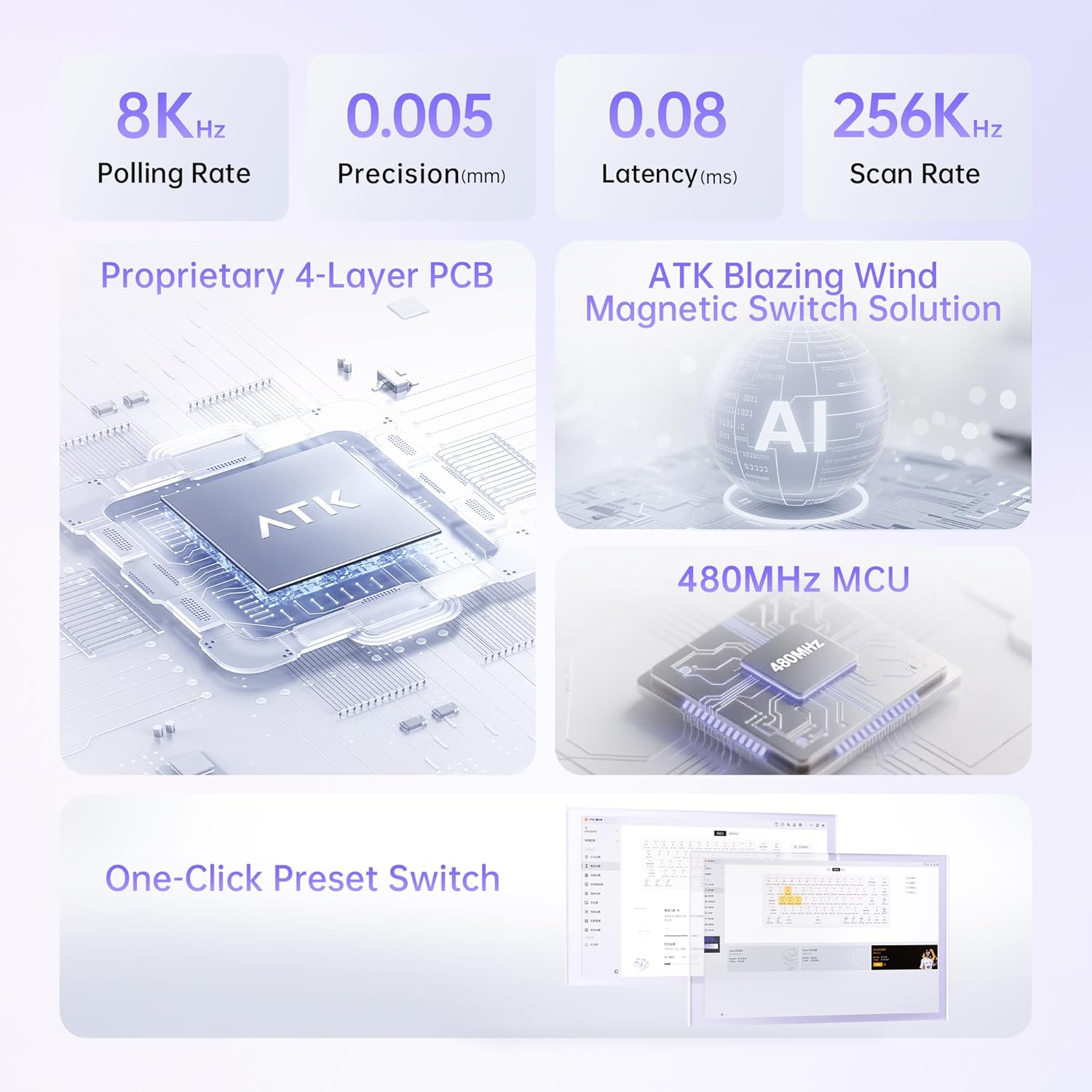
Figure 4: Illustration of 0.005mm step precision.
- 65% / 68-Key Compact Layout: This layout retains essential keys and arrow keys while significantly saving desk space, which is ideal for gamers requiring quick mouse movements.
- Tray-Mount Structure with Aluminum Plate: This design ensures consistent keystroke stability, reduces unwanted vibration, and provides a more rigid and premium feel compared to standard plastic-mounted keyboards.
- Technical Components & Customization: The keyboard features Cherry-profile frosted PC keycaps that improve RGB diffusion. Users can choose between Wolf or Primordial magnetic switches based on their preference.

Figure 5: The compact size of the ATK 68 RX keyboard.
Customization and Features
- One-Click Preset Switch: Utilize the driver software to set up three customizable presets, allowing seamless switching between work and gaming modes.
- RGB apgaismojums: The keyboard features south-facing 16.8 million color RGB lighting with 22 pre-set lighting effects, offering extensive visual customization.
- Papildu funkcijas: Supports RT (Rapid Trigger), DKS (Dynamic Key Stroke), MT (Macro Trigger), TGL (Toggle), adjustable deadzone, and comprehensive key remapping through the software.
- Innovative Wrist Rest Design: The detachable aluminum wrist rest provides ergonomic support and allows for custom DIY modifications.

Figure 6: Software interface for one-click preset switching.

Figure 7: Innovative wrist rest design with color options.
Apkope
Proper maintenance ensures the longevity and optimal performance of your ATK 68 RX keyboard.
- Vispārējā tīrīšana: Regularly use a soft brush or compressed air to remove dust and debris from between the keycaps. For surface cleaning, wipe with a slightly damp, nepūkojoša drāna. Izvairieties no spēcīgām ķīmiskām vielām.
- Taustiņu vāciņu kopšana: The Cherry-profile frosted PC keycaps can be removed using the provided keycap puller for deeper cleaning. Wash keycaps with mild soap and water, then dry thoroughly before reattaching.
- Slēdža kopšana: Due to the Hall Effect magnetic switches, there is no physical contact wear. However, ensure no foreign objects enter the switch housing. If a switch needs replacement, use the provided switch puller.
- Kabeļu vadība: Lai novērstu bojājumus, izvairieties no asiem USB-C kabeļa līkumiem vai pārmērīgas vilkšanas.
Problēmu novēršana
If you encounter issues with your ATK 68 RX keyboard, consider the following common solutions:
- Tastatūra nereaģē:
- Pārliecinieties, vai USB-C kabelis ir droši pievienots gan tastatūrai, gan datoram.
- Mēģiniet pievienot tastatūru citam datora USB portam.
- Pārbaudiet tastatūru citā datorā, lai izslēgtu ar sistēmu saistītas problēmas.
- Atsevišķas atslēgas nedarbojas:
- Remove the keycap and visually inspect the switch for any obstructions.
- If you suspect a faulty switch, and you have spare switches, you may attempt to hot-swap the switch using the provided tool.
- Programmatūras problēmas/pielāgošana netiek lietota:
- Ensure you have the latest version of the ATK software driver installed.
- Restart the software and/or your computer.
- Check for any conflicting software that might interfere with keyboard functions.
- RGB Lighting Problems:
- Verify that the lighting settings in the ATK software are correctly configured.
- Pārliecinieties, vai tastatūra saņem pietiekamu strāvu no USB porta.
Ja šīs darbības neatrisina problēmu, lūdzu, skatiet atbalsta sadaļu, lai saņemtu papildu palīdzību.
Specifikācijas
Detailed technical specifications for the ATK 68 RX Hall Effect Gaming Keyboard:
| Funkcija | Apraksts |
|---|---|
| Produkta nosaukums | ATK 68 RX esports Hall Effect Keyboard |
| Krāsu opcijas | White, Black, Pink |
| Slēdža veids | Wolf Switch / Primordial Switch (Magnetic Hall Effect) |
| Stabilizators | V1 Demagnetized Stabilizer |
| RT (Rapid Trigger) Range | 0.005 mm ~ 3.3 mm |
| RT Step Precision | 0.001 mm |
| Latentums | 0.08 ms |
| Skenēšanas ātrums | 256K Hz |
| Aptauju skaits | 8000 Hz |
| Taustiņu vāciņi | PC Frosted Keycaps (Cherry-profile) |
| Polsterējums | Silicone Base Pad, Poron Foam, EPDM Foam, PET Film, IXPE Pad, Silicone Plate Foam |
| Plaukstas locītavas materiāls | CNC alumīnijs |
| Wrist Rest Color Options | Champagne Gold, Gray, Pink |
| Wrist Rest Finish | Anodized Sandblasting, Electrostatic Powder Coating |
| Apgaismojums | South-Facing 16.8M RGB with 22 Pre-set Lighting Effects |
| Pozicionēšanas plāksne | Aluminum Positioning Plate |
| Atbalstītās funkcijas | RT/DKS/MT/TGL/Adjustable Deadzone and Key Remapping |
| Savienojamība | Vadu (USB-C) |
| Sistēmas saderība | Windows / MacOS / Linux |
| Produkta izmēri | 31.75 cm x 11.43 cm x 3.05 cm (12.5 collu garums x 4.5 collu platums x 1.2 colla augstums) |
| Preces svars | 2 mārciņas (0.91 kg) |
| Ražotājs | ATK |
| Modeļa numurs | ATK 68 RX |
| Pirmais pieejams | 16. gada 2025. augusts |

8. attēls: Tehniskā pārsniegšanaview of the ATK 68 RX keyboard.
Garantija un atbalsts
ATK is committed to providing high-quality gaming gear. For information regarding product warranty, please refer to the warranty certificate included in your product packaging (Figure 2, item 2).
For technical support, driver downloads, or frequently asked questions, please visit the official ATK store or support page:
Visit the Official ATK Store on Amazon
You can also contact the seller, ATK Gaming Gears, directly through the Amazon platform for assistance.
Saistītie dokumenti — ATK 68 RX
 |
ATK EDGE 60 HE & 63 HE Esports Magnetic Switch Keyboard User Manual Comprehensive user guide for the ATK EDGE 60 HE and ATK EDGE 63 HE esports magnetic switch keyboards, covering setup, functions, specifications, and troubleshooting. Learn about customization, connectivity, and special features. |
 |
ATK RS6 Air Gaming Keyboard User Manual and Setup Guide This user manual provides comprehensive instructions for the ATK RS6 Air gaming keyboard, detailing product specifications, FN key functions, device connection, special features, troubleshooting, and driver downloads for optimal performance. |
 |
ATK RS6 Air Hall Effect Keyboard User Manual - ATK GEAR ATK RS6 Air Hall Effect Keyboard User Manual: Features, connection, FN key functions, troubleshooting, and driver download for ATK GEAR's 68-key magnetic switch gaming keyboard. |
 |
ATK 68 V2 spēļu magnētiskā slēdža tastatūras lietotāja rokasgrāmata Lietotāja rokasgrāmata spēļu magnētiskā slēdža tastatūrām ATK 68 V2 un ATK 68 V2 PRO, kurā detalizēti aprakstītas funkcijas, FN taustiņu kombinācijas, sistēmas pārslēgšana un draiveru lejupielādes. |
 |
ATK 68 RX Gaming Keyboard User Manual - ATK GEAR Comprehensive user manual for the ATK 68 RX gaming keyboard by ATK GEAR. Includes detailed information on key functions, FN key combinations, multimedia shortcuts, frequently asked questions, and instructions for driver and firmware updates. |
 |
Santos Juice Extractor #68 Parts Diagram and Identification Uzsprāga view diagram and parts list for the Santos Juice Extractor #68, including part numbers and identification. Useful for maintenance and repair. |
Ask a question about this manual
Ask about setup, troubleshooting, compatibility, parts, safety, or missing instructions. Manuals+ will review the question and use this page’s manual context to help answer it.