
1. Ievads
The HUAWEI Watch GT 6 Pro 46mm is an advanced smartwatch designed to enhance your daily life and fitness activities. Featuring a vibrant 1.47-inch AMOLED display, durable sapphire crystal, and aerospace-grade titanium alloy casing, this device offers comprehensive health monitoring, precise GPS tracking, and extended battery life. It is compatible with both iOS and Android devices, providing seamless integration with your smartphone.
2. Kas ir kastē
Upon unboxing your HUAWEI Watch GT 6 Pro, you should find the following items:
- HUAWEI Watch GT 6 Pro Smartwatch 46mm
- Bezvadu uzlādes paliktnis
- Uzlādes kabelis
- Īsā lietošanas pamācība
- Garantijas karte
Video apraksts: An unboxing video demonstrating the contents of the HUAWEI Watch GT 6 Pro package, including the watch, charging accessories, and documentation.
3. Produkts beidziesview
The HUAWEI Watch GT 6 Pro features a robust and elegant design. The watch case is crafted from aerospace-grade titanium alloy, providing both lightness and durability. The display is protected by a sapphire crystal, known for its scratch resistance and clarity. The watch is equipped with a fluoroelastomer strap for comfort and resilience.
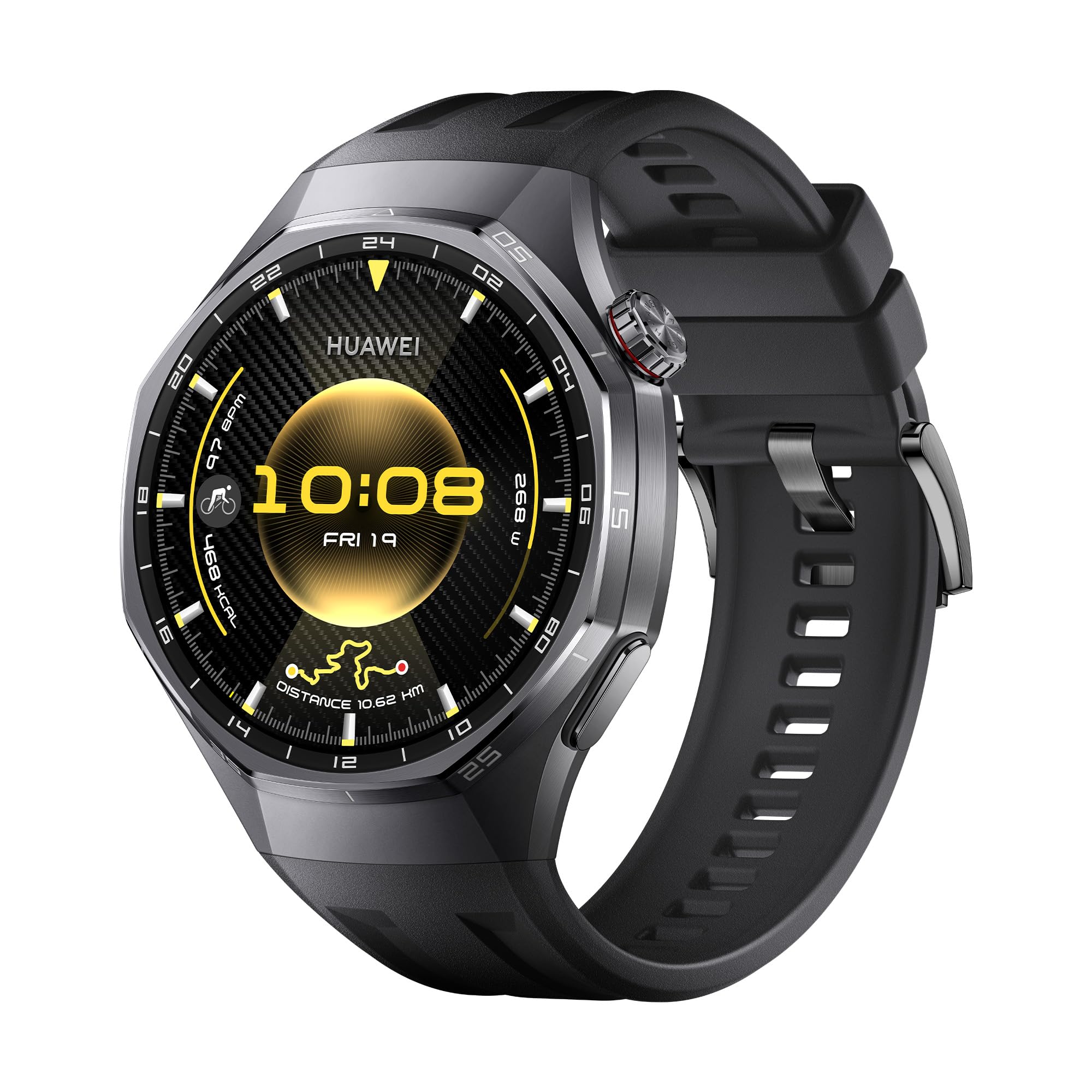
Attēla apraksts: Priekšpuse view of the HUAWEI Watch GT 6 Pro Smartwatch with a black fluoroelastomer strap, showcasing its round AMOLED display.

Attēla apraksts: Tuvplāns view highlighting the titanium alloy casing and sapphire crystal display of the HUAWEI Watch GT 6 Pro, emphasizing its premium materials.
4. Iestatīšana
4.1. Ierīces uzlāde
Before initial use, fully charge your HUAWEI Watch GT 6 Pro. Connect the charging cable to the wireless charging cradle and place your watch on the cradle. Ensure the watch is properly aligned for charging to begin. A full charge typically takes approximately 1.5 hours.
4.2 Lietotnes HUAWEI Health instalēšana
The HUAWEI Health app is essential for managing your smartwatch, tracking data, and accessing additional features. It is compatible with both iOS and Android devices.
- Lejupielādēt: Scan the QR code provided in the Quick Start Guide or search for "HUAWEI Health" in your device's app store (App Store for iOS, Google Play Store or HUAWEI AppGallery for Android). Alternatively, visit HUAWEI.com to download the application.
- Instalēt: Follow the on-screen instructions to install the app on your smartphone.

Attēla apraksts: An image illustrating the HUAWEI Watch GT 6 Pro's compatibility with iOS and Android, featuring a smartphone screen displaying the HUAWEI Health app interface.
4.3 Viedpulksteņa savienošana pārī
To pair your HUAWEI Watch GT 6 Pro with your smartphone:
- Open the HUAWEI Health app on your smartphone.
- Dodieties uz Ierīces > Pievienot > Viedpulkstenis.
- Select your HUAWEI Watch GT 6 Pro from the list of available devices.
- Lai pabeigtu savienošanas pārī procesu, izpildiet ekrānā redzamos norādījumus gan tālrunī, gan pulkstenī.
4.4. Programmaparatūras atjaunināšana
Regularly update your watch firmware to ensure optimal performance and access to the latest features:
- Open the HUAWEI Health app.
- Dodieties uz Personīga > Pārbaudiet, vai nav atjauninājumu.
- Follow the instructions to download and install any available updates.
5. Lietošanas instrukcijas
5.1 Veselības uzraudzība
The HUAWEI Watch GT 6 Pro offers advanced health tracking features:
- ECG Analysis: Press and hold the side electrode for 30 seconds to generate an ECG report directly on your watch. This feature provides insights into your heart rhythm.
- SpO2 uzraudzība: Continuously monitor your blood oxygen saturation levels.
- Sirdsdarbības ātruma izsekošana: Accurate heart rate monitoring during workouts and throughout the day.
- Miega izsekošana: Detailed analysis of your sleep patterns, including sleep stages un kvalitāte.
- Stresa uzraudzība: Track your stress levels and receive guidance for relaxation.

Attēla apraksts: A visual representation of the ECG analysis feature on the HUAWEI Watch GT 6 Pro, showing a heart rate graph and instructions to press the side electrode.

Attēla apraksts: Displays the watch's capabilities for 24-hour fatigue monitoring (HRV) and blood oxygen (SpO2) level at a glance.
5.2 Sporta režīmi un GPS izsekošana
The watch supports over 100 sports modes, including advanced tracking for cycling, trail running, and golf. The HUAWEI Sunflower Positioning System provides 20% increased positioning accuracy for outdoor activities.
- Riteņbraukšana: Monitor critical indicators like heart rate, incline, speed, and distance. Virtual Cycling Power helps optimize your training.
- Kritiena noteikšana: The watch can detect falls during activities and automatically send an SOS call or request to selected contacts after your confirmation.
- Navigācija: Utilize the integrated GPS for easy navigation, whether commuting or exploring new routes.

Attēla apraksts: Attēlu demonstrējumsasing the variety of sports modes available on the HUAWEI Watch GT 6 Pro, including trail running, golf, and skiing.

Attēla apraksts: A cyclist wearing the HUAWEI Watch GT 6 Pro, with an overlay showing real-time cycling metrics like heart rate, speed, and virtual power.
5.3 NFC funkcionalitāte
The HUAWEI Watch GT 6 Pro supports NFC, enabling convenient contactless payments and other NFC-based interactions where available.
6. Akumulatora darbības laiks
The HUAWEI Watch GT 6 Pro is equipped with a high-capacity battery, offering impressive endurance:
- Līdz 21 dienas with light usage.
- Līdz 12 dienas with typical usage.
- Līdz 7 dienas with Always-On Display (AOD) activated.
Battery life may vary based on usage patterns, settings, and environmental factors.

Attēla apraksts: An infographic illustrating the impressive battery life of the HUAWEI Watch GT 6 Pro, showing up to 21 days for light use, 12 days for typical use, and 7 days with AOD.
7. Specifikācijas
| Funkcija | Specifikācija |
|---|---|
| Modeļa nosaukums | Atum-B29F |
| Modeļa numurs | 55020FUC |
| Displeja izmērs | 1.47 collas |
| Displeja veids | AMOLED |
| Displeja izšķirtspēja | 390 x 390 vai vairāk |
| Max Screen Brightness | 1000 NIT Coating |
| Uzglabāšanas ietilpība | 64 GB |
| Akumulatora ietilpība | 867 miljoniamp Stundas |
| Akumulatora tips | Litija polimērs |
| Vidējais akumulatora darbības laiks | 21 dienas |
| Savienojamības tehnoloģija | Bluetooth |
| Bezvadu sakaru standarts | Bluetooth |
| Īpašas funkcijas | GPS, NFC, ECG, SpO2, Virtual Cycling Power, HUAWEI TruSense |
| GPS | Integrēts GPS |
| Ūdensizturības līmenis | IP69, 5 Meters (5 ATM) |
| Lietas materiāls | Titanium Alloy & Black Ceramic |
| Siksnas materiāls | Fluorelastomērs |
| Saderīgas ierīces | Smartphone, Tablet, PC (iOS and Android compatible) |
| Izmēri | 12 x 12 x 6 milimetri |
| Izcelsmes valsts | Ķīna |
8. Traucējummeklēšana
If you encounter any issues with your HUAWEI Watch GT 6 Pro, consider the following steps:
- Restartējiet ierīci: Vienkārša restartēšana bieži vien var novērst nelielas programmatūras problēmas.
- Check App Connection: Ensure your watch is properly connected to the HUAWEI Health app on your smartphone via Bluetooth.
- Atjaunināt programmaparatūru: Make sure your watch's firmware and the HUAWEI Health app are updated to the latest versions.
- Atiestatīt uz rūpnīcas iestatījumiem: As a last resort, you can reset your watch to its factory settings. Be aware that this will erase all data on the watch.
- Apskatiet lietotni: The HUAWEI Health app often provides specific troubleshooting tips for common issues.
For persistent problems, please refer to the official HUAWEI support webvietni vai sazinieties ar klientu apkalpošanas dienestu.
9. Garantija un atbalsts
Your HUAWEI Watch GT 6 Pro comes with a 1 gada ražotāja garantijaLūdzu, saglabājiet pirkuma apliecinājumu garantijas prasību iesniegšanai.
For detailed warranty information, technical support, or service inquiries, please visit the official HUAWEI support website or contact their customer service department. Additional protection plans may be available for purchase.