
VOOPEAK TC27-1
VOOPEAK 4G LTE Trail Camera TC27-1 User Manual
Model: TC27-1 | Brand: VOOPEAK
1. Ievads
This manual provides essential instructions for the setup, operation, and maintenance of your VOOPEAK 4G LTE Trail Camera TC27-1. Please read this guide thoroughly before using the device to ensure optimal performance and longevity.
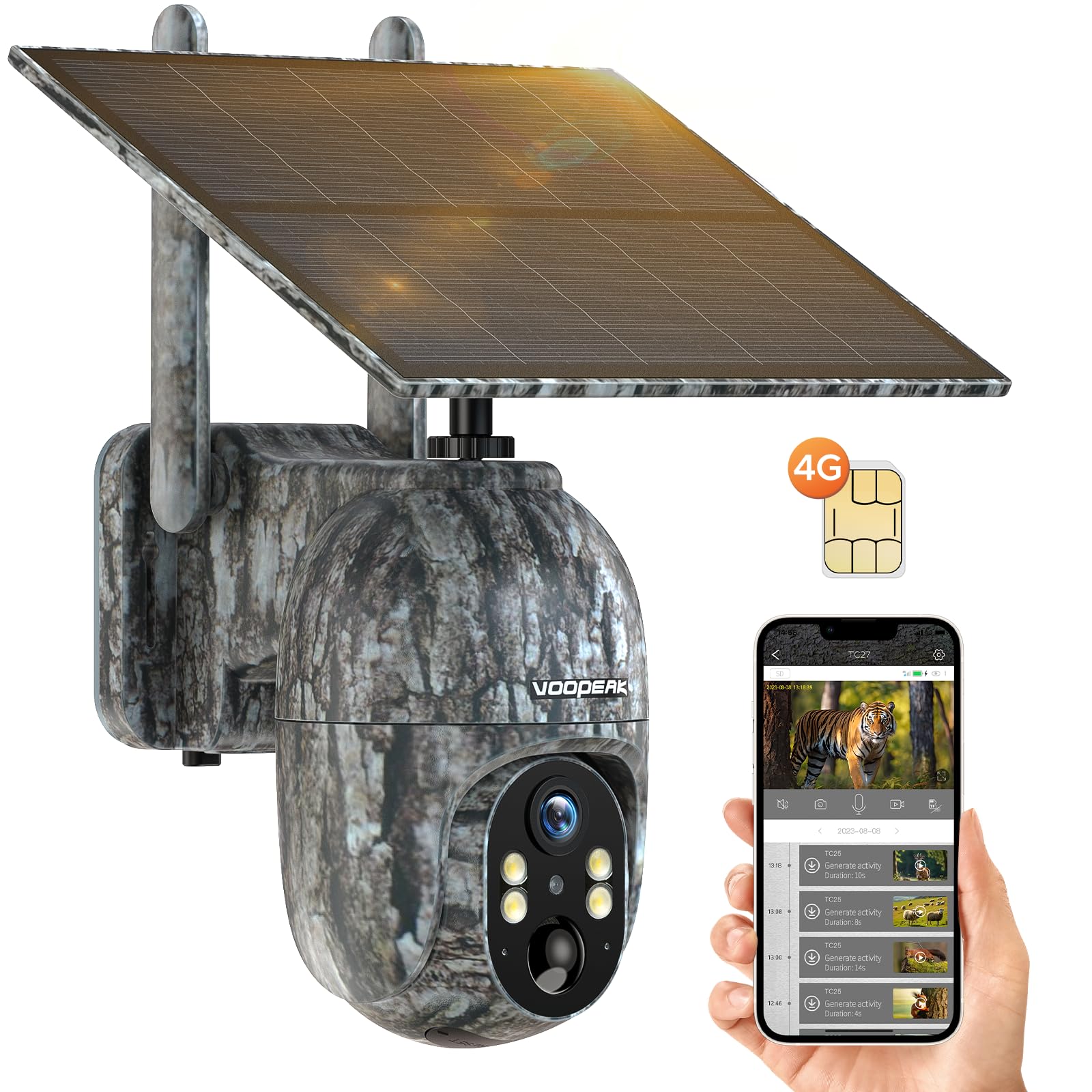
Figure 1: VOOPEAK 4G LTE Trail Camera TC27-1
2. Galvenās iezīmes
- 4G LTE Cellular Connectivity: Built-in SIM card compatible with major US carriers (Verizon, T-Mobile, AT&T). No Wi-Fi required. Includes trial data for new users.
- 2.5K HD Video & Color Night Vision: Captures high-definition 2560x1440 video. Offers color night vision when ambient brightness exceeds 0.5 lux, otherwise switches to infrared black and white.
- Solar Powered with Built-in Battery: Equipped with a 6W solar panel and a 10400mAh battery for extended operation, providing up to one year of standby time.
- 360° Pan & 90° Tilt Remote Control: Adjust camera direction (355° pan, 90° tilt) remotely via the UCon app for optimal wildlife monitoring.
- Motion-Activated Notifications & Playback: Receives real-time alerts on your phone. Supports video and image storage on Micro SD card (up to 128GB) or cloud service (30-day free trial).
- Izturīgs un ūdensnecaurlaidīgs dizains: IP66 waterproof rating, suitable for various outdoor environments.

Figure 2: AI Animal Recognition feature in action.
3. Iepakojuma saturs
Pēc izpakošanas pārliecinieties, vai visas tālāk norādītās lietas ir klāt un ir labā stāvoklī:
- VOOPEAK 4G LTE Trail Camera (TC27-1)
- Solar Panel (integrated)
- Mounting Hardware (screws, wall anchors, tree strap)
- USB uzlādes kabelis
- Lietotāja rokasgrāmata (šis dokuments)
- Built-in SIM Card (non-removable, pre-installed)
- (Micro SD card not included)
Video 1: Demonstrates how to connect the solar panel to the camera.
4. Iestatīšanas rokasgrāmata
4.1. Sākotnējā uzlāde
Before first use, ensure the camera's built-in battery is fully charged. Connect the camera to a power source using the provided USB cable. The solar panel will maintain charge during outdoor use.
4.2. SIM Card Activation & Data Plan
Your camera comes with a built-in, non-removable SIM card. New users receive 100MB trial data for 7 days. To activate and manage your data plan, download the UCon app and follow the in-app instructions. Data plans are required for cellular functionality.

Figure 3: Information regarding the built-in SIM card and data plans.
4.3. Micro SD kartes uzstādīšana (pēc izvēles)
The camera supports a Micro SD card up to 128GB for local storage. Locate the SD card slot, insert the card with the contacts facing down, and gently push until it clicks into place. Ensure the waterproof cover is securely closed after installation.
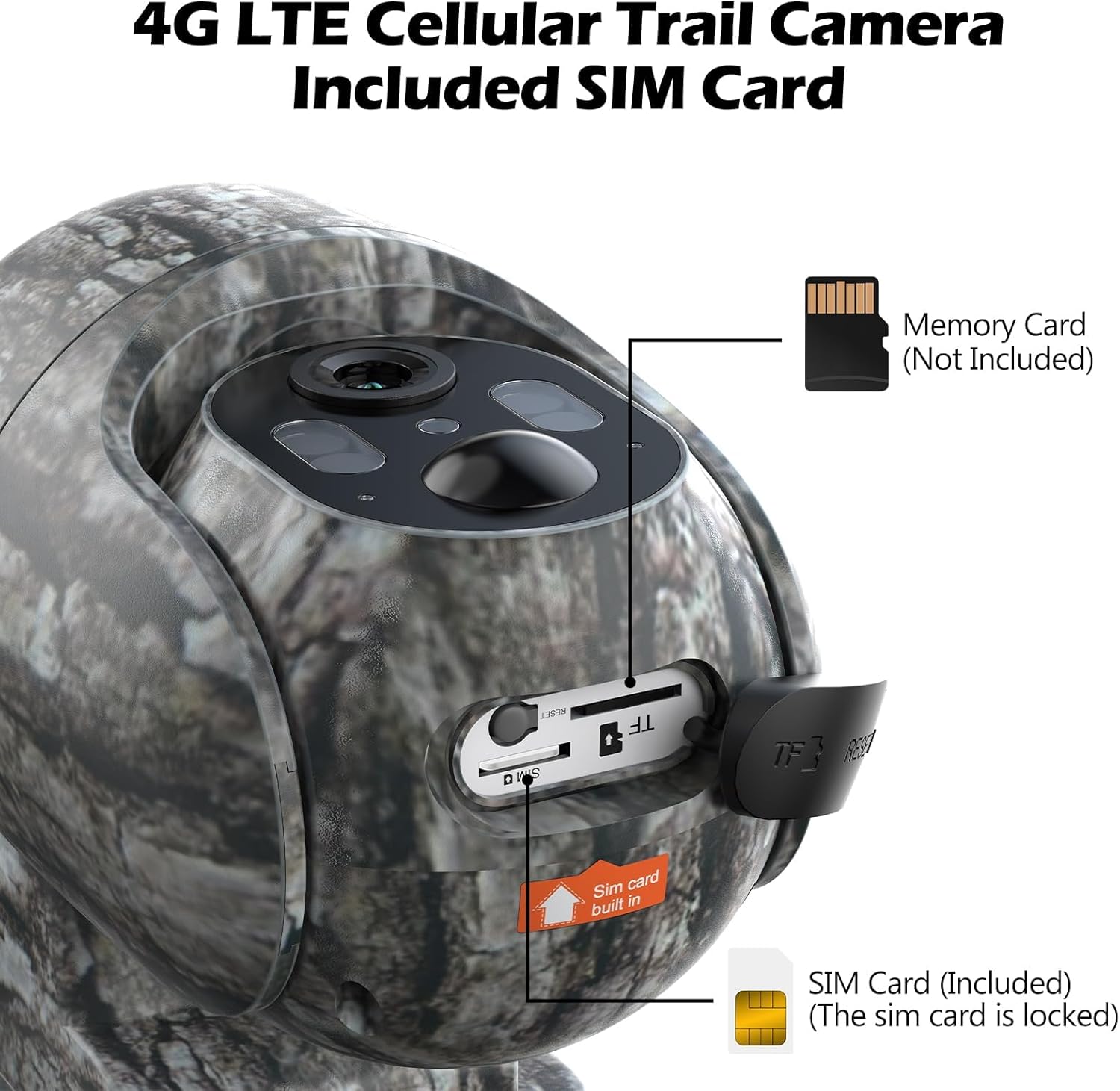
Figure 4: Location of the built-in SIM card and Micro SD card slot.
4.4. Kameras uzstādīšana
Choose a suitable location with good cellular signal and direct sunlight exposure for the solar panel. Use the provided mounting hardware (screws, wall anchors, or tree strap) to secure the camera. Ensure the camera is stable and has a clear view vēlamās uzraudzības zonas.

Figure 5: Trail camera installed on a tree, powered by its solar panel.
5. Lietošanas instrukcijas
5.1. Downloading the UCon App
Meklēt "UCon" in your smartphone's app store (iOS or Android) and download the application. Follow the on-screen instructions to register an account and add your camera device.
5.2. Tiešraide View un tālvadības pults
Once connected, you can access live video streaming from your camera through the UCon app. Use the pan (355°) and tilt (90°) controls within the app to adjust the camera's viewattālināti.
Video 2: Guide on adjusting the camera's angle using the UCon app.

Figure 6: Live 2.5K video view from the UCon app.

Figure 7: Remote pan and tilt control via the app.
5.3. Kustību noteikšana un paziņojumi
The camera features motion-activated recording. Ensure app notifications are enabled on your phone to receive real-time alerts when motion is detected. You can review recorded videos and images directly from the app.

Figure 8: Real-time motion notifications on a smartphone.

Figure 9: Motion detection of a squirrel.
5.4. Nakts redzamības režīmi
The camera offers two night vision modes: color night vision (when ambient light > 0.5 lux) and infrared black & white night vision. The camera automatically switches between modes based on lighting conditions.

10. attēls: Piemample of colorful video capture at night.

Figure 11: Day and Color Night Vision comparison.
6. Apkope
- Tīrīšana: Regulāri noslaukiet kameras objektīvu un saules paneli ar mīkstu, sausu drānu.amp audums, lai nodrošinātu skaidrus attēlus un efektīvu uzlādi.
- Akumulatora pārbaude: Monitor battery levels via the UCon app. While solar-powered, extreme weather or prolonged low light may require manual charging.
- Programmaparatūras atjauninājumi: Check the UCon app periodically for firmware updates to ensure your camera has the latest features and security enhancements.
- Data Plan Monitoring: Keep track of your cellular data usage through the UCon app to avoid service interruptions.
7. Traucējummeklēšana
| Problēma | Iespējamais risinājums |
|---|---|
| Camera not connecting to 4G network. | Check cellular signal strength in the camera's location. Ensure your data plan is active and has sufficient balance via the UCon app. |
| App screen appears black after several days. | This may indicate depleted cellular data. Recharge the SIM card through the UCon app or the website mentioned on the SIM packaging. |
| Nav kustību noteikšanas brīdinājumu. | Verify that motion detection is enabled in the UCon app settings. Ensure app notifications are allowed in your phone's system settings. Check camera placement for obstructions. |
| Slikta attēla/video kvalitāte. | Clean the camera lens. Ensure the camera is securely mounted and not vibrating. Check lighting conditions, especially for night vision. |
| Akumulators netiek uzlādēts. | Ensure the solar panel is receiving direct sunlight. Check the USB charging cable connection. Verify the solar panel is clean and free of debris. |
8. Produkta specifikācijas
| Funkcija | Detaļas |
|---|---|
| Modeļa numurs | TC35 (Note: Product title refers to TC27-1, but specifications list TC35. Please verify with manufacturer if discrepancy exists.) |
| Barošanas avots | Solar Powered (with built-in 10400mAh Lithium Metal battery) |
| Savienojamības protokols | Mobilais tīkls (4G LTE) |
| Saderīgi operatori | Verizon, T-Mobile, AT&T (US only) |
| Kontrollera tips | Android (via UCon App, also iOS compatible) |
| Efektīva video izšķirtspēja | 2.5K (2560x1440) |
| Panoramēšanas/noliekšanas diapazons | Panoramēt 355°, noliekt 90° |
| Nakts redze | Color Night Vision (>0.5 lux), Infrared Black & White Night Vision |
| Uzglabāšana | Micro SD Card (up to 128GB, not included), Cloud Service (30-day free trial) |
| Ūdensizturīgs vērtējums | IP66 |
| Produkta izmēri | 10 x 2 x 2.7 collas |
| Preces svars | 2.51 mārciņas |
| UPC | 758918449212 |
9. Additional Media
9.1. Wildlife Footage
3. video: Piemērsample footage captured by the VOOPEAK Trail Camera, showing deer in a natural habitat.
4. video: Virsview of the TC27 Cellular Trail Camera features.
Video 5: Demonstration of the 4G LTE Cellular Trail Camera, highlighting solar power capabilities.
Video 6: Detailed look at the VOOPEAK 4G LTE Cellular Trail Camera.
Video 7: Features of the 4G Trail Camera.
Video 8: Additional features of the 4G Cellular Trail Camera.
10. Garantija un atbalsts
VOOPEAK is committed to providing high-quality products and professional service. For any inquiries or support needs:
- Klientu apkalpošana: Responses typically within 24 hours.
- Atgriešana un maiņa: Vienkārša preču atgriešana un apmaiņa 30 dienu laikā pēc iegādes.
- Produktu atbalsts: Lifetime continuous support for VOOPEAK trail cameras.
Lai saņemtu papildu palīdzību, lūdzu, apmeklējiet VOOPEAK Store on Amazon or contact customer support directly.