
Ievads
Welcome to the user manual for your Samsung QN65QN990FFXZA 65 Inch QN990F Neo QLED 8K TV. This document provides essential information for setting up, operating, maintaining, and troubleshooting your television. Please read these instructions carefully to ensure proper use and to maximize your viewpieredzi.

1. attēls. Priekšpuse view of the Samsung QN65QN990FFXZA 65 Inch QN990F Neo QLED 8K TV.
Iestatīšana
1. Izpakošana un novietošana
- Uzmanīgi izņemiet televizoru un visus piederumus no iepakojuma.
- Place the TV on a stable, flat surface or mount it on a wall using a VESA 400mm x 300mm compatible mount. Ensure adequate ventilation around the TV.
2. Connecting the Wireless One Connect Box
The Samsung QN990F utilizes a Wireless One Connect Box to manage all external connections, reducing cable clutter around the TV. Connect all your devices to this box.

Figure 2: Wireless One Connect Box for streamlined connections.
3. External Device Connections
Connect your external devices (e.g., Blu-ray player, game console, soundbar) to the Wireless One Connect Box using the appropriate ports.

Figure 3: Detailed diagram of the Wireless One Connect Box ports.
- Kabelis/ANT: Connect for over-the-air antenna or cable TV signals.
- USB-A: Standarta taisnstūrveida ports barošanai vai multivides atskaņošanai.
- EX-saite: Samsung servisa ports ārējai vadībai un diagnostikai.
- HDMI 1, 2, 4: Transmits high-definition video and audio from external devices. Supports 8K@120Hz / 4K@240Hz for Gaming.
- HDMI 3 (eARC): Enhanced audio return for high-quality sound and advanced formats. Supports 8K@120Hz / 4K@240Hz for Gaming.
- Ethernet: Vadu interneta pieslēgums straumēšanai, atjauninājumiem un viedajām funkcijām.
- Audio izeja (optiskā): Nodrošina augstas kvalitātes digitālo audio skaņu joslām vai uztvērējiem.
- Jauda: Connects the power cable to the Wireless One Connect Box.
4. Strāvas pieslēgums
- Connect the power cable to the Wireless One Connect Box, then plug it into a wall outlet.
- Ensure the TV is properly connected to the One Connect Box.
Lietošanas instrukcijas
1. Initial Setup and Smart Features
Upon first power-on, the TV will guide you through the initial setup process, including network connection, channel scanning, and smart feature configuration. The TV runs on the One UI Tizen operating system.
- NQ8 AI Gen3 procesors: This processor optimizes content for enhanced viewing.
- 8K mākslīgā intelekta mērogošanas profesionālis: Lower resolution content is automatically upscaled to near 8K clarity.

Figure 4: 8K AI Upscaling Pro enhances content to near 8K resolution.
2. Attēla kvalitātes uzlabojumi
- Bez atspīduma: This technology minimizes reflections on the screen, improving visibility in bright environments.
- Neo Quantum HDR 8K+: Experience enhanced contrast and color depth.
- Kvantu matricas tehnoloģija Pro: Precise light control for detailed images.
- Ultra Viewleņķis: Maintains picture quality from various viewpozīcijām.
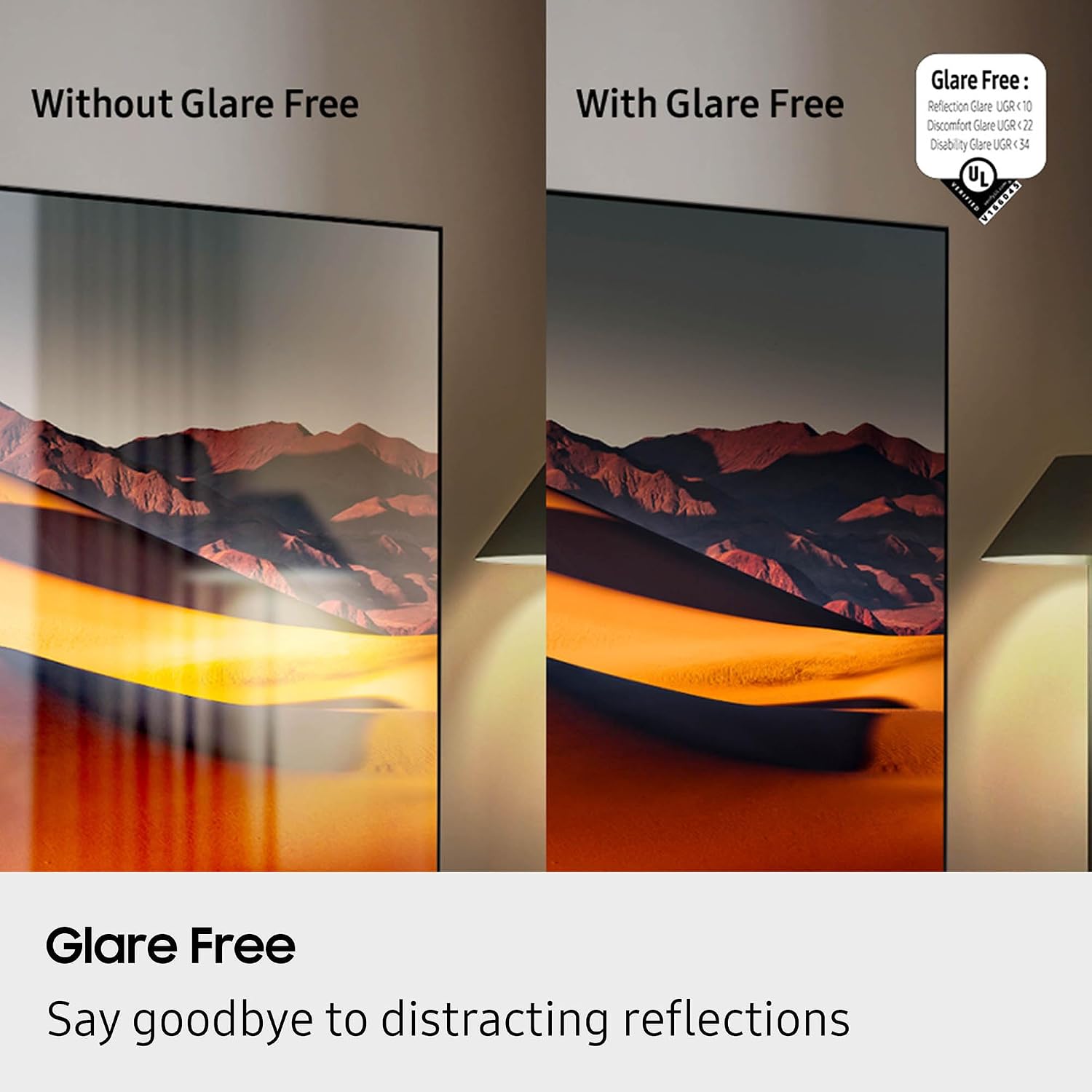
Figure 5: Glare Free technology reduces screen reflections.
3. Audio funkcijas
- Dolby Atmos: Nodrošina ieskaujošu, daudzdimensionālu skaņu.
- Q-simfonija: Synchronizes TV speakers with compatible Samsung soundbars for a richer audio experience.
- AVA Pro (Active Voice Amplifier Pro): Enhances dialogue clarity in noisy environments.
- Adaptīvā skaņa Pro: Optimizes sound based on content and room acoustics.
- 6.2.4 kanālu telpiskā skaņa: Integrated speaker system for a comprehensive audio field.
4. Spēļu funkcijas
- Spēļu centrs: Access cloud gaming services and console games directly from your TV.
- 120Hz Refresh Rate & VRR FreeSync Premium Pro: Ensures smooth, tear-free gaming.

Figure 6: Samsung Gaming Hub for integrated gaming experience.
5. Oficiālais produkta video
Video 1: An informational overview of the Samsung QN990F Series TV features and capabilities.
Apkope
1. Ekrāna tīrīšana
To clean your TV screen, use a soft, lint-free cloth. For stubborn marks, a non-ammonia and alcohol-free screen cleaning solution is recommended.

Figure 7: Recommended screen cleaning solution for display screens.
- Apply cleaning solution to the cloth, not directly to the screen.
- Gently wipe the screen to remove dust, dirt, and fingerprints.
- Izvairieties no spēcīgām ķīmiskām vielām vai abrazīviem materiāliem.
2. Programmatūras atjauninājumi
Periodically check for and install software updates to ensure optimal performance and access to the latest features. This can usually be done through the TV's settings menu under "Support" or "Software Update."
Problēmu novēršana
Ja rodas problēmas ar televizoru, skatiet tālāk norādītās bieži sastopamās problēmu novēršanas darbības.
Nav strāvas / Nav attēla
- Pārliecinieties, vai strāvas kabelis ir droši pievienots gan One Connect Box ierīcei, gan sienas kontaktligzdai.
- Verify the One Connect Box is properly connected to the TV.
- Pārbaudiet, vai sienas kontaktligzda darbojas, pievienojot tai citu ierīci.
- Nospiediet ieslēgšanas/izslēgšanas pogu uz tālvadības pults vai uz paša televizora.
Nav skaņas
- Pārbaudiet skaļuma līmeni gan televizorā, gan visās pievienotajās audio ierīcēs (skaņas joslā, uztvērējā).
- Pārliecinieties, vai televizors nav izslēgts.
- Verify audio cables are correctly connected to the One Connect Box.
- If using external audio, check the audio output settings on the TV.
Slikta attēla kvalitāte
- Check the source resolution. While 8K AI Upscaling Pro enhances content, native 8K content will provide the best quality.
- Pielāgojiet attēla iestatījumus (spilgtumu, kontrastu, asumu, krāsu) televizora izvēlnē.
- Ensure all video cables are securely connected and not damaged.
- If using an antenna, check antenna positioning and signal strength.
Tālvadības pults nedarbojas
- Nomainiet tālvadības pults baterijas.
- Pārliecinieties, vai starp tālvadības pulti un televizoru nav šķēršļu.
- Try re-pairing the remote control with the TV if it's a Bluetooth remote (refer to the TV's on-screen guide for pairing instructions).
Specifikācijas
| Funkcija | Specifikācija |
|---|---|
| Modeļa nosaukums | QN65QN990FFXZA |
| Ekrāna izmērs | 65 collas |
| Displeja tehnoloģija | Neo QLED |
| Izšķirtspēja | 8K |
| Atsvaidzināšanas biežums | 120 Hz |
| Procesors | NQ8 AI Gen3 procesors |
| Paaugstināšanas tehnoloģija | 8K mākslīgā intelekta uzlabotā Pro |
| Operētājsistēma | Viena lietotāja saskarne Tizen |
| Savienojamība | HDMI x 5, USB-A x 3, USB-C x 1, Ethernet, RF, Wireless One Connect, Bluetooth, Wi-Fi |
| Audio izvades režīms | Surround (6.2.4 channel) |
| Integrated Surround Sound | Dolby Atmos |
| Atbalstīts HDR formāts | HDR10+, HDR10 |
| Produkta izmēri (D x P x A) | 10.5"D x 56.4"W x 35.1"H |
| Preces svars | 66.6 mārciņas |
| VESA stiprinājuma standarts | 400 mm x 300 mm |
| Krāsa | Grafīts Melns |
Garantija un atbalsts
Ražotāja garantija
Your Samsung QN65QN990FFXZA 65 Inch QN990F Neo QLED 8K TV comes with a full 1-year manufacturer's warranty. This warranty covers defects in materials and workmanship under normal use. Please retain your proof of purchase for warranty claims.
Klientu atbalsts
For technical assistance, troubleshooting beyond this manual, or warranty service, please contact Samsung Customer Support. Refer to the official Samsung website or your product registration documents for the most current contact information.
- Tiešsaistes atbalsts: Apmeklējiet oficiālo Samsung atbalsta vietni webvietne.
- Atbalsts pa tālruni: Contact the Samsung customer service hotline.