
1. Ievads
This manual provides essential information for setting up, operating, and maintaining your HP OmniDesk Slim Desktop PC, Model S03-0006. This desktop PC is designed for daily tasks, offering an Intel Core i3-14100 processor, ample memory, and various connectivity options for productivity and entertainment.
2. Iepakojuma saturs
Pārliecinieties, vai iepakojumā ir visi priekšmeti:
- HP S03-000 OmniDesk Slim Desktop PC
- Barošanas avots
- USB Black Wired Keyboard (if included with specific bundle)
- USB Wired Mouse (if included with specific bundle)
Piezīme: Papildu piederumi var tikt pārdoti atsevišķi.
3. Produkts beidziesview
The HP OmniDesk Slim Desktop PC features a compact design with essential components for efficient computing.

3.1. attēls: HP OmniDesk Slim Desktop PC showcasing tā ir slim profile, Intel Core i3-14100 processor, 8GB DDR5 RAM, 256GB SSD, Intel UHD Graphics 710, Wi-Fi 6, Bluetooth 5.4, Windows 11, and dual display support.
3.1. Porti un savienotāji
Familiarize yourself with the various ports on your desktop PC for connecting peripherals and displays.
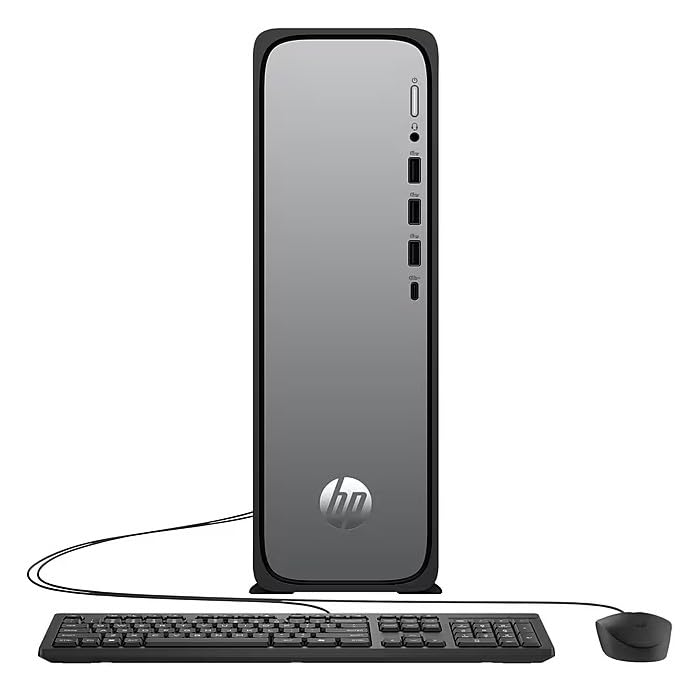
3.2. attēls: Front and rear port layout of the HP OmniDesk Slim Desktop PC. Front ports include a headphone/microphone combo jack, USB Type-A 5Gbps ports, and a USB Type-C 10Gbps port. Additional ports (typically rear) include 4 USB 2.0 Type-A, 1 RJ-45 (Ethernet), 1 HDMI Out, and 1 DisplayPort 1.4.
- Priekšējie porti:
- Austiņu/mikrofona kombinācija
- USB Type-A 5Gbps signaling rate (3 ports)
- USB Type-C 10Gbps signaling rate (1 port)
- Aizmugurējie porti:
- USB 2.0 Type-A (4 ports)
- RJ-45 (Ethernet)
- HDMI 1.4b (1 port)
- DisplayPort 1.4a (1 port)
4. Iestatīšanas rokasgrāmata
Follow these steps to set up your HP OmniDesk Slim Desktop PC:
- Pievienot monitoru: Connect your monitor to the PC using an HDMI or DisplayPort cable. Ensure the cable is securely plugged into both the PC and the monitor.
- Pievienojiet perifērijas ierīces: Plug in your USB keyboard and mouse into the available USB ports on the PC.
- Pievienojiet strāvu: Connect the power supply cable to the PC's power input, then plug the other end into a wall outlet or surge protector.
- Ieslēgšana: Press the power button on the front of the PC. The system will boot up, and you will see the Windows 11 setup screen.
- Sākotnējā Windows iestatīšana: Izpildiet ekrānā redzamos norādījumus, lai pabeigtu Windows 11 iestatīšanu, tostarp valodas, reģiona, tīkla savienojuma un lietotāja konta izveidi.
5. Lietošanas instrukcijas
5.1. Pamatdarbība
- Ieslēgšana/izslēgšana: Press the power button to turn on the PC. To shut down, click the Start button, then Power > Shut down.
- Restartēt: Noklikšķiniet uz pogas Sākt, pēc tam uz Ieslēgt/izslēgt > Restartēt.
- Miega režīms: Noklikšķiniet uz pogas Sākt, pēc tam uz Izslēgt > Miega režīms.
5.2. Savienojuma izveide ar tīklu
Your PC supports both wired (Ethernet) and wireless (Wi-Fi) network connections.
- Vadu savienojums: Connect an Ethernet cable from your router or modem to the RJ-45 port on the back of the PC.
- Wireless Connection (Wi-Fi 6):
- Noklikšķiniet uz Wi-Fi ikonas uzdevumjoslā.
- Sarakstā atlasiet vēlamo Wi-Fi tīklu.
- Ievadiet tīkla drošības atslēgu (paroli), ja tiek prasīts, un pēc tam noklikšķiniet uz Savienot.
5.3. Dual Display Support
To extend your desktop to a second monitor:
- Connect the second monitor to an available video output port (HDMI or DisplayPort) on your PC.
- Ar peles labo pogu noklikšķiniet uz darbvirsmas un atlasiet Displeja iestatījumi.
- Under "Multiple displays," select how you want the displays to behave (e.g., Extend these displays, Duplicate these displays).
6. Apkope
- Programmatūras atjauninājumi: Regulāri pārbaudiet un instalējiet Windows atjauninājumus, lai nodrošinātu sistēmas stabilitāti un drošību. Dodieties uz Iestatījumi > Windows atjaunināšana.
- Draiveru atjauninājumi: Keep your device drivers updated. HP Support Assistant (MyHP) can help manage these updates.
- Tīrīšana: Use a soft, dry cloth to clean the exterior of the PC. Avoid liquid cleaners directly on components. Ensure ventilation openings are clear of dust.
- Dublējuma dati: Regulāri dublējiet svarīgi fileuz ārējo disku vai mākoņkrātuvi, lai novērstu datu zudumu.
7. Traucējummeklēšana
| Problēma | Iespējamais risinājums |
|---|---|
| Dators neieslēdzas. |
|
| Monitorā nav displeja. |
|
| Nav interneta savienojuma. |
|
| Peripherals (keyboard/mouse) not working. |
|
8. Specifikācijas
| Modeļa nosaukums | HP OmniDesk Desktop HP S03-000 PC |
| Modeļa numurs | OmniDesk Slim S03-0006 |
| Procesors | Intel Core i3-14100 (3.5 GHz, 6 MB Cache) |
| Grafika | Intel UHD Graphics 710 (integrēta) |
| RAM | 8 GB DDR5 (4800 MT/s), Max 64 GB |
| Uzglabāšana | 256 GB SSD (cietvielu disks) |
| Operētājsistēma | Windows 11 Home |
| Savienojamība | Realtek Wi-Fi 6 (2x2), Bluetooth 5.4, Gigabit Ethernet (RJ-45) |
| Ostas |
|
| Izmēri (A x P x D) | 11.61 x 3.94 x 11.97 collas |
| Svars | 8.38 mārciņas |
| Sertifikāti | ENERGY STAR certified, EPEAT Gold with Climate+ |
9. Garantija un atbalsts
9.1. Informācija par garantiju
This HP OmniDesk Slim Desktop PC comes with a 90 dienu ierobežota garantija. Please refer to the warranty documentation included with your product for specific terms and conditions.
9.2. Tehniskais atbalsts
Lai saņemtu tehnisko palīdzību, draiveru lejupielādes vai papildu informāciju, lūdzu, apmeklējiet oficiālo HP atbalsta vietni. website. You can also utilize the pre-installed MyHP application for device customization, optimization, and access to helpful messages and settings.
Always provide your product model number (S03-0006) and serial number when contacting support.