
1. Produkts beidziesview
The ATK N9 Tri-Mode Gaming Headset is designed for gamers requiring flexible connectivity, clear audio, and reliable communication across multiple devices. It supports 3.5 mm wired, 2.4G wireless, and Bluetooth connections, allowing seamless switching between gaming consoles, PC, and mobile devices. Stereo-tuned dynamic drivers deliver balanced sound, enhancing in-game audio cues such as footsteps, gunfire, and environmental effects. The detachable noise-canceling microphone improves voice clarity for team communication, online gaming, and voice calls. Its over-ear design, with soft ear cushions and an adjustable headband, ensures a comfortable fit for extended gaming sessions. The headset is compatible with PS5, PS4, PC, Nintendo Switch, and mobile devices. For Xbox Series X|S, audio and microphone functions are supported via the 3.5 mm wired connection.

2. Iepakojuma saturs
Pārliecinieties, vai jūsu iepakojumā ir iekļauti visi tālāk norādītie priekšmeti:
- ATK N9 Pro/White Gaming Headset
- Detachable Noise-Canceling Microphone
- USB-C uzlādes kabelis
- 3.5 mm audio kabelis
- 2.4G Wireless USB Adapter
- Lietotāja rokasgrāmata (šis dokuments)

3. Sākotnējā iestatīšana
3.1. Austiņu uzlāde
Before first use, fully charge the headset using the provided USB-C charging cable. Connect the USB-C end to the headset's charging port and the USB-A end to a compatible USB power source (e.g., PC, wall adapter). The LED indicator will show charging status.
3.2. Mikrofona pievienošana
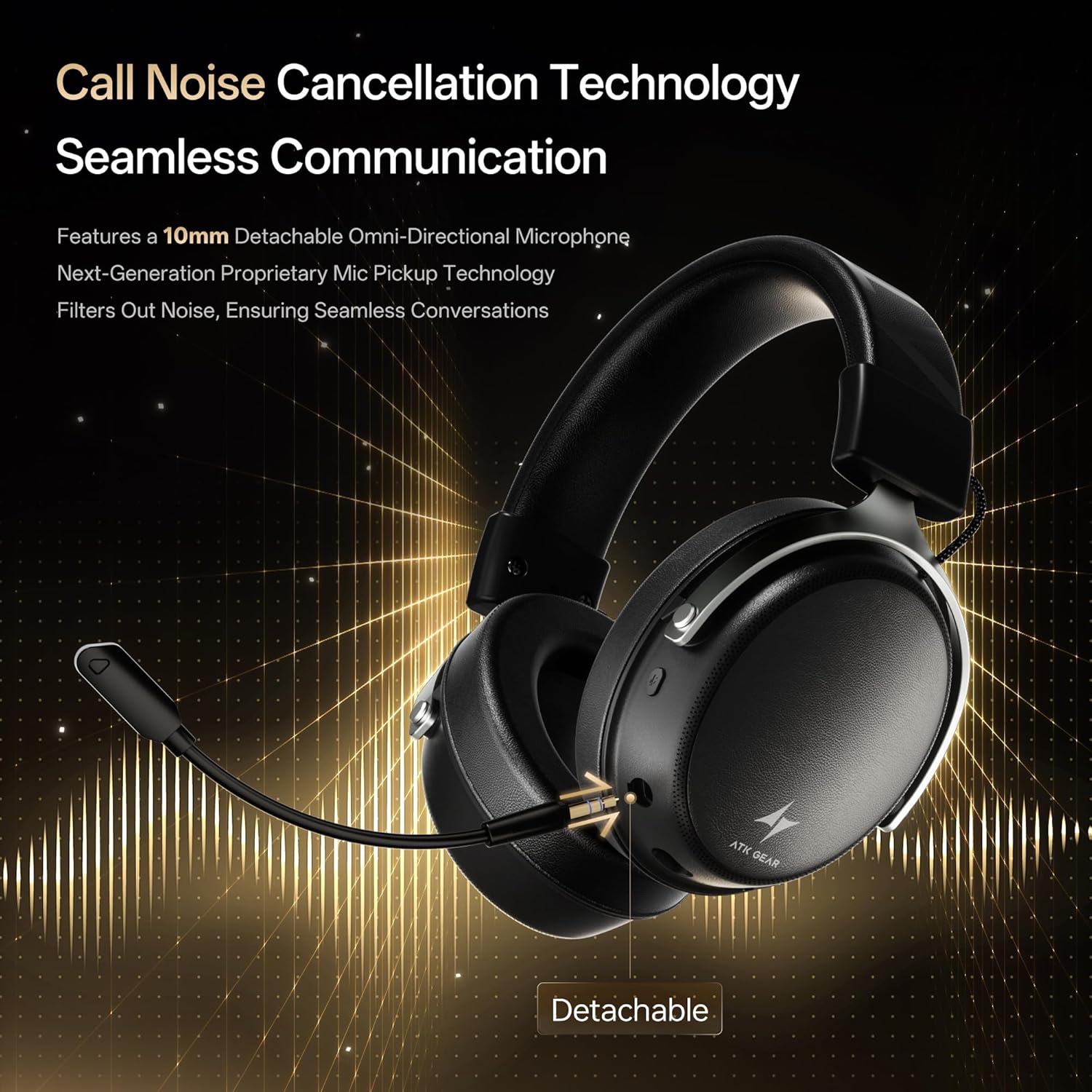
Insert the detachable boom microphone into the microphone port on the left earcup until it clicks into place. Ensure it is securely connected for optimal voice pickup.
3.3. Savienojuma iespējas
The ATK N9 Pro/White headset offers three connectivity modes:
- 2.4 G bezvadu režīms: For PC, PS4, PS5, and Nintendo Switch (docked mode).
- Plug the 2.4G wireless USB adapter into an available USB port on your device.
- Strāvas padeve austiņās.
- Switch the headset to 2.4G mode using the mode switch. The headset will automatically pair with the adapter.
- Adjust audio output settings on your device if necessary to select the headset.
- Bluetooth režīms: For mobile devices, PC, and Nintendo Switch (handheld mode).
- Power on the headset and switch to Bluetooth mode. The LED indicator will flash, indicating pairing mode.
- On your device, go to Bluetooth settings and select "ATK N9 Pro" from the list of available devices.
- Kad savienojums ir izveidots, LED indikators deg nepārtraukti.
- 3.5 mm vadu režīms: For Xbox Series X|S, PS4, PS5, PC, Nintendo Switch, and mobile devices.
- Pievienojiet vienu 3.5 mm audio kabeļa galu austiņu 3.5 mm ligzdai.
- Connect the other end to the 3.5mm audio port on your device (e.g., controller, PC audio jack).
- Austiņas darbosies vadu režīmā, apejot bezvadu funkcijas.

4. Lietošanas instrukcijas
4.1. Headset Controls
The ATK N9 Pro/White headset features intuitive controls located on the earcups:
- Barošanas poga: Press and hold to power on/off. Short press for play/pause (in 2.4G/Bluetooth mode).
- Režīma slēdzis: Toggle between 2.4G wireless, Bluetooth, and wired modes.
- Volume Up/Down Wheel: Pagrieziet, lai regulētu audio skaļumu.
- Mikrofona izslēgšanas poga: Nospiediet, lai izslēgtu/ieslēgtu mikrofonu.
- Spatial Audio Button: Press to activate/deactivate 3D Spatial Audio.
- Mic Monitoring Button: Press to enable/disable microphone monitoring (sidetone).
4.2. Mikrofona lietošana
The detachable noise-canceling microphone is designed for clear communication. Position the microphone approximately 1-2 inches from your mouth for optimal voice pickup. Use the microphone mute button on the headset to quickly mute your voice when needed.
4.3. Pielāgošana
The headset features an adjustable headband and soft ear cushions for comfort. Extend or retract the headband to achieve a snug yet comfortable fit. The earcups are designed to fully enclose your ears for passive noise isolation and comfort during long gaming sessions.
5. Tehniskās specifikācijas
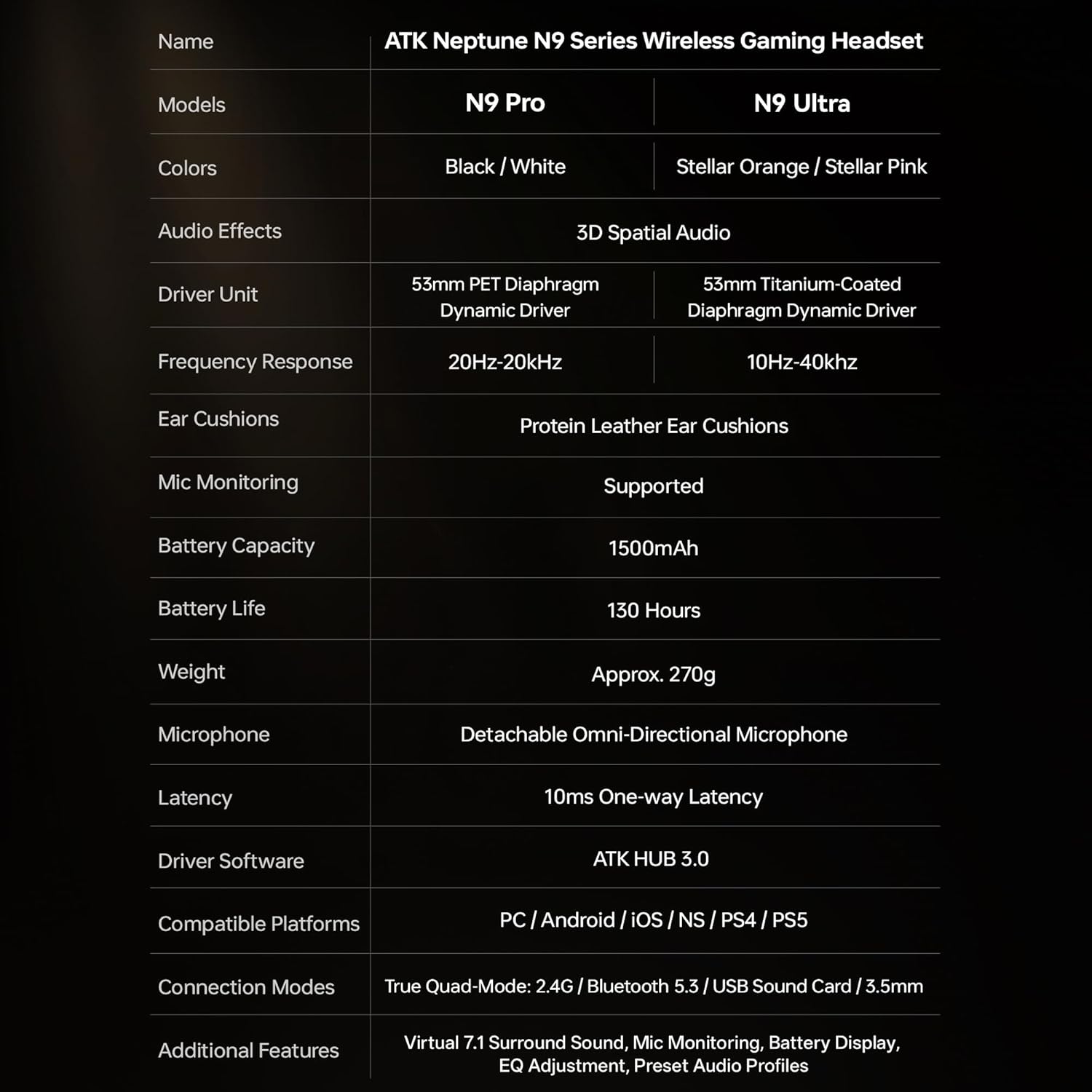
| Funkcija | Specifikācija |
|---|---|
| Modeļa nosaukums | ATK N9 Pro |
| Savienojamība | 3.5mm Wired, 2.4G Wireless, Bluetooth 5.3 |
| Vadītāja tips | Dinamiskais draiveris |
| Vadītāja izmērs | 53 mm |
| Frekvenču diapazons | 20 Hz–22 000 Hz |
| Impedance | 64 omi |
| Mikrofons | Detachable Noise-Canceling Omni-Directional |
| Akumulatora ietilpība | 1500 mAh |
| Akumulatora darbības laiks | Līdz 130 stundām |
| Latentums (2.4 G) | 10 Milliseconds (one-way) |
| Svars | 270 grami |
| Ausu novietojums | Virs auss |
| Saderīgas ierīces | PS5, PS4, PC, Nintendo Switch, Mobile Devices, Xbox Series X|S (wired) |
| Papildu funkcijas | 3D Spatial Audio, Mic Monitoring, Volume Control |

6. Kopšana un uzturēšana
- Tīrīšana: Austiņu tīrīšanai izmantojiet mīkstu, sausu drānu. Izvairieties no asu ķīmisku vielu vai abrazīvu materiālu lietošanas.
- Uzglabāšana: Uzglabājiet austiņas vēsā, sausā vietā, pasargājot tās no tiešiem saules stariem un ekstremālām temperatūrām.
- Akumulatora kopšana: Lai paildzinātu akumulatora darbības laiku, izvairieties no biežas austiņu pilnīgas izlādes. Regulāri uzlādējiet tās, pat ja tās ilgstoši netiek lietotas.
- Ūdens izturība: The headset is not water-resistant. Avoid exposure to liquids.
7. Traucējummeklēšana
7.1. No Audio / Low Volume
- Ensure the headset is powered on and connected in the correct mode (2.4G, Bluetooth, or 3.5mm wired).
- Pārbaudiet austiņu skaļuma ritenīti un ierīces skaļuma iestatījumus.
- For wireless modes, ensure the headset is paired correctly and selected as the audio output device in your system settings.
- If using 3.5mm wired, ensure the cable is fully inserted into both the headset and the device.
7.2. Mikrofons nedarbojas
- Pārliecinieties, vai mikrofons ir droši piestiprināts pie austiņām.
- Check if the microphone mute button on the headset is engaged.
- Verify that the headset microphone is selected as the input device in your device's sound settings.
- For Xbox Series X|S, ensure you are using the 3.5mm wired connection for microphone support.
7.3. Savienojamības problēmas
- 2.4G bezvadu savienojums: Ensure the USB adapter is firmly plugged in. Try a different USB port.
- Bluetooth: Ensure the headset is in pairing mode. Forget the device on your phone/PC and re-pair. Keep the headset within the 5-meter Bluetooth range.
- Vispārīgi: Power cycle both the headset and your connected device.
8. Garantija un atbalsts
8.1. Informācija par garantiju
The ATK N9 Pro/White Gaming Headset comes with a 6 mēnešu garantija no iegādes datuma. Šī garantija attiecas uz ražošanas defektiem un izgatavošanas defektiem normālas lietošanas apstākļos. Tā neattiecas uz bojājumiem, kas radušies nepareizas lietošanas, negadījumu, neatļautu modifikāciju vai normāla nolietojuma rezultātā.
8.2. Klientu atbalsts
For further assistance, technical support, or warranty claims, please contact ATK customer service through the retailer where the product was purchased or visit the official ATK webvietne atbalsta kontaktinformācijai.