
Ievads
This manual provides essential information for the safe and efficient use of your Samsung 43-Inch Class U8000H Series Crystal UHD 4K Smart TV. Please read all instructions carefully before using the product and retain this manual for future reference.
Kas atrodas kastē
Pārliecinieties, vai iepakojumā ir visas sastāvdaļas:
- Samsung 43-Inch U8000H Series Crystal UHD 4K Smart TV
- Strāvas kabelis
- Tālvadības pults
- Stāvēt
- Lietotāja rokasgrāmata (šis dokuments)
- Garantijas karte

Image: Included components for the Samsung U8000H Series TV.
Iestatīšana
1. Physical Setup (Stand or Wall Mount)
Before proceeding, ensure the TV is placed on a stable, level surface or securely mounted to a wall. Refer to the separate wall mount instructions if applicable.
- Statīva piestiprināšana: Carefully place the TV screen-down on a soft, clean cloth. Align the stand with the designated slots on the bottom of the TV. Secure the stand using the provided screws.
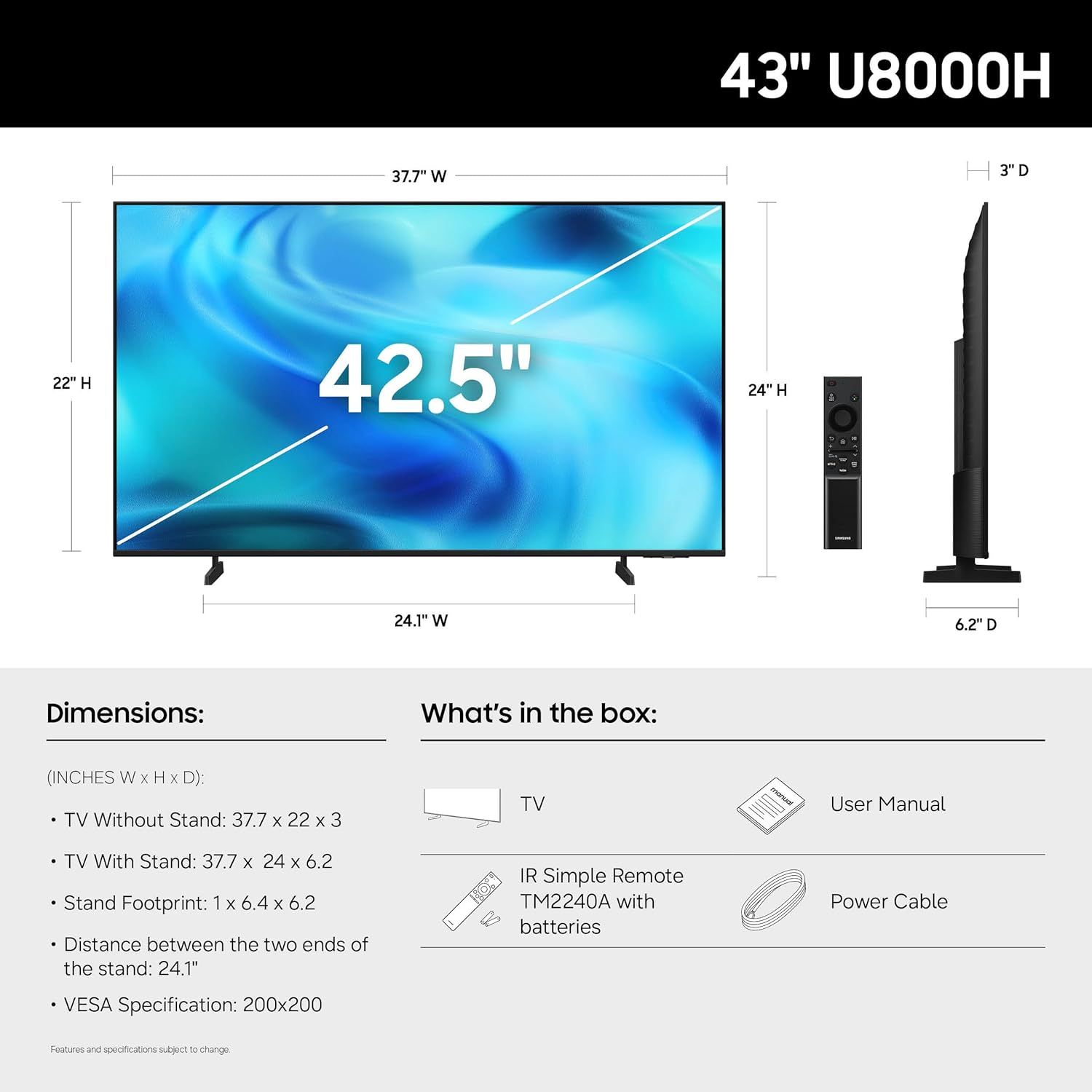
- Sienas montāža: If wall mounting, ensure you use a VESA-compatible mount (200 x 200 mm) and follow the mount manufacturer's instructions. Disconnect the stand if already attached.
Attēls: Aizmugure view of the TV, highlighting VESA mounting points and input panel.
2. Ierīču savienošana
Connect your external devices (cable box, Blu-ray player, gaming console, etc.) to the TV's input ports.
- HDMI: Use HDMI cables for high-definition video and audio. The TV has 3 HDMI ports. HDMI 1 supports eARC for enhanced audio return.
- USB: Connect USB devices for media playback or power. The TV has 1 USB port.
- Ethernet (LAN): Lai nodrošinātu stabilu vadu interneta savienojumu.
- Antena/kabelis: Connect an antenna or cable TV signal for over-the-air or cable channels.

Attēls: Detalizēts view of the TV's connectivity panel.
3. Sākotnējā ieslēgšana un tīkla iestatīšana
- Pievienojiet strāvas kabeli televizoram un pēc tam sienas kontaktligzdai.
- Nospiediet ieslēgšanas/izslēgšanas pogu uz tālvadības pults vai televizora.
- Izpildiet ekrānā redzamos norādījumus, lai pabeigtu sākotnējo iestatīšanu, tostarp valodas izvēli, tīkla savienojumu (Wi-Fi vai Ethernet) un kanālu skenēšanu.
- For smart features, you may be prompted to log in to or create a Samsung Account.
Televizora darbība
Tālvadības pults
The included remote control allows you to navigate the TV's interface, adjust settings, and access smart features. Familiarize yourself with the button layout for optimal use.

Image: The standard remote control for the Samsung U8000H Series TV.
Galvenās funkcijas un funkcijas
-
Kristāla procesors 4K: This powerful processor enhances colors and sharpens details, providing a vibrant 4K viewing experience. It also performs 4K upscaling for lower-resolution content.

Image: Visual representation of the Crystal Processor 4K technology.
-
Motion Xcelerator: Enjoy clear picture and smooth motion, especially in fast-paced scenes like sports and games. This technology estimates and adjusts frame transitions in real-time.

Image: Motion Xcelerator in action, demonstrating smooth visuals.
-
Krāsu pastiprinātājs: This feature enhances color intensity, making reds fiery and blues sparkling, transforming content into a visually rich experience.

Image: Demonstrating the enhanced colors with Color Booster.
-
4K mērogošana: Upgrade your favorite shows and movies to crisp 4K clarity. This advanced technology enhances details and clarity even from lower-quality sources.

Image: Illustration of 4K Upscaling improving image detail.
-
Endless Free Content (Samsung TV Plus): Access over 2,700 free streaming options, including 750+ subscription-free channels. Content includes news, sports, movies, and more.

Image: Samsung TV Plus interface with free streaming options.
-
Samsung spēļu centrs: Play thousands of video games without a console. This central hub brings together games from consoles, cloud services, and gaming apps.

Image: Samsung Gaming Hub interface.
-
Vision AI Companion: Ask your TV questions and access powerful AI features. Get personalized answers with Bixby, and utilize AI agents like Microsoft Copilot for enhanced viewing.

Image: Vision AI Companion features.
-
One UI Tizen: The TV's operating system provides an intuitive smart TV platform tailored to you, with personal data secured by Samsung Knox. It also receives 7 years of automatic OS updates.

Image: One UI Tizen smart TV interface.
-
Samsung Knox drošība: Enjoy peace of mind with built-in triple-layer data protection. Your TV experiences are secured against harmful apps and phishing sites.

Image: Samsung Knox Security features.
Apkope
- Ekrāna tīrīšana: Viegli noslaukiet ekrānu ar mīkstu, sausu mikrošķiedras drānu. Noturīgu traipu gadījumā viegli noslaukietampNoslaukiet drānu ar ūdeni vai specializētu ekrāna tīrīšanas līdzekli. Izvairieties no spēcīgām ķīmiskām vielām vai abrazīviem materiāliem.
- Rāmja tīrīšana: Televizora rāmja un statīva tīrīšanai izmantojiet mīkstu, sausu drānu.
- Ventilācija: Nodrošiniet atbilstošu ventilāciju ap televizoru, lai novērstu pārkaršanu. Neaizsedziet ventilācijas atveres.
- Strāvas vads: Regulāri pārbaudiet strāvas vadu, vai tas nav bojāts. Ja tas ir bojāts, nekavējoties nomainiet to pret pilnvarotu Samsung detaļu.
Problēmu novēršana
| Problēma | Iespējamais risinājums |
|---|---|
| Nav spēka |
|
| Nav attēla / Izkropļots attēls |
|
| Nav skaņas / klusa skaņa |
|
| Tālvadības pults nedarbojas |
|
| Viedās funkcijas nedarbojas / tīkla problēmas |
|
Specifikācijas
| Funkcija | Detaļas |
|---|---|
| Modeļa nosaukums | U8000H |
| Modeļa numurs | UN43U8000HFXZA |
| Ekrāna izmērs | 43 collas |
| Displeja tehnoloģija | LED |
| Izšķirtspēja | 4K UHD (3840 x 2160) |
| Atsvaidzināšanas biežums | 60 Hz |
| Procesors | 4K kristāla procesors |
| Atbalstīts HDR formāts | HDR10+ |
| Savienojamība | 3x HDMI, 1x USB, Ethernet (LAN), Wi-Fi, Bluetooth 5.3 |
| Operētājsistēma | Tizen |
| Kontroles metode | Lietotne, tālvadības pults, balss |
| Audio izvade | Iebūvēts skaļrunis |
| VESA stiprinājuma standarts | 200 x 200 mm |
| Produkta izmēri (D x P x A) | 6.2 collu dziļums x 37.7 collu platums x 24 collu augstums (ar statīvu) |
| Preces svars | 14.8 mārciņas (ar statīvu) |
| Krāsa | Melns |

Image: Dimensional diagram of the Samsung 43-inch U8000H TV.
Garantija un atbalsts
Your Samsung 43-Inch U8000H Series Crystal UHD 4K Smart TV comes with a 1 gads ražotāja garantija. For warranty claims, technical support, or service inquiries, please contact Samsung Customer Service.
You can find additional support resources, FAQs, and contact information on the official Samsung support webvietne.
Tiešsaistes atbalsts: www.samsung.com/us/support/