1. Ievads
The Extech EX330 is a compact, autoranging digital multimeter designed for a wide range of electrical and electronic measurements. Its robust design and comprehensive features make it an essential tool for professionals and hobbyists alike. This manual provides detailed instructions for the safe and effective use of your EX330 multimeter.
Key features of the EX330 include:
- Iebūvēts bezkontakta maiņstrāvas tilptage detector (NCV) for enhanced safety.
- Large 4000-count LCD display for clear readings.
- Automatic ranging for simplified operation.
- Pasākumi AC/DC Voltage, AC/DC Current, Resistance, Capacitance, Frequency, Duty Cycle, and Temperature.
- Diode test and Continuity check functions.
- Data Hold and Max Hold features.
- Durable rubber holster for protection.
- UL listed Cat III 600V safety rating.

2. Darba sākšana
2.1. Akumulatora uzstādīšana
The EX330 multimeter requires two AAA batteries for operation. To install or replace batteries:
- Pārliecinieties, vai multimetrs ir izslēgts.
- Atrodiet bateriju nodalījumu ierīces aizmugurē.
- Atveriet akumulatora nodalījuma vāku, izmantojot skrūvgriezi.
- Ievietojiet divas AAA baterijas, ievērojot pareizo polaritāti (+ un -), kā norādīts nodalījuma iekšpusē.
- Uzlieciet atpakaļ akumulatora nodalījuma vāku un nostipriniet to ar skrūvi.
2.2. Testa vadu pievienošana
The multimeter comes with a set of red and black test leads. Proper connection is crucial for accurate and safe measurements.
- Vienmēr pievienojiet melno testa vadu pie COM (Kopējā) ieejas ligzda.
- Lielākajai daļai tilpumatage, resistance, and continuity measurements, connect the red test lead to the V/Ω/µA/CAP/Hz/Temp ievades ligzda.
- For current measurements up to 400mA, connect the red test lead to the mA ievades ligzda.
- For high current measurements up to 10A, connect the red test lead to the 10A ievades ligzda.

3. Lietošanas instrukcijas
3.1. Ieslēgšana/izslēgšana
To turn the multimeter on, rotate the function switch from the IZSLĒGTS position to any desired measurement function. To turn the multimeter off, rotate the function switch back to the IZSLĒGTS pozīciju.
3.2. Function Selection (Rotary Dial)
The large rotary dial on the front of the multimeter allows you to select the desired measurement function. The EX330 features automatic ranging, which simplifies operation by automatically selecting the correct measurement range.
- VAC / VDC: Measures AC or DC Voltage.
- mA / 10A: Measures AC or DC Current (milliampvai ampere).
- Ω: Measures Resistance.
- KLP: Measures Capacitance.
- Hz /%: Measures Frequency and Duty Cycle.
- ° F / ° C: Measures Temperature in Fahrenheit or Celsius.
- Diode / Nepārtrauktība: Tests diodes and checks for circuit continuity.
3.3. Non-Contact Voltage (NCV) noteikšana
NCV funkcija ļauj ātri noteikt maiņstrāvas spriegumutage without direct contact, enhancing safety when working with electrical systems. To use the NCV function, press and hold the NCV button. The top of the meter will illuminate and an audible tone will sound if AC voltage tiek atklāts.

3.4. sējtage Mērīšana (maiņstrāvas/līdzstrāvas)
Lai izmērītu tilptage:
- Iestatiet grozāmo ripu uz VAC or VDC pēc vajadzības.
- Savienojiet melno testa vadu ar COM ligzdu un sarkano testa vadu pie V/Ω/µA/CAP/Hz/Temp džeks.
- Pievienojiet testa zondes paralēli pāri mērāmajai ķēdei vai komponentam.
- Izlasiet sējtage vērtība LCD displejā.

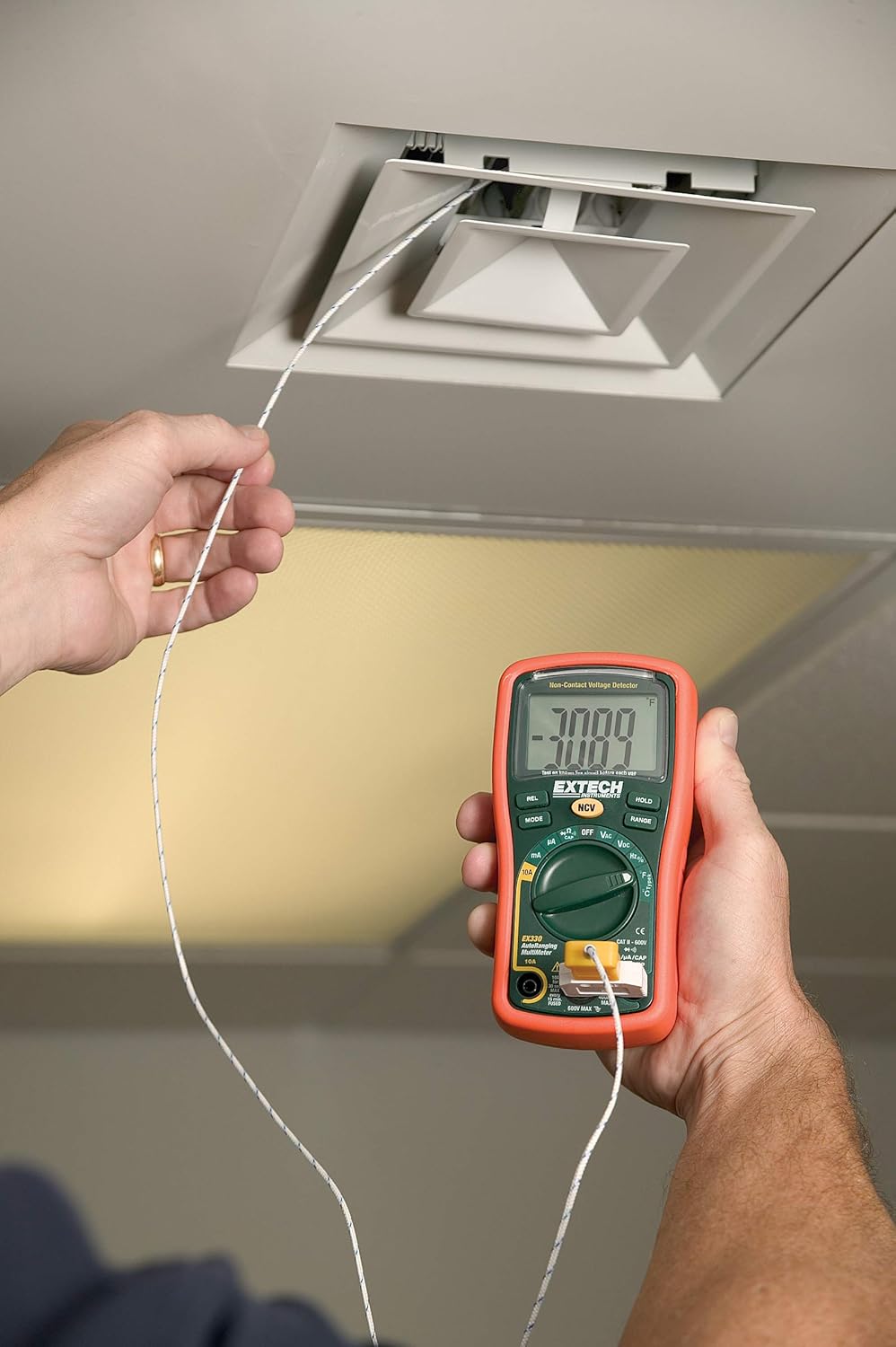
3.5. Temperature Measurement (Type K)
The EX330 includes a Type K temperature probe for accurate temperature readings.
- Iestatiet grozāmo ripu uz °F or °C.
- Plug the Type K temperature probe into the V/Ω/µA/CAP/Hz/Temp un COM ieejas ligzdas, ievērojot polaritāti.
- Novietojiet temperatūras zondes galu uz vai tuvu objektam, kura temperatūra tiks mērīta.
- Allow time for the reading to stabilize on the display.
3.6. Data Hold and Max Hold
- Nospiediet pogu TURĒT pogu, lai iesaldētu pašreizējo rādījumu displejā. Nospiediet vēlreiz, lai atbrīvotu.
- Nospiediet pogu REŽĪMS button repeatedly while in certain functions to cycle through sub-functions or to activate MAX HOLD, which captures and displays the maximum measured value.
3.7. Produkta funkcijasview
Noskatieties šo video, lai ātri pārskatītuview of the Extech EX330's key features and applications.
3.1. video: Virsview of Extech EX330 Multimeter features, including AC/DC voltage measurement, 4000-count display, built-in non-contact voltage detector, and Type K temperature measurement.
3.8. Accuracy Demonstration
This video demonstrates the accuracy and reliability of Extech multimeters, showcasing two units providing consistent readings when measuring voltage from a power supply.
Video 3.2: Demonstration of two Extech multimeters measuring voltage from a power supply, highlighting their consistent and accurate readings over time.
4. Apkope un kopšana
4.1. Tīrīšana
To clean the multimeter, use a soft, damp cloth. Do not use abrasives or solvents. Ensure the unit is off and disconnected from any circuits before cleaning.
4.2. Akumulatora nomaiņa
When the battery indicator appears on the display, replace the batteries as described in Section 2.1. Prompt battery replacement ensures continued accuracy and proper operation.
4.3. Drošinātāju nomaiņa
If the multimeter fails to measure current, the fuse may need replacement. Refer to the specifications for the correct fuse type and rating. Fuse replacement should only be performed by qualified personnel.
5. Traucējummeklēšana
This section addresses common issues you might encounter with your EX330 multimeter.
| Problēma | Iespējamais cēlonis | Risinājums |
|---|---|---|
| Nav displeja vai blāvs displejs | Izlādējušās vai zemas baterijas | Replace batteries (Section 2.1) |
| Nepareizi rādījumi | Incorrect function selected, poor test lead connection, damaged test leads | Verify function, check connections, replace test leads if damaged |
| No current measurement | Izdedzis drošinātājs | Replace fuse (Section 4.3) |
| NCV neuzrāda tilpumutage | Voltage too low, interference, or incorrect usage | Nodrošina voltage is within detectable range, minimize interference, follow NCV instructions (Section 3.3) |
6. Tehniskās specifikācijas
| Specifikācija | Vērtība |
|---|---|
| Displejs | 4000 ciparu LCD ekrāns |
| AC/DC sējtage | Līdz 600V |
| Maiņstrāvas / līdzstrāvas strāva | Līdz 10A |
| Pretestība | Up to 40MΩ |
| Kapacitāte | Līdz 100µF |
| Biežums | Līdz 10 MHz |
| Temperatūra (K tips) | -4 līdz 1382 °F (-20 līdz 750 °C) |
| Non-Contact Voltage (NCV) | 100 līdz 600 VAC |
| Barošanas avots | 2 x AAA baterijas (iekļautas komplektā) |
| Izmēri (G x P x A) | 5.7 x 2.9 x 1.6 collas |
| Svars | 9.9 unces (0.28 kg) |
| Drošības vērtējums | UL listed Cat III - 600V |
| Izcelsmes valsts | Ķīna |

7. Garantija un atbalsts
7.1. Informācija par garantiju
The Extech EX330 Autoranging Mini Multimeter is covered by a 1 gadu garantija detaļām un darbam from the date of purchase. This warranty covers defects in materials and workmanship under normal use. It does not cover damage resulting from misuse, unauthorized modifications, accidents, or neglect.
7.2. Klientu atbalsts
For technical assistance, troubleshooting, or warranty claims, please contact Extech customer support. Refer to the official Extech webjaunāko kontaktinformāciju skatiet tīmekļa vietnē vai produkta iepakojumā.


