1. Ievads
This manual provides comprehensive instructions for the safe and efficient use of your Logisys PS480D 480W ATX Power Supply. Please read this manual thoroughly before installation and operation to ensure proper functionality and to prevent damage to the unit or other components.

Figure 1: Logisys PS480D 480W ATX Power Supply, front view with cables bundled.
2. Drošības informācija
BRĪDINĀJUMS: Power supplies contain high voltage komponenti. Neatveriet barošanas bloku casing. Iekšpusē nav detaļu, ko lietotājs varētu apkalpot.
- Pirms uzstādīšanas vai apkopes pārliecinieties, vai strāvas padeve ir atvienota no maiņstrāvas kontaktligzdas.
- Always ground yourself to prevent electrostatic discharge (ESD) when handling internal computer components.
- Nelietojiet barošanas bloku mitrā vai sausā vietā.amp nosacījumiem.
- Nodrošiniet pareizu ventilāciju ap strāvas padevi, lai novērstu pārkaršanu.
- Use only the provided power cables and connectors.
3. Produkta īpašības
The Logisys PS480D is a 480W ATX power supply designed for personal computers. Key features include:
- Augsta Efektivitāte
- Low Noise & Ripple
- Virs sējtage Aizsardzība
- Aizsardzība pret īssavienojumu
- Built-in EMI Filter
- Insulation Resistance 100MΩ min.
- Complies with FCC part 15J class B 115VAC operation and CISPR 22 230 VAC operation.
- Meets UL 1950, CSA 22.2 LEVEL 3 Requirement.
- 100% Burn-in test / Vibration test / Hi-pot test / Leakage current test.
- MTBF above 100,000 hours at 25 °C.

Figure 2: Rear panel of the power supply with fan, AC inlet, and power switch.
4. Iestatīšana un instalēšana
Follow these steps to install the Logisys PS480D power supply into your computer system.
- Sagatavošana: Ensure your computer is completely powered off and unplugged from the wall outlet. Open your computer case according to its manufacturer's instructions.
- Noņemiet veco barošanas bloku (ja piemērojams): Disconnect all cables from the old power supply to the motherboard, drives, and other components. Unscrew and remove the old power supply from the case.
- Jauna barošanas avota instalēšana: Carefully place the Logisys PS480D into the power supply bay of your computer case. Secure it with screws.
- Pievienojiet galveno strāvas padevi: Connect the 20+4 pin ATX mainboard connector to your motherboard. If your motherboard uses a 20-pin connector, detach the 4-pin section. If it uses a 24-pin connector, connect both sections.
- Pievienojiet procesora barošanu: Connect the 4-pin +12V power connector to the corresponding port on your motherboard.
- Connect Peripheral Power:
- Use the 4-pin standard drive connectors for HDDs and CD/DVD-ROM drives.
- Use the 4-pin 3.5" FDD or ZIP connectors for floppy disk drives or similar devices.
- Use the Serial ATA (SATA) connectors for SATA hard drives and SSDs.
- Kabeļu vadība: Route cables neatly to ensure proper airflow within the case.
- Aizvērt lietu: Once all connections are secure, close your computer case.
- Pievienojiet maiņstrāvu: Plug the AC power cord into the power supply's AC inlet and then into a wall outlet.
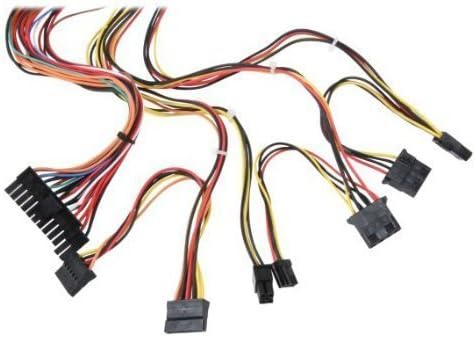
3. Attēls: beidziesview of power supply connectors.

Figure 4: Power supply dimensions and included AC power cord.
5. Lietošanas instrukcijas
After successful installation, you can power on your computer.
- Ensure the power switch on the rear of the power supply (Figure 2) is in the "ON" (I) position.
- Nospiediet datora korpusa ieslēgšanas/izslēgšanas pogu.
- The power supply will provide stable power to your system components.
- To power off, shut down your operating system normally. For complete power disconnection, switch the power supply to the "OFF" (O) position and unplug the AC cord.
6. Apkope
Regulāra apkope palīdz nodrošināt barošanas avota ilgmūžību un optimālu veiktspēju.
- Tīrīšana: Periodically clean dust from the power supply's fan and vents using compressed air. Ensure the power supply is unplugged before cleaning.
- Gaisa plūsma: Pārliecinieties, vai datora korpusā ir pietiekama gaisa plūsma un vai barošanas avota ventilators nav aizsprostots.
- Kabeļa integritāte: Periodically check all power cables for secure connections and signs of wear or damage.
7. Traucējummeklēšana
Ja rodas problēmas ar barošanas avotu, skatiet tālāk norādītās bieži sastopamās problēmu novēršanas darbības.
- Nav jaudas:
- Pārbaudiet, vai maiņstrāvas vads ir droši pievienots gan barošanas avotam, gan sienas kontaktligzdai.
- Ensure the power switch on the rear of the power supply is in the "ON" (I) position.
- Pārliecinieties, vai sienas kontaktligzda darbojas, pievienojot tai citu ierīci.
- Check all internal power connections (20/24-pin ATX, 4-pin +12V, peripheral connectors) are firmly seated.
- Sistēmas nestabilitāte/nejauša izslēgšanās:
- This could indicate an overloaded or failing power supply. Ensure your system's power requirements do not exceed the PS480D's 480W capacity.
- Check for proper ventilation and ensure the power supply fan is spinning. Overheating can cause instability.
- Neparasts troksnis:
- A loud fan noise might indicate dust buildup or a failing fan bearing. Clean the fan as described in the Maintenance section.
If problems persist after attempting these steps, contact Logisys customer support or a qualified technician.
8. Specifikācijas
| Funkcija | Specifikācija |
|---|---|
| Zīmols | Logisys |
| Modeļa numurs | PS480D |
| Izvades vattage | 480 vati |
| Formas faktors | ATX |
| Izmēri (LxWxH) | 6 collas garums x 5.5 collas platums x 3.25 collas augstums (15.24 x 13.97 x 8.25 cm) |
| Preces svars | 2.06 mārciņas (0.93 kg) |
| Galvenās plates savienotājs | 1x 20+4 Pin ATX |
| CPU barošanas savienotājs | 1x 4 Pin +12V |
| Standard Drive Connectors | 4x 4 Pin (Molex) |
| FDD/ZIP Connectors | 1x 4 Pin 3.5" |
| Serial ATA savienotāji | 1x SATA |
| Dzesēšanas metode | Gaiss |
| Aizsardzības līdzekļi | Virs sējtage Aizsardzība, īssavienojuma aizsardzība |
| Sertifikāti | FCC part 15J class B, CISPR 22, UL 1950, CSA 22.2 LEVEL 3 |
9. Garantija un atbalsts
For warranty information, technical support, or service inquiries, please refer to the official Logisys webvietnē vai sazinieties ar klientu apkalpošanas nodaļu. Saglabājiet pirkuma čeku kā pirkuma apliecinājumu.