Ievads
This manual provides essential instructions for the safe and efficient operation of your Panasonic DVD-LS83 8.5-Inch Portable DVD Player. Please read this manual thoroughly before using the device and retain it for future reference. This player offers an 8.5-inch diagonal widescreen LCD display and supports multi-format playback including DVD, DivX, DVD-RAM, DVD-R, DVD-RW, CD, CD-R, CD-RW, JPEG, and MPEG4.
Drošības informācija
Lai nodrošinātu drošu darbību un novērstu bojājumus, ievērojiet šādus piesardzības pasākumus:
- Nepakļaujiet ierīci lietum, mitrumam vai ekstremālām temperatūrām.
- Avoid placing the unit near heat sources such as radiators or stoves.
- Use only the specified power adapters (AC adapter and Car DC adapter) provided with the unit.
- Nemēģiniet ierīci izjaukt vai pārveidot. Visus apkopes darbus uzticiet kvalificētam personālam.
- Sargājiet ierīci no spēcīgiem magnētiskajiem laukiem.
- Nodrošiniet atbilstošu ventilāciju; neaizbloķējiet ventilācijas atveres.
Iepakojuma saturs
Lūdzu, pārliecinieties, vai jūsu iepakojumā ir visas preces:
- Panasonic DVD-LS83 Portable DVD Player
- Uzlādējams akumulators
- Maiņstrāvas adapteris
- Car DC Adapter
- Galvas balsta stiprinājuma kronšteins
- Lietotāja rokasgrāmata (šis dokuments)
Produkts beidziesview
Iepazīstieties ar sava portatīvā DVD atskaņotāja sastāvdaļām.
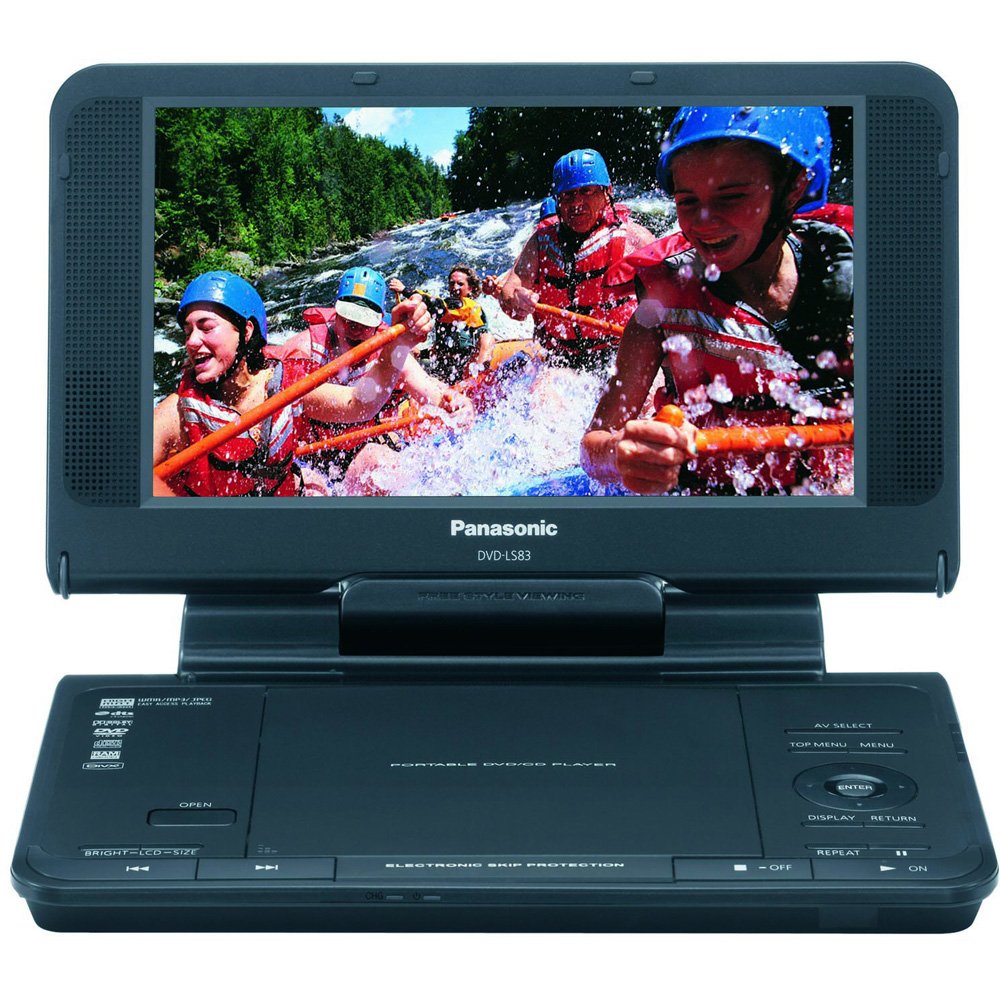
This image displays the Panasonic DVD-LS83 portable DVD player with its 8.5-inch screen open, revealing the disc compartment and control buttons on the main unit. The player features an integrated screen that can swivel for optimal viewing angles. Control buttons for playback, menu navigation, and volume are typically located on the front panel or along the sides of the main unit. Various ports for power, headphones, and AV output are usually found on the side panels.
Iestatīšana
Akumulatora uzlāde
Before initial use, fully charge the included rechargeable battery. Connect the AC adapter to the player's DC IN jack and then to a standard wall power outlet. The battery indicator light will illuminate to show charging status. A full charge provides up to 6 hours of playback time, depending on screen brightness and usage. Alternatively, use the included Car DC Adapter to power or charge the unit while in a vehicle.
Mounting in a Vehicle
The included headrest mounting bracket allows for secure attachment of the player to a vehicle's headrest. Follow the specific instructions provided with the bracket for proper installation. Ensure the player is securely fastened and does not obstruct the driver's view or interfere with vehicle safety features before driving.
Lietošanas instrukcijas
Ieslēgšana/izslēgšana
To turn the player on, press and hold the SPĒKS button until the screen illuminates. To turn it off, press and hold the SPĒKS button again until the screen goes dark.
Inserting and Removing Discs
Open the disc compartment cover. Carefully place a compatible disc (DVD, CD, DivX) onto the spindle with the label side facing up. Gently press the disc until it clicks into place. Close the compartment cover firmly. To remove a disc, press the ATVĒRTS button, gently lift the disc from its edges, and store it in its protective case.
Atskaņošanas pamata vadīklas
- ATSKAŅOT/PAUZĒT: Press to start playback or to pause/resume the current content.
- STOP: Press to stop disc playback.
- IZLAIDIET (Forward/Backward): Press to skip to the next or previous track/chapter.
- FF / REW (Fast Forward/Rewind): Press and hold to fast forward or rewind through the content.
Skaļuma regulēšana
Izmantojiet Skaļums +/- buttons or the dedicated volume dial, typically located on the side or front panel, to adjust the audio output level.
Ekrāna iestatījumi
The 8.5-inch widescreen LCD display features an LCD Selector ar NORMAL/FULL modes to adjust the aspect ratio of the displayed content. You can also adjust screen brightness and contrast via the on-screen menu or dedicated controls for optimal viewing. Be aware that higher brightness settings may reduce battery life.
Vairāku formātu atskaņošana
The player supports a wide range of formats including DVD, DivX, DVD-RAM, DVD-R, DVD-RW, CD, CD-R, CD-RW, JPEG, and MPEG4. Ensure discs are clean and free from scratches or damage for optimal performance.
Austiņu lietošana
Two headphone terminals are provided for private listening. Connect standard 3.5mm stereo headphones to either jack. Adjust the volume to a comfortable level to protect your hearing.
Apkope
Iekārtas tīrīšana
Wipe the exterior of the player with a soft, dry cloth. For stubborn dirt, slightly dampen the cloth with water. Do not use abrasive cleaners, solvents, or alcohol, as these can damage the finish. Clean the disc lens periodically with a specialized DVD lens cleaner disc (not included) to maintain optimal playback quality.
Akumulatora kopšana
To prolong battery life, fully charge the battery before first use and after long periods of inactivity. Avoid exposing the battery to extreme temperatures (hot or cold), as this can reduce its capacity and lifespan. If storing the unit for an extended period, charge the battery to approximately 50% capacity.
Uzglabāšana
When not in use, store the player in a cool, dry place, away from direct sunlight, high humidity, and extreme temperatures. Keep the disc compartment closed to prevent dust accumulation.
Problēmu novēršana
If you encounter problems with your player, refer to the following common issues and solutions:
Nav spēka
- Ensure the AC adapter or car adapter is securely connected to both the player and the power source.
- Check if the rechargeable battery is sufficiently charged.
- Nospiediet un dažas sekundes turiet nospiestu ieslēgšanas/izslēgšanas pogu.
Disks neatskaņojas
- Pārliecinieties, vai disks ir ievietots pareizi ar etiķeti uz augšu.
- Check if the disc is clean and free from scratches, smudges, or damage. Clean with a soft, lint-free cloth if necessary.
- Verify that the disc format is supported by the player (e.g., DVD, CD, DivX).
Nav skaņas vai zems skaļums
- Adjust the volume control on the player.
- If using headphones, ensure they are fully plugged into one of the headphone terminals and are functional.
- Check the audio settings within the player's on-screen menu.
Slikta attēla kvalitāte
- Rūpīgi notīriet disku.
- Adjust screen brightness and contrast settings via the player's controls or menu.
- Ensure the LCD Selector is set appropriately (NORMAL/FULL) for the content being viewed.
Specifikācijas
| Funkcija | Detaļas |
|---|---|
| Zīmols | Panasonic |
| Modeļa numurs | DVD-LS83 |
| Ekrāna izmērs | 8.5 collas |
| Displeja veids | LCD |
| Atbalstītie multivides veidi | DVD, DivX, DVD-RAM, DVD-R, DVD-RW, CD, CD-R, CD-RW, JPEG, MPEG4 |
| Playback Time (Battery) | Up to 6 hours (with included rechargeable battery) |
| Produkta izmēri | 7.2 x 9.5 x 2.1 collas |
| Preces svars | 2 mārciņas |
| Krāsa | Melns |
| Datums pirmais pieejams | 21. gada 2008. februāris |
Garantija un atbalsts
For detailed warranty information, technical support, or service inquiries, please refer to the documentation included with your original purchase. You may also visit the official Panasonic website for the most current support resources and contact information.


