1. Ievads
This manual provides essential information for the safe and efficient use of your Lexmark E260D Monochrome Laser Printer. Please read these instructions carefully before operating the device and retain them for future reference. The Lexmark E260D is designed for fast, high-quality black and white document printing, featuring automatic two-sided printing for efficiency.
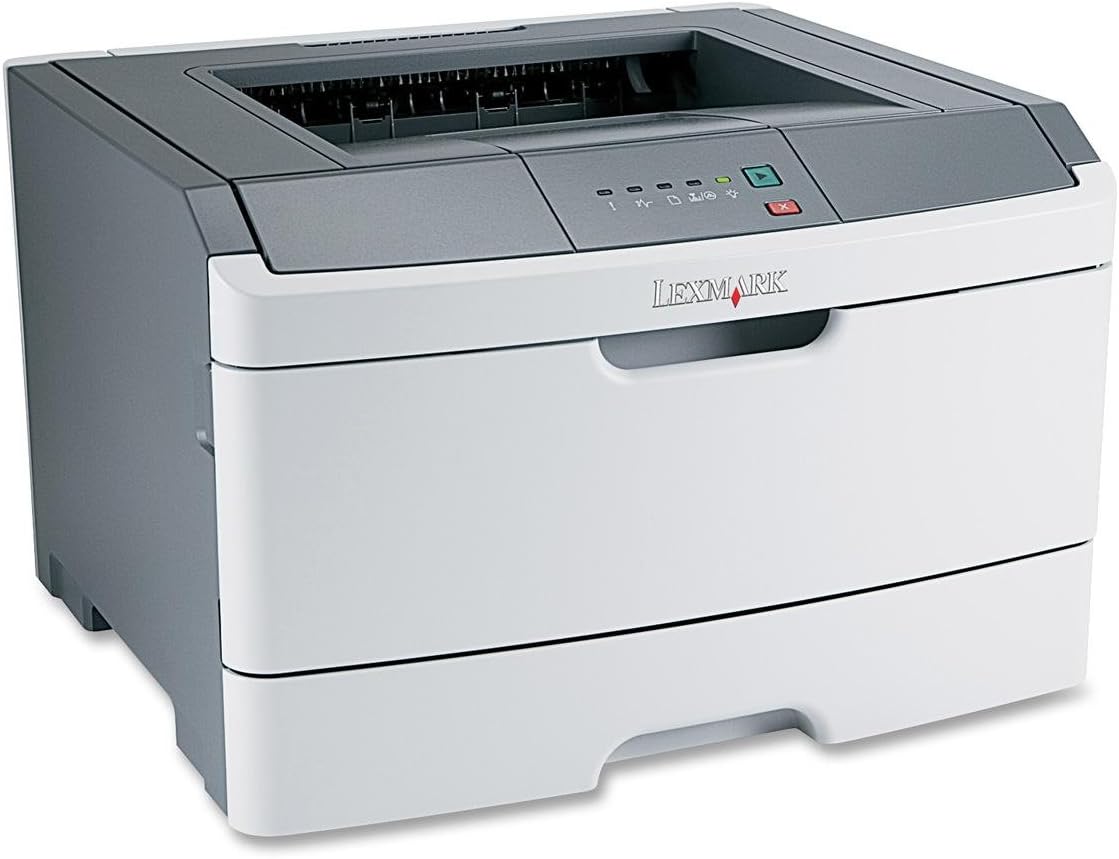
1. attēls: Lexmark E260D Monochrome Laser Printer. This image shows the printer from a front-right angle, highlighting its compact design with a white body and a dark gray top cover. The output tray is visible on top, and the Lexmark logo is displayed on the front panel above the paper input tray.
2. Drošības informācija
- Vienmēr pievienojiet printeri iezemētai strāvas kontaktligzdai.
- Nebloķējiet ventilācijas atveres.
- Sargājiet printeri no ūdens vai pārmērīga mitruma.
- Use only specified power cords and accessories.
- Avoid touching the fuser area, as it can be hot.
3. Iepakojuma saturs
Pārliecinieties, vai iepakojumā ir visi priekšmeti:
- Lexmark E260D Monochrome Laser Printer
- Strāvas vads
- Starter Toner Cartridge (may vary by region)
- Setup Guide or Documentation
- USB Cable (may be sold separately)
4. Iestatīšana
4.1 Printera izsaiņošana
- Izņemiet printeri no iepakojuma.
- Noņemiet visus iepakojuma materiālus, lentes un aizsargplēves no printera ārpuses un iekšpuses.
- Novietojiet printeri uz stabilas, līdzenas virsmas ar atbilstošu ventilāciju.
4.2 Printera pievienošana
- Pievienojiet strāvas vadu printerim un pēc tam iezemētai elektrotīkla kontaktligzdai.
- Pievienojiet vienu USB kabeļa galu printera USB portam un otru galu datoram.
4.3 Tonera kasetnes uzstādīšana
- Atveriet printera priekšējās piekļuves durtiņas.
- Carefully remove the toner cartridge from its packaging and shake it gently to distribute the toner.
- Ievietojiet tonera kasetni printerī, līdz tā noklikšķ savā vietā.
- Cieši aizveriet priekšējās piekļuves durtiņas.
4.4. Papīra ievietošana
- Izvelciet papīra tekni.
- Pielāgojiet papīra vadotnes atbilstoši ievietojamā papīra izmēram.
- Ievietojiet papīru teknē, pārliecinoties, ka tā ir līdzena un nepārsniedz maksimālās uzpildes līniju.
- Iespiediet papīra tekni atpakaļ printerī, līdz tā nofiksējas.
4.5 Draivera instalēšana
After connecting the printer, your operating system may automatically detect and install the necessary drivers. If not, follow these steps:
- Insert the driver CD (if included) into your computer's CD/DVD drive, or download the latest drivers from the official Lexmark support webvietne.
- Izpildiet ekrānā redzamos norādījumus, lai pabeigtu draivera instalēšanu.
- Restartējiet datoru, ja tas tiek prasīts.
5. Printera lietošana
5.1 Pamata drukāšana
- Pārliecinieties, vai printeris ir ieslēgts un pievienots datoram.
- Atveriet datorā dokumentu, kuru vēlaties drukāt.
- Izvēlieties File > Drukāt (vai līdzvērtīgu komandu jūsu lietojumprogrammā).
- Choose the Lexmark E260D from the list of available printers.
- Adjust print settings as needed (e.g., number of copies, page range).
- Noklikšķiniet Drukāt.
5.2 Divpusējā drukāšana
The Lexmark E260D supports automatic two-sided printing.
- Nosūtot drukas darbu, piekļūstiet printera rekvizītiem vai preferencēm.
- Meklējiet opciju, kas saistīta ar Dupleksā druka or Drukāt uz abām pusēm.
- Atlasiet vēlamo divpusējās drukāšanas opciju (piemēram, iesiešana garajā malā, iesiešana īsajā malā).
- Apstipriniet iestatījumus un noklikšķiniet uz Drukāt.
6. Apkope
6.1 Printera tīrīšana
- Ārpuse: Noslaukiet ārējās virsmas ar mīkstu, damp, nepūkojošu drānu. Nelietojiet abrazīvus tīrīšanas līdzekļus vai šķīdinātājus.
- Interjers: Periodically open the front access door and gently remove any loose toner dust with a dry, lint-free cloth. Avoid touching sensitive components.
6.2 Tonera kasetnes nomaiņa
When the toner level is low, the printer's control panel will indicate it. Replace the toner cartridge as follows:
- Pārliecinieties, vai printeris ir ieslēgts.
- Atveriet priekšējās piekļuves durtiņas.
- Uzmanīgi izņemiet veco tonera kaseti, pavelkot to taisni ārā.
- Unpack the new Lexmark E260D compatible toner cartridge and shake it gently.
- Ievietojiet jauno kasetni printerī, līdz tā nofiksējas savā vietā.
- Aizveriet priekšējās piekļuves durtiņas.
7. Traucējummeklēšana
7.1. Papīra iestrēgšana
If a paper jam occurs, the printer's control panel will display an error. Follow these general steps:
- Izslēdziet printeri un atvienojiet to no strāvas kontaktligzdas.
- Open all accessible covers (front door, rear door, etc.).
- Carefully remove any jammed paper, pulling it in the direction of the paper path to avoid tearing.
- Cieši aizveriet visus vākus.
- Pievienojiet un ieslēdziet printeri.
7.2 Drukas kvalitātes problēmas
- Faded or Light Prints: The toner cartridge may be low. Try shaking the cartridge gently or replace it.
- Streaks or Smudges: Clean the interior of the printer, especially around the toner cartridge area. Ensure the paper type setting matches the loaded paper.
- Tukšas lapas: Ensure the toner cartridge is properly installed and has toner. Check printer drivers and print settings.
7.3 Savienojamības problēmas
- Printeris nav atrasts: Ensure the USB cable is securely connected to both the printer and the computer. Try a different USB port or cable. Reinstall printer drivers if necessary.
- Print Jobs Stuck: Clear the print queue on your computer. Restart both the printer and the computer.
7.4 Envelope Printing on Mac
Users printing envelopes on macOS may encounter issues with incorrect print orientation or partial printing. To resolve this:
- In the print dialogue box, locate the menu that initially reads 'Layout'.
- Select 'Paper Feed' from this menu.
- Change the 'Auto Select' option to 'Manual Envelope'.
- Turpiniet drukāšanu.
8. Specifikācijas
| Funkcija | Specifikācija |
|---|---|
| Modeļa nosaukums | E260D |
| Drukas tehnoloģija | Lāzers |
| Printera izvade | Vienkrāsains |
| Maksimālais drukas ātrums (vienkrāsains) | 35 ppm |
| Maksimālā drukas izšķirtspēja (melnbalta) | 1200 dpi |
| Dupleksā druka | Automātiski |
| Savienojamības tehnoloģija | USB 2.0 |
| Maksimālā ievades loksnes ietilpība | 250 XNUMX loksnes |
| Supported Print Media | Envelopes, Labels, Paper (plain), Transparencies |
| Atmiņas krātuves ietilpība | 32 MB |
| Produkta izmēri | 16.5 x 18.1 x 14 collas |
| Preces svars | 29.8 mārciņas (13.53 kg) |
| Enerģijas patēriņš (ieslēgtā režīmā) | 16 vati |
9. Informācija par garantiju
The Lexmark E260D Monochrome Laser Printer comes with an Exchange Warranty. For specific terms, conditions, and duration of your warranty, please refer to the warranty documentation included with your product or visit the official Lexmark support webvietne.
10. Klientu atbalsts
For further assistance, technical support, or to order replacement parts and supplies, please contact Lexmark Customer Support. You can find contact information and additional resources on the official Lexmark webvietne:
- Lexmark Support Webvietne: www.lexmark.com/support (Lūdzu, ņemiet vērā: šis ir aizvietotājs URL. Refer to your product documentation for the exact support link.)


