Ievads
This manual provides essential information for the safe and efficient installation, operation, and maintenance of your HP ATX 300W Power Supply, Model 366505-001. This power supply is designed to provide reliable power to compatible personal computer systems.
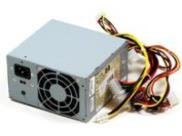
1. attēls: priekšpuse view of the HP ATX 300W Power Supply. This image displays the compact form factor and primary connectors of the power supply unit.
Pirms jebkādas uzstādīšanas vai darbības veikšanas, lūdzu, rūpīgi izlasiet šo rokasgrāmatu. Saglabājiet šo rokasgrāmatu turpmākai uzziņai.
Drošības informācija
- Elektrības apdraudējums: Power supplies contain high voltage komponenti. Neatveriet barošanas bloku casing. Elektriskās strāvas trieciena risks.
- Ventilācija: Ensure adequate ventilation around the power supply. Do not block air vents. Overheating can cause damage or fire.
- Zemējums: Always connect the power supply to a properly grounded electrical outlet.
- Mitrums: Do not expose the power supply to water or excessive moisture.
- Profesionāla uzstādīšana: If you are unsure about the installation process, seek assistance from a qualified technician.
- Saderība: Use only with compatible personal computer systems as specified.
Uzstādīšana un uzstādīšana
Follow these steps for proper installation of the HP ATX 300W Power Supply into your personal computer system:
- Sagatavošana:
- Turn off and unplug your computer from the wall outlet.
- Open the computer case according to your computer's manufacturer instructions.
- Pirms detaļu apstrādes izlādējiet statisko elektrību, pieskaroties iezemētam metāla priekšmetam.
- Noņemiet veco barošanas bloku (ja piemērojams):
- Disconnect all cables from the existing power supply to the motherboard, graphics card, hard drives, and other components.
- Unscrew the old power supply from the computer case and carefully remove it.
- Jauna barošanas avota instalēšana:
- Carefully place the HP ATX 300W Power Supply into the designated power supply bay in your computer case.
- Secure the power supply to the case using the appropriate screws.
- Pievienojiet kabeļus:
- Connect the main 20+4 pin ATX connector to the motherboard.
- Pievienojiet mātesplatei 4 vai 8 kontaktu procesora barošanas savienotāju.
- Connect SATA power connectors to hard drives, SSDs, and optical drives.
- Connect any necessary PCIe power connectors to graphics cards (if applicable).
- Pārliecinieties, vai visi savienojumi ir stingri un pareizi ievietoti.
- Pēdējie soļi:
- Organize cables to improve airflow and prevent interference.
- Aizveriet datora korpusu.
- Plug the computer's power cord into the power supply and then into a grounded wall outlet.
Darbība
Once installed, the HP ATX 300W Power Supply operates automatically with your computer system. When you power on your computer, the power supply will deliver stable and consistent power to all connected components.
- Ieslēgšana/izslēgšana: The power supply is controlled by your computer's power button. Ensure the main power switch on the back of the power supply (if present) is in the 'ON' position before powering on the computer.
- Dzesēšana: The integrated air cooling system will activate automatically to maintain optimal operating temperatures. Ensure the fan intake and exhaust are not obstructed.
- Jaudas izvade: This unit provides a maximum output of 300 Watts. Ensure your system's total power requirements do not exceed this limit for stable operation.
Apkope
Regulāra apkope palīdz nodrošināt barošanas avota ilgmūžību un optimālu veiktspēju:
- Tīrīšana: Periodically clean the exterior of the power supply and its fan vents to prevent dust buildup. Use compressed air to gently clear dust from the fan and internal components (with the computer powered off and unplugged).
- Pārbaude: Laiku pa laikam pārbaudiet strāvas kabeļus, vai nav nodiluma, nodiluma vai bojājumu pazīmju. Nekavējoties nomainiet bojātos kabeļus.
- Vide: Operate the computer in a clean, dry, and well-ventilated environment to prevent dust accumulation and overheating.
Problēmu novēršana
Ja rodas problēmas ar barošanas avotu, apsveriet tālāk norādītās bieži sastopamās problēmu novēršanas darbības.
- Nav jaudas:
- Check if the power cord is securely plugged into both the power supply and the wall outlet.
- Ensure the main power switch on the power supply is in the 'ON' position.
- Pārbaudiet, vai sienas kontaktligzda darbojas, pievienojot tai citu ierīci.
- Check all internal power connections (motherboard, CPU, peripherals) are firmly seated.
- Periodiska strāvas padeve/sistēmas nestabilitāte:
- Pārliecinieties, vai barošanas avots irtage (300W) is sufficient for all your computer components. Upgrading components may require a higher wattage barošanas avots.
- Check for overheating. Ensure proper airflow and clean any dust from the power supply fan.
- Inspect for loose cable connections.
- Neparasti trokšņi:
- A grinding or loud fan noise may indicate a failing fan. Consider professional inspection or replacement.
If problems persist after attempting these steps, contact HP customer support or a qualified computer technician.
Specifikācijas
| Zīmols | HP |
| Modeļa nosaukums/numurs | 366505-001 |
| Formas faktors | ATX |
| Izvades vattage | 300 vati |
| Savienotāja veids | ATX |
| Saderīgas ierīces | Personālais dators |
| Dzesēšanas metode | Gaiss |
| Produkta izmēri (G x P x A) | 9.5 x 12 x 4 collas |
| Preces svars | 5.59 mārciņas (2.54 kilogrami) |
| ASIN | B001U0ICS6 |
| Datums pirmais pieejams | 16. gada 2010. augusts |
Garantija un atbalsts
For information regarding the warranty coverage for your HP ATX 300W Power Supply, please refer to the warranty documentation provided with your original computer system or contact HP customer support directly. Warranty terms and conditions may vary based on region and purchase date.
For technical support, service, or further inquiries, please visit the official HP support website or contact their customer service department. Have your product model number (366505-001) and serial number (if applicable) ready when contacting support.
HP atbalsts Webvietne: www.hp.com/support