1. Ievads
This manual provides essential information for the safe and efficient operation of your Intermec PD42 Series Commercial Printer. The PD42 is a dependable and versatile direct thermal printer designed for medium-duty applications in manufacturing, transportation, and warehousing environments. It features a robust all-metal chassis, proven printing mechanics, and powerful electronics to ensure reliable performance. The integrated monochrome graphical display allows for direct setup and configuration, enhancing user control and reducing reliance on host commands.
2. Drošības informācija
Pirms printera lietošanas, lūdzu, izlasiet un izprotiet visus drošības norādījumus. Šo norādījumu neievērošana var izraisīt traumas vai aprīkojuma bojājumus.
- Vienmēr pievienojiet printeri iezemētai strāvas kontaktligzdai.
- Do not operate the printer with a damaged power cord or plug.
- Avoid placing the printer in areas with excessive dust, humidity, or extreme temperatures.
- Nemēģiniet apkalpot printeri pats. Visu apkopi uzticiet kvalificētam personālam.
- Darbības laikā turiet rokas un vaļīgu apģērbu tālāk no kustīgajām daļām.
3. Iepakojuma saturs
Pārliecinieties, vai iepakojumā ir visas preces. Ja kādas preces trūkst vai ir bojātas, nekavējoties sazinieties ar piegādātāju.
- Intermec PD42 Series Commercial Printer
- Power Cord (Euro and US compatible)
- Īsā lietošanas pamācība (ja iekļauta)
- Documentation CD (if included)
4. Fiziskais pārsvarsview
Familiarize yourself with the external components and connection ports of the Intermec PD42 printer.

4.1. attēls: Priekšpuse un sāni View of the Intermec PD42 Printer. This image displays the printer's front panel with its graphical display and control buttons, along with a label partially ejected from the print mechanism. The robust casing and compact design are visible.
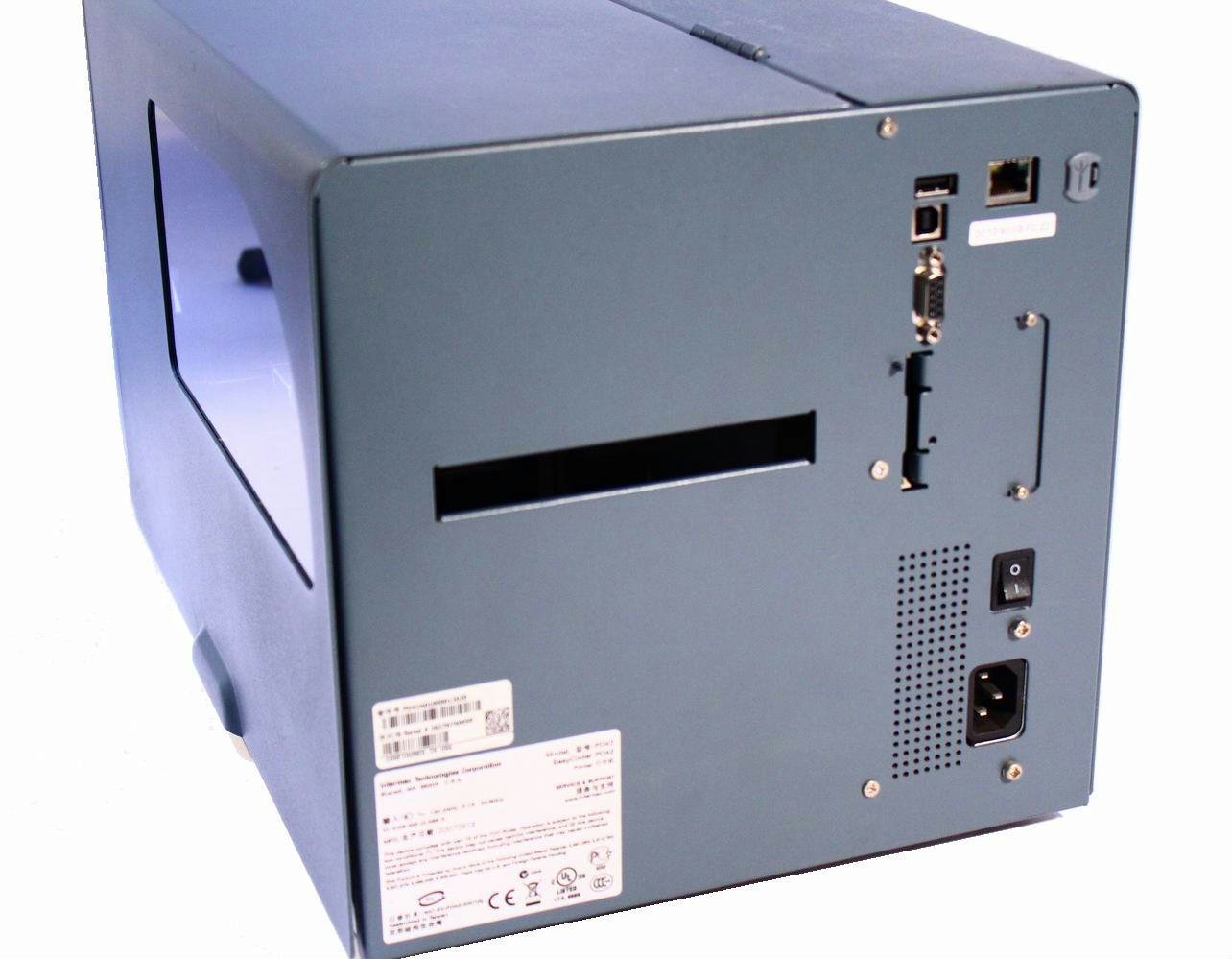
4.2. attēls. Aizmugure View of the Intermec PD42 Printer. This image highlights the various connectivity options available on the back of the printer, including USB, Serial, and Ethernet ports. The power input and main power switch are also visible.

4.3. attēls: iekšējais View of the Intermec PD42 Printer. With the top cover open, this image reveals the internal mechanisms for loading labels and ribbon. Key components such as the printhead assembly, media guides, and ribbon spindles are visible, illustrating the media path.
5. Iestatīšana
5.1 Izpakošana un novietošana
- Uzmanīgi izņemiet printeri no iepakojuma.
- Novietojiet printeri uz stabilas, līdzenas virsmas ar atbilstošu ventilāciju.
- Ensure sufficient space around the printer for media loading and maintenance.
5.2 Strāvas pieslēgšana
- Connect the power cord to the power input on the rear of the printer (refer to Figure 4.2).
- Pievienojiet otru strāvas vada galu iezemētai elektrības kontaktligzdai.
5.3 Connecting Data Cables
The PD42 offers multiple connectivity options:
- USB: Connect a USB cable from the printer's USB port to your computer.
- Sērija: Connect a serial cable from the printer's serial port to your computer or host system.
- Ethernet: Connect an Ethernet cable from the printer's Ethernet port to your network.
5.4 Loading Media (Labels and Ribbon)
The PD42 supports industry-standard 200-mm (8-inch) label rolls and 450-m (18,000-inch) ribbon rolls.
- Open the printer's top cover (refer to Figure 4.3).
- Follow the internal diagrams or specific instructions for your media type to correctly load the label roll onto the media spindle.
- Thread the labels through the media guides and under the printhead assembly.
- If using thermal transfer printing, load the ribbon onto the ribbon supply spindle and thread it according to the internal guides.
- Droši aizveriet augšējo vāku.
6. Lietošanas instrukcijas
6.1 Ieslēgšana/izslēgšana
- Lai ieslēgtu: Flip the main power switch on the rear of the printer to the 'On' position. The graphical display will illuminate.
- Lai izslēgtu: Flip the main power switch to the 'Off' position.
6.2 Using the Graphical Display
The monochrome graphical display and control buttons on the front panel allow you to configure printer settings directly. Navigate through menus using the arrow buttons and confirm selections with the 'Enter' button. Refer to the on-screen prompts for specific options.
6.3 Draiveru un programmatūras instalēšana
Before printing from a computer, install the appropriate printer drivers. These are typically available on the manufacturer's website or an included CD. Follow the on-screen instructions during installation.
6.4 Printing a Test Label
After setup, it is recommended to print a test label to verify proper operation and media loading. This option is usually available through the printer's front panel menu or via the printer driver software.
7. Apkope
Regulāra apkope nodrošina optimālu veiktspēju un pagarina printera kalpošanas laiku.
7.1 Drukas galviņas tīrīšana
The printhead should be cleaned regularly, especially if print quality degrades. Use a lint-free cloth or a printhead cleaning pen with isopropyl alcohol. Ensure the printer is powered off and cooled down before cleaning.
7.2 Cleaning Rollers and Media Path
Dust and adhesive residue can accumulate on rollers and within the media path. Use a lint-free cloth dampened with isopropyl alcohol to clean these components. Always power off the printer before cleaning.
7.3 Replacing Media
When the label roll or ribbon runs out, follow the steps in Section 5.4 to load new media.
8. Traucējummeklēšana
This section addresses common issues you might encounter with your PD42 printer.
- Printeris neieslēdzas: Check power cord connections and ensure the power outlet is functional.
- Nav drukas izvades: Verify that the printer is online, connected correctly to the host, and that media is loaded properly. Check for error messages on the graphical display.
- Slikta drukas kvalitāte: Clean the printhead. Ensure the correct media and ribbon (if applicable) are used and properly loaded. Adjust print darkness settings via the display or driver.
- Savienojamības problēmas: Check all cable connections. Verify network settings for Ethernet connections. Reinstall printer drivers if necessary.
- Kļūdu ziņojumi displejā: Consult the printer's graphical display for specific error codes or messages, then refer to the full product documentation or manufacturer's support webvietne, kurā sniegti detalizēti risinājumi.
9. Specifikācijas
| Funkcija | Specifikācija |
|---|---|
| Modeļa nosaukums | PD42BJ1000002021 |
| Drukas tehnoloģija | Tiešā termiskā |
| Printera izvade | Vienkrāsains |
| Izšķirtspēja | 203 dpi |
| Drukas ātrums | Līdz 150 mm/s (6 ips) |
| Savienojamības tehnoloģija | USB, seriālais, Ethernet |
| Īpaša iezīme | Graphical Display, Ethernet |
| Preces svars | 28.7 mārciņas |
| Produkta izmēri | 25 x 15 x 15 collas |
| Kontrollera tips | Spiedpoga |
| Drukātie materiāli | Etiķetes |
10. Garantija un atbalsts
For warranty information and technical support, please refer to the documentation provided with your printer or visit the official Intermec (now Honeywell) webSaglabājiet pirkuma čeku kā pirkuma apliecinājumu garantijas prasību gadījumā.
Tiešsaistes resursi: For the latest drivers, firmware updates, and detailed troubleshooting guides, visit the manufacturer's support portal.


