Ievads
This manual provides essential instructions for the setup, operation, and maintenance of your Logitech Stereo Headset H110. Please read this guide thoroughly before using the product to ensure optimal performance and longevity.
Iepakojuma saturs
The Logitech Stereo Headset H110 package typically includes:
- Logitech Stereo Headset H110
- Lietotāja dokumentācija (šī rokasgrāmata)
Produkts beidziesview
The Logitech Stereo Headset H110 is designed for clear audio communication and listening. It features a comfortable over-the-head design with an adjustable microphone.

1. attēls: The Logitech Stereo Headset H110, showing the adjustable headband, earcups with foam padding, and the flexible microphone boom.
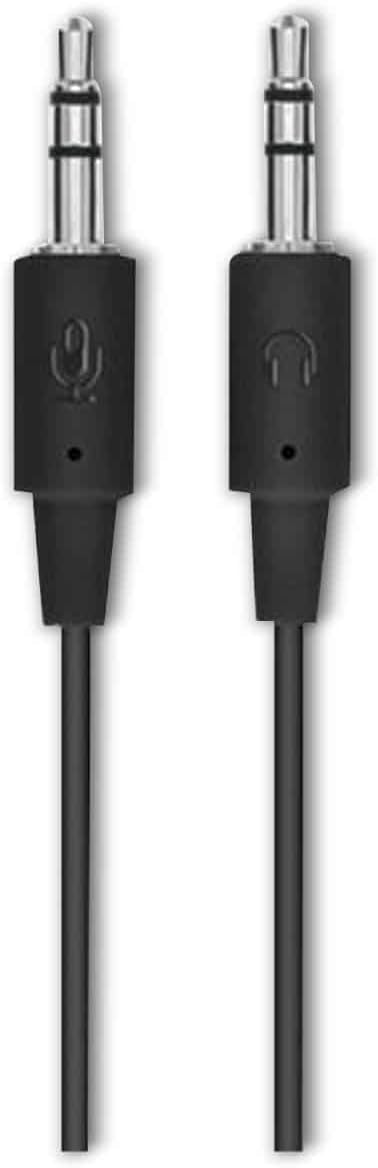
2. attēls: The two 3.5mm audio jacks for the Logitech H110 headset. One jack is for audio output (headphones), and the other is for microphone input.
Iestatīšana
- Pievienojiet austiņas:
The Logitech H110 headset uses two 3.5mm audio jacks. One jack is typically green for audio output (headphones), and the other is pink for microphone input. Connect the green jack to your computer's audio output port and the pink jack to your computer's microphone input port.
Piezīme: Some devices, such as laptops or smartphones, may use a single combined 3.5mm jack for both audio and microphone. An adapter (not included) may be required for compatibility with such devices.
- Adjust the Headset:
Adjust the headband for a comfortable fit on your head. The earcups should rest gently over your ears.
- Novietojiet mikrofonu:
Position the flexible microphone boom so that the microphone is approximately 1-2 inches (2.5-5 cm) from your mouth for optimal voice clarity.
Lietošanas instrukcijas
- Audio atskaņošana:
Once connected, your computer should automatically detect the headset as an audio output device. Play any audio (music, video, calls) to test the sound. Adjust the volume using your computer's system volume controls.
- Mikrofona lietošana:
For voice communication (e.g., video calls, online gaming), ensure the headset microphone is selected as the input device in your computer's sound settings or within the application you are using. Speak clearly into the microphone.
Apkope
- Tīrīšana:
Wipe the headset surfaces with a soft, dry cloth. Do not use liquid cleaners or abrasive materials. For the foam earpads, gently dab with a slightly damp drānu, ja nepieciešams, un pirms lietošanas ļaujiet pilnībā nožūt.
- Uzglabāšana:
Uzglabājiet austiņas tīrā, sausā vietā, pasargājot tās no ekstremālām temperatūrām un tiešiem saules stariem. Izvairieties no vada sapīšanās.
- Kabeļa kopšana:
Nevelciet aiz vada, lai atvienotu austiņas. Vienmēr stingri satveriet kontaktdakšu. Izvairieties no asiem vada līkumiem vai mezgliem, lai novērstu iekšējus bojājumus.
Problēmu novēršana
| Problēma | Iespējamais risinājums |
|---|---|
| Nav skaņas no austiņām |
|
| Mikrofons nedarbojas |
|
| Slikta audio kvalitāte |
|
Specifikācijas
- Modelis: H110
- Daļas numurs (P/N): 981-000271
- Savienojamība: Dual 3.5mm audio jacks (one for audio, one for microphone)
- Izmēri (A x P x D): Aptuveni 5.91 x 2.36 x 0.79 collas (15 x 6 x 2 cm)
- Svars: Aptuveni 5.3 unces (150 grami)
- Mikrofons: Adjustable, noise-cancelling (typical for basic headsets)
- Ausu aizbāžņi: Foam padded
Garantija un atbalsts
Specific warranty information for the Logitech Stereo Headset H110 is typically provided with the product packaging or available on the official Logitech website. For technical support, product registration, or further assistance, please visit the official Logitech support page:
Piezīme: Warranty terms and conditions may vary by region and purchase date. Please retain your proof of purchase for warranty claims.


