1. Produkts beidziesview
The Universal Office Products 8173 Adjustable Cubicle Hangers are designed to provide a versatile solution for hanging various items on cubicle walls. This set includes two black hangers, engineered for adjustability to accommodate different cubicle wall thicknesses.
Galvenās funkcijas ietver:
- Adjustable design for various cubicle wall widths.
- Durable construction for reliable support.
- Black finish to blend with office environments.
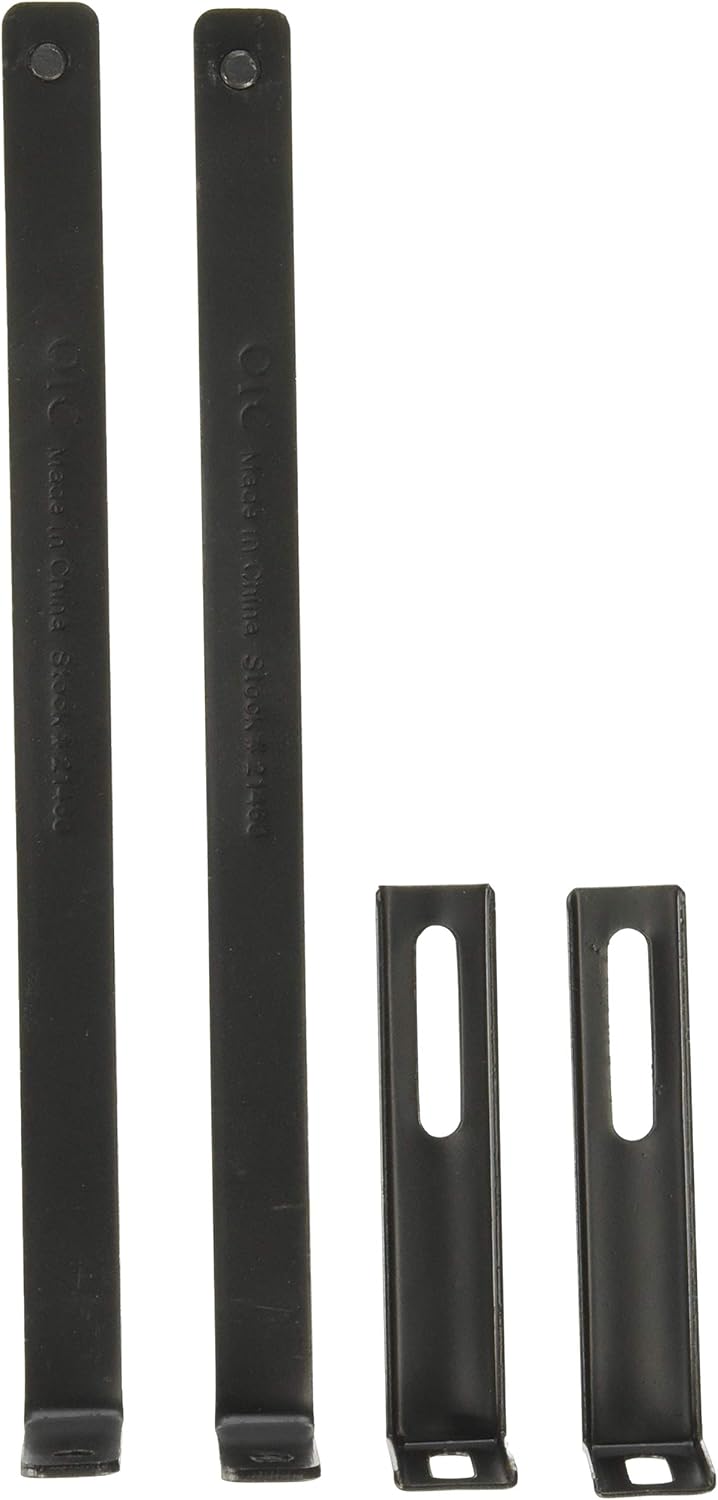
Figure 1: Universal Office Products 8173 Adjustable Cubicle Hangers. This image displays the two main components of the hanger set: two long, flat vertical pieces and two shorter, L-shaped horizontal pieces, all in black.
2. Iestatīšana un instalēšana
The Universal Office Products 8173 hangers are designed for easy assembly and installation. Follow these steps to properly set up your cubicle hangers:
- Identificējiet sastāvdaļas: Each hanger consists of two main parts: a longer vertical piece with a hook at one end and a shorter, L-shaped horizontal piece with screw holes.
- Adjust for Wall Thickness: The shorter L-shaped piece is designed to slide along the longer vertical piece. Loosen the screws on the L-shaped piece. Adjust its position to match the thickness of your cubicle wall. The goal is for the hanger to fit snugly over the top edge of the cubicle wall.
- Secure the Adjustment: Once the desired width is achieved, tighten the screws on the L-shaped piece firmly to secure its position. Ensure the hanger is stable and does not wobble.
- Izvietojums: Place the assembled hanger over the top edge of your cubicle wall. The hook portion should face outwards, ready to hold items.
- Testa stabilitāte: Gently pull down on the hanger to ensure it is securely seated on the cubicle wall before hanging any items.

Figure 2: Dimensions and Scale. This diagram illustrates the approximate dimensions of the hanger components, showing a total length of 7.7 inches (19 cm) for the longer piece, alongside a human hand for visual scale.
3. Lietošanas instrukcijas
Once installed, the cubicle hangers are ready for use. Simply hang desired items such as pictures, whiteboards, or other office accessories directly onto the hook. Ensure the weight of the item does not exceed the hanger's capacity to maintain stability and prevent damage to the cubicle wall or the hanger itself.
4. Apkope
These cubicle hangers require minimal maintenance. Periodically check the tightness of the screws, especially if the hanger is frequently moved or if heavy items are consistently hung. Clean with a soft, dry cloth if dust accumulates.
5. Traucējummeklēšana
| Problēma | Iespējamais cēlonis | Risinājums |
|---|---|---|
| Hanger does not fit cubicle wall. | Incorrect adjustment for wall thickness. | Loosen screws and re-adjust the sliding piece to precisely match the cubicle wall thickness. Ensure a snug fit. Note that these hangers are designed for standard cubicle wall thicknesses and may not fit unusually thick walls (e.g., 3.5 inches or more). |
| Hanger feels unstable or wobbly. | Skrūves nav pietiekami pievilktas. | Ensure all screws are tightened firmly after adjusting the hanger to the correct wall thickness. |
| Hanger breaks or bends under load. | Exceeded weight capacity. | Reduce the weight of the item being hung. These hangers are designed for typical office accessories and light to medium weight items. |
6. Specifikācijas
| Atribūts | Detaļas |
|---|---|
| Zīmols | Universāls |
| Modeļa numurs | UNV08173 |
| Preces svars | 4 ounces (per set) |
| Produkta izmēri | 8 x 2.6 x 1.2 collas |
| Krāsa | Melns |
| Forma | Triangular (referring to the overall profile when assembled) |
| Preču skaits | 1 (set of two hangers) |
| Ražotājs | Universal Office Products |
| Datums pirmais pieejams | 11. gada 2011. novembris |
7. Garantija un atbalsts
For any questions regarding the Universal Office Products 8173 Adjustable Cubicle Hangers, please contact Universal Office Products directly. While specific warranty details are not provided in this manual, standard manufacturer warranties typically cover defects in materials and workmanship. Please refer to the manufacturer's official website or contact their customer service for detailed warranty information and support.
Manufacturer: Universal Office Products
Lai saņemtu papildu palīdzību, apmeklējiet vietni Universal brand page on Amazon or search for "Universal Office Products" online.


