1. Ievads
Thank you for choosing the Hama 95236 8-inch LCD Digital Photo Frame. This manual provides important information regarding the safe operation, setup, and maintenance of your device. Please read it thoroughly before using the product and keep it for future reference.
2. Drošības instrukcijas
- Do not open the device. Incorrect assembly or repair can lead to electric shock.
- Nedarbiniet izstrādājumu, ja tas ir redzami bojāts.
- Aizsargājiet produktu no netīrumiem, mitruma un pārkaršanas. Lietojiet to tikai sausā vidē.
- Nemetiet izstrādājumu un nepakļaujiet to spēcīgai vibrācijai.
- Izmantojiet produktu tikai paredzētajam mērķim.
- Glabājiet šo izstrādājumu, tāpat kā visus elektriskos izstrādājumus, bērniem nepieejamā vietā.
- Nekavējoties atbrīvojieties no iepakojuma materiāla saskaņā ar vietējiem noteikumiem.
3. Iepakojuma saturs
Please check that the package contains the following items:
- Hama 95236 8-inch LCD Digital Photo Frame
- Strāvas adapteris
- Lietotāja rokasgrāmata (šis dokuments)
4. Produkts beidziesview
Iepazīstieties ar sava digitālā foto rāmja sastāvdaļām un vadības ierīcēm.
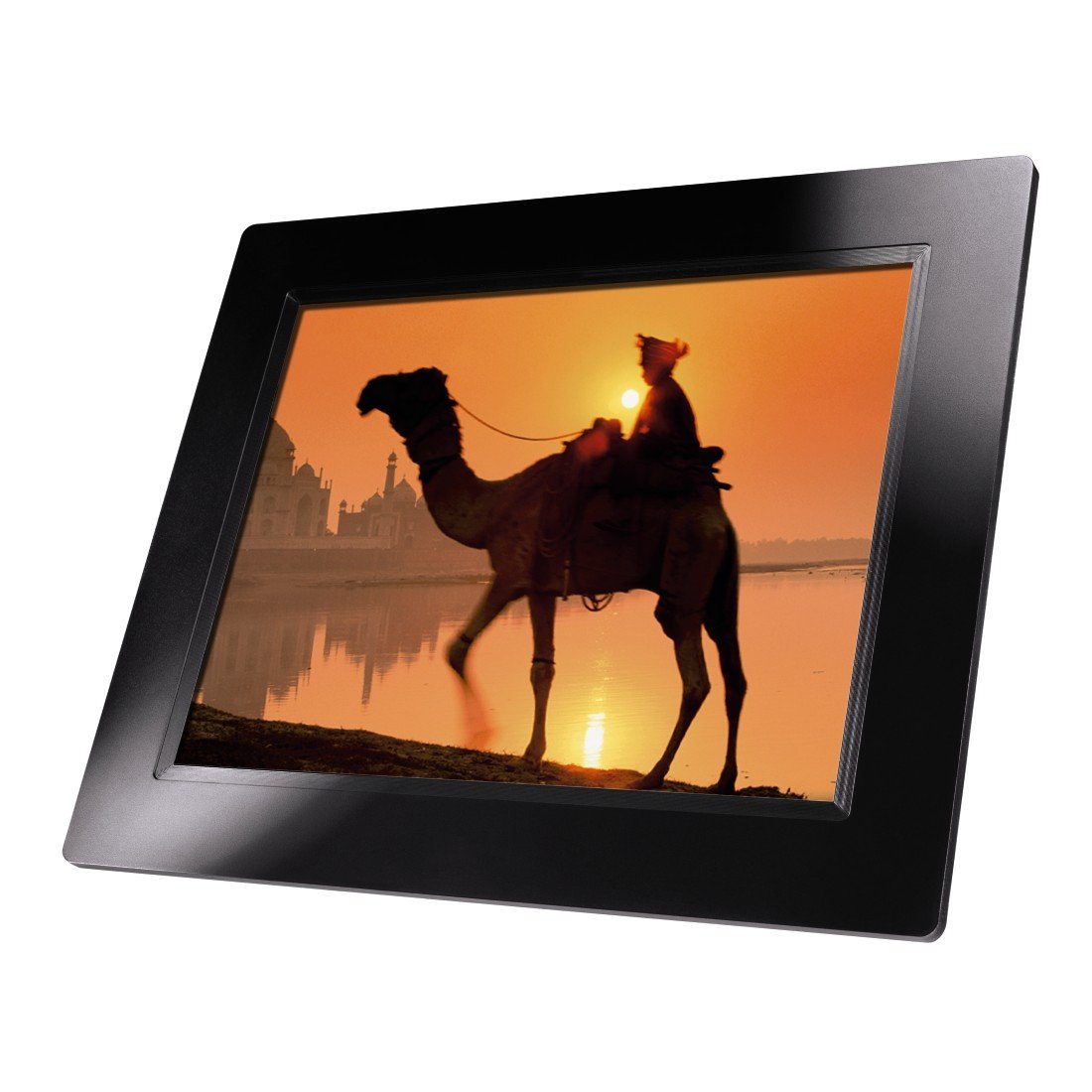
4.1. attēls: Priekšpuse view of the Hama 95236 Digital Photo Frame, showing the 8-inch LCD screen.

4.2. attēls: Sānu view of the digital photo frame, highlighting the various input ports including the SD/MMC/MS card slot, USB port, and DC IN power port.

4.3. attēls: Aizmugure view of the digital photo frame, showing the stand attachment point, ventilation grilles, and the control panel with power, navigation, and menu buttons.
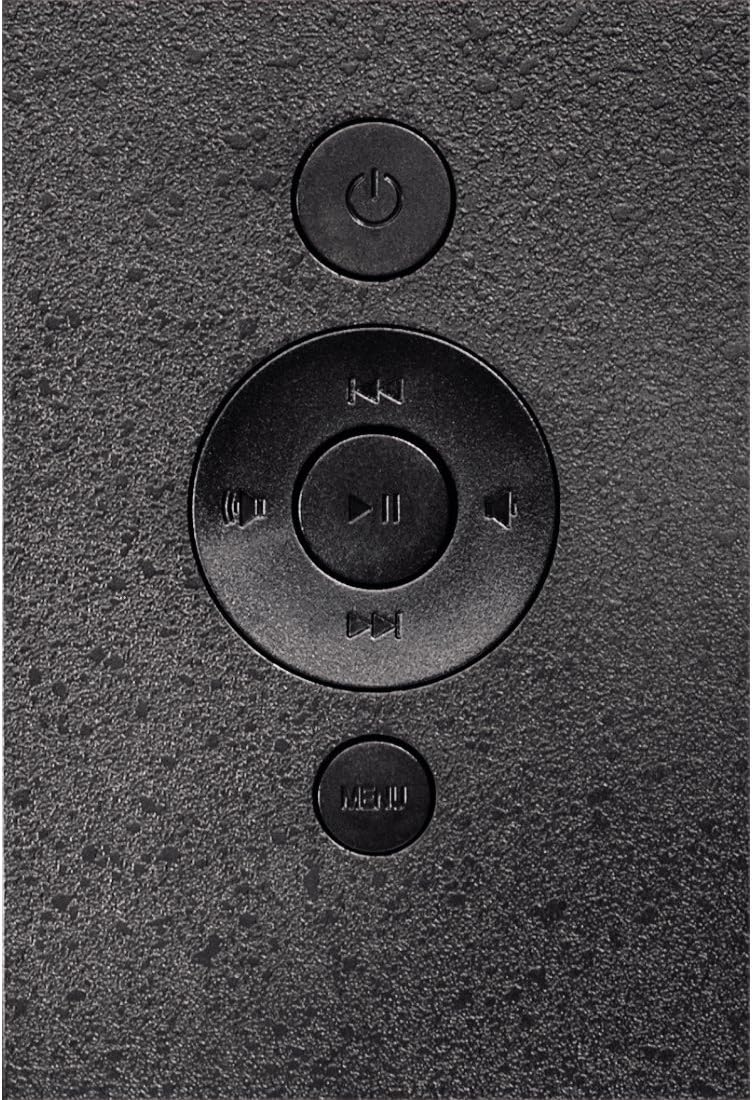
4.4. attēls: Close-up of the control buttons located on the back of the frame. These include the power button, directional navigation buttons (up, down, left, right), play/pause/enter button, and the menu button.
4.1. Porti un vadības ierīces
- SD/MMC/MS kartes slots: For inserting memory cards to display photos and videos.
- USB ports: For connecting USB flash drives or other compatible USB storage devices.
- DC IN: Power input for connecting the provided power adapter.
- Barošanas poga: Ieslēdz vai izslēdz ierīci.
- Navigācijas pogas (augšup/lejup/pa kreisi/pa labi): Izmanto, lai pārvietotos pa izvēlnēm un atlasītu opcijas.
- Play/Pause/Enter Button: Apstiprina atlasi vai kontrolē multivides atskaņošanu.
- Izvēlnes poga: Piekļūst galvenajai izvēlnei, lai piekļūtu iestatījumiem un opcijām.
5. Iestatīšana
5.1. Statīva piestiprināšana
Insert the metal stand into the designated slot on the back of the digital photo frame. Ensure it is securely fastened to provide stable support for the frame.
5.2. Strāvas pieslēgums
- Connect the power adapter to the DC IN port on the back of the photo frame.
- Pievienojiet strāvas adapteri piemērotai elektrības kontaktligzdai.
- Rāmis parasti ieslēdzas automātiski vai arī to var ieslēgt, izmantojot barošanas pogu.
5.3. Atmiņas kartes vai USB diska ievietošana
The Hama 95236 supports SD/MMC/MS memory cards and USB flash drives.
- Locate the SD/MMC/MS card slot or the USB port on the side of the frame (refer to Figure 4.2).
- Carefully insert your memory card or USB drive into the corresponding slot/port. Ensure it is inserted correctly to avoid damage.
- The frame should automatically detect the storage device and prompt you to view its contents or start a slideshow.
6. Lietošanas instrukcijas
6.1. Pamata navigācija
Use the navigation buttons on the back of the frame to move through menus and options. The Play/Pause/Enter button confirms your selection.
6.2. Galvenā izvēlne
Nospiediet pogu IZVĒLNE button to access the main menu. From here, you can select different modes and settings:
- Foto: View photos in a slideshow or individually.
- Mūzika: Atskaņot audio files.
- Video: Atskaņot video files.
- Calendar/Clock: Display the calendar and time.
- Iestatījumi: Adjust various device parameters.
6.3. Photo Playback
- Galvenajā izvēlnē atlasiet Fotoattēls.
- Navigate to your desired folder or select all photos.
- Nospiediet pogu Atskaņot/Pauzēt/Ievadīt button to start the slideshow.
- During a slideshow, you can use the navigation buttons to skip photos or pause playback.
6.4. Sistēmas iestatījumi
Piekļūstiet Iestatījumi menu to customize your photo frame:
- Displeja iestatījumi: Adjust brightness, contrast, and display mode.
- Slaidrādes iestatījumi: Configure transition effects, display time per photo, and repeat mode.
- Datums un laiks: Iestatiet pašreizējo datumu un laiku. Note: Some users have reported that date and time settings may reset after power loss.
- Valoda: Izvēlieties vēlamo valodu izvēlnes saskarnei.
- Uzglabāšanas informācija: View details about connected storage devices.
7. Apkope
7.1. Ierīces tīrīšana
- Pirms tīrīšanas vienmēr atvienojiet ierīci no strāvas padeves.
- Notīriet ekrānu un ārējās virsmas ar mīkstu, sausu un neplūksnojošu drānu.
- Do not use aggressive cleaning agents, solvents, or abrasive materials.
7.2. Uzglabāšana
If storing the device for an extended period, disconnect it from power and store it in a cool, dry place away from direct sunlight and extreme temperatures.
8. Traucējummeklēšana
| Problēma | Iespējamais cēlonis | Risinājums |
|---|---|---|
| Ierīce neieslēdzas. | Strāvas adapteris nav pievienots vai ir bojāts. | Ensure the power adapter is securely connected to both the frame and the power outlet. Test the outlet with another device. |
| Nav parādīti attēli. | No memory card/USB drive inserted or filenav atbalstīts. | Insert a compatible memory card or USB drive with supported image formats (e.g., JPEG). Check if the storage device is properly inserted. |
| Date and time reset after power off. | No internal battery backup for clock. | This model may not retain date/time settings without continuous power. Re-enter settings if necessary after power interruption. |
| Video playback is choppy or distorted. | Unsupported video format or high bitrate. | Nodrošiniet video files are in a supported format and resolution. Convert videos to a lower resolution or bitrate if issues persist. |
| Pogas nereaģē. | Pagaidu programmatūras kļūme. | Disconnect the power adapter, wait a few seconds, then reconnect it to restart the device. |
9. Specifikācijas
| Funkcija | Detaļas |
|---|---|
| Modeļa numurs | 00095236 |
| Ekrāna izmērs | 8 collas |
| Displeja izšķirtspēja | 800x600 pikseļi |
| Malu attiecība | 4:3 |
| Iekšējā krātuve | 2 GB (2048 MB) |
| Savienojamība | USB, SD/MMC/MS Card Slot |
| Izmēri (G x P x A) | 2.6 x 22.2 x 17.8 cm |
| Svars | 550 g |
| Ražotājs | Hama |
10. Informācija par garantiju
Hama GmbH & Co KG provides a manufacturer's warranty for this product. The specific terms and conditions of the warranty period and coverage are subject to the purchase date and the region of purchase. Please retain your proof of purchase (receipt) for any warranty claims.
For detailed warranty information, please refer to the official Hama webvietnē vai sazinieties tieši ar viņu klientu atbalsta dienestu.
11. Klientu atbalsts
Should you have any questions regarding this product, please contact Hama Customer Support:
- Webvietne: Visit the official Hama website for FAQs, drivers, and further product information. www.hama.com
- Kontaktpersona: Skatiet kontaktinformācijas sadaļu Hama vietnē webvietnē, lai saņemtu tālruņu numurus vai e-pasta atbalstu jūsu reģionā.
Sazinoties ar atbalsta dienestu, lūdzu, sagatavojiet sava modeļa numuru (00095236) un pirkuma apliecinājumu.