Ievads
The Logitech MK270 Wireless Keyboard and Mouse Combo provides a reliable and convenient wireless solution for your computing needs. This combo features a 2.4 GHz wireless connection, offering a range of up to 10 meters with minimal delays or dropouts. Designed for ease of use, it includes a full-size keyboard with media hotkeys and a compact, ambidextrous mouse. This manual provides instructions for setup, operation, maintenance, and troubleshooting to ensure optimal performance of your device.
Kas atrodas kastē
Atverot iepakojumu, pārliecinieties, vai ir visas sastāvdaļas:
- Logitech MK270 Wireless Keyboard
- Logitech bezvadu pele
- USB nano uztvērējs
- 2 AAA baterijas (klaviatūrai)
- 1 AA battery (for mouse)


Iestatīšanas instrukcijas
- Bateriju uzstādīšana: Open the battery compartments on the underside of both the keyboard and the mouse. Insert the included AAA batteries into the keyboard and the AA battery into the mouse, ensuring correct polarity (+/-).
- Pievienojiet USB uztvērēju: Locate an available USB port on your computer. Plug the tiny Logitech Nano Receiver into the USB port. The system should automatically detect the receiver and install necessary drivers.
- Ieslēgšanas ierīces: Locate the ON/OFF switch on the top right of the keyboard and on the underside of the mouse. Slide both switches to the 'ON' position.
- Pārbaudīt savienojumu: Once powered on, the keyboard and mouse should be ready for use. Test by typing on the keyboard and moving the mouse cursor. If they do not respond, ensure the receiver is securely plugged in and the devices are powered on.
The Logitech MK270 is designed for plug-and-play simplicity and is compatible with Windows 10 or later, Windows 8, 7, Windows Vista, Windows XP, and Chrome OS. It is not Bluetooth compatible.
Lietošanas instrukcijas
Tastatūras funkcijas
- Pilna izmēra izkārtojums: The keyboard features a standard full-size layout with deep-profile, quiet keys for comfortable typing.
- Eight Hot Keys: Access frequently used functions instantly with the dedicated hotkeys located above the function row. These include controls for movies, music, internet, email, volume adjustment, and play/pause.
- Ieslēgšanas/izslēgšanas slēdzis: Conserve battery life by using the ON/OFF switch located on the top right of the keyboard when not in use.


Peles funkcijas
- Compact and Ambidextrous Design: The mouse is designed for comfortable control, suitable for both left and right-handed users.
- Vienmērīga izsekošana: Provides responsive and accurate cursor control.
- 10m Wireless Range: Maintain a reliable connection up to 10 meters from your computer.
- Uztvērēja glabāšana: The USB Nano Receiver can be conveniently stored inside the mouse when not in use, making it ideal for portability.
- Ieslēgšanas/izslēgšanas slēdzis: An ON/OFF switch on the underside of the mouse helps conserve battery power.


Apkope
Akumulatora pārvaldība
The Logitech MK270 combo is designed for extended battery life:
- Tastatūras akumulatora darbības laiks: Up to 36 months (3 years) with typical use.
- Peles akumulatora darbības laiks: Up to 12 months with typical use.
Battery life may vary based on user and computing conditions. To maximize battery life, always use the ON/OFF switches on both the keyboard and mouse when not in use. The devices also feature an auto-sleep function to conserve power during periods of inactivity.

Tīrīšana
Lai tīrītu ierīces, izmantojiet mīkstu, damp cloth. Avoid using harsh chemicals or abrasive cleaners, as these can damage the surfaces. Ensure devices are powered off before cleaning.
Problēmu novēršana
- Nav atbildes no tastatūras/peles:
- Ensure both the keyboard and mouse are switched 'ON'.
- Check that the USB Nano Receiver is securely plugged into a working USB port on your computer.
- Replace the batteries in both the keyboard and mouse. Low batteries are a common cause of connectivity issues.
- Mēģiniet pievienot USB uztvērēju citam USB portam.
- Pārtraukts savienojums vai aizture:
- Move the keyboard and mouse closer to the USB receiver. The optimal range is up to 10 meters, but environmental factors (e.g., metal objects, other wireless devices) can reduce this.
- Avoid placing the receiver near other electrical devices that may cause interference (e.g., speakers, monitors, Wi-Fi routers).
- If using a USB hub, try connecting the receiver directly to a USB port on your computer.
- Hotkeys Not Working:
- Pārliecinieties, vai jūsu operētājsistēma ir atjaunināta.
- While plug-and-play, some advanced functions or specific hotkey behaviors might benefit from Logitech's optional software, available on their official support webvietne.
Specifikācijas
| Zīmols | Logitech |
| Modeļa numurs | 920-004536 |
| Savienojamības tehnoloģija | Bezvadu (2.4 GHz radiofrekvence) |
| Wireless Range | Līdz 10 metriem (33 pēdām) |
| Tastatūras akumulatora darbības laiks | Līdz 36 mēnešiem (3 gadiem) |
| Peles akumulatora darbības laiks | Līdz 12 mēnešiem |
| Operētājsistēmas saderība | Windows 10, Windows 7, Windows 8, Windows Vista, Windows XP, Chrome OS |
| Tastatūras izmēri (GxPxA) | 441 mm x 149 mm x 18 mm (aptuveni 17.36 x 5.87 x 0.71 collas) |
| Tastatūras svars | 481 g (aptuveni 1.06 mārciņas) |
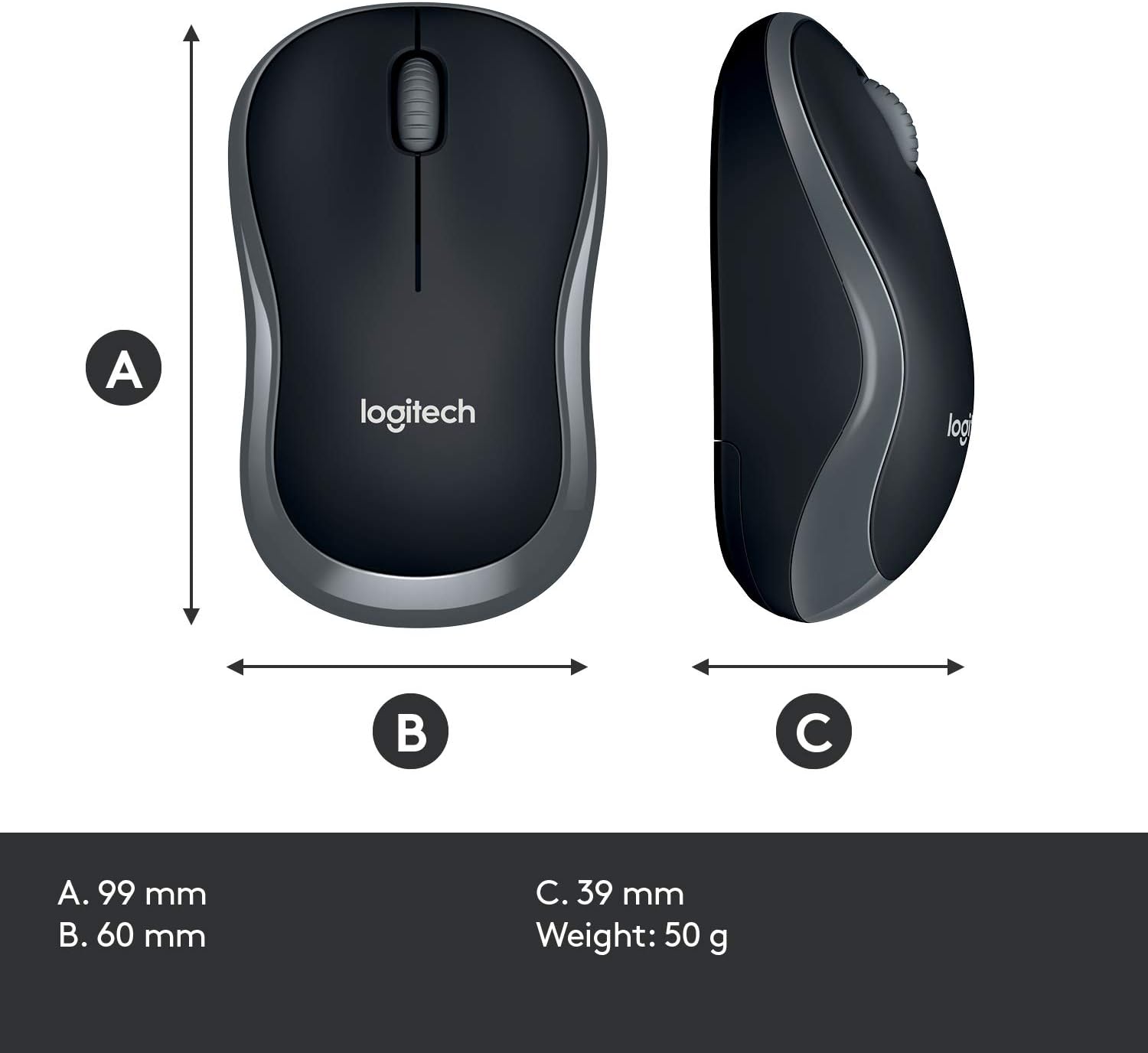
| Peles izmēri (GxPxA) | 99 mm x 60 mm x 39 mm (aptuveni 3.90 x 2.36 x 1.54 collas) |
| Peles svars | 50 g (aptuveni 0.11 mārciņas) |
| Krāsa | Melns |

Garantija un atbalsts
Warranty information for the Logitech MK270 Wireless Keyboard and Mouse Combo is typically provided with your product packaging or can be found on the official Logitech webvietne. Lūdzu, skatiet šos resursus, lai iepazītos ar konkrētiem garantijas noteikumiem un nosacījumiem.
For further assistance, technical support, or to download the latest drivers and software, please visit the official Logitech support webvietne:


