1. Ievads
This manual provides comprehensive instructions for the proper use and maintenance of your Horizon SF-400D Digital Precision Scale. Please read this manual thoroughly before operating the device to ensure accurate measurements and prolong its lifespan.
The Horizon SF-400D is a versatile digital precision scale designed for various weighing applications, including jewelry, coins, herbs, spices, and medication. It offers high accuracy and multiple weighing modes, along with a convenient counting function.

1. attēls: Horizon SF-400D Digital Precision Scale. This image shows the overall design of the scale, featuring a black body, a stainless steel weighing platform, and a blue backlit LCD display with control buttons.
2. Drošības pasākumi
- Do not overload the scale beyond its maximum capacity of 500g.
- Nepakļaujiet svarus ekstremālām temperatūrām, mitrumam vai tiešiem saules stariem.
- Turiet svarus tālāk no spēcīgiem elektromagnētiskajiem laukiem.
- Notīriet svarus ar mīkstu, damp drānu. Nelietojiet abrazīvus tīrīšanas līdzekļus un neiegremdējiet ierīci ūdenī.
- Ensure the scale is placed on a stable, level surface during operation to ensure accuracy.
3. Produkta sastāvdaļas
Familiarize yourself with the main parts of your SF-400D scale:
- Svēršanas platforma: Nerūsējošā tērauda virsma priekšmetu novietošanai.
- LCD displejs: Backlit screen showing weight, units, and other indicators.
- IESLĒGŠANAS/IZSLĒGŠANAS poga: Ieslēdz vai izslēdz svarus.
- MODE poga: Changes weighing units (g, oz, ct, dwt, gn, T).
- TARE poga: Atiestata displeju uz nulli, kas ir noderīgi priekšmetu svēršanai konteinerā.
- PCS Button: Activates the piece counting function.
- CAL poga: Izmanto kalibrēšanai.
- Regulējamas kājas: Located on the bottom for leveling the scale.
- Burbuļa līmenis: Integrated on the scale to assist with leveling.
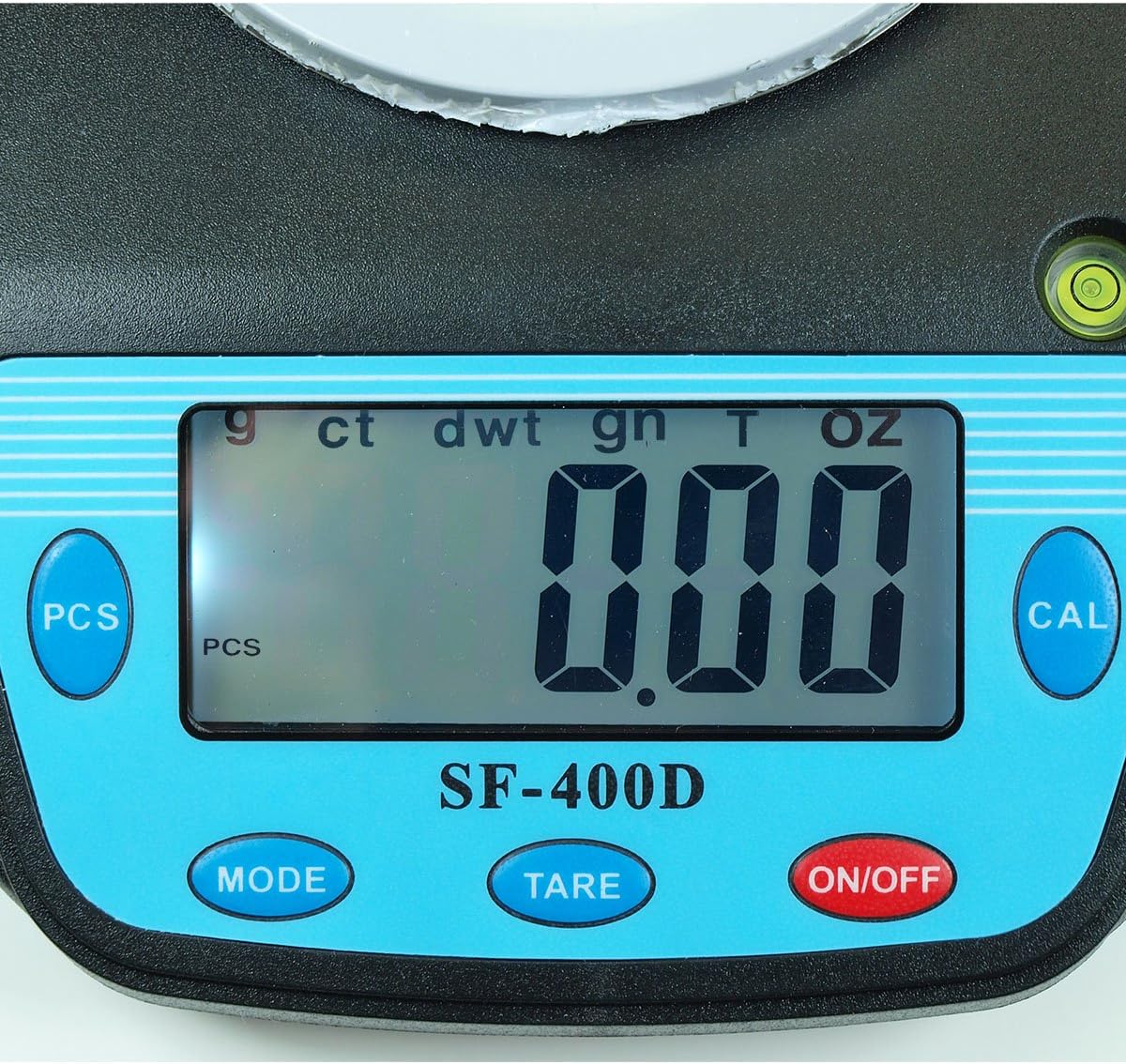
2. attēls: Close-up of the SF-400D display and control buttons. This image highlights the LCD screen, showing various unit indicators (g, ct, dwt, gn, T, oz), and the function buttons: PCS, MODE, TARE, ON/OFF, and CAL.

3. attēls: Underside of the SF-400D scale showing adjustable legs. Green arrows indicate the location of the four adjustable feet, which are used to level the scale for accurate measurements.
4. Iestatīšana
4.1. Barošanas avots
The SF-400D scale operates on two AA batteries (included) or an optional AC power adapter (not included).
- Atveriet bateriju nodalījuma vāciņu svaru apakšpusē.
- Ievietojiet divas AA baterijas, nodrošinot pareizu polaritāti (+/-).
- Aizveriet akumulatora nodalījumu.
- Alternatively, connect a compatible AC power adapter (6V, amperage not specified in product details, consult manufacturer if needed) to the power port.
4.2. Placement and Leveling
For optimal accuracy, the scale must be placed on a stable, flat, and level surface.
- Place the scale on your desired weighing surface.
- Observe the integrated bubble level.
- Adjust the four adjustable legs on the bottom of the scale by rotating them until the bubble is centered within the level indicator.
5. Lietošanas instrukcijas
5.1. Pamata svēršana
- Nospiediet pogu IESLĒGTS/IZSLĒGTS button to turn on the scale. The display will show "88888" and then "0.00" (or "0.0" depending on the unit).
- If the display does not show zero, press the TĀRA pogu, lai nulli skalu.
- Nospiediet pogu REŽĪMS button to select your desired weighing unit (g, oz, ct, dwt, gn, T).
- Gently place the item(s) to be weighed on the center of the stainless steel platform.
- Read the stable weight displayed on the LCD screen.
- Lai izslēgtu svarus, nospiediet un turiet IESLĒGTS/IZSLĒGTS button for a few seconds. The scale also features an auto shut-off function to conserve battery power.
5.2. Taras funkcija
The Tare function allows you to subtract the weight of a container, so only the contents are weighed.
- Novietojiet tukšu trauku uz svēršanas platformas.
- Pagaidiet, līdz displejs stabilizēsies un parādīsies konteinera svars.
- Nospiediet pogu TĀRA button. The display will reset to "0.00" (or "0.0").
- Pievienojiet traukā preces, kuras vēlaties nosvērt. Displejā tagad tiks rādīts tikai preču neto svars.
- To clear the tare, remove all items from the platform and press TĀRA again if the display does not return to zero automatically.
5.3. Piece Counting Function (PCS)
This function is useful for counting multiple identical items.
- Turn on the scale and ensure it is zeroed.
- Nospiediet pogu PCS button. The display will show "PCS" and a sampfaila lielums (piemēram, "25", "50", "75", "100").
- Nospiediet pogu REŽĪMS button to cycle through the available sample sizes (25, 50, 75, 100 pieces). Select the sample size that matches the number of items you will place on the scale for sampjūras līdaka.
- Place the exact number of sample items (e.g., 25 pieces) onto the weighing platform according to your selected sample lielums.
- Nospiediet pogu PCS vēlreiz, lai apstiprinātuample. The display will now show the number of pieces.
- You can now add more items of the same type, and the scale will display the total count.
- To exit the counting mode, press the REŽĪMS pogu.
5.4. Kalibrēšana
Calibration ensures the accuracy of your scale. It is recommended to calibrate the scale periodically or if you suspect inaccurate readings. You will need a known calibration weight (e.g., 500g) for this process.

4. attēls: SF-400D display showing "CAL" during calibration mode. This image illustrates the scale's screen indicating it is in calibration mode, prompting the user to place a calibration weight.
- Ensure the scale is on a stable, level surface and turned off.
- Nospiediet un turiet CAL pogu, pēc tam nospiediet IESLĒGTS/IZSLĒGTS button simultaneously. Release both buttons when the display shows "CAL".
- The display will then show a flashing weight value (e.g., "500.00g"). This is the required calibration weight.
- Place the exact calibration weight (e.g., 500g) onto the center of the weighing platform.
- Wait for the display to stabilize and show "PASS" or return to normal weighing mode. This indicates successful calibration.
- Remove the calibration weight. The scale is now calibrated and ready for use.
- If "FAIL" or an error message appears, repeat the calibration process.
6. Apkope
6.1. Tīrīšana
- Wipe the scale surface with a soft, slightly damp audums.
- Do not use harsh chemicals, abrasive cleaners, or immerse the scale in water.
- Pirms uzglabāšanas vai nākamās lietošanas reizes pārliecinieties, vai svari ir pilnībā sausi.
6.2. Uzglabāšana
- Uzglabājiet svarus vēsā, sausā vietā, pasargājot no tiešiem saules stariem un ekstremālām temperatūrām.
- Ja ilgstoši uzglabājat, izņemiet baterijas, lai novērstu to noplūdi.
7. Traucējummeklēšana
| Problēma | Iespējamais cēlonis | Risinājums |
|---|---|---|
| Svari neieslēdzas. | Low or dead batteries; incorrect battery installation; no power from AC adapter. | Replace batteries; check battery polarity; ensure AC adapter is properly connected and functional. |
| Neprecīzi rādījumi. | Scale not level; unstable surface; needs calibration; overloaded; strong air currents or vibrations. | Ensure scale is level using adjustable legs and bubble level; place on stable surface; perform calibration; do not exceed 500g capacity; operate in a stable environment. |
| "O_Ld" or "EEEE" displayed. | Svari ir pārslogoti. | Remove excess weight immediately. Do not exceed 500g capacity. |
| Displejā redzams "UNST". | Unstable environment or surface. | Move the scale to a more stable location, away from vibrations or drafts. |
| Counting function not working correctly. | Nepareizs sample size selected; sample items not identical in weight. | Nodrošiniet sample size matches the number of items placed for sampling; use identical items for accurate counting. |
8. Specifikācijas
| Funkcija | Detaļas |
|---|---|
| Modelis | SF-400D |
| Jauda | 500 grams (g) / 17.5 ounces (oz) |
| Accuracy (Readability) | 0.01 grams (g) / 0.0005 ounces (oz) |
| Svēršanas režīmi | g (grams), oz (ounces), ct (carats), dwt (pennyweights), gn (grains), T (troy ounces), pcs (pieces) |
| Platformas materiāls | Nerūsējošais tērauds |
| Platform Diameter | 4.2 collas |
| Displejs | LCD ar fona apgaismojumu |
| Jauda | 2 x AA batteries (included) or 6V AC adapter (not included) |
| Izmēri (G x P x A) | 8.25 cm x 6.0 cm x 1.75 cm |
| Funkcijas | Tare function, Piece Counting, Auto Shut-Off, Backlit Display, Adjustable Legs, Bubble Level |
9. Garantija un atbalsts
For warranty information or technical support, please refer to the documentation included with your purchase or contact the retailer. Specific warranty terms may vary by region and retailer.
Vispārīgiem jautājumiem vai citu produktu izpētei varat apmeklēt vietni Horizon Store on Amazon.


