1. Ievads
This manual provides detailed instructions for the installation, operation, and maintenance of the Supermicro MBD-X10SLH-F-O uATX Server Motherboard. Please read this manual thoroughly before beginning installation to ensure proper setup and to maximize the performance and longevity of your system. This motherboard is designed for server applications, supporting Intel LGA1150 processors and DDR3 memory.
2. Produkts beidziesview
The Supermicro MBD-X10SLH-F-O is a high-performance uATX server motherboard featuring the Intel C226 chipset. It is engineered for reliability and efficiency in server environments.
Galvenās funkcijas:
- CPU ligzda: LGA1150, supporting Intel Xeon E3-1200 v3/v4 series, 4th/5th Gen Core i3, Pentium, Celeron processors.
- Atmiņa: 4x 204-pin DDR3-1600 SODIMM slots, supporting up to 32GB ECC/non-ECC Unbuffered memory.
- Paplašināšanas sloti: 1x PCI-Express 3.0 x16, 1x PCI-Express 2.0 x8, 1x PCI-Express 2.0 x4.
- Uzglabāšana: 6x SATA3 (6Gbps) ports.
- Savienojamība: Dual Gigabit Ethernet LAN ports (2x RJ45) and 1x Dedicated IPMI LAN port (RJ45).
- USB porti: 4x USB 3.0 ports, 6x USB 2.0 ports.
- Video izvade: 1x VGA port.
- Formas faktors: uATX (9.6" x 9.6").
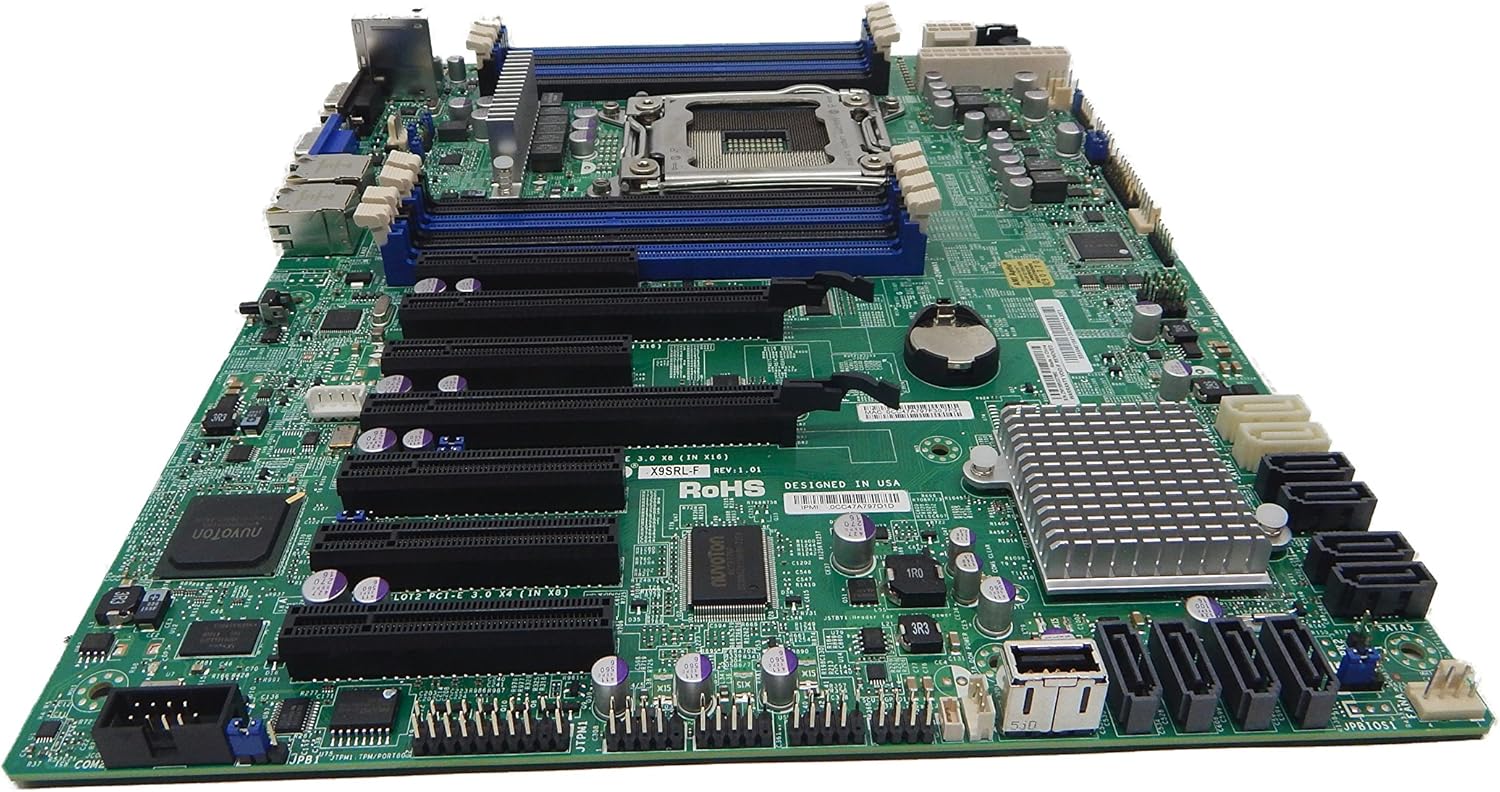
2.1. attēls: No augšas uz leju view of the Supermicro MBD-X10SLH-F-O motherboard, showing the CPU socket, RAM slots, and various expansion slots.

2.2. attēls: Leņķveida view of the motherboard, highlighting the LGA1150 CPU socket and the four DDR3 SODIMM memory slots.

2.3. attēls: Aizmugure view of the Supermicro MBD-X10SLH-F-O motherboard, displaying the I/O panel with USB, VGA, LAN, and IPMI ports.

2.4. attēls: Tuvplāns view of the motherboard, showing the six SATA3 ports and other onboard connectors.
3. Specifikācijas
| Funkcija | Specifikācija |
|---|---|
| Zīmols | Supermikro |
| Modeļa nosaukums | MBD-X10SLH-F-O |
| CPU ligzda | LGA 1150 |
| Čipsetu tips | Intel C226 |
| Saderīgi procesori | Intel Core i3-4xxx, i5-4xxx, i7-4xxx, i3-5xxx, i5-5xxx, i7-5xxx, Intel Xeon E3-1200 v3/v4 series |
| RAM atmiņas tehnoloģija | DDR3 |
| Atmiņas ātrums | 1600 MHz |
| Maksimālā atbalstītā RAM | 32 GB |
| USB 2.0 portu skaits | 6 |
| USB 3.0 portu skaits | 4 |
| SATA porti | 6x SATA3 (6Gbps) |
| Paplašināšanas sloti | 1x PCIe 3.0 x16, 1x PCIe 2.0 x8, 1x PCIe 2.0 x4 |
| Formas faktors | uATX |
| Izmēri (LxWxH) | 14 x 11 x 3.5 collas |
| Preces svars | 3.52 unces |
4. Iestatīšana
Before beginning installation, ensure your system is powered off and disconnected from the power source. Always handle the motherboard by its edges to avoid static discharge.
4.1. Centrālā procesora instalēšana
- Viegli paceliet centrālā procesora ligzdas sviru.
- Align the CPU with the socket, ensuring the gold triangle on the CPU matches the triangle on the socket.
- Uzmanīgi ievietojiet centrālo procesoru ligzdā, to nepiespiežot.
- Lower the socket lever and secure it.
- Uzklājiet termopastas un uzstādiet procesora dzesētāju saskaņā ar ražotāja norādījumiem.
4.2. Atmiņas instalēšana
- Atveriet klipšus abos DIMM slota galos.
- Novietojiet atmiņas moduļa iecirtumu ar atslēgu DIMM slotā.
- Stingri nospiediet abus atmiņas moduļa galus, līdz klipši nofiksējas savās vietās.
4.3. Paplašināšanas kartes uzstādīšana
- Remove the corresponding slot cover from your chassis.
- Novietojiet paplašināšanas karti ar vēlamo PCIe slotu.
- Press down firmly until the card is fully seated.
- Nostipriniet karti ar skrūvi vai fiksatoru.
4.4. Krātuves ierīces savienojums
- Pievienojiet SATA datu kabeļa vienu galu SATA portam mātesplatē.
- Pievienojiet SATA datu kabeļa otru galu atmiņas ierīcei (HDD/SSD).
- Pievienojiet SATA barošanas kabeli no barošanas avota atmiņas ierīcei.
4.5. Barošanas savienojumi
- Pievienojiet barošanas bloka 24 kontaktu ATX galveno barošanas savienotāju mātesplatei.
- Pievienojiet 8 kontaktu (vai 4 kontaktu) ATX 12 V centrālā procesora barošanas savienotāju mātesplatei.
4.6. Priekšējā paneļa savienojumi
Connect the front panel headers (Power LED, HDD LED, Power Switch, Reset Switch, USB, Audio) to the corresponding pins on the motherboard. Refer to the motherboard's silkscreen labels for correct pin orientation.
5. Lietošanas instrukcijas
5.1. Sākotnējā palaišana
- After all components are installed and connected, connect the power cord to your power supply and turn on the power switch.
- Press the power button on your chassis.
- Sistēmai vajadzētu ieslēgties, un monitorā vajadzētu redzēt displeju.
5.2. BIOS/UEFI piekļuve
Lai atvērtu BIOS/UEFI iestatīšanas utilītu, nospiediet norādīto taustiņu (parasti DEL or F2) during the initial boot sequence. The exact key may vary; observe the on-screen prompts.
5.3. IPMI Remote Management
This motherboard features a dedicated IPMI LAN port for remote management. To access the IPMI interface, connect the IPMI LAN port to your network. Obtain the IP address assigned to the IPMI interface (either from BIOS or a network scan) and access it via a web browser from another computer on the same network. Java may be required for remote console functionality.
6. Apkope
Regular maintenance helps ensure the stability and longevity of your motherboard and system.
- Putekļu noņemšana: Periodiski notīriet mātesplati un tās komponentus no putekļiem, izmantojot saspiestu gaisu. Pirms tīrīšanas pārliecinieties, vai sistēma ir izslēgta un atvienota no strāvas.
- Kabeļu vadība: Ensure all cables are neatly routed and secured to prevent obstruction of airflow and accidental disconnections.
- BIOS/programmatūras atjauninājumi: Pārbaudiet Supermicro website for the latest BIOS and IPMI firmware updates. Follow the provided instructions carefully. Note that IPMI BIOS upgrades may require a separate license. Always update BIOS before IPMI firmware.
- Komponentu pārbaudes: Occasionally inspect all connections (power, data, expansion cards) to ensure they are securely seated.
7. Traucējummeklēšana
Šajā sadaļā ir aplūkotas bieži sastopamas problēmas, ar kurām jūs varētu saskarties.
7.1. System Fails to Boot
- Pārbaudiet strāvas savienojumus: Ensure the 24-pin ATX and 8-pin CPU power connectors are securely attached.
- Atkārtoti ievietojiet komponentus: Remove and re-install the CPU, memory modules, and any expansion cards to ensure they are properly seated.
- Notīrīt CMOS: Refer to your motherboard's detailed manual for instructions on how to clear the CMOS, which can resolve boot issues caused by incorrect BIOS settings.
- Minimālā konfigurācija: Try booting with only essential components (CPU, one RAM stick, power supply, and display) to isolate the problem.
7.2. Fan Speed Issues
Some low RPM, high-efficiency fans may not be accurately detected by the motherboard's fan controller, leading to erratic fan speed behavior (e.g., fans spinning up to max RPM). This is often due to the controller expecting server-grade fans with higher RPM ranges.
- BIOS iestatījumi: Check BIOS settings for fan control options. Adjust fan curves or modes if available.
- 3-Pin vs. 4-Pin Fans: If using 4-pin PWM fans that exhibit this behavior, consider using 3-pin adapters if available with your fans. This can sometimes provide a more stable, albeit less precise, fan control.
- IPMI Fan Control: While IPMI offers fan control, it may have limitations for low RPM fans.
7.3. SATA Port Obstruction
When installing a full-size graphics processing unit (GPU), some SATA ports may become physically blocked or difficult to access.
- Plānojiet uz priekšu: Connect SATA cables to the necessary ports before installing large expansion cards.
- Angled SATA Cables: Use SATA cables with angled connectors if straight connectors are obstructed.
- Alternative Ports: Utilize any unblocked SATA ports first.
8. Garantijas un atbalsta informācija
For detailed warranty information, including terms, conditions, and duration, please refer to the official Supermicro website or the warranty card included with your product. For technical support, driver downloads, and additional documentation, visit the Supermicro support portal.
Supermicro Official Webvietne: www.supermicro.com


