1. Ievads
Paldies par pirkumuasing the SEIKO SQ767W Digital Alarm Clock. This compact and versatile clock features a digital display, dual alarms, a calendar, and displays both temperature and humidity. It is designed for convenience on your bedside table or desktop. This manual provides essential information for setup, operation, and maintenance to ensure optimal performance.
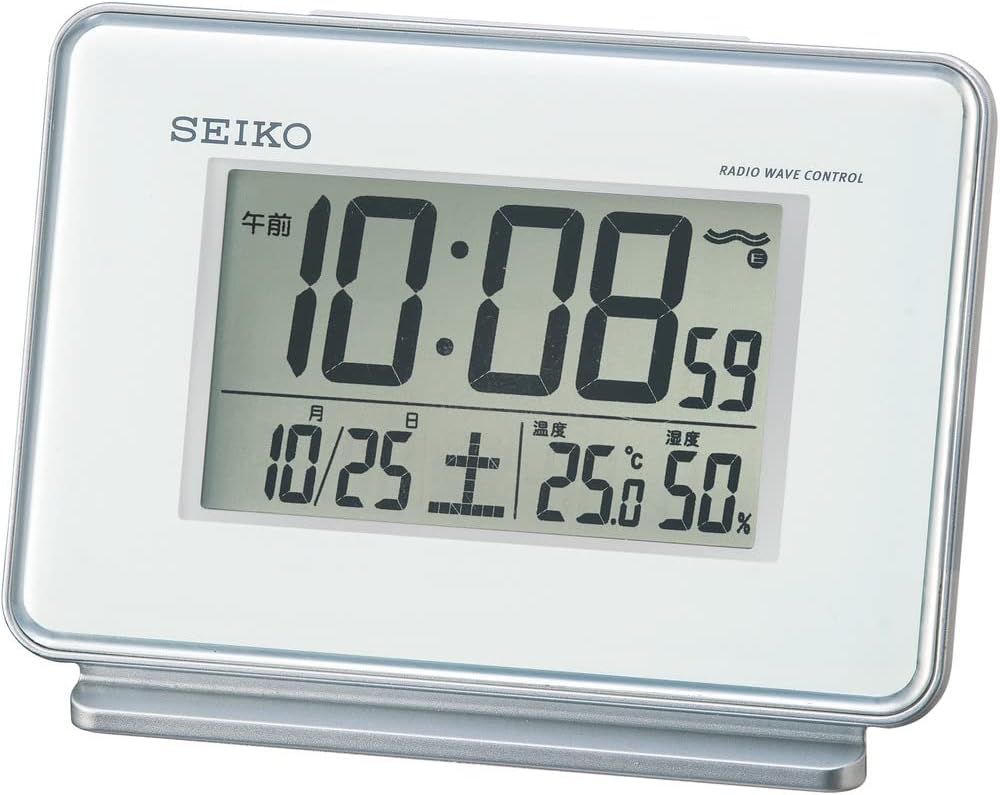
1. attēls. Priekšpuse view of the SEIKO SQ767W Digital Alarm Clock.
2. Produkta īpašības
- Dubultie trauksmes signāli: Set two independent alarm times.
- Radio Wave Correction: Automatically corrects time by receiving standard radio waves (40 kHz/60 kHz automatic selection). Includes a radio wave off function.
- Digitālais displejs: Clear display of time, date, temperature, and humidity.
- Atlikt funkciju: Temporarily pauses the alarm.
- Gaismas funkcija: Izgaismo displeju redzamībai vājā apgaismojumā.
- Alarm Monitor: Allows checking the alarm sound.
- Alarm Auto Stop: Alarm automatically stops after 5 minutes.
- Pilnībā automātisks kalendārs: Displays the correct date automatically.
- Temperature/Humidity Display: Provides current room temperature and humidity readings.
3. Iestatīšana
3.1 Akumulatora uzstādīšana
- Atveriet bateriju nodalījuma vāku, kas atrodas pulksteņa aizmugurē.
- Insert two (2) AA manganese batteries, ensuring correct polarity (+/-).
- Droši aizveriet akumulatora nodalījuma vāku.
The clock requires 2 AA batteries, which are included with the product.
3.2 Sākotnējā ieslēgšana un radioviļņu uztveršana
Upon battery installation, the clock will attempt to receive radio waves to set the time automatically. For best reception:
- Novietojiet pulksteni pie loga.
- Avoid locations with potential radio interference, such as:
- Inside buildings, basements, or areas with thick walls.
- Netālu no liela apjomatage lines, TV towers, or train rails.
- Close to electronic appliances (TVs, refrigerators, air conditioners, computers, etc.).
- In vehicles (automotive, train, airplane).
- Near metal furniture like steel desks.
If radio waves are not received, the clock will operate with quartz accuracy. Reception may vary depending on environmental conditions.

Figure 2: Radio wave coverage map for time synchronization.
4. Lietošanas instrukcijas
The control buttons are located on the back of the clock. Refer to Figure 3 for button identification.

3. attēls. Aizmugure view ar vadības pogām.
4.1. Laika un datuma iestatīšana
- Automatic Setting (Radio Wave): The clock attempts to set the time and date automatically via radio wave reception. Ensure the clock is placed in an optimal reception area.
- Manuālais iestatījums: If radio wave reception is not possible or desired, you can manually set the time and date using the '時刻/日付合わせ' (Time/Date Adjustment) button and other relevant controls on the back. Consult the detailed instructions for specific button sequences.
4.2 Trauksmes iestatīšana (1. un 2. trauksme)
Pulkstenim ir divi neatkarīgi modinātāji.
- Use the 'アラーム時刻合わせ' (Alarm Time Adjustment) button to select Alarm 1 or Alarm 2.
- Adjust the desired alarm time using the appropriate adjustment buttons.
- Toggle the 'アラーム1 ON/OFF' or 'アラーム2 ON/OFF' switch to activate or deactivate each alarm.
4.3 Atlikšanas un apgaismojuma funkcija
Press the large button on top of the clock to activate the snooze function when an alarm sounds. This button also illuminates the display temporarily when pressed outside of an alarm event.
4.4 Temperatūras un mitruma displejs
The clock continuously displays the current room temperature and humidity on its screen. No special action is required to view šie rādījumi.

Figure 4: Close-up of the digital display.
5. Apkope
5.1. Tīrīšana
Wipe the clock with a soft, dry cloth. Do not use abrasive cleaners or solvents, as they may damage the casing vai displejs.
5.2. Akumulatora nomaiņa
Replace batteries when the display dims or the clock's functions become unreliable. Always replace both batteries at the same time with new AA manganese batteries. Dispose of used batteries according to local regulations.
6. Traucējummeklēšana
- Clock not displaying time/functions: Pārbaudiet bateriju uzstādīšanu un pārliecinieties, vai tās nav izlādējušās.
- Laiks nav pareizs: Ensure the clock is in an optimal location for radio wave reception. If automatic correction fails, manually set the time.
- Signalizācija neskan: Verify that the alarm is set to 'ON' and the alarm time is correctly configured.
- Displejs ir blāvs: Nomainiet baterijas.
- Radio wave reception issues: Relocate the clock away from electronic devices, metal objects, or large structures that may interfere with signals.
7. Specifikācijas
| Funkcija | Detaļas |
|---|---|
| Zīmols | SEIKO |
| Modeļa numurs | SQ767W |
| Displeja veids | Digitālais |
| Krāsa | Balts |
| Produkta izmēri | 3.5 x 5.0 x 2.3 collas (9.0 x 12.7 x 5.8 cm) |
| Preces svars | 0.4 lbs (210 grams / 7.4 ounces) |
| Materiāls | Plastmasa |
| Barošanas avots | Darbojas ar baterijām (nepieciešamas 2 AA baterijas, iekļautas komplektā) |
| Īpašas funkcijas | Calendar Display, Loud Alarm, Temperature/Humidity Display, Radio Wave Correction |
| Alarm Channels | 2 |
| Alarm Auto Stop | 5 minūtes |
| Savienojamības tehnoloģija | Radio |
| Montāžas veids | Brīvi stāvoši |
| Izcelsmes valsts | Ķīna |
8. Garantija un atbalsts
For warranty information or technical support, please refer to the documentation included with your purchase or contact SEIKO customer service. Keep your purchase receipt as proof of purchase.


