1. Ievads
The Comfast CF-WU720N is a compact 150Mbps Wireless USB Adapter designed to provide high-speed wireless connectivity for your desktop or notebook computer. It allows you to connect to a wireless network and access the internet, share files, and enjoy online gaming at speeds up to 150Mbps. This adapter is compliant with IEEE 802.11b/g/n standards and supports USB 2.0 for efficient data transfer.
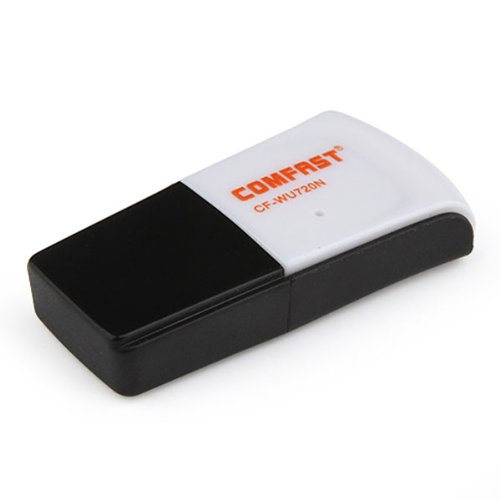
Image 1.1: The Comfast CF-WU720N Wireless USB Adapter, a compact device for wireless connectivity.
2. Produkta īpašības
- Meets IEEE 802.11b/g/n wireless standards.
- Supports USB 2.0 interface for broad compatibility.
- Utilizes Realtek 8191 SU chipset for reliable performance.
- Achieves wireless connection rates up to 150Mbps.
- Supports wireless roaming technology for seamless connectivity.
- Strong compatibility with various popular operating systems.
- Compact size: approximately 39 x 12 x 7mm (1.5 x 0.7 x 0.3 inches).
- Lightweight design: approximately 5g.
3. Iepakojuma saturs
Lūdzu, pārliecinieties, ka iepakojumā ir visi nepieciešamie priekšmeti:
- 1 x Comfast CF-WU720N Wireless USB Adapter
- 1 x ātrās uzstādīšanas rokasgrāmata
- 1 x CD-ROM Driver
- 1x garantijas karte

Image 3.1: The retail packaging for the Comfast CF-WU720N, showing the adapter inside.
4. Iestatīšana un instalēšana
4.1. Draivera instalēšana
Before connecting the USB adapter, it is recommended to install the necessary drivers from the provided CD-ROM. This ensures proper functionality and compatibility with your operating system.
- Insert the driver CD-ROM into your computer's optical drive.
- If the installer does not launch automatically, navigate to "My Computer" or "This PC," open the CD-ROM drive, and run the setup executable (e.g., "setup.exe" or "autorun.exe").
- Follow the on-screen instructions to complete the driver installation. You may be prompted to restart your computer after installation.
- Piezīme: If your computer does not have an optical drive, you may need to download the latest drivers from the manufacturer's official webvietne.
4.2. Connecting the USB Adapter
Once the drivers are installed, you can connect the Comfast CF-WU720N Wireless USB Adapter to your computer.
- Locate an available USB 2.0 or 3.0 port on your desktop or laptop computer.
- Carefully insert the Comfast CF-WU720N adapter into the USB port. Ensure it is fully seated.
- The operating system should automatically detect the adapter and configure it using the installed drivers. A small LED indicator on the adapter may light up or blink, indicating activity.
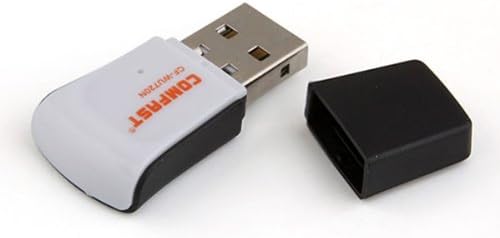
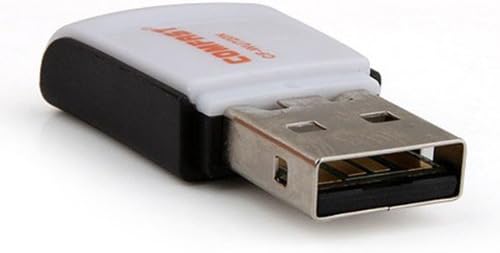
Image 4.1: The Comfast CF-WU720N adapter with its protective cap removed, revealing the USB connector. Image 4.2: A side view of the adapter, highlighting its compact design and USB interface.
5. Lietošanas instrukcijas
After successful driver installation and adapter connection, you can now connect to a wireless network.
- Piekļuves tīkla iestatījumi:
- Windows: Click the wireless network icon in the system tray (usually bottom-right corner).
- MacOS: Click the Wi-Fi icon in the menu bar (usually top-right corner).
- Linux: Access network settings through your desktop environment's network manager.
- Izvēlieties savu tīklu: A list of available wireless networks (SSIDs) will appear. Select the name of your desired network.
- Savienot: Click "Connect" or "Join." If the network is secured, you will be prompted to enter the network security key (password).
- Apstipriniet savienojumu: Once connected, the network icon will typically change to indicate a successful connection, and you should be able to access the internet.
6. Apkope
To ensure optimal performance and longevity of your Comfast CF-WU720N Wireless USB Adapter, follow these simple maintenance guidelines:
- Uzturēt tīru: Gently wipe the adapter with a soft, dry cloth to remove dust. Avoid using liquid cleaners or solvents.
- Aizsargājiet USB savienotāju: When not in use, keep the protective cap on the USB connector to prevent dust and damage.
- Izvairieties no ekstremāliem apstākļiem: Nepakļaujiet adapteri ekstremālām temperatūrām, mitrumam vai tiešiem saules stariem.
- Rīkojieties uzmanīgi: Izvairieties no adaptera nomešanas vai pakļaušanas spēcīgiem triecieniem.
- Draiveru atjauninājumi: Periodiski pārbaudiet ražotāja webvietni, lai atjauninātu draiverus, lai nodrošinātu vislabāko veiktspēju un saderību.
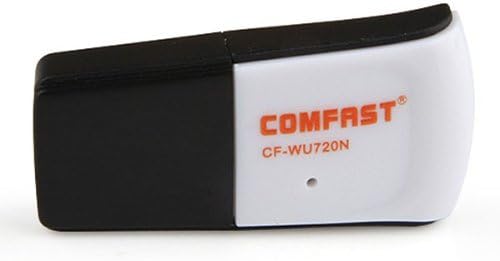
Image 6.1: The Comfast CF-WU720N adapter with its protective cap in place, ready for storage or transport.
7. Traucējummeklēšana
If you encounter issues with your Comfast CF-WU720N Wireless USB Adapter, refer to the following common solutions:
| Problēma | Iespējamais risinājums |
|---|---|
| Adapter not detected / No Wi-Fi networks visible. |
|
| Nevar izveidot savienojumu ar konkrētu Wi-Fi tīklu. |
|
| Slow connection speed or frequent disconnections. |
|
8. Specifikācijas
| Funkcija | Detaļas |
|---|---|
| Modelis | CF-WU720N |
| Bezvadu standarti | IEEE 802.11b/g/n |
| Interfeiss | USB 2.0 |
| Chipset | Realtek 8191 SU |
| Bezvadu ātrums | Līdz 150 Mbps |
| Frekvenču diapazons | 2.4 GHz |
| Drošības līdzekļi | WPA/WPA2, WPA-PSK/WPA2-PSK, 64/128-bit WEP |
| Operētājsistēmas | Windows XP/Vista/7/8/10, macOS, Linux (driver dependent) |
| Izmēri (G x P x A) | Aptuveni 39 x 12 x 7 mm (1.5 x 0.7 x 0.3 collas) |
| Svars | Apm. 5g |
9. Garantija un atbalsts
This product comes with a warranty as specified on the included Warranty Card. Please refer to the card for details regarding warranty period, terms, and conditions.
For technical support, driver updates, or further assistance, please visit the official Comfast webvietnē vai sazinieties ar viņu klientu apkalpošanas nodaļu. Kontaktinformācija parasti ir atrodama uz produkta iepakojuma vai ražotāja webvietne.
Lūdzu, saglabājiet pirkuma čeku garantijas vajadzībām.


