Ievads
This user manual provides essential information for setting up, operating, maintaining, and troubleshooting your Vibox Standard 3XL Gaming PC. Please read this manual thoroughly before using your computer to ensure proper function and longevity of the product. Keep this manual for future reference.
Drošības informācija
- Ensure the PC is placed on a stable, flat surface with adequate ventilation.
- Do not block ventilation openings. Overheating can damage components.
- Keep the PC away from direct sunlight, heat sources, and liquids.
- Use only the power supply unit provided with the PC.
- Disconnect the power cable before cleaning or performing any maintenance.
- Do not open the PC casing, ja vien to nav norādījis kvalificēts tehniķis.
- Avoid placing heavy objects on the PC or its cables.
Iepakojuma saturs
Pārliecinieties, vai jūsu iepakojumā ir visi tālāk norādītie priekšmeti:
- Vibox Standard 3XL Gaming PC Tower
- 21.5-inch LED HD Monitor
- UK QWERTY Gamer Keyboard
- Spēļu pele
- Strāvas kabelis(-i)
- HDMI kabelis
- Windows 10 Operating System Disk/License Key
- Lietotāja rokasgrāmata (šis dokuments)
Iestatīšanas rokasgrāmata
1. Izpakošana un novietošana
Carefully remove all components from their packaging. Place the PC tower on a flat, stable surface, ensuring sufficient space around it for airflow. Avoid placing it in enclosed cabinets.

1. attēls. Priekšpuse view of the Vibox Standard 3XL Gaming PC tower, showcasing tā dizainu un zilajiem LED akcentiem.
2. Perifērijas ierīču pievienošana
- Monitors: Connect the HDMI cable from your monitor to the HDMI port on the back of the PC.
- Tastatūra un pele: Connect the USB cables from your keyboard and mouse to any available USB ports on the back or front of the PC.
- Jauda: Connect the power cable to the power supply unit on the back of the PC, then plug the other end into a wall outlet. Connect the monitor's power cable to an outlet as well.
- Tīkls (pēc izvēles): For a wired internet connection, connect an Ethernet cable from your router to the Ethernet port on the back of the PC. For Wi-Fi, ensure the Wi-Fi antenna (if provided) is connected.

2. attēls: No augšas uz leju view of the PC, illustrating the location of top-mounted USB ports and ventilation.
3. Sākotnējā ieslēgšana un Windows iestatīšana
- Press the power button on the front of the PC tower.
- Ieslēdziet monitoru.
- Follow the on-screen instructions to complete the Windows 10 setup process. This typically involves selecting your region, language, creating a user account, and accepting terms.
- Once Windows 10 is set up, you may need to install drivers for any additional peripherals or update existing drivers.
Lietošanas instrukcijas
Ieslēgšana/izslēgšana
- Ieslēgt: Nospiediet ieslēgšanas/izslēgšanas pogu datora priekšpusē.
- Lai izslēgtu: Click the Start button in Windows 10, then select Power > Shut down. Do not force shut down by holding the power button unless absolutely necessary to prevent data loss.
- Lai restartētu: Noklikšķiniet uz pogas Sākt un pēc tam atlasiet Barošana > Restartēt.
USB ierīču pievienošana
Your PC is equipped with multiple USB 2.0 and USB 3.0 ports. USB 3.0 ports are typically blue and offer faster data transfer speeds. Simply plug your USB device into an available port.
Karšu lasītāja lietošana
The integrated card reader supports various memory card formats. Insert your memory card into the appropriate slot on the PC. The card will appear as a removable drive in 'This PC' (or 'My Computer').
Apkope
Tīrīšana
- Ārpuse: Izmantojiet mīkstu, damp cloth to wipe the exterior of the PC. Avoid abrasive cleaners or solvents.
- Ventilācija: Periodically use compressed air to clear dust from the ventilation grilles to ensure optimal airflow and prevent overheating. Ensure the PC is powered off and unplugged before doing so.
- Monitors: Use a specialized screen cleaner and a microfiber cloth for the monitor display.
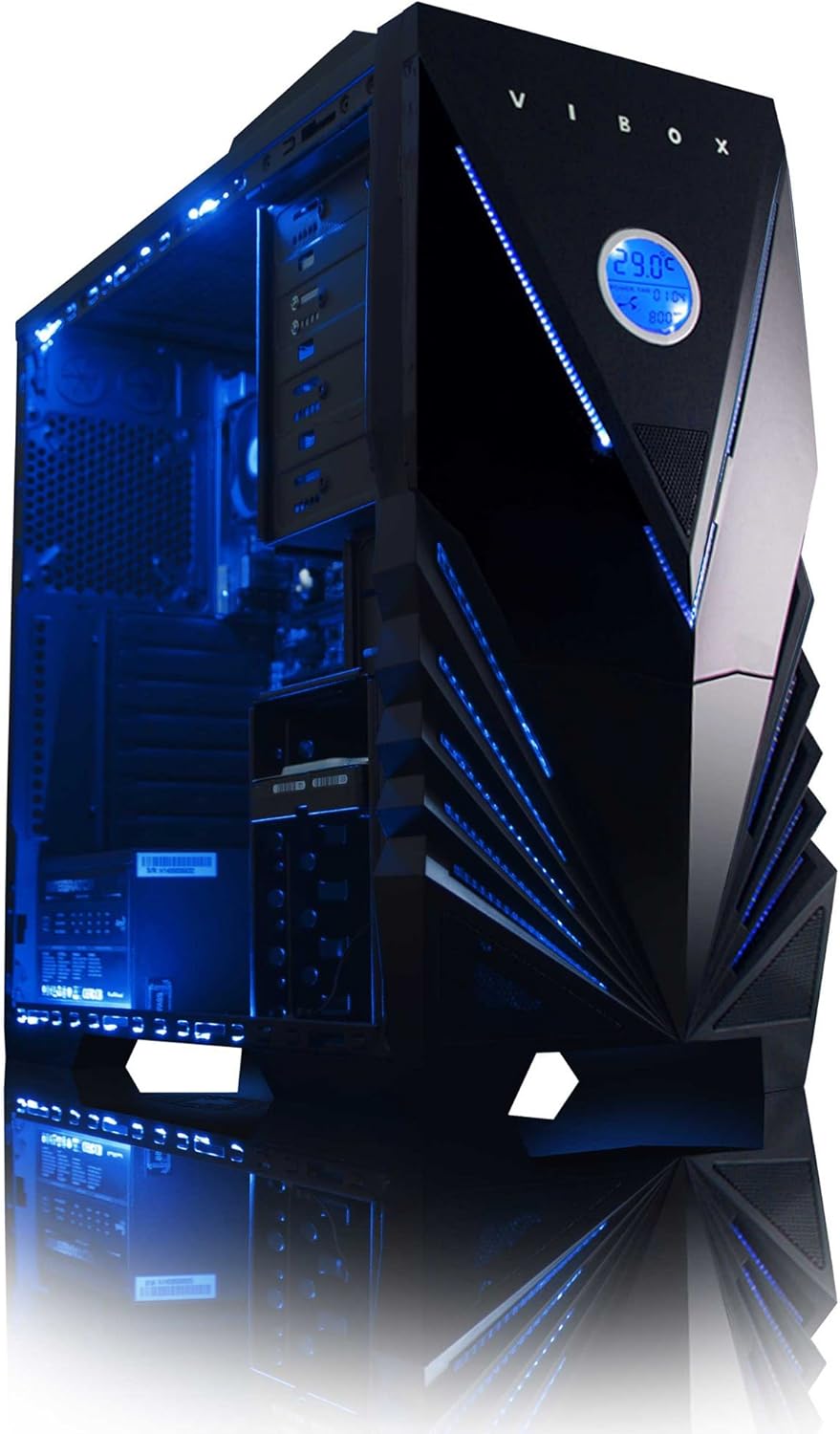
3. attēls: iekšējais view of the Vibox Standard 3XL Gaming PC, highlighting the arrangement of components and cooling system.
Programmatūras atjauninājumi
Regularly update your Windows operating system, drivers, and antivirus software to ensure system stability, security, and optimal performance.
Datu dublēšana
Ieteicams regulāri dublēt svarīgus datus ārējā diskdzinī vai mākoņkrātuvē, lai novērstu datu zudumu sistēmas kļūmes gadījumā.
Problēmu novēršana
| Problēma | Iespējamais cēlonis | Risinājums |
|---|---|---|
| Dators neieslēdzas. | Power cable loose, power supply issue, power button malfunction. | Check all power connections. Ensure the wall outlet is functional. Try a different power cable if available. |
| Monitorā nav displeja. | Monitor not powered, video cable loose, incorrect input selected on monitor. | Ensure monitor is powered on and connected. Check video cable connections. Select correct input source on monitor (e.g., HDMI). |
| PC is running slow. | Too many programs running, insufficient RAM, hard drive full, malware. | Close unnecessary applications. Check disk space. Run antivirus scans. Consider upgrading RAM if consistently slow. |
| Perifērijas ierīces (klaviatūra/pele) nereaģē. | Vaļīgs USB savienojums, draivera problēma. | Reconnect the peripheral to a different USB port. Restart the PC. Check device manager for driver issues. |
If you encounter issues not covered here or require further assistance, please refer to the Support section.
Specifikācijas
| Funkcija | Detaļas |
|---|---|
| Zīmols | Vibox |
| Modeļa numurs | VBX-PC-6450 |
| sērija | VIBOX Standard |
| Operētājsistēma | Windows 10 |
| Procesora zīmols | AMD |
| Procesora tips | Athlon 64 FX (AMD A8 Quad-Core) |
| Procesora ātrums | 3.1 GHz (3.8 GHz Turbo) |
| Kodolu skaits | 4 |
| RAM | 32 GB DDR3 1600 MHz atmiņa |
| Atbalstīta maksimālā atmiņa | 32 GB |
| Cietā diska izmērs | 2000 GB (2 TB) |
| Cietā diska tehnoloģija | HDD (7200 RPM, Serial ATA 600) |
| Grafikas mikroshēmojuma zīmols | Radeons |
| Grafikas kartes apraksts | AMD Radeon R7 (integrēts) |
| Displeja tehnoloģija | Bez pieskāriena |
| Screen Size (Included Monitor) | 21.5 collas |
| Screen Resolution (Included Monitor) | 1920 x 1080 (1080p pilna HD izšķirtspēja) |
| Malu attiecība | 16:9 |
| Savienojamības veids | Wi-Fi (802.11bgn) |
| Bluetooth savietojams | Nē |
| HDMI porti | 1 |
| USB 2.0 porti | 6 |
| USB 3.0 porti | 3 |
| Ethernet porti | 1 |
| Īpašas funkcijas | Karšu lasītājs |
| Izmēri (G x P x A) | 51.5 x 19 x 44 cm |
| Produkta svars | 16 Grams (PC Tower only) |
Garantijas informācija
Your Vibox Standard 3XL Gaming PC comes with a Mūža garantija. This warranty covers manufacturing defects and hardware failures under normal use conditions. For specific terms and conditions, please refer to the warranty documentation included with your purchase or contact Vibox customer support.
To claim warranty service, you will typically need your proof of purchase and the product's serial number. Do not attempt to repair the product yourself, as this may void your warranty.
Klientu atbalsts
For technical assistance, troubleshooting beyond this manual, or warranty inquiries, please contact Vibox customer support. You can usually find contact information (phone number, email, or support webražotāja oficiālajā vietnē webvietā vai uz iepakojuma materiāliem.
When contacting support, please have your product model number (VBX-PC-6450) and serial number ready to expedite the service process.


