Ievads
The Electro-Harmonix KEY9 Electric Piano Machine Pedal is designed to emulate a variety of classic electric pianos and other keyboard instruments. This pedal allows guitarists to transform their instrument's sound, offering a versatile range of tones from iconic Wurlitzer and Rhodes sounds to mallets and steel drums. Each of the 9 presets provides control over fundamental parameters that define the instrument's sound, often including adjustable modulation effects such as tremolo, phaser, and chorus. The KEY9 is a powerful tool for expanding your sonic palette.

Figure 1: The KEY9 Electric Piano Machine Pedal positioned on a keyboard.
Iestatīšana
To begin using your KEY9 pedal, follow these steps:
- Strāvas pieslēgums: Connect the included 9.6VDC 500mA power supply to the 9V power jack on the pedal.
- Ievades savienojums: Connect your guitar to the INPUT jack on the right side of the pedal using a standard 1/4-inch instrument cable.
- Izvades savienojums: Connect the KEYS OUTPUT jack on the left side of the pedal to your amplifier or mixer using a standard 1/4-inch instrument cable. An additional DRY OUTPUT jack is available to send your unaffected guitar signal to a separate amplifier or input.
- Sākotnējie iestatījumi: Ensure all control knobs (DRY, VOL, KEYS, CTRL 1, CTRL 2) are set to their minimum positions before powering on to avoid sudden volume changes.

2. attēls: No augšas uz leju view of the KEY9 pedal showing input and output connections.
Lietošanas instrukcijas
The KEY9 pedal features intuitive controls for shaping your sound. Familiarize yourself with the knobs and presets to unlock its full potential.
Vadības ierīces:
- DRY poga: Controls the volume of your unaffected guitar signal at the KEYS OUTPUT.
- VOL poga: Controls the overall volume of the selected KEY9 preset sound.
- KEYS Knob: Controls the volume of the selected KEY9 preset sound at the KEYS OUTPUT.
- CTRL 1 & CTRL 2 Knobs: These controls adjust different parameters depending on the selected preset. They typically modify aspects like modulation speed/depth, tone, or attack characteristics.
- Preset Selector Knob: A 9-position rotary switch to select between the different electric piano and keyboard sounds.
- Apiet kāju slēdzi: Toggles the effect on/off. When the effect is active, the LED illuminates red.
Izvades:
- KEYS OUTPUT: Delivers the processed KEY9 sound, mixed with the dry signal if the DRY knob is raised.
- DRY OUTPUT: Provides a buffered bypass of your guitar signal, allowing you to send your unaffected signal to a separate destination.
Iepriekš iestatījumi:
The KEY9 offers 9 distinct presets, each emulating a unique keyboard or percussive instrument. The CTRL 1 and CTRL 2 knobs will have different functions for each preset.
- Dynamo: Emulates a classic Fender Rhodes electric piano, known for its smooth, ambient tones. CTRL 1 and CTRL 2 adjust overtones and low-end response.
- Wurli: Recreates the distinct sound of a Wurlitzer electric piano, often featuring a built-in tremolo. CTRL 1 and CTRL 2 typically control tremolo speed and depth.
- Čemodāns: A variation of the electric piano sound, often characterized by a phase shifter effect. CTRL 1 and CTRL 2 adjust phaser speed and depth.
- Mallets: Produces marimba-like or other mallet percussion sounds. This preset is highly responsive to playing dynamics.
- Eighty Eight: Another Rhodes electric piano emulation, often with a bright, bell-like quality and tremolo. CTRL 1 and CTRL 2 adjust tremolo and tone.
- Tri-Glorious: Emulates a three-voice chorus rack effect, providing lush, swirling textures. CTRL 1 and CTRL 2 control chorus depth and rate.
- Vibes: Recreates the sound of a vibraphone, typically with a distinct tremolo. CTRL 1 and CTRL 2 adjust tremolo speed and depth.
- Ērģeles: A classic organ sound, offering rich, sustained tones. CTRL 1 and CTRL 2 may adjust attack and decay or modulation.
- Steel Drums: Produces the bright, percussive sound of steel drums. This preset is highly dynamic and responsive.
Video 1: Official demonstration of the Electro-Harmonix KEY9 Electric Piano Machine Pedal, showcasing its various presets and controls.
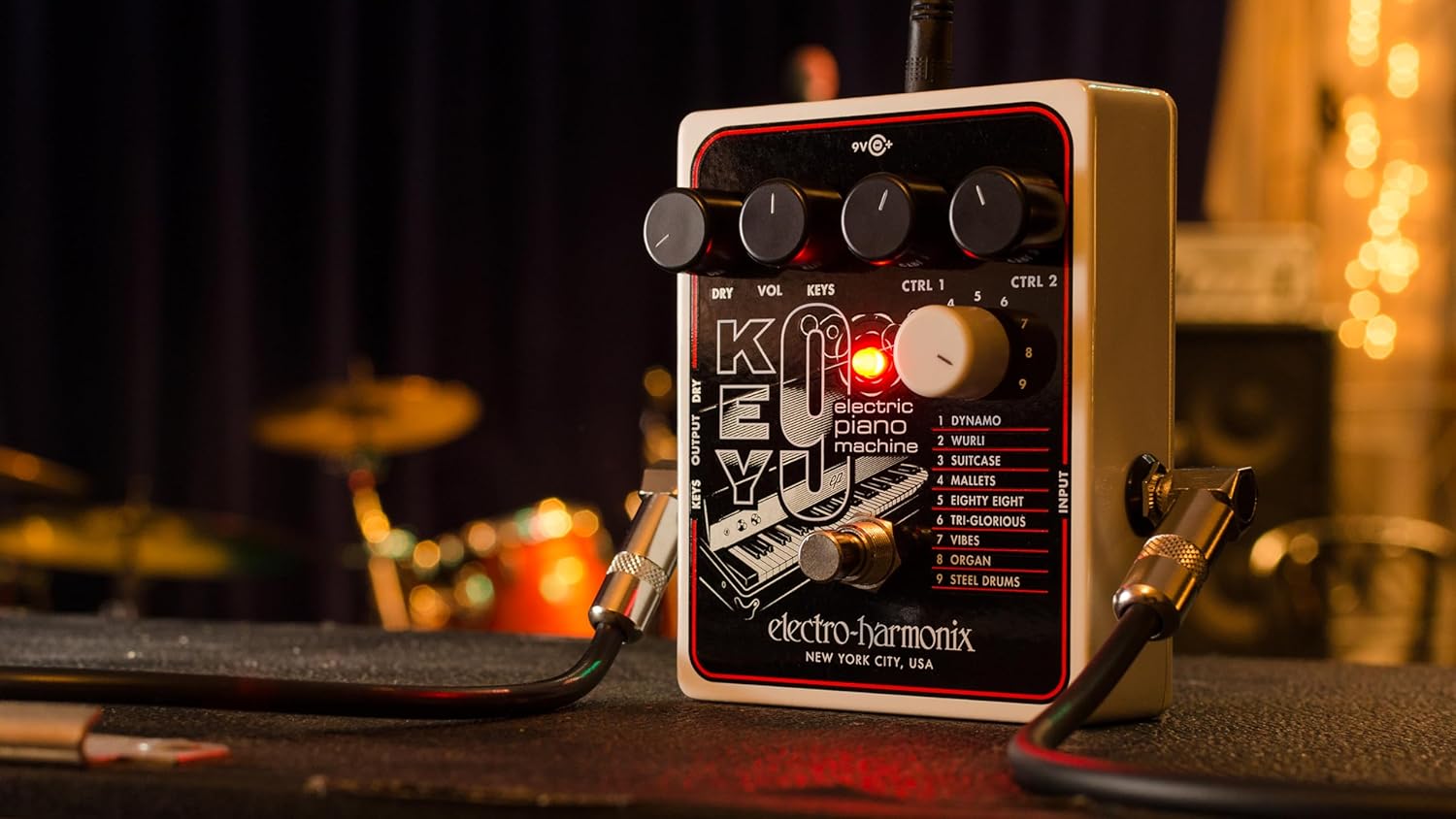
3. attēls: Leņķis view of the KEY9 pedal, highlighting the control knobs and jacks.
Apkope
To ensure the longevity and optimal performance of your Electro-Harmonix KEY9 pedal, follow these maintenance guidelines:
- Tīrīšana: Pedāļa ārpuses tīrīšanai izmantojiet mīkstu, sausu drānu. Izvairieties no abrazīviem tīrīšanas līdzekļiem vai šķīdinātājiem.
- Uzglabāšana: Kad pedālis netiek lietots, uzglabājiet to vēsā, sausā vietā, pasargājot to no tiešiem saules stariem un ekstremālām temperatūrām.
- Barošanas avots: Always use the included 9.6VDC 500mA power supply or a compatible, regulated power supply to prevent damage.
- Savienojumi: Periodiski pārbaudiet visus kabeļu savienojumus, vai tie nav nodiluši. Pārliecinieties, vai domkrati nav putekļi un gruži.
Problēmu novēršana
If you encounter issues with your KEY9 pedal, consult the following common troubleshooting steps:
- Nav skaņas:
- Pārbaudiet visus kabeļu savienojumus (ieejas, izejas, strāvas).
- Pārliecinieties, vai barošanas avots ir pareizi pievienots un darbojas.
- Pārbaudiet, vai jūsu amplifier or mixer is powered on and its volume is up.
- Adjust the DRY and KEYS/VOL knobs on the pedal.
- Slikta skaņas kvalitāte/troksnis:
- Ensure you are using a proper, regulated 9.6VDC power supply.
- Pārbaudiet, vai nav bojātu kabeļu.
- Experiment with different guitar pickups or guitar settings.
- Adjust the CTRL 1 and CTRL 2 knobs, as some settings may introduce unwanted artifacts depending on your guitar and playing style.
- Efekts nav saistošs:
- Press the footswitch firmly to ensure it engages. The LED should illuminate.
- If the LED does not light up, check the power supply.
Specifikācijas
| Preces svars | 1.1 mārciņas |
| Produkta izmēri | 4.75 collu garums × 4 collu platums × 2.25 collu augstums |
| Preces modeļa numurs | KEY9 |
| Barošanas avots | Corded Electric (9.6VDC 500mA power supply included) |
| Aparatūras saskarne | 1/4 collu audio |
| Signāla formāts | Analogs |
| Materiāla veids | Plastic (brushed aluminum finish) |
| Prasmju līmenis | Vidējs, Advanced |
Garantija un atbalsts
Electro-Harmonix products are designed for reliability and performance. For warranty information, technical support, or service inquiries, please refer to the official Electro-Harmonix webvietnē vai sazinieties ar klientu apkalpošanas nodaļu. Saglabājiet pirkuma čeku kā pirkuma apliecinājumu jebkādu garantijas prasību gadījumā.


