Ievads
This manual provides instructions for the HAVIT HV-KB366L RGB Backlit Mechanical Gaming Keyboard. This keyboard features blue mechanical switches, full anti-ghosting, and customizable RGB backlighting, designed for reliable performance.
Iestatīšanas instrukcijas
Tastatūras pievienošana
- Atrodiet datorā pieejamo USB portu.
- Connect the USB cable from the HAVIT HV-KB366L keyboard to the USB port on your computer.
- Tastatūra ir “plug-and-play” tipa, un operētājsistēmai tā būtu jāatpazīst automātiski.
Sistēmas saderība
- Compatible with Windows 10 and other Windows operating systems.
- Mac OS supports 6-key rollover only.
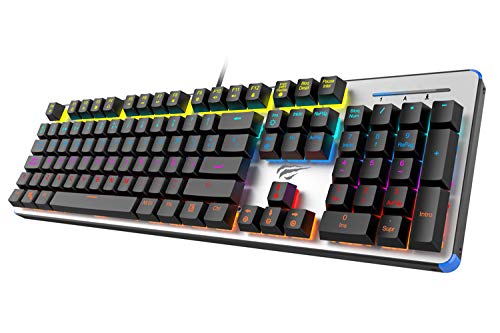
Figure 1: HAVIT HV-KB366L RGB Backlit Mechanical Gaming Keyboard. An overhead view of the keyboard, showcasing its full layout with RGB lighting on the keys and a white frame.
Lietošanas instrukcijas
Mehāniskie atslēgu slēdži
The keyboard is equipped with blue mechanical switches, providing tactile feedback and an audible click with each keystroke. This design is intended for precise input during typing and gaming.
Pret spoku funkciju
The full key anti-ghosting mechanism ensures that all key presses are registered accurately, even when multiple keys are pressed simultaneously. This feature is beneficial for fast-paced gaming.
Fona apgaismojuma regulēšana
- To change the backlight color or mode, press the Fn taustiņu vienlaikus ar Aizmugurgaismojums key. Repeated presses will cycle through available modes and colors.
- Marquee Mode: In 7-color backlit mode (non-breathing), press the Aizmugurgaismojums key once to activate marquee mode. Press the Aizmugurgaismojums key again to deactivate marquee mode and return to 7-color backlit mode.
- Spilgtuma līmeņi: The backlight offers 4 levels of brightness adjustment.
- Breathing Rate: The breathing effect has 10 adjustable levels.
Apkope
Tastatūras tīrīšana
- Pirms tīrīšanas atvienojiet tastatūru no datora.
- Tastatūras virsmas noslaukšanai izmantojiet mīkstu, sausu drānu.
- Lai notīrītu putekļus un gružus starp taustiņiem, izmantojiet saspiestu gaisu.
- Avoid using harsh chemicals or abrasive materials, as these can damage the finish or keycaps.
Izturība
The keyboard features an aluminum top housing with a sanded finish and a metal base, contributing to its overall durability and stable performance.
Problēmu novēršana
Tastatūra nereaģē
- Pārliecinieties, vai USB kabelis ir droši pievienots gan tastatūrai, gan datoram.
- Mēģiniet pievienot tastatūru citam datora USB portam.
- Pārbaudiet tastatūru citā datorā, lai noteiktu, vai problēma ir saistīta ar tastatūru vai datora USB portu.
Fona apgaismojums nedarbojas vai ir nepareizs
- Pārliecinieties, vai tastatūra ir pareizi pievienota un saņem strāvu.
- Nospiediet Fn + Backlit key to cycle through backlight modes and ensure it is not turned off or set to a very low brightness.
- Refer to the "Backlight Adjustment" section for detailed instructions on changing modes and brightness.
Specifikācijas
| Zīmols | HAVIT |
| Modeļa numurs | HV-KB366L |
| Ražotājs | HAVIT |
| Produkta izmēri | 50.5 x 17.6 x 6 centimetri |
| Preces svars | 1.33 kg |
| Savienojamības tehnoloģija | Vadu (USB) |
| Tastatūras apraksts | Spēļu mehāniskā tastatūra |
| Īpaša iezīme | RGB Backlit, Anti-Ghosting |
| Aparatūras platforma | Klēpjdators, dators |
| Operētājsistēma | Windows 10 (and compatible), Mac OS (6-key rollover) |
| Voltage | 5 volts |
| Iekļautie komponenti | USB kabelis |
Garantija un atbalsts
Garantijas informācija
Specific warranty details for the HAVIT HV-KB366L keyboard are not provided in the product data. Please refer to the product packaging or contact HAVIT directly for warranty terms and conditions.
Klientu atbalsts
For technical assistance, troubleshooting, or further inquiries, please contact HAVIT customer support through their official webvietni vai pirkuma laikā sniegto kontaktinformāciju.


