1. Ievads
Paldies par pirkumuasing the Gotech GTV-7-TFT 7-inch Portable Color TFT LCD TV. This manual provides essential information for the safe and efficient operation of your device. Please read it thoroughly before use and retain it for future reference.
2. Svarīgi drošības norādījumi
- Nepakļaujiet ierīci lietum vai mitrumam, lai novērstu ugunsgrēku vai elektriskās strāvas triecienu.
- Neatveriet casing. Visus apkopes darbus uzticiet kvalificētam personālam.
- Nenovietojiet ierīci siltuma avotu tuvumā vai tiešos saules staros.
- Nodrošiniet pareizu ventilāciju ap iekārtu.
- Izmantojiet tikai norādīto strāvas adapteri.
- Sargājiet ierīci no spēcīgiem magnētiskajiem laukiem.
- Tīriet ierīci ar mīkstu, sausu drānu. Nelietojiet šķidrus tīrīšanas līdzekļus.
3. Iepakojuma saturs
Pārliecinieties, vai iepakojumā ir visi priekšmeti:
- Gotech GTV-7-TFT Portable TV Unit
- Tālvadības pults
- AC/DC adapteris
- Car Cord (Car Holder not explicitly listed as included, but mentioned as a feature)
- Antenas džeks
- AV kabelis
- Noņemams statīvs

Image 3.1: The retail box for the Gotech GTV-7-TFT Portable TV, showing the product, remote control, and included accessories.
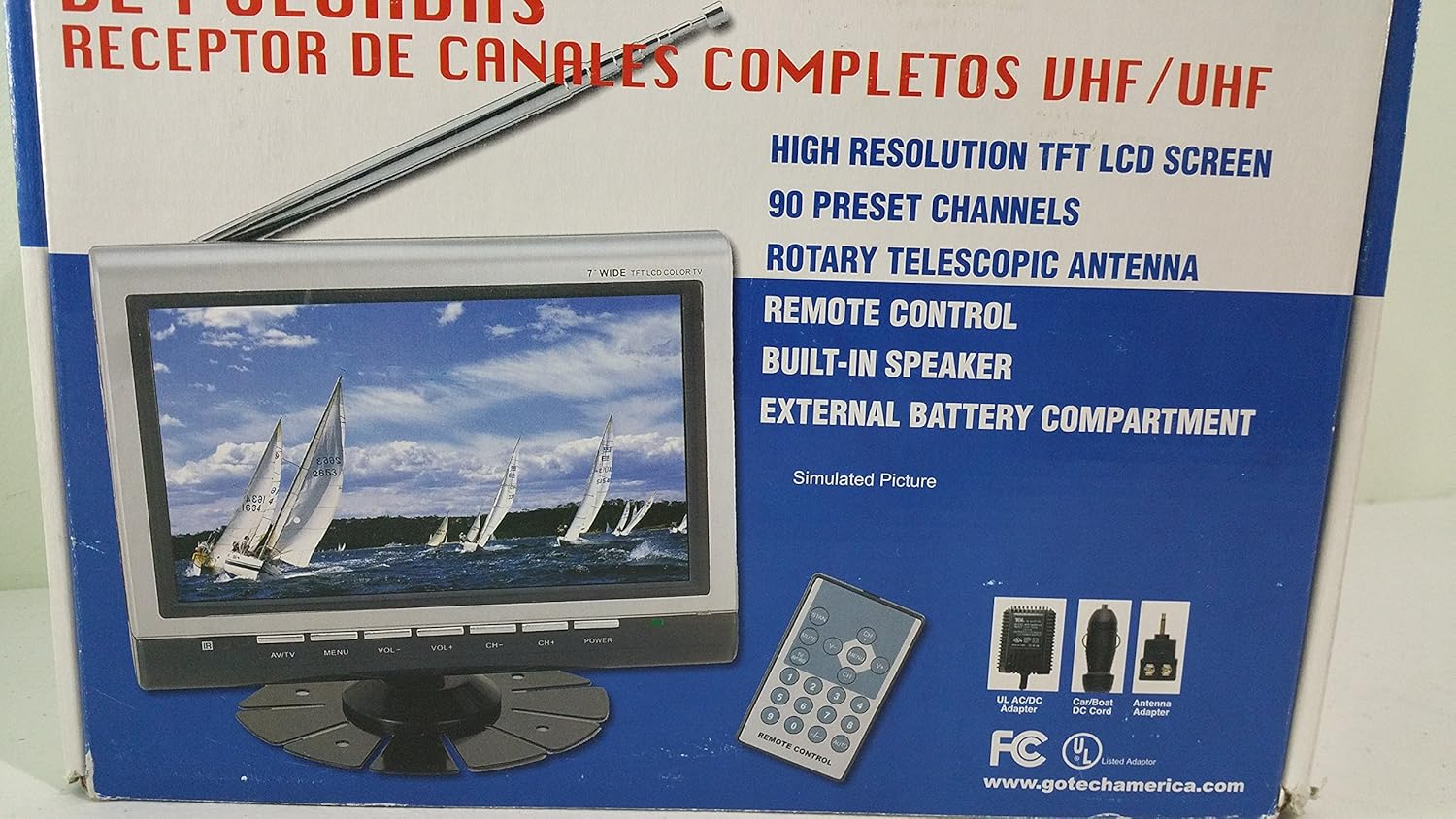
3.2. attēls: Aizvērējs view of the Gotech GTV-7-TFT TV screen and the remote control, as depicted on the product packaging.
4. Produkts beidziesview
4.1 Galvenās funkcijas
- 7-inch High Resolution TFT LCD Screen
- Pilna kanāla VHF/UHF uztvērējs
- 90 Iepriekš iestatīti kanāli
- Digital Up/Down Tuning
- Auto Channel Programming
- Rotācijas teleskopiskā antena
- On-Screen Display (OSD) for Picture and Volume Adjustment
- Iebūvēts skaļrunis
- External Battery Compartment (requires 10x AA batteries, not included)
- Remote Control with Button Cell
- New Detachable Stand with Battery

Image 4.1: Side panel of the Gotech GTV-7-TFT packaging, detailing the product's main features.
5. Iestatīšana
5.1 Powering the TV
The GTV-7-TFT can be powered in several ways:
- Maiņstrāvas/līdzstrāvas adapteris: Connect the provided AC/DC adapter to the TV's power input and then to a standard wall outlet.
- Car Cord: For in-vehicle use, connect the car cord to the TV's power input and then to your vehicle's 12V power outlet.
- Ārējie akumulatori: Open the external battery compartment and insert 10x AA size batteries (UM3) according to the polarity indicators. Ensure the batteries are fresh and correctly oriented.
5.2 Antenas pievienošana
Extend the rotary telescopic antenna for optimal signal reception. For improved reception, you may connect an external antenna to the antenna jack using the provided antenna jack adapter.
5.3 Connecting External Devices (AV Input)
To connect external devices such as a DVD player or gaming console, use the provided AV cable. Connect one end to the TV's AV input port and the other end to the AV output ports of your external device. Select the AV input source on the TV to view saturu no pievienotās ierīces.
6. Darbība
6.1 Ieslēgšana/izslēgšana
Nospiediet pogu SPĒKS button on the TV unit or the remote control to turn the TV on or off.
6.2 Kanālu regulēšana
- Automātiska kanālu programmēšana: It is recommended to perform an auto channel scan upon first use or when moving to a new location. Access the menu, navigate to the channel setup, and select 'Auto Scan' or 'Auto Program'. The TV will search and store available channels.
- Digital Up/Down Tuning: Izmantojiet CH+ un CH- buttons on the TV or remote control to navigate through the preset channels.
6.3 Volume and Picture Adjustment
Izmantojiet VOL+ un VOL- buttons on the TV or remote control to adjust the volume. Picture settings (brightness, contrast, color) can be adjusted via the on-screen display (OSD) menu. Press the IZVĒLNE button to access these options.
6.4 tālvadības pults
The remote control allows convenient operation from a distance. Ensure the button cell battery is correctly inserted. Point the remote control directly at the TV's infrared sensor.
7. Apkope
7.1. Tīrīšana
Wipe the TV screen and casing with a soft, dry, lint-free cloth. Do not use abrasive cleaners, waxes, or solvents as they may damage the finish or screen.
7.2. Uzglabāšana
If the TV will not be used for an extended period, remove the external batteries to prevent leakage. Store the unit in a cool, dry place away from direct sunlight and extreme temperatures.
8. Traucējummeklēšana
| Problēma | Iespējamais cēlonis | Risinājums |
|---|---|---|
| Nav jaudas | Strāvas adapteris nav pievienots; Baterijas ir izlādējušās vai nepareizi ievietotas. | Check power connections; Replace or correctly insert batteries. |
| Nav attēla/skaņas | Incorrect input source; Antenna not connected or extended; No channels scanned. | Select correct input (TV/AV); Extend antenna or connect external one; Perform auto channel scan. |
| Slikta uztveršana | Weak signal; Antenna position. | Adjust antenna position; Try an external antenna; Check for local signal strength. |
| Tālvadības pults nedarbojas | Battery depleted; Obstruction between remote and TV. | Replace remote control battery; Remove any obstructions. |
9. Specifikācijas
| Funkcija | Detaļas |
|---|---|
| Modeļa numurs | gtv-7-tft |
| Ekrāna izmērs | 7 collas (17.8 cm) |
| Displeja veids | TFT LCD krāsu displejs |
| Uztvērēja tips | Pilna kanāla VHF/UHF uztvērējs |
| Iepriekš iestatītie kanāli | 90 |
| Audio izvades veids | Iebūvēts skaļrunis |
| Kontroles metode | Tālvadības pults |
| Saderīgas ierīces | Televīzija, skaļrunis |
| Barošanas avots | AC/DC Adapter, Car Cord, External Battery Compartment (10x AA batteries, not included) |
10. Garantija un atbalsts
Specific warranty information and customer support details are not provided within this manual. Please refer to the product packaging or contact your retailer for warranty claims and technical assistance.


