1. Ievads
This manual provides comprehensive instructions for the installation, operation, and maintenance of your Lorex LNR1141TC4 4-Channel 1TB Network Video Recorder (NVR) system with four 1080p HD cameras. This system is designed to provide high-definition surveillance for your property, offering real-time recording and remote access capabilities.
Please read this manual thoroughly before setting up and operating your system to ensure proper functionality and to maximize its features.
2. Iepakojuma saturs
Verify that all components listed below are included in your package. If any items are missing or damaged, please contact Lorex support.
- 1 x NVR with Pre-Installed 1TB HDD
- 1x HDMI kabelis
- 1 x strāvas adapteris NVR
- 1 x USB pele
- 1 x Ethernet kabelis
- Quick Start Guides
- 4 x IP Bullet Cameras (1080p HD)
- 4 x Mounting Kits for Cameras
- 4 x 60ft (18m) Cat5e Ethernet Cables
3. Sistēma beigusiesview
The Lorex LNR1141TC4 system consists of a Network Video Recorder (NVR) and four 1080p HD IP cameras. The NVR manages video recording, storage, and network connectivity, while the cameras capture high-definition video footage.
3.1 NVR and Camera Components

3.1. attēls: Lorex LNR1141TC4 NVR system with four 1080p HD bullet cameras. This image displays the main components of the surveillance system, including the central NVR unit and the four included bullet-style IP cameras.
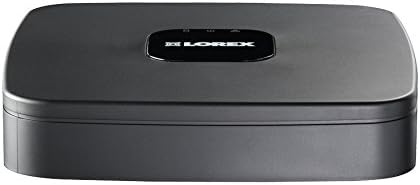
3.2. attēls: Augšā view of the Lorex LNR1141TC4 NVR. The NVR unit features a sleek black design with the Lorex logo prominently displayed on the top surface.

3.3. attēls: Rear panel of the Lorex LNR1141TC4 NVR. This view shows the various input and output ports, including HDMI, VGA, USB, Ethernet, and the four Power over Ethernet (PoE) ports for camera connections.

3.4. attēls: Close-up of a Lorex 1080p HD bullet camera lens. This image highlights the camera's lens, infrared LEDs for night vision, and light sensor.
4. Iestatīšana
Follow these steps to set up your Lorex LNR1141TC4 NVR system.
4.1 NVR pievienošana
- Pievienojiet monitoru: Connect the NVR to a monitor using the supplied HDMI cable or a VGA cable (not included).
- Pievienojiet peli: Plug the USB mouse into one of the USB ports on the NVR's rear panel.
- Tīkla savienojums (pēc izvēles, bet ieteicams): Connect the NVR to your router using the supplied Ethernet cable for remote access and system updates.
- Ieslēgšana: Connect the NVR power adapter to the NVR and then to a power outlet. The NVR will power on automatically.
4.2 Connecting the Cameras
The Lorex LNR1141TC4 NVR features Power over Ethernet (PoE) ports, simplifying camera installation.
- Montējamās kameras: Securely mount each camera in your desired location using the provided mounting kits. Ensure the camera's field of view aptver apgabalu, kuru vēlaties uzraudzīt.
- Pievienojiet Ethernet kabeļus: Connect one end of the supplied 60ft Cat5e Ethernet cable to the camera's Ethernet port and the other end to one of the PoE ports on the NVR's rear panel. The NVR will automatically detect and power the cameras.
- Pielāgojiet kameras leņķi: Once connected, adjust each camera's angle to optimize surveillance coverage.
5. Darbība
This section covers the basic operation of your Lorex NVR system.
5.1 Sākotnējās iestatīšanas vednis
Upon first power-up, the NVR will guide you through an initial setup wizard to configure basic settings such as language, date/time, network settings, and password creation. Follow the on-screen prompts.
5.2 Ierakstīšana
- Nepārtraukts ierakstīšana: The NVR is configured for continuous recording by default, utilizing the pre-installed 1TB hard drive.
- Plānota ierakstīšana: You can customize recording schedules for each camera through the NVR's menu. This allows you to set specific times for recording.
- Kustību ierakstīšana: Configure motion detection zones and sensitivity to trigger recording only when movement is detected. This helps conserve storage space.
- High Definition 1080p: The system records in 1080p resolution at 30/25 frames per second (fps) per channel, ensuring clear and detailed footage.
5.3 Atskaņošana
Piekļuve ierakstītajam footage through the NVR's playback menu. You can search by date, time, and event type (e.g., motion detection). The system supports selectable area digital zoom during live view and playback for detailed examination.
5.4 Remote Access (FLIR Cloud)
The FLIR Cloud connectivity solution enables remote viewing of your surveillance system.
- Lejupielādēt lietotni: Download the free Lorex FLIR Cloud app on your iOS or Android smartphone or tablet.
- Skenēt QR kodu: Use the app to scan the QR code located on your NVR or in the quick start guide.
- Savienot: Follow the app's instructions to connect to your NVR. This allows you to view live feeds, playback recordings, and receive push notifications for motion events and instant email alerts with snapshot attachments from anywhere with an internet connection.
6. Apkope
Regular maintenance ensures the longevity and optimal performance of your surveillance system.
- Tīrīšana: Periodiski tīriet kameras objektīvus ar mīkstu,amp cloth to remove dust and smudges. Ensure the NVR's ventilation openings are clear of obstructions.
- Cietā diska veselība: The NVR's hard drive is crucial for recording. Monitor its health through the NVR's system settings. Consider backing up important footage regulāri.
- Programmaparatūras atjauninājumi: Pārbaudiet Lorex website for any available firmware updates for your NVR to ensure you have the latest features and security enhancements.
7. Traucējummeklēšana
This section addresses common issues you might encounter with your Lorex LNR1141TC4 system.
- Nav video izejas monitorā:
- Pārliecinieties, vai HDMI/VGA kabelis ir droši pievienots gan NVR, gan monitoram.
- Pārliecinieties, vai monitors ir iestatīts uz pareizo ievades avotu.
- Izmēģiniet citu HDMI/VGA kabeli vai monitoru.
- Kameras, kas netiek rādītas:
- Check that the Ethernet cables are securely connected to both the cameras and the NVR's PoE ports.
- Pārliecinieties, vai NVR ir ieslēgts.
- If a camera is still not detected, try connecting it to a different PoE port on the NVR.
- A power cycle of the NVR (unplug and replug) can sometimes resolve camera detection issues.
- Attālā piekļuve nedarbojas:
- Verify the NVR is connected to your router and has internet access.
- Pārliecinieties, vai jūsu viedtālrunim/planšetdatoram ir stabils interneta savienojums.
- Double-check the QR code scan and account login details in the FLIR Cloud app.
- Ierakstīšanas problēmas:
- Check the hard drive status in the NVR's system settings.
- Pārliecinieties, vai ierakstīšanas grafiki ir pareizi konfigurēti.
- Verify that motion detection settings are appropriate if using motion-triggered recording.
8. Specifikācijas
| Funkcija | Detaļas |
|---|---|
| Modeļa numurs | LNR1141TC4 |
| Video uzņemšanas izšķirtspēja | 1080p HD |
| Kanālu skaits | 4 |
| Atmiņas krātuves ietilpība | 1 TB (iepriekš instalēts cietais disks) |
| Savienojamības tehnoloģija | Wired (Ethernet, PoE for cameras) |
| Īpaša iezīme | Motion Sensor, Remote Access (FLIR Cloud) |
| Kadru ātrums | 30/25 fps per channel |
| Ierakstīšanas režīms | Continuous, Scheduled, Motion |
| Barošanas avots | Elektrība ar vadu |
| NVR Dimensions (L x W x H) | 8.1 x 8.1 x 1.8 collas (20.6 x 20.6 x 4.6 cm) |
| NVR Item Weight | 1.1 mārciņas (0.5 kg) |
| Saderīgas ierīces | Cameras, Personal Computers, Smartphones, Tablets |
9. Garantija un atbalsts
For warranty information and technical support, please refer to the documentation included with your product or visit the official Lorex website. Lorex provides resources and customer service to assist with any questions or issues you may encounter.
Tiešsaistes resursi: www.lorex.com/support


