Ievads
This manual provides instructions for the setup, operation, and maintenance of your Logitech Harmony 700 Rechargeable Remote Control. The Harmony 700 is designed to simplify your home entertainment experience by controlling multiple devices with a single remote.

1. attēls: priekšpuse view of the Logitech Harmony 700 Rechargeable Remote Control, displaying its color screen and button layout.
Iestatīšana
1. Sākotnējā uzlāde
Before first use, ensure the remote is fully charged. The Harmony 700 uses 2 AA rechargeable batteries (included). Insert the batteries into the compartment on the back of the remote. Connect the remote to a power source using the provided USB cable and power adapter. The screen will indicate charging status.
2. Software Installation and Device Configuration
The Harmony 700 requires configuration via a computer. Visit the official Logitech Harmony website to download the Harmony software. Follow the on-screen instructions to install the software.
- Connect the Harmony 700 remote to your computer using the USB cable.
- Launch the Harmony software.
- Izveidojiet jaunu kontu vai piesakieties esošajā.
- Follow the prompts to add your home entertainment devices (e.g., TV, cable box, DVD player, audio receiver). You will need the brand and model number for each device.
- Configure "Activities" (e.g., "Watch TV," "Watch a Movie," "Listen to Music"). Activities allow you to control multiple devices with a single button press.
- Synchronize the settings to your remote.

2. attēls: Leņķis view of the Logitech Harmony 700, highlighting the color screen interface and various control buttons.
Operating Your Harmony 700
1. Ieslēgšana/izslēgšana
Nospiediet pogu Visi izslēgti button located at the top left to turn off all devices configured in your current activity. To power on, select an activity from the remote's screen or press a dedicated activity button if configured.
2. Selecting Activities
The color screen displays available activities. Use the navigation buttons around the OK button to scroll through and select an activity. Once an activity is selected, the remote will send the necessary commands to power on and switch inputs for all associated devices.
3. Controlling Devices within an Activity
During an activity, the remote's buttons automatically control the appropriate device. For example, in "Watch TV" activity:
- Volume buttons control your audio receiver or TV.
- Channel buttons control your cable/satellite box.
- Playback buttons (Play, Pause, Stop, Rewind, Fast Forward) control your DVR or media player.
4. Using the Help Button
If devices do not respond correctly during an activity, press the Palīdzība button. The remote will guide you through steps to correct the issue, such as confirming if a device is on or off.
5. Ierīces režīms
To control a single device directly, select Ierīces from the remote's screen. Choose the specific device you wish to control. The remote's buttons will then function as if it were the original remote for that device.
Apkope
1. Tīrīšana
Wipe the remote with a soft, dry cloth. Do not use abrasive cleaners or solvents. Avoid getting moisture into any openings.
2. Akumulatora kopšana
The Harmony 700 uses rechargeable AA batteries. For optimal performance, charge the remote regularly. If the remote will not be used for an extended period, fully charge it before storage and recharge periodically to maintain battery health.
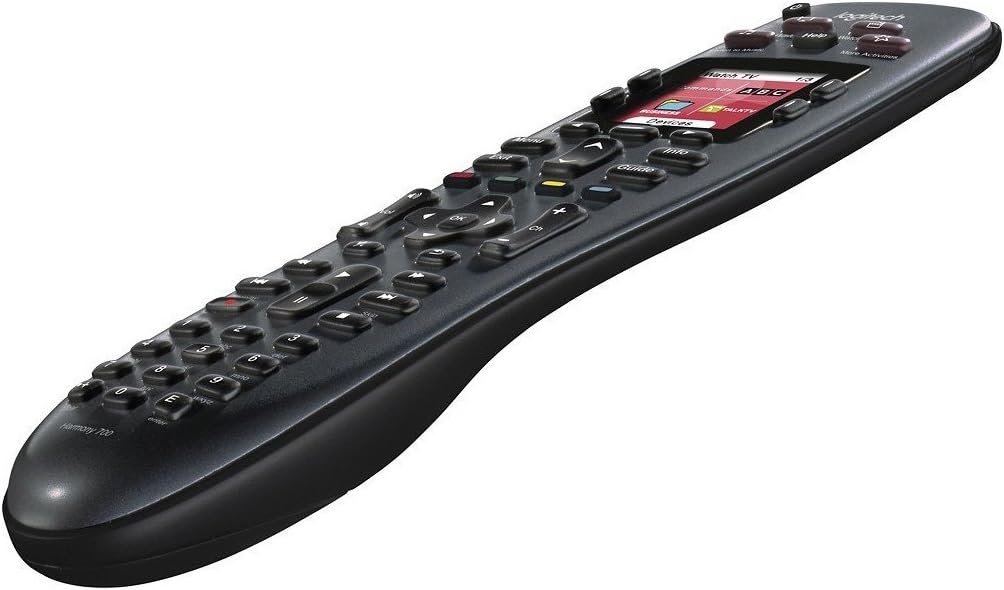
Image 3: Side angled view of the Logitech Harmony 700, illustrating its ergonomic design.
Problēmu novēršana
Tālvadības pults nereaģē
- Pārbaudiet akumulatoru: Ensure the remote is charged. Connect it to the power adapter.
- Restart Remote: Izņemiet un ievietojiet atpakaļ baterijas.
- Use Help Button: If an activity is not working correctly, press the Palīdzība pogu uz tālvadības pults.
Devices Not Responding to Activities
- Redzes līnijas: Ensure there is a clear line of sight between the remote and your devices.
- Ierīces konfigurācija: Verify that all devices are correctly added and configured in the Harmony software. Check model numbers and input settings.
- Jaudas stāvoklis: Confirm that all devices are powered on and in the correct input state before starting an activity.
- Resynchronize: Connect the remote to your computer and resynchronize the settings using the Harmony software.
Remote Screen is Blank or Frozen
- Uzlādēt: The battery may be depleted. Charge the remote.
- Atiestatīt: Remove the batteries for 10 seconds, then reinsert them.
Specifikācijas
| Zīmols | Logitech |
| Modeļa nosaukums | Harmonija 700 |
| Modeļa numurs | 915-000162-PB-RCB |
| Produkta izmēri | 9.75 x 2.25 x 4.5 collas |
| Preces svars | 11.2 unces |
| Baterijas | 2 AA uzlādējamas baterijas (iekļautas komplektā) |
| Maksimālais atbalstīto ierīču skaits | 8 |
| Saderīgas ierīces | Television and other home entertainment components |
| Īpaša iezīme | Universal, Rechargeable, Color Screen |
| Krāsa | Melns |
Garantija un atbalsts
Garantijas informācija
Detalizētu informāciju par garantiju skatiet produktam pievienotajā garantijas kartē vai apmeklējiet oficiālo Logitech tīmekļa vietni. website. Warranty terms may vary based on region and product condition (e.g., new vs. renewed).
Klientu atbalsts
For technical assistance, software downloads, or further support, please visit the Logitech support webvietne. Jūs varat atrast bieži uzdotos jautājumus, problēmu novēršanas rokasgrāmatas un klientu apkalpošanas kontaktinformāciju.
- Logitech atbalsts Webvietne: support.logi.com
- Harmony Software Download: Meklēt "Logitech Harmony Software" on the official Logitech webvietne.


