1. Ievads
This manual provides essential information for the proper installation, operation, and maintenance of your Datalogic Scanning STD-G040-BK Basic Stand. Please read this manual thoroughly before using the product to ensure safe and efficient operation. This stand is designed to securely hold compatible Datalogic barcode scanners, such as the Gryphon 4130, enabling hands-free scanning functionality.
2. Drošības informācija
- Ensure the stand is placed on a stable, flat surface to prevent tipping.
- Do not attempt to modify the stand. Unauthorized modifications may void the warranty and pose safety risks.
- Keep the stand away from excessive heat, moisture, and direct sunlight.
- Handle the stand with care to avoid damage to its components, especially the flexible gooseneck.
3. Iepakojuma saturs
Pārbaudiet, vai jūsu iepakojumā ir šādas preces:
- Datalogic Scanning STD-G040-BK Stand (1 unit)
- Barcode sticker for scanner configuration (may be included for setting scanner to stand mode)
Ja kādas preces trūkst vai ir bojātas, lūdzu, nekavējoties sazinieties ar piegādātāju.
4. Iestatīšana
Follow these steps to set up your Datalogic Scanning STD-G040-BK Stand:
- Izpakojiet statīvu: Uzmanīgi izņemiet statīvu no iepakojuma.
- Novietojiet statīvu: Place the stand on a stable, flat surface where it will be used. Ensure there is adequate space for the scanner and its cable. The base of the stand includes pre-drilled holes for optional secure mounting to a surface, if desired (mounting hardware not included).
- Insert the Scanner: Gently place your compatible Datalogic barcode scanner (e.g., Gryphon 4130) into the cradle at the top of the stand. Ensure it sits securely.
- Pielāgojiet zosskaklu: The stand features a flexible gooseneck. Adjust the angle and height of the scanner cradle to optimize scanning ergonomics for your specific application.
- Configure Scanner (if necessary): If your scanner does not automatically detect stand mode, use the provided barcode sticker (if included) or refer to your scanner's user manual to scan the appropriate configuration barcode to enable 'stand mode' or 'presentation mode'. This typically optimizes the scanner for hands-free operation.
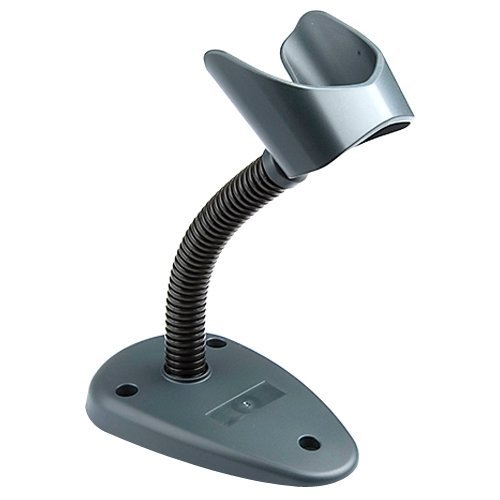
Image of the Datalogic Scanning STD-G040-BK stand, featuring a dark grey base, a flexible black gooseneck, and a dark grey scanner cradle.
5. Lietošanas instrukcijas
Once the stand is set up and your compatible Datalogic scanner is placed in the cradle and configured for stand mode, operation is straightforward:
- Skenēšana brīvroku režīmā: Present items with barcodes directly in front of the scanner's window. The scanner, when in stand mode, will automatically detect and read the barcode without requiring you to press a trigger.
- Optimāla pozicionēšana: Adjust the gooseneck as needed throughout the day to maintain an optimal scanning angle and reduce operator fatigue.
- Scanner Removal: To use the scanner in handheld mode, simply lift it out of the cradle. Depending on your scanner's configuration, it may automatically switch to handheld mode, or you may need to scan a specific barcode to change modes.
6. Apkope
The Datalogic Scanning STD-G040-BK Stand requires minimal maintenance to ensure its longevity and proper function:
- Tīrīšana: Izmantojiet mīkstu, damp cloth to wipe down the stand's surfaces. Avoid abrasive cleaners or solvents, which can damage the finish.
- Pārbaude: Periodically inspect the gooseneck for any signs of wear or damage. Ensure the scanner cradle remains secure.
- Uzglabāšana: If storing the stand for an extended period, keep it in a clean, dry environment away from extreme temperatures.
7. Traucējummeklēšana
If you encounter issues with your stand, consider the following:
- Scanner Not Entering Stand Mode: Ensure your scanner is compatible with the stand. Verify that you have scanned the correct configuration barcode to enable 'stand mode' or 'presentation mode' on your scanner. Refer to your scanner's specific user manual for detailed instructions.
- Statīva nestabilitāte: Ensure the stand is placed on a completely flat and stable surface. If necessary, consider using the optional mounting holes to secure the base.
- Gooseneck Stiffness/Looseness: The gooseneck is designed for flexibility and durability. If it feels too stiff or too loose, ensure no foreign objects are obstructing its movement. Avoid excessive force when adjusting.
For persistent issues, contact Datalogic support or your product supplier.
8. Specifikācijas
| Funkcija | Detaļas |
|---|---|
| Modeļa numurs | STD-G040-BK |
| Produkta izmēri | 4.21 x 6.97 x 3.19 collas |
| Svars | 1 mārciņas |
| Krāsa | Tumši pelēks |
| Funkcija | Basic Stand with Flexible Gooseneck |
| Saderīgas ierīces | Datalogic Gryphon 4130 and other compatible Datalogic scanners |
| Ražotājs | BlueStar Inc. (for Datalogic) |
| UPC | 783555015759 |
9. Garantija un atbalsts
This Datalogic product is manufactured by BlueStar Inc. and is covered by a standard manufacturer's warranty. For specific warranty terms and conditions, please refer to the documentation provided with your purchase or visit the official Datalogic website. For technical support, troubleshooting assistance, or to inquire about replacement parts, please contact your authorized Datalogic dealer or Datalogic customer service directly.
Piezīme. Garantijas noteikumi var atšķirties atkarībā no reģiona un mazumtirgotāja. Saglabājiet pirkuma apliecinājumu garantijas prasību iesniegšanai.