1. Ievads
The Sengled Smart Light Bulbs A19 are Zigbee-compatible LED bulbs designed for integration into smart home systems. These bulbs provide soft white (2700K) illumination, are dimmable, and offer control via voice commands or a mobile application when connected to a compatible Zigbee hub. This manual provides instructions for installation, setup, operation, and troubleshooting.

Image 1.1: Sengled Smart Light Bulbs A19 (4-Pack)
2. Drošības informācija
- Elektriskā drošība: Always ensure power is turned off at the switch before installing or removing bulbs.
- Lietošanai tikai iekštelpās: These bulbs are designed for indoor use in dry locations. Do not expose to water or excessive humidity.
- Darba temperatūra: Do not install in enclosed fixtures that restrict airflow, as this may reduce bulb lifespan.
- Dimmeru saderība: These bulbs are dimmable via the smart home system. Do not use with standard incandescent dimmers.
- Atbrīvošanās: Atbrīvojieties no elektroniskajiem atkritumiem atbildīgi saskaņā ar vietējiem noteikumiem.
3. Iepakojuma saturs
Komplektā ietilpst:
- 4 x Sengled Smart LED Light Bulbs (A19, Soft White 2700K)
4. Specifikācijas
| Funkcija | Detaļas |
|---|---|
| Modeļa numurs | E21-N13A |
| Spuldzes tips | LED |
| Spuldzes formas izmērs | A19 |
| Spuldzes pamatne | E26 |
| Wattage | 9 vati |
| Kvēlspuldzes ekvivalents | 60 vati |
| Spilgtums | 800 lūmenu |
| Krāsu temperatūra | 2700 kelvini (mīksti balts) |
| Voltage | 120 volti (100–120 V, 60 Hz) |
| Kontroles metode | Balss, lietotne |
| Savienojamība | Zigbee Protocol (Hub Required) |
| Vidējā dzīve | 25,000 stundas |
| Lietošana iekštelpās/ārā | Iekštelpās |
| Izmēri | 2.4 cm platums x 4.5 cm augstums |
5. Iestatīšanas instrukcijas
These Sengled Smart Light Bulbs require a compatible Zigbee hub for full functionality. Compatible hubs include Sengled Smart Hub, Amazon Echo devices with a built-in Zigbee hub (e.g., Echo 4th Gen, Echo Plus, Echo Show 10, Echo Studio), SmartThings Hub, Wink Hub, or Hubitat Hub.
5.1. Sākotnējās iestatīšanas darbības
- Uzstādiet spuldzi: Screw the Sengled Smart Light Bulb into a standard E26 light socket. Ensure the power to the fixture is turned off before installation.
- Ieslēgšana: Ieslēdziet gaismekli ar strāvu. Spuldzei vajadzētu iedegties.
- Lejupielādējiet lietotni: Download the Sengled Home App from the Apple App Store or Google Play Store. Alternatively, use the app for your chosen compatible hub (e.g., Amazon Alexa App, SmartThings App).
- Reģistrēties/Pieslēgties: Atveriet lietotni un reģistrējieties kontam vai piesakieties, ja jums tāds jau ir.
- Pievienot ierīci: Follow the in-app instructions to add a new device. This typically involves scanning a QR code on the bulb or packaging, or initiating a device search within the app.
- Izveidot savienojumu ar centrmezglu: The bulb will connect to your Zigbee hub. This process usually completes within one minute.
5.2. Hub-Specific Setup Options
The following images illustrate common setup configurations:

Image 5.1: Setup with Sengled Smart Hub

Image 5.2: Setup with Samsung SmartThings Hub

Image 5.3: Setup with Amazon Echo (Built-in Hub)
6. Darbība
Once successfully paired with your smart hub, the Sengled Smart Light Bulbs offer various control options.
6.1. Balss vadība
Control your lights hands-free using voice commands with compatible assistants like Amazon Alexa or Google Home Assistant.

Image 6.1: Voice control example with Alexa
6.2. Dimming and Remote Control
Adjust the brightness from 1% to 100% and control your lights from anywhere using the Sengled Home App or your smart home platform's app.
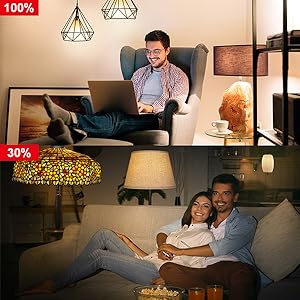
Image 6.2: Dimming functionality from 100% to 30%

Image 6.3: Remote control from any location
6.3. Scheduling and Routines
Set schedules for your lights to turn on/off or adjust brightness at specific times, such as dusk or sunrise. Create routines for automated lighting scenarios.
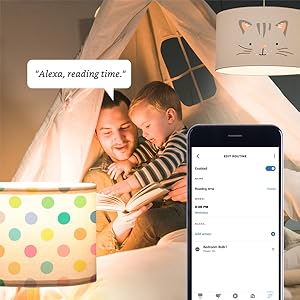
Image 6.4: Setting up a reading time routine
6.4. Grupas kontrole
Add multiple smart bulbs (up to 64) to your smart hub system and control them individually or as a group within the app.
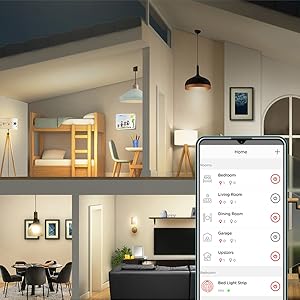
Image 6.5: Managing lights by room for group control
7. Apkope
- Tīrīšana: Pirms tīrīšanas pārliecinieties, vai spuldze ir izslēgta un atdzisusi. Noslaukiet ar mīkstu, sausu drānu. Nelietojiet šķidrus tīrīšanas līdzekļus.
- Uzglabāšana: Ja sīpolus uzglabājat, tie jāglabā vēsā, sausā vietā, prom no tiešiem saules stariem un ekstremālām temperatūrām.
- Nav lietotāja apkalpojamu daļu: Do not attempt to disassemble or repair the bulb. This will void the warranty.
8. Traucējummeklēšana
8.1. Bulb Not Responding/Connecting
- Pārbaudiet jaudu: Ensure the light fixture switch is in the ON position and the bulb is receiving power.
- Hub Connection: Verify that your Zigbee hub is powered on and connected to your network.
- Tuvums: Ensure the bulb is within range of your Zigbee hub or another Zigbee device acting as a repeater.
- Atkārtota savienošana pārī: If the bulb loses connection, try removing it from your app and re-pairing it according to the setup instructions. Power cycling the bulb (turning it off and on 5 times) can sometimes reset it for re-pairing.
- Lietotnes atjauninājums: Ensure your Sengled Home App or smart home platform app is updated to the latest version.
8.2. Balss vadības problēmas
- Assistant Link: Confirm that your Sengled account (or smart hub) is correctly linked to your voice assistant (Alexa, Google Home).
- Ierīces atklāšana: Ask your voice assistant to "Discover devices" to ensure all bulbs are recognized.
- Command Clarity: Speak commands clearly and ensure the device name used in the command matches the name in your app.
8.3. Unstable Connection
- Zigbee tīkls: A strong Zigbee mesh network is crucial. Adding more Zigbee devices (like smart plugs or other bulbs) can strengthen the network.
- Traucējumi: Keep your Zigbee hub away from Wi-Fi routers, microwaves, or other devices that might cause wireless interference.
9. Informācija par garantiju
Sengled Smart Light Bulbs are covered by a 3 gads ierobežota garantija from the date of purchase. This warranty covers defects in materials and workmanship under normal use. For warranty claims or detailed terms, please refer to the official Sengled webvietni vai sazinieties ar klientu atbalsta dienestu.
10. Klientu atbalsts
For further assistance, technical support, or to report issues, please visit the official Sengled support website or contact their customer service department. Contact information can typically be found on the Sengled website or within the Sengled Home App.