1. Ievads
This manual provides instructions for the installation, operation, and maintenance of the Nexxt Solutions Naxos800 8-Port Fast Ethernet Network Switch. The Naxos800 is an unmanaged compact desktop switch designed for small office/home office (SOHO) environments, student dormitories, and small enterprises, offering reliable network connectivity.
2. Galvenās iezīmes
- 8 ātras Ethernet pieslēgvietas: Provides 8 UTP/STP 10/100Mbps ports with auto MDI/MDIX.
- Plug and Play: Simple setup requiring no software configuration.
- Nepārvaldīts slēdzis: Operates without requiring complex management interfaces.
- Store-and-Forward Technology: Ensures efficient packet transmission.
- MAC adreses mācīšanās: Supports auto-learning and aging with a built-in 1000 MAC address table.
- Kompakts dizains: Suitable for desktop or wall mounting.
- Enerģijas taupīšana: Zema enerģijas patēriņa dizains.
- Plūsmas kontrole: Full duplex and half duplex back pressure flow control.
- Izturība: Integrated lightning protection and a sturdy metal case.
- Klusa darbība: Fanless design for silent performance.
3. Iepakojuma saturs
Pārbaudiet, vai jūsu iepakojumā ir šādas preces:
- One (1) Nexxt Solutions Naxos800 8-Port Fast Ethernet Switch
- Viens (1) strāvas adapteris

Image: The Nexxt Solutions Naxos800 switch, its power adapter, and product packaging.
4. Produkts beidziesview

Attēls: priekšpuse view of the Naxos800 switch, showing the Nexxt logo and eight green LED indicators for port activity.
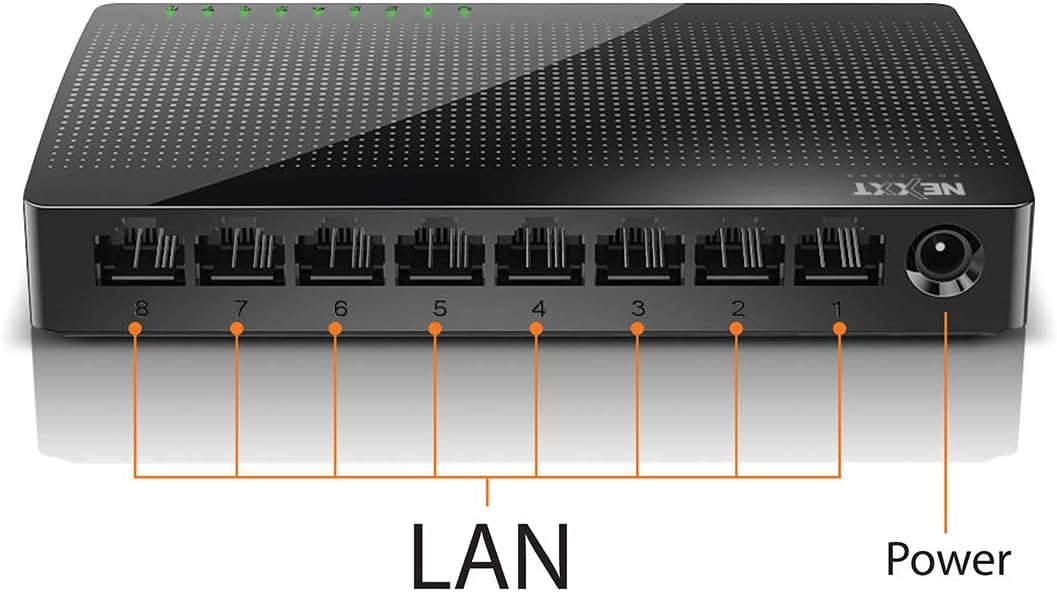
Attēls: Aizmugure view of the Naxos800 switch, highlighting the eight LAN ports (numbered 1-8) and the power input port.
LED indikatori
The front panel features LED indicators for each port, providing visual status:
- Zaļa gaismas diode (deg nepārtraukti): Indicates a stable link connection.
- Zaļa gaismas diode (mirgo): Indicates data activity on the corresponding port.
- LED izslēgts: No link or connection detected.
5. Iestatīšana un instalēšana
The Naxos800 switch is designed for simple plug-and-play installation. No software or complex configuration is required.
- Izvietojums: Place the switch on a stable, flat surface or mount it on a wall using appropriate hardware (not included). Ensure adequate ventilation around the device.
- Pievienojiet strāvas padevei: Connect the provided power adapter to the power input port on the switch and then plug the adapter into a standard electrical outlet. The power LED (if present, or the port LEDs will light up) should illuminate.
- Savienojuma izveide ar tīklu:
- Connect your router or modem to any of the 8 LAN ports on the Naxos800 switch using an Ethernet cable.
- Connect your network devices (e.g., computers, gaming consoles, IP cameras, Smart TVs, printers) to the remaining LAN ports on the Naxos800 switch using an Ethernet cable.
- Pārbaudiet savienojumu: Once devices are connected, the corresponding LED indicators on the switch's front panel should light up green (solid for link, flashing for activity).

Image: Diagram illustrating a typical network setup. An ADSL or Cable Modem connects to a Router, which then connects to the Naxos800 switch. Various devices like laptops, media players, game consoles, IP cameras, Smart TVs, and IP phones are connected to the Naxos800 switch.
6. Slēdža darbība
The Naxos800 is an unmanaged switch, meaning it operates automatically without user intervention once connected. It functions as an internet splitter, expanding the number of wired network connections available from your router or modem.
- Automātiska ātruma noteikšana: Each port automatically detects the speed of the connected device (10Mbps or 100Mbps) and adjusts accordingly.
- Automātiska MDI/MDIX: Eliminates the need for crossover cables; the switch automatically detects and corrects for straight-through or crossover cable types.
- Datu pārraide: Data packets are forwarded between connected devices at Fast Ethernet speeds. The store-and-forward architecture ensures data integrity.
7. Apkope
The Naxos800 switch requires minimal maintenance.
- Tīrīšana: Slēdža ārpuses tīrīšanai izmantojiet mīkstu, sausu drānu. Nelietojiet šķidrus vai aerosola tīrīšanas līdzekļus.
- Ventilācija: Pārliecinieties, ka ventilācijas atveres nav bloķētas, lai novērstu pārkaršanu.
- Jaudas cikls: If the device experiences issues, a simple power cycle (unplugging and replugging the power adapter) can often resolve minor problems.
8. Traucējummeklēšana
If you encounter issues with your Naxos800 switch, refer to the following common problems and solutions:
| Problēma | Iespējamais cēlonis | Risinājums |
|---|---|---|
| No power / Device not turning on. | Strāvas adapteris nav pievienots vai ir bojāts; strāvas kontaktligzda nedarbojas. | Ensure the power adapter is securely connected to the switch and a working electrical outlet. Try a different outlet. |
| Pievienotajai ierīcei nedeg savienojuma indikators. | Bojāts vai nepareizi pievienots Ethernet kabelis; ierīce nav ieslēgta vai ir bojāta; nepareiza pieslēgvieta. |
|
| Lēns tīkla ātrums. | Network congestion; faulty cable; device limitations. |
|
9. Specifikācijas
| Atribūts | Vērtība |
|---|---|
| Modeļa numurs | ASIDT084U3 |
| Ostas | 8 x 10/100Mbps Fast Ethernet (UTP/STP) |
| Aizmugures joslas platums | 1.6 Gbps |
| MAC adrešu tabula | 1000 ieraksti |
| Piekļuves kontrole | CDMA |
| Plūsmas kontrole | Full duplex and half duplex back pressure |
| Izmēri (G x P x A) | 12.4 x 5.9 x 2.3 cm |
| Svars | 140 g |
| Strāvas padeve | Ārējais strāvas adapteris (iekļauts) |
Piezīme: specifikācijas var tikt mainītas bez iepriekšēja brīdinājuma.
10. Garantija un atbalsts
The Nexxt Solutions Naxos800 8-Port Fast Ethernet Network Switch comes with a 5 gads ierobežota garantija. For warranty claims or technical support, please contact Nexxt Solutions customer service. Refer to the official Nexxt Solutions webvietni, lai iegūtu visjaunāko atbalsta informāciju un kontaktinformāciju.
Nexxt Solutions is a US company committed to quality and customer service.


