1. Ievads
This manual provides essential information for the safe and efficient operation of your Fenton FT215LED Portable Speaker. Please read these instructions thoroughly before using the device and retain them for future reference. The FT215LED is a versatile portable sound system featuring Bluetooth connectivity, USB/SD playback, AUX input, two wireless microphones, and integrated LED lighting, designed for various audio applications.
2. Drošības informācija
To prevent electric shock, fire, or injury, always observe the following safety precautions:
- Nepakļaujiet ierīci lietus vai mitruma iedarbībai.
- Neatveriet casing. Iekšpusē nav detaļu, ko varētu apkalpot lietotājs. Visu apkopi uzticiet kvalificētam personālam.
- Nodrošiniet strāvas padeves apjomutage atbilst uz ierīces norādītajām prasībām.
- Sargājiet ierīci no siltuma avotiem, tiešiem saules stariem un pārmērīga putekļu daudzuma.
- Nenovietojiet uz ierīces smagus priekšmetus.
- Izmantojiet tikai ražotāja norādītos piederumus.
- Atvienojiet strāvas vadu zibens laikā vai ja ierīce netiek lietota ilgstoši.
3. Iestatīšana
3.1 Izpakošana
Carefully remove the speaker and all accessories from the packaging. Verify that all components are present:
- Fenton FT215LED Portable Speaker
- Bezvadu mikrofoni (x2)
- Tālvadības pults
- Strāvas kabelis
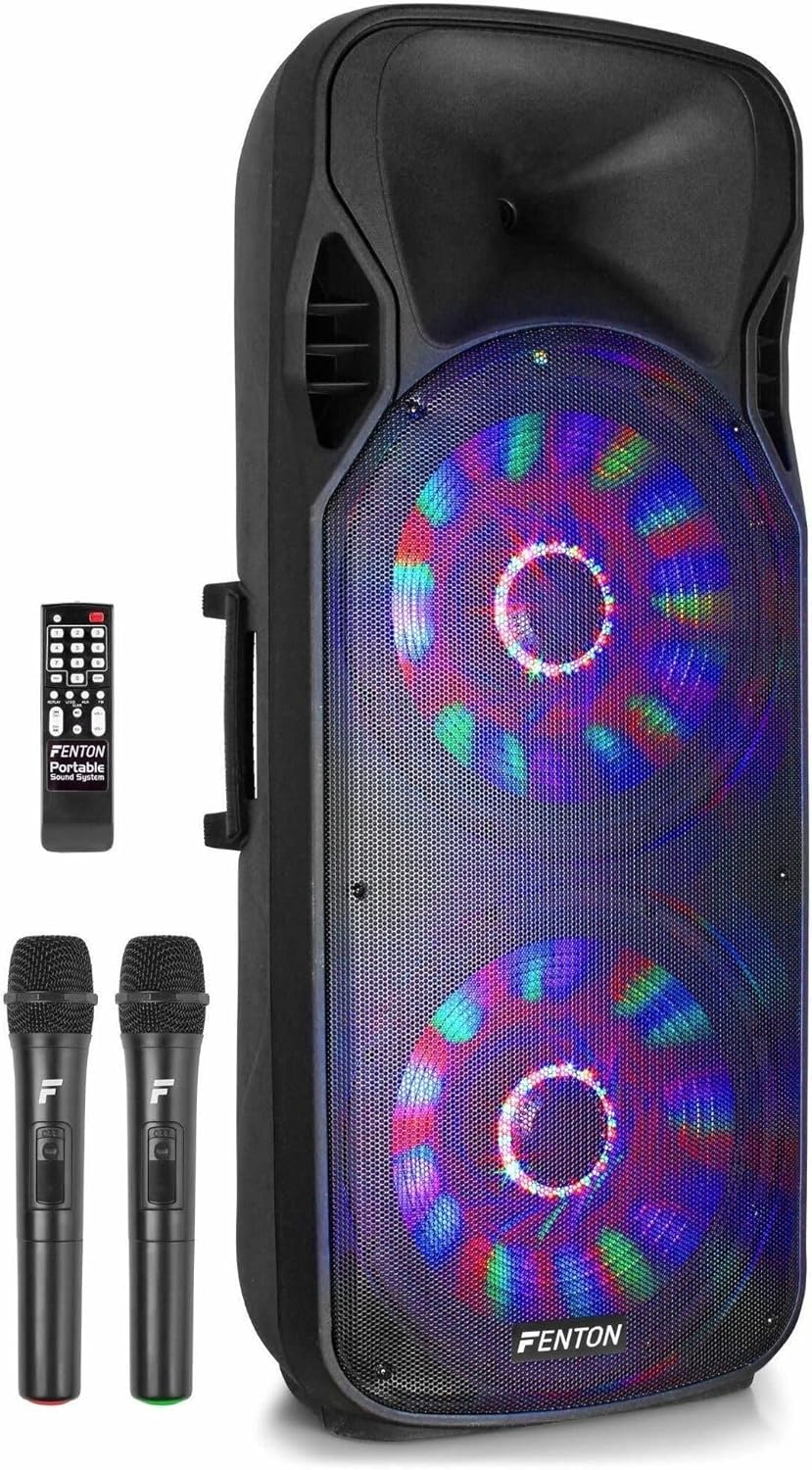
Figure 1: Fenton FT215LED Portable Speaker with included accessories.
3.2 Ierīces ieslēgšana/izslēgšana
The FT215LED speaker features an integrated battery for portable use. Before first use, ensure the battery is fully charged. Connect the provided power cable to the speaker's power input and then to a suitable wall outlet. The charging indicator will illuminate. Once fully charged, the indicator may change color or turn off, depending on the model.
3.3 Sākotnējie savienojumi
Locate the control panel on the rear of the speaker. This panel provides various input options.

Figure 2: Rear control panel of the FT215LED speaker.
- Mikrofoni: The speaker comes with two wireless microphones. Ensure batteries are inserted correctly into the microphones. Turn on the microphones using their respective power switches.
- AUX ieeja: For connecting external audio devices (e.g., CD player, laptop) via a 3.5mm or RCA cable.
- USB/SD karte: Insert a USB drive or SD card into the designated slots for media playback.
4. Lietošanas instrukcijas
4.1 Ieslēgšana/izslēgšana
Press the main power switch on the control panel to turn the speaker on or off.
4.2 Bluetooth savienošana pārī
- Ensure the speaker is powered on and in Bluetooth mode. The display will indicate 'BT' or a similar Bluetooth icon.
- Activate Bluetooth on your mobile device (smartphone, tablet, computer).
- Meklēt available devices and select 'Fenton FT215LED' from the list.
- Once paired, the speaker will emit a confirmation sound, and you can stream audio wirelessly.

Figure 3: Connecting a smartphone via Bluetooth for audio streaming.
4.3 USB/SD atskaņošana
Insert a USB drive or SD card containing MP3 files into the corresponding slot. The speaker will automatically switch to USB/SD mode and begin playback. Use the control panel or remote control to navigate tracks, adjust volume, and pause/play.
4.4 AUX ieeja
Connect your external audio device to the AUX input using an appropriate cable. Select AUX mode on the speaker's control panel or remote. Audio from your external device will now play through the speaker.
4.5 Mikrofona lietošana
Turn on the wireless microphones. Adjust the microphone volume and echo effect using the dedicated knobs on the speaker's control panel. Ensure the microphones are within range for optimal performance.

Figure 4: The two wireless microphones included with the FT215LED speaker.
4.6 LED apgaismojums
The speaker features integrated LED lighting. Use the dedicated button on the control panel or remote control to activate or deactivate the LED effects.
4.7 tālvadības pults
The included remote control provides convenient access to various functions, including power, mode selection, volume, track navigation, and LED control.

Figure 5: The remote control for the Fenton FT215LED speaker.
5. Apkope
5.1. Tīrīšana
Wipe the speaker's exterior with a soft, dry cloth. Do not use abrasive cleaners, waxes, or solvents. Ensure no liquids enter the unit.
5.2. Uzglabāšana
When not in use for extended periods, store the speaker in a cool, dry place, away from direct sunlight and extreme temperatures. If the unit has an integrated rechargeable battery, charge it periodically (e.g., every 3 months) to maintain battery health.
6. Traucējummeklēšana
If you encounter issues with your Fenton FT215LED speaker, refer to the following common problems and solutions:
| Problēma | Iespējamais cēlonis | Risinājums |
|---|---|---|
| Nav jaudas | Strāvas kabelis nav pievienots; Akumulators ir izlādējies; Izslēgts barošanas slēdzis | Check power cable connection; Charge the battery; Ensure power switch is ON |
| Nav skaņas | Pārāk mazs skaļums; Nepareizs ievades režīms; Ierīce nav pareizi pievienota | Increase volume; Select correct input mode (BT, USB, SD, AUX); Reconnect device |
| Bluetooth netiek savienots | Speaker not in pairing mode; Device too far; Incorrect device selected | Ensure speaker is in BT mode; Move device closer; Select 'Fenton FT215LED' |
| Mikrofons nedarbojas | Microphone off; Batteries depleted; Volume too low | Turn on microphone; Replace batteries; Increase microphone volume |
7. Specifikācijas
The following are the technical specifications for the Fenton FT215LED Portable Speaker:
- Modeļa numurs: 170.094
- Zīmols: Fentons
- Jaudas izvade: 1600 W (maksimālā jauda)
- Savienojamība: Bluetooth, USB, SD, AUX (3.5mm, RCA)
- Audio ieeja: Mikrofons, ģitāra
- Frekvences reakcija: Līdz 19000 Hz
- Īpašas funkcijas: USB Port, Portable design, Remote Control, LED Lighting
- Izmēri (G x P x A): 36 x 47 x 111 cm
- Svars: 19.2 kilogrami
- Materiāls: Koksne
- Barošanas avots: Darbojas ar baterijām
- Krāsa: Melns

Figure 6: The FT215LED speaker delivers a powerful 1600W sound experience.
8. Garantija un atbalsts
Specific warranty details are not provided within the product information. For warranty claims or detailed support, please contact the retailer or the manufacturer, Fenton, directly. Information regarding spare parts availability and software updates is not available in the provided product data.