1. Ievads
Paldies par pirkumuasing the Bytech Massive Bluetooth Long Bar Speaker-BK. This manual provides essential information for the proper setup, operation, and maintenance of your new speaker. Please read this manual thoroughly before using the product to ensure optimal performance and longevity.
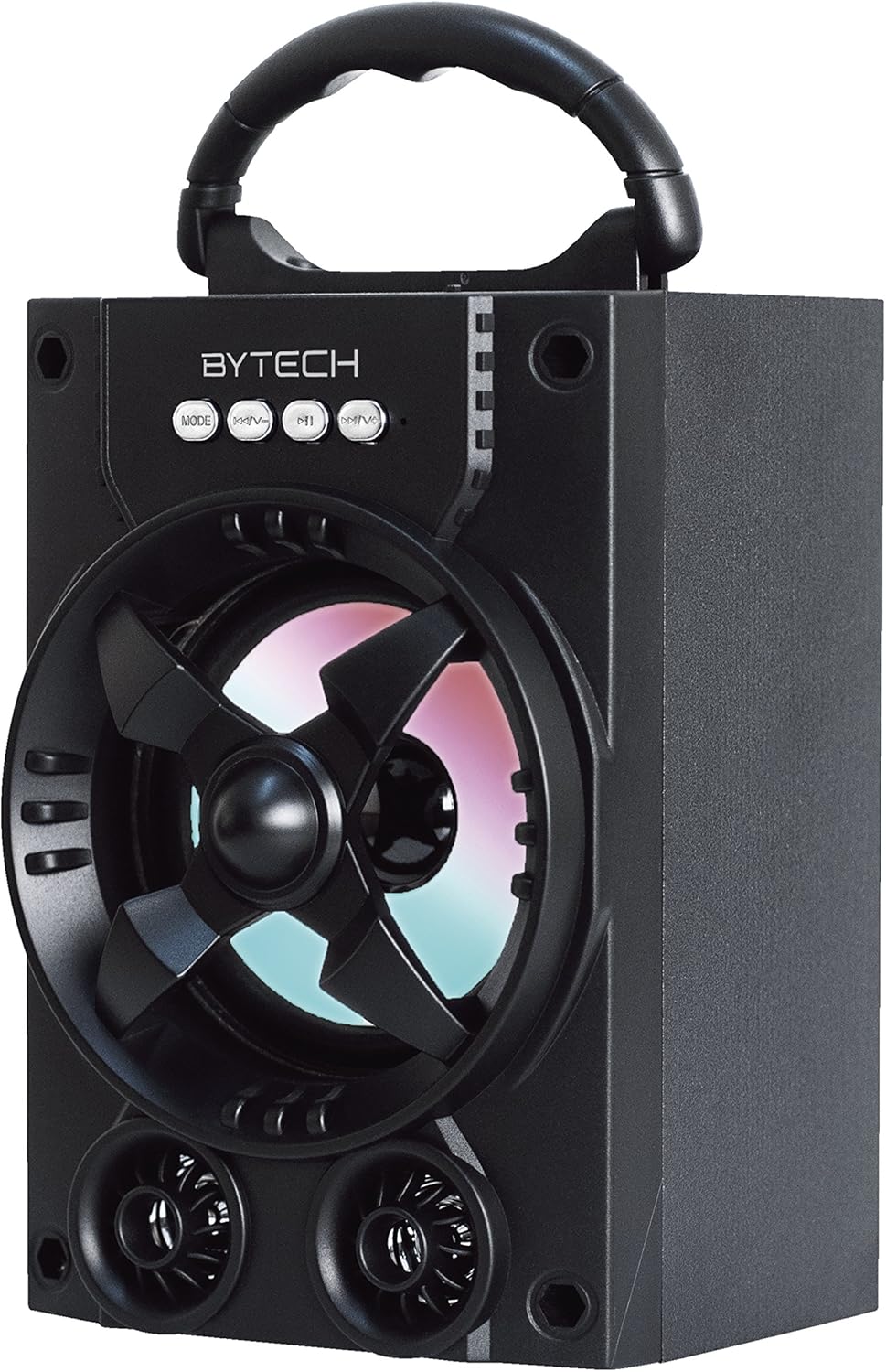
1.1. attēls. Priekšpuse view of the Bytech Massive Bluetooth Long Bar Speaker-BK, showcasing its design, handle, and speaker grille with LED lights.
2. Iepakojuma saturs
Lūdzu, pārbaudiet, vai iepakojumā nav šādu priekšmetu:
- Bytech Massive Bluetooth Long Bar Speaker-BK
- USB uzlādes kabelis
- Lietotāja rokasgrāmata (šis dokuments)
Ja kādas preces trūkst vai ir bojātas, lūdzu, sazinieties ar klientu atbalsta dienestu.
3. Produkta īpašības
- LED Performance Lights: Dynamic LED lights that synchronize with your music for an enhanced audio-visual experience.
- Ērts rokturis pārnēsāšanai: Integrated handle for easy portability, allowing you to take your music anywhere.
- Universal Bluetooth Connectivity: Seamlessly connect wirelessly to your smartphone, tablet, or other Bluetooth-enabled devices.
- Apkārtējā skaņa: Designed to deliver a high-quality surround sound experience.
- Pārnēsājams dizains: Ideal for various settings, including parties, outdoor gatherings, and personal use.

Figure 1.2: The speaker shown with its retail packaging, illustrating its key features such as multi-color LED lights, Bluetooth connectivity, and surround sound capability.
4. Vadības ierīces un indikatori
The speaker features intuitive controls and indicators for easy operation:
- MODE poga: Press to switch between available input modes (e.g., Bluetooth).
- V poga: Press to decrease volume. Long press to skip to the previous track.
- V+ poga: Nospiediet, lai palielinātu skaļumu. Ilgi nospiediet, lai pārietu uz nākamo celiņu.
- M poga: (Function not explicitly detailed, typically for mode or mute)
- LED gaismas: Indicate power status, charging status, and provide dynamic light effects during audio playback.
5. Iestatīšanas rokasgrāmata
5.1 Skaļruņa uzlāde
- Pievienojiet USB uzlādes kabeļa mazo galu skaļruņa uzlādes portam.
- Pievienojiet USB uzlādes kabeļa lielāko galu USB strāvas adapterim (nav iekļauts komplektā) vai datora USB portam.
- The LED indicator will show charging status (e.g., red for charging, off when fully charged).
- Pirms pirmās lietošanas reizes pilnībā uzlādējiet aptuveni 3–4 stundas.
5.2 Ieslēgšana/izslēgšana
- To power on, press and hold the Power button (location not specified, typically near charging port or on control panel) for a few seconds until you hear an audible prompt or see the LED lights activate.
- Lai izslēgtu skaļruni, vēlreiz nospiediet un turiet ieslēgšanas/izslēgšanas pogu, līdz tas izslēdzas.
5.3 Bluetooth savienošana pārī
- Ensure the speaker is powered on and in Bluetooth pairing mode (indicated by a flashing LED light or audible prompt).
- Viedtālrunī vai planšetdatorā dodieties uz Bluetooth iestatījumiem.
- Meklēt available devices. The speaker will appear as "BYTECH" or a similar name.
- Lai sāktu savienošanu pārī, atlasiet skaļruni no saraksta.
- Once successfully paired, the LED indicator will typically become solid, and you may hear a confirmation tone.
6. Lietošanas instrukcijas
6.1 Audio atskaņošana, izmantojot Bluetooth
- After successful Bluetooth pairing, open your preferred music application on your connected device.
- Select and play your desired audio. The sound will be streamed wirelessly to the speaker.
- Use the V+ and V- buttons on the speaker or your connected device to adjust the volume.
- Long press V+ or V- to skip tracks.
6.2 LED Performance Lights
The speaker features integrated LED lights that enhance your listening experience. These lights typically activate automatically when the speaker is powered on and playing audio. Specific controls for light modes are not detailed, but they are designed to provide dynamic visual effects.
6.3. Režīmu pārslēgšana
Nospiediet pogu REŽĪMS button to cycle through available input modes. While Bluetooth is the primary connectivity, other modes (if available, such as FM radio or AUX input) can be accessed via this button.
7. Apkope un kopšana
- Tīrīšana: Skaļruņa ārpuses tīrīšanai izmantojiet mīkstu, sausu drānu. Nelietojiet abrazīvus tīrīšanas līdzekļus, vasku vai šķīdinātājus.
- Uzglabāšana: Ja skaļrunis ilgstoši netiek lietots, uzglabājiet to vēsā, sausā vietā, pasargājot to no tiešiem saules stariem un ekstremālām temperatūrām.
- Akumulatora kopšana: To prolong battery life, avoid fully discharging the battery frequently. Recharge the speaker regularly, even if not in use, to maintain battery health.
- Ūdens izturība: Šis produkts ir NAV waterproof. Avoid exposure to water, rain, or excessive moisture to prevent damage.
8. Traucējummeklēšana
Ja rodas problēmas ar skaļruni, skatiet tālāk norādītās bieži sastopamās problēmas un risinājumus.
| Problēma | Iespējamais cēlonis | Risinājums |
|---|---|---|
| Skaļrunis neieslēdzas. | Zems akumulators. | Pilnībā uzlādējiet skaļruni. |
| Nav skaņas no skaļruņa. | Volume too low; Not paired; Incorrect mode. | Increase volume on speaker and device; Ensure successful Bluetooth pairing; Press MODE button to select correct input. |
| Bluetooth savienojums ir nestabils vai neizdodas. | Device too far; Interference; Pairing issue. | Move device closer to speaker (within 33 ft/10m); Avoid obstacles; Forget device on your phone and re-pair. |
| LED gaismas nedarbojas. | Speaker not powered on or playing audio. | Ensure speaker is on and audio is playing. |
9. Specifikācijas
| Funkcija | Detaļas |
|---|---|
| Zīmols | Bytech |
| Modeļa nosaukums | BYTECH |
| Preces modeļa numurs | BCAUBS134BK |
| Skaļruņa tips | Telpiskā skaņa |
| Savienojamības tehnoloģija | Bluetooth |
| Bezvadu sakaru tehnoloģija | Bluetooth |
| Saderīgas ierīces | Viedtālrunis |
| Skaļruņa maksimālā izejas jauda | 20 vati |
| Frekvences reakcija | 20 KHz |
| Impedance | 1 omi |
| Skaļruņa izmērs | 5 collas |
| Barošanas avots | Vadu elektriskais (uzlādei) |
| Akumulatora tips | Nepieciešams 1 litija jonu akumulators |
| Krāsa | Melns |
| Produkta izmēri | 4.75 x 5.5 x 8.5 collas |
| Preces svars | 1.3 mārciņas |
| Ir Ūdensizturīgs | Nē |
| Izcelsmes valsts | Ķīna |
| UPC | 805112038121 |
10. Informācija par garantiju
Bytech products are manufactured to the highest quality standards. For specific warranty terms and conditions, please refer to the warranty card included with your purchase or visit the official Bytech webvietne. Saglabājiet pirkuma apliecinājumu garantijas prasību iesniegšanai.
11. Klientu atbalsts
For technical assistance, troubleshooting, or general inquiries, please contact Bytech customer support. Contact information can typically be found on the product packaging, the official Bytech webvietnē vai pirkuma čekā.
Piezīme: Pamatojoties uz sniegtajiem datiem, iegulšanai nebija pieejami oficiāli pārdevēja produktu video.


