Ievads
This manual provides essential information for the safe and efficient operation of your Behringer EUROPORT MPA200BT portable PA system. Please read these instructions thoroughly before using the device to ensure proper setup, usage, and maintenance. Retain this manual for future reference.
The Behringer EUROPORT MPA200BT is an all-in-one portable PA system designed for various applications, featuring 200 watts of power, Bluetooth connectivity for audio streaming, and a wireless microphone for vocal performances or presentations. Its battery operation allows for use in locations without direct power access.
Svarīgi drošības norādījumi
Lietojot elektriskās iekārtas, vienmēr ievērojiet šos pamata drošības pasākumus:
- Pirms izstrādājuma lietošanas izlasiet visas instrukcijas.
- Do not use this product near water or in wet environments.
- Tīriet tikai ar sausu drānu.
- Neaizbloķējiet ventilācijas atveres. Uzstādiet saskaņā ar ražotāja norādījumiem.
- Neuzstādiet tuvu siltuma avotiem, piemēram, radiatoriem, siltuma reģistriem, krāsnīm vai citām ierīcēm (tostarp amppacēlāji), kas ražo siltumu.
- Nepārkāpiet polarizētā vai zemējuma spraudņa drošības mērķi. Polarizētam spraudnim ir divi asmeņi, no kuriem viens ir platāks par otru. Zemējuma tipa kontaktdakšai ir divi lāpstiņas un trešais zemējuma dakšas. Jūsu drošībai ir paredzēts platais asmens vai trešais zars. Ja komplektā iekļautā kontaktdakša neietilpst jūsu kontaktligzdā, konsultējieties ar elektriķi, lai nomainītu novecojušo kontaktligzdu.
- Aizsargājiet strāvas vadu no uzkāpšanas vai saspiešanas, jo īpaši pie kontaktdakšām, kontaktligzdām un vietā, kur tie iziet no ierīces.
- Izmantojiet tikai ražotāja norādītos piederumus/piederumus.
- Atvienojiet šo ierīci zibens negaisa laikā vai tad, ja tā netiek lietota ilgu laiku.
- Visus apkopes darbus nododiet kvalificētam apkopes personālam. Apkope ir nepieciešama, ja ierīce ir jebkādā veidā bojāta, piemēram, ir bojāts barošanas vads vai kontaktdakša, aparātā ir izlijis šķidrums vai iekrituši priekšmeti, ierīce ir bijusi pakļauta lietus vai mitruma iedarbībai, nedarbojas normāli. , vai ir nomests.
Iepakojuma saturs
Upon unpacking your Behringer EUROPORT MPA200BT, please verify that all components are present and in good condition:
- Behringer EUROPORT MPA200BT Portable PA System
- Wireless Microphone (ULM300M)
- USB Receiver for Wireless Microphone (ULM300USB)
- Strāvas kabelis
- Lietotāja rokasgrāmata (šis dokuments)

Image: The Behringer EUROPORT MPA200BT portable PA system shown with its accompanying wireless microphone.
Produkts beidziesview: Vadības ierīces un savienojumi
Familiarize yourself with the various controls and connection points on your MPA200BT unit.

Image: Rear panel of the MPA200BT, highlighting the main control interface, inputs, and outputs.

Attēls: Detalizēts view of the MPA200BT's control panel, including display, rotary encoder, and buttons.
Vadības paneļa funkcijas:
- Displeja ekrāns: Shows current settings, input levels, and Bluetooth status.
- Rotējošais kodētājs: Used to navigate menus and adjust parameters. Press to confirm selections.
- PROCESS poga: Activates or deactivates sound processing effects.
- SETUP poga: Ieiet sistēmas iestatījumu izvēlnē.
- Poga EXIT: Exits current menu or setting.
- ENTER poga: Apstiprina atlasi izvēlnēs.
- Bluetooth poga: Uzsāk Bluetooth savienošanas pārī režīmu.
Ieejas/izejas savienojumi:
- INPUT 1 & 2 (XLR/TRS Combo Jacks): Mikrofonu vai līnijas līmeņa instrumentu pievienošanai.
- WIRELESS SYSTEM (USB Port): For connecting the ULM300USB wireless microphone receiver.
- MP3 Input (3.5mm Stereo Jack): Ārējo audio atskaņotāju pievienošanai.
- MIKSA IZEJA (XLR): For sending the mixed audio signal to another PA system or recording device.
- Maiņstrāvas ieeja: Strāvas kabeļa pievienošanai.
Iestatīšana
- Strāvas pieslēgums:
Connect the supplied power cable to the AC Power Inlet on the rear of the MPA200BT and then to a suitable power outlet. The unit can also operate on its internal battery.
- Sākotnējā ieslēgšana:
Press the power switch to turn on the unit. The display will illuminate.
- Pozicionēšana:
Place the MPA200BT on a stable, flat surface or mount it on a speaker stand (sold separately). Ensure proper ventilation around the unit.
- Ievadu pievienošana:
- Wired Microphones/Instruments: Connect to INPUT 1 or INPUT 2 using XLR or 1/4" TRS cables.
- External Audio Players: Connect to the MP3 Input using a 3.5mm stereo cable.
Lietošanas instrukcijas
Bluetooth audio straumēšana

Image: The Bluetooth logo, representing wireless audio streaming capability.
- Ensure the MPA200BT is powered on.
- Nospiediet pogu Bluetooth button on the control panel. The Bluetooth icon on the display will flash, indicating pairing mode.
- On your smartphone or Bluetooth-enabled device, navigate to the Bluetooth settings and select "BEHRINGER MPA200BT" from the list of available devices.
- Once paired, the Bluetooth icon on the MPA200BT display will stop flashing and remain solid.
- You can now stream audio from your device to the MPA200BT. Adjust the volume using your device's controls and the MPA200BT's master volume.
Wireless Microphone Usage (ULM300M/ULM300USB)
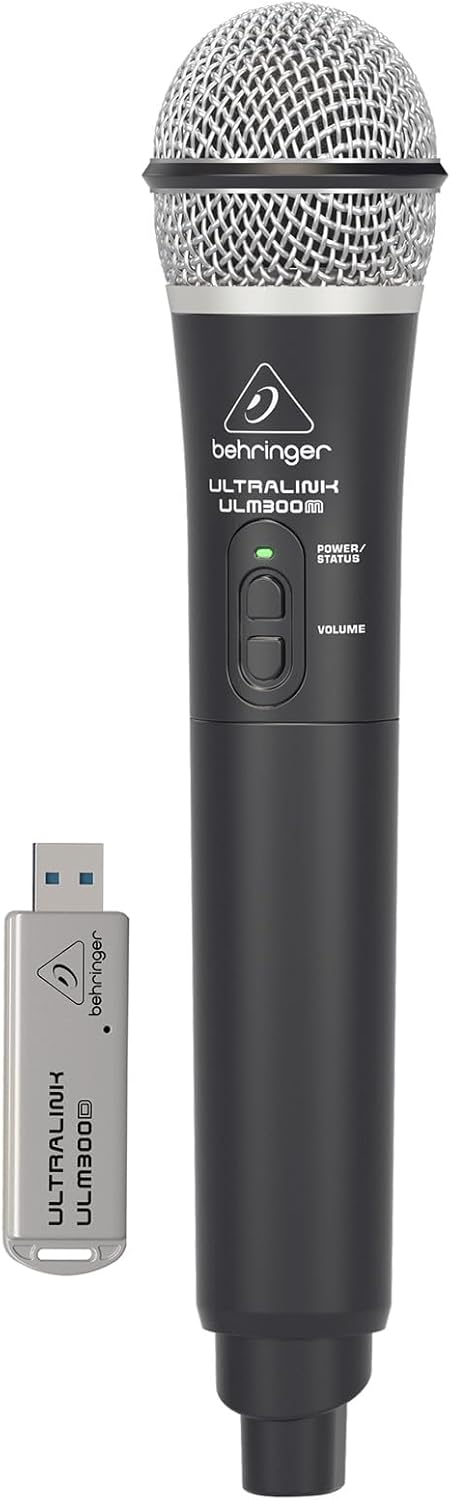
Image: The Behringer ULM300M wireless microphone shown with its USB receiver, the ULM300USB.
- Insert the ULM300USB receiver into the BEZVADU SISTĒMA USB port on the MPA200BT.
- Ensure the ULM300M wireless microphone has fresh batteries installed.
- Power on the wireless microphone. The status LED on both the microphone and the receiver should indicate a successful connection (usually a solid green light).
- Adjust the microphone's volume using the controls on the microphone itself and the MPA200BT's input gain settings.
Remote Control via Smartphone App

Image: A smartphone screen showing the graphical user interface of the Behringer remote control application, used to manage the PA system settings.
The MPA200BT can be controlled remotely using a dedicated smartphone application. This allows for adjustments to volume, EQ, and effects from a distance.
- Download the official Behringer MPA200BT control app from your device's app store (iOS/Android).
- Ensure your smartphone is connected to the MPA200BT via Bluetooth (as described in the "Bluetooth Audio Streaming" section).
- Open the app. It should automatically detect and connect to your MPA200BT unit.
- Use the app's interface to control various parameters of the PA system.
Darbība ar akumulatoru
The MPA200BT features an internal rechargeable battery for portable use.
- The battery charges automatically when the unit is connected to AC power.
- A battery level indicator on the display shows the remaining charge.
- For optimal battery life, fully charge the unit before its first use and periodically when not in use for extended periods.
Apkope
- Tīrīšana: Ierīces ārpuses tīrīšanai izmantojiet mīkstu, sausu drānu. Nelietojiet abrazīvus tīrīšanas līdzekļus vai šķīdinātājus.
- Uzglabāšana: When not in use, store the MPA200BT in a cool, dry place, away from direct sunlight and extreme temperatures.
- Akumulatora kopšana: If storing for extended periods, ensure the battery is partially charged (around 50%) and recharge it every few months to prevent deep discharge.
- Ventilācija: Ensure that the ventilation openings are not obstructed during operation to prevent overheating.
Problēmu novēršana
| Problēma | Iespējamais cēlonis | Risinājums |
|---|---|---|
| Nav jaudas | Power cable not connected; unit not switched on; battery depleted. | Check power cable connection; ensure power switch is ON; charge battery. |
| Nav skaņas izvades | Volume too low; input source not connected or selected; faulty cable; microphone off. | Increase master volume and input gain; check input connections; test cables; ensure microphone is powered on and paired. |
| Bluetooth savienošana pārī neizdodas | MPA200BT not in pairing mode; device too far; interference. | Press Bluetooth button to enter pairing mode; move device closer; restart both devices. |
| Bezvadu mikrofons nedarbojas | USB receiver not connected; microphone off; depleted batteries in microphone; interference. | Ensure ULM300USB is fully inserted; power on microphone; replace microphone batteries; ensure clear line of sight. |
| Squealing/Feedback | Mikrofons ir pārāk tuvu skaļrunim; mikrofona pastiprinājums ir pārāk augsts. | Move microphone further from speaker; reduce microphone input gain. |
Specifikācijas
| Funkcija | Detaļas |
|---|---|
| Modelis | EUROPORT MPA200BT |
| Izvades vattage | 200 vati |
| Barošanas avots | Battery Powered / AC Power |
| Savienojamības tehnoloģija | Bluetooth |
| Kanālu skaits | 2 |
| Preces svars | 12.1 kg (26.6 mārciņas) |
| Produkta izmēri (G x P x A) | 11.02 x 10.11 x 16.53 collas |
| Montāžas veids | Galda virsma |
| Saderīgas ierīces | Viedtālrunis |
| Ražotājs | Mūzikas cilts ASV |
Garantija un atbalsts
Lai iegūtu detalizētu informāciju par garantiju un tehnisko atbalstu, lūdzu, sazinieties ar oficiālo Behringer webvietnē vai sazinieties ar viņu klientu apkalpošanas dienestu. Saglabājiet pirkuma čeku kā pirkuma apliecinājumu.
Tiešsaistes resursi: www.behringer.com
Ražotājs: Mūzikas cilts ASV
Oficiālie produktu video
No relevant official product videos from the seller were found in the provided data for embedding.


