1. Ievads un beigasview
The Dio DiOCAMRI01 is an advanced 360° HD WiFi camera designed for indoor surveillance, offering comprehensive monitoring while prioritizing user privacy. This camera features a motorized lens, 1080p resolution, and infrared night vision, ensuring clear visuals day and night. Its unique geo-fencing capability automatically activates a privacy mode when you are home, retracting the lens to ensure your personal space remains private. The camera also includes motion and noise detection, two-way audio communication, and local recording options via a Micro SD card.
This manual provides essential information for the proper installation, operation, and maintenance of your DiOCAMRI01 camera.
2. Drošības informācija
- Pirms lietošanas rūpīgi izlasiet visas instrukcijas.
- Izmantojiet tikai ierīces komplektācijā iekļauto strāvas adapteri.
- Nepakļaujiet kameru ūdens, mitruma vai ekstremālu temperatūru iedarbībai.
- Nenovietojiet kameru siltuma avotu tuvumā vai tiešos saules staros.
- Nemēģiniet pats izjaukt vai remontēt kameru. Visus apkopes darbus uzticiet kvalificētam personālam.
- Ensure the camera is securely mounted if using wall or ceiling installation.
3. Iepakojuma saturs
Pārliecinieties, vai iepakojumā ir visas sastāvdaļas:
- DiOCAMRI01 HD WiFi Camera
- Strāvas adapteris
- Mounting Kit (screws, wall plugs, mounting bracket)
- Lietotāja rokasgrāmata (šis dokuments)
4. Produkta īpašības
- Attālā uzraudzība: Day and night vision (infrared night vision up to 10m).
- Wide-Angle Motorized Lens: Offers 360° horizontal and 150° vertical rotation for comprehensive coverage.
- Privātuma aizsardzība: Geo-fencing feature automatically puts the camera in standby mode and closes the lens when the owner is present. Manual standby mode is also available via the app.
- Motion and Noise Detection: Adjustable sensitivity with 3 levels. Sends direct notifications to your smartphone.
- Divvirzienu audio: Built-in microphone and intercom function allow you to hear and speak through the camera.
- Vietējais ieraksts: Supports Micro SD card (up to 128GB, not included) for manual or automatic recording upon detection. Remote viewing of recordings is available via the smartphone app.
- Vienkārša iestatīšana: Quick and intuitive installation via the DiO Cam+ mobile application.
- Elastīga montāža: Designed for discreet integration, can be mounted on a wall, ceiling, or placed on a shelf.
5. Iestatīšana
5.1 Sākotnējā iestatīšana
- Strāvas pieslēgums: Connect the camera to a power outlet using the provided power adapter. The camera will power on.
- Download DiO Cam+ App: Meklēt "DiO Cam+" in your smartphone's app store (iOS or Android) and download the application.
- Reģistrēties/Pieslēgties: Atveriet lietotni un izpildiet ekrānā redzamos norādījumus, lai izveidotu kontu vai pieteiktos, ja jums tāds jau ir.
- Pievienot kameru: Within the DiO Cam+ app, select the option to add a new device. Follow the in-app wizard to connect your camera to your Wi-Fi network. This typically involves scanning a QR code on the camera or entering Wi-Fi credentials.
- Izvietojums: Position the camera in your desired location. It can be placed on a flat surface, or mounted on a wall or ceiling using the included mounting kit. Ensure the camera has a clear line of sight to the area you wish to monitor.
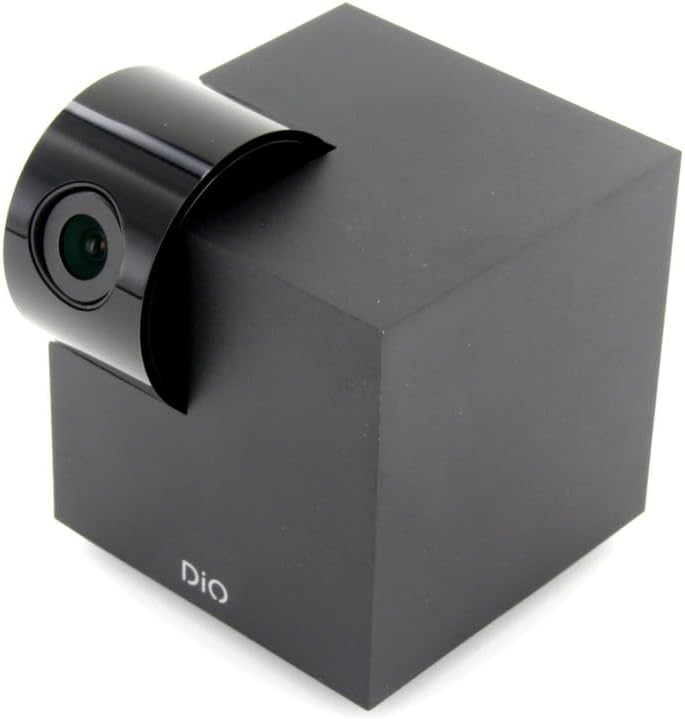
Figure 5.1: The DiOCAMRI01 camera in its standard upright position.

Figure 5.2: Camera placed on a shelf, demonstrating discreet integration.

Figure 5.3: Camera mounted on a ceiling for overhead surveillance.
5.2 Micro SD kartes instalēšana (pēc izvēles)
To enable local video recording, insert a Micro SD card (up to 128GB, not included) into the designated slot on the camera. Ensure the camera is powered off before inserting or removing the card.
5.3 Sharing Camera Access
The DiO Cam+ app allows you to easily share access to your camera with family members or trusted friends. Navigate to the camera settings within the app and select the sharing option to invite others to view the live feed and recordings.
6. Lietošanas instrukcijas
6.1. Tiešraide View un tālvadības pults
Once connected, open the DiO Cam+ app to access the live video feed from your camera. From the live view screen, you can:
- Pielāgot View Leņķis: Use the on-screen controls to remotely rotate the camera lens up to 350° horizontally and 150° vertically to cover all corners of your room.
- Divvirzienu audio: Tap the microphone icon to speak through the camera's speaker, and listen to audio from the camera's microphone.
- Take Snapshots/Record Video: Capture still images or start manual video recordings directly from the live view.

Figure 6.1: Camera interacting with the DiO Cam+ smartphone application.

6.2. attēls: sāni view of the camera, highlighting the rotating lens mechanism.
6.2 Privacy Features (Geo-Fencing and Manual Standby)
The DiOCAMRI01 camera offers advanced privacy protection:
- Ģeogrāfiskā norobežošana: Configure geo-fencing in the app to automatically switch the camera to privacy mode when your smartphone enters a predefined home zone. In privacy mode, the camera lens will retract, ensuring no recording or live viewrodas.
- Manuāla gaidstāves režīms: You can manually activate or deactivate the camera's standby mode (privacy mode) at any time through the DiO Cam+ app.
- Scheduled Standby: Set a schedule within the app for the camera to automatically enter or exit standby mode at specific times.

Figure 6.3: Camera with lens retracted, indicating privacy mode.
6.3 Motion and Noise Detection
The camera can detect motion and noise within its field of view. When triggered, it will send a notification to your smartphone and can automatically begin recording to the Micro SD card.
- Jutības regulēšana: Adjust the detection sensitivity (3 levels) in the app settings to minimize false alarms.
- Ierakstīšanas iespējas: Configure recording duration (1, 3, or 5 minutes per clip) or continuous recording if a Micro SD card is installed.
7. Apkope
- Tīrīšana: Kameras korpusa un objektīva tīrīšanai izmantojiet mīkstu, sausu drānu. Nelietojiet šķidrus tīrīšanas līdzekļus vai abrazīvus materiālus.
- Programmatūras atjauninājumi: Regularly check the DiO Cam+ app for firmware updates to ensure optimal performance and security. Follow the in-app instructions for any available updates.
- Micro SD kartes pārvaldība: Periodiski review and manage recordings on your Micro SD card. Format the card through the app if necessary to maintain performance.
8. Traucējummeklēšana
- Kamera bezsaistē: Ensure the camera is powered on and connected to your Wi-Fi network. Check your Wi-Fi router and internet connection. Try restarting the camera and your router.
- Nevar izveidot savienojumu ar lietotni: Verify your Wi-Fi password. Ensure your smartphone is connected to a 2.4GHz Wi-Fi network during initial setup, as the camera may not support 5GHz networks.
- Slikta video kvalitāte: Pārbaudiet interneta savienojuma ātrumu. Pārliecinieties, vai kameras objektīvs ir tīrs un bez šķēršļiem. Pielāgojiet kameras novietojumu optimālam apgaismojumam.
- Motion/Noise Detection Not Working: Check the sensitivity settings in the app. Ensure the detection zones are correctly configured.
- Nav ierakstīšanas SD kartē: Ensure the Micro SD card is correctly inserted and formatted. Check if the card is full. The camera supports up to 128GB.
- Privātuma režīms netiek aktivizēts: Verify that geo-fencing is enabled and configured correctly in the app, and that your smartphone's location services are active.
9. Specifikācijas
| Funkcija | Specifikācija |
|---|---|
| Modeļa numurs | DIOCAM-RI01 |
| Montāžas veids | Sienas stiprinājums |
| Video uzņemšanas izšķirtspēja | 1080p |
| Krāsa | Balts |
| Preču skaits | 1 |
| Iekļautie komponenti | DiOCAMRI01 WiFi HD 360° Rotating 1080P 2MP Camera with Geo-Fencing |
| Bezvadu sakaru tehnoloģija | Wi-Fi |
| Formas faktors | Dome (Cube with rotating lens) |
| Efektīva video izšķirtspēja | 1080 |
| Viewleņķis | 360 grādi (horizontāli) |
| Nakts redzamības diapazons | 10 metri |
| Materiāls | Metāls |
| Voltage | 5 volts |
| Wattage | 5 vati |
| Vienuma izmēri (G x P x A) | 9.4 x 4.9 x 31.9 centimetri |
| Ražotājs | ŠAKONS |
| Īpašas funkcijas | Vietējais ieraksts, nakts redzamība |
| Baterijas ir iekļautas | Nē |
| Nepieciešamas baterijas | Nē |
| Ieteicamie lietojumi | Motion Detection, Night Vision |
| Savienojamības tehnoloģija | Bezvadu |
| Lietošana iekštelpās/ārā | Iekštelpās |
| Saderīgas ierīces | Viedtālrunis |
| Barošanas avots | Battery Powered (Note: Product specs indicate 'No batteries required', implying external power) |
| Savienojamības protokols | Wi-Fi |
| Kontrollera tips | Android |
10. Garantija un atbalsts
For information regarding warranty coverage, technical support, or service, please refer to the official Dio webvietnē vai sazinieties ar iegādes vietu. Saglabājiet pirkuma apliecinājumu garantijas prasību iesniegšanai.
Ražotājs: ŠAKONS


