Jabra Evolve 20 MS Stereo Headset Instruction Manual
Model: Evolve 20 (GSA4999-823-109)
1. Ievads
The Jabra Evolve 20 MS Stereo Headset is a professional wired headset designed for clear communication and music listening. It features a noise-canceling microphone to reduce background distractions and an intuitive control unit for easy call management. This manual provides essential information for setting up, operating, and maintaining your headset.
2. Iepakojuma saturs
Lūdzu, pārbaudiet, vai iepakojumā nav šādu priekšmetu:
- Jabra Evolve 20 MS Stereo Headset with integrated control unit
3. Produkts beidziesview
3.1 Austiņu sastāvdaļas
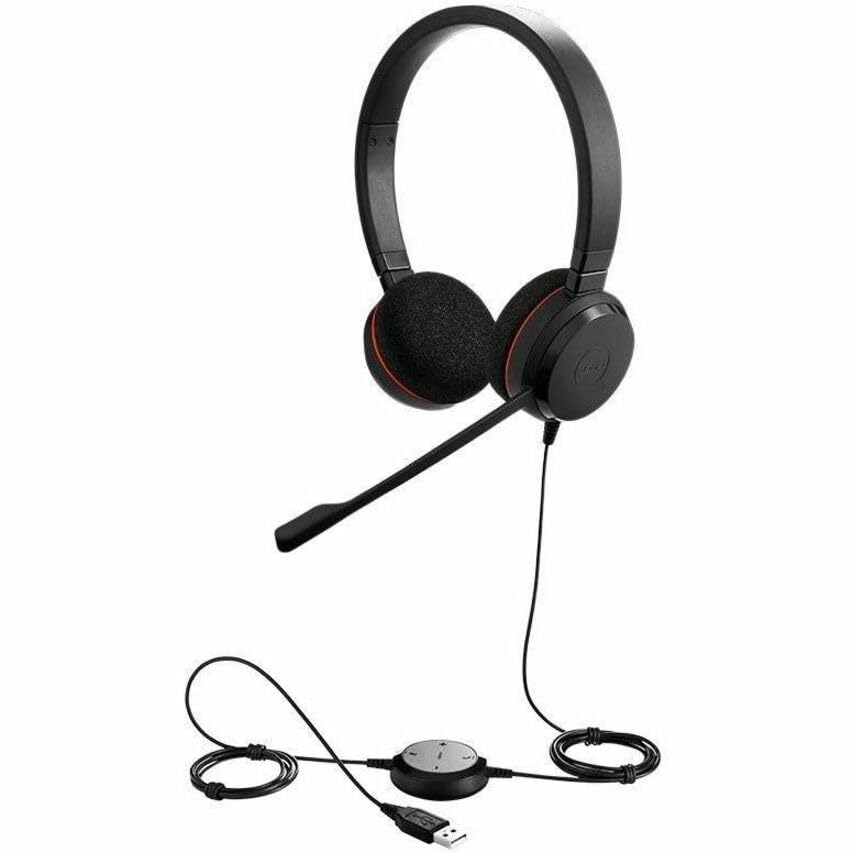
The Jabra Evolve 20 MS Stereo Headset features an adjustable headband, foam ear cushions for comfort, and a flexible microphone boom arm that can be positioned for optimal voice pickup.
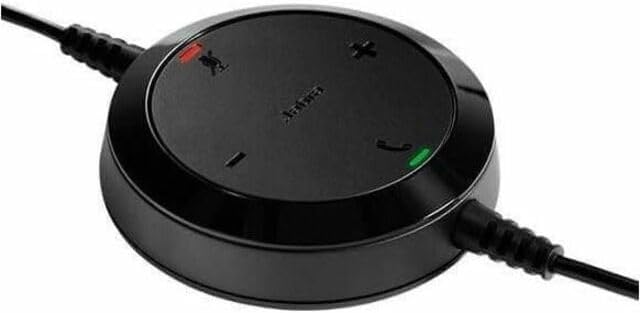
The inline control unit provides easy access to essential call management functions, including volume adjustment, microphone mute, and answer/end call buttons.
4. Iestatīšana
4.1 Savienošana ar datoru
- Atrodiet datorā (galddatorā vai klēpjdatorā) pieejamu USB portu.
- Plug the USB connector of the Jabra Evolve 20 headset into the USB port.
- Jūsu datoram vajadzētu automātiski noteikt un instalēt nepieciešamos draiverus. Tas var aizņemt dažas minūtes.
- Once installed, the headset will be ready for use. You may need to select the Jabra Evolve 20 as your default audio device (microphone and speaker) in your operating system's sound settings or your communication software (e.g., Microsoft Teams, Skype for Business).
5. Lietošanas instrukcijas
5.1 Austiņu valkāšana
- Adjust the headband to ensure a comfortable and secure fit on your head.
- Position the microphone boom arm so that the microphone is approximately 2-3 cm (1 inch) from your mouth.
5.2 Using the Control Unit
- Skaļuma palielināšana (+): Nospiediet, lai palielinātu klausīšanās skaļumu.
- Skaļums uz leju (-): Nospiediet, lai samazinātu klausīšanās skaļumu.
- Izslēgt mikrofonu: Press the microphone icon button to mute or unmute your microphone during a call. An indicator light on the control unit may show the mute status.
- Atbildēt/beigt zvanu: Press the phone icon button to answer an incoming call or end an active call.
6. Apkope
Pareiza apkope nodrošina jūsu austiņu ilgmūžību un veiktspēju.
- Tīrīšana: Gently wipe the headset and control unit with a soft, dry cloth. For ear cushions, use a slightly damp cloth if necessary, but avoid excessive moisture. Do not use harsh chemicals or abrasive cleaners.
- Uzglabāšana: When not in use, store the headset in a clean, dry place, away from extreme temperatures and direct sunlight. Avoid tangling the cable.
- Kabeļa kopšana: Do not pull on the cable to disconnect the headset. Always grasp the USB connector.
7. Traucējummeklēšana
If you encounter issues with your Jabra Evolve 20 headset, refer to the table below for common problems and solutions.
| Problēma | Risinājums |
|---|---|
| Nav skaņas no austiņām |
|
| Mikrofons nedarbojas |
|
| Zvanu vadības pogas nereaģē |
|
8. Specifikācijas
Key technical specifications for the Jabra Evolve 20 MS Stereo Headset:
| Funkcija | Apraksts |
|---|---|
| Modeļa nosaukums | Attīstīties 20 |
| Savienojamības tehnoloģija | Vadu (USB) |
| Trokšņa kontrole | Active Noise Cancellation, Passive Noise Cancellation |
| Mikrofons | Trokšņu slāpēšana |
| Ausu novietojums | Virs auss |
| Formas faktors | Uz auss |
| Material (Ear Cushions) | Putas |
| Preces svars | 4.6 unces (0.29 mārciņa) |
| Produkta izmēri | 8 x 7 x 1.5 collas |
| Saderīgas ierīces | Desktops, Laptops, Softphones, Web Clients, Desk Phones |
| Kontrollera tips | Answer/End, Mute, Volume |
9. Garantija un atbalsts
For detailed warranty information, please refer to the warranty card included with your product or visit the official Jabra webvietne. Garantijas noteikumi un nosacījumi var atšķirties atkarībā no reģiona un mazumtirgotāja.
For technical support, product registration, or to access additional resources, please visit the official Jabra support webvietnē vai sazinieties tieši ar klientu apkalpošanas dienestu. Saglabājiet pirkuma apliecinājumu garantijas prasību iesniegšanai.