1. Ievads un beigasview
Thank you for choosing the Lorex Analog 4K Weatherproof Indoor/Outdoor HD Wired Add-On Security Camera. This manual provides essential information for the proper installation, operation, and maintenance of your new security camera. This camera is designed as an add-on unit and requires a compatible Lorex recorder (DVR/NVR) for full functionality.
This camera features 4K resolution for superior image clarity, robust weatherproof construction for reliable indoor and outdoor use, and advanced deterrence features such as motion-activated lights and remote-triggered sirens. Its long-range night vision ensures comprehensive surveillance even in low-light conditions.
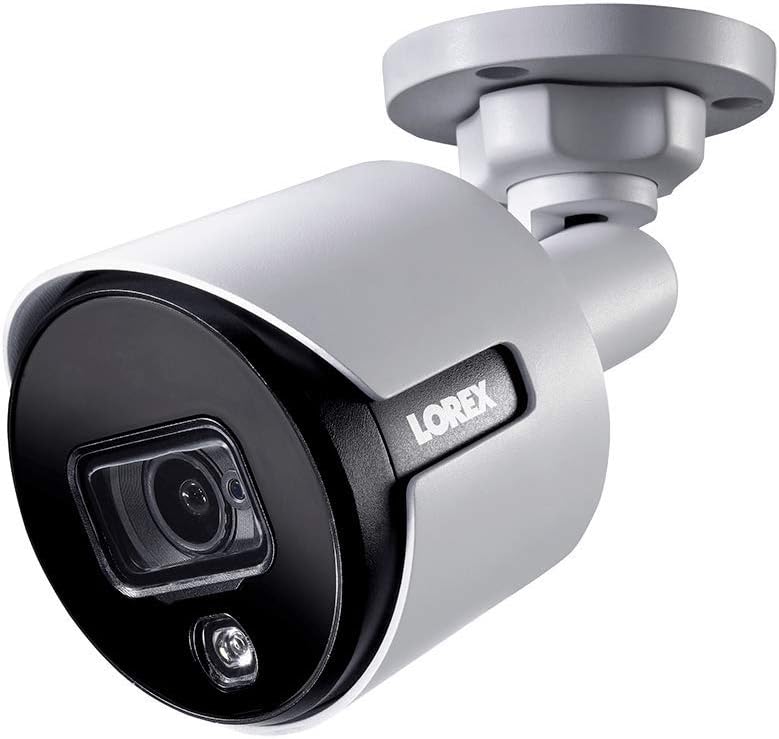
1.1. attēls: Priekšējais leņķis view of the Lorex 4K Weatherproof Security Camera. This image shows the camera's bullet form factor, lens, and integrated light.
2. Iepakojuma saturs
The Lorex Analog 4K Weatherproof Indoor/Outdoor HD Wired Add-On Security Camera package includes:
- 1 x Lorex Analog 4K Weatherproof Indoor/Outdoor HD Wired Add-On Security Camera (Model: LBV8543XW)
- Montāžas komplekts (skrūves un sienas dībeļi)
- Allen Key (for adjustment)
Note: This is an add-on camera. Video cables, power adapters, and a compatible Lorex recorder are sold separately and are required for operation.
3. Galvenās iezīmes
- 4K Ultra HD izšķirtspēja: Provides exceptional detail and clarity with an 8MP effective still resolution.
- Laikapstākļiem izturīgs dizains (IP67): Durable metal housing ensures reliable performance in various weather conditions, suitable for both indoor and outdoor installation.
- Long Range Night Vision: See clearly up to 150 feet (45m) in ambient night conditions and up to 98 feet (30m) in total darkness. Features Color Night Vision for enhanced detail in low light.
- Motion-Activated Warning Light: Integrated LED light can be triggered by motion to deter intruders.
- Remote-Triggered Siren: Activate a loud siren directly from your Lorex recorder or connected app to scare away unwanted visitors.
- Wired Connectivity (BNC): Ensures a stable and secure connection to your Lorex DVR/NVR system.
- Plaša darba temperatūra: Functions reliably in temperatures up to 60 degrees Celsius.
4. Iestatīšana un instalēšana
Before installation, ensure you have a compatible Lorex recorder (DVR/NVR) and necessary video/power cables.
4.1. Atrašanās vietas izvēle
Izvēlieties atrašanās vietu, kas nodrošina vēlamo viewing angle and is within reach of your Lorex recorder and a power source. Consider areas prone to intrusion, such as entry points or vulnerable perimeters. The camera is suitable for ceiling mount and wall mount applications.

4.1. attēls: sāni view of the Lorex 4K Weatherproof Security Camera, showing its adjustable mounting base.
4.2 Kameras uzstādīšana
- Atzīmējiet urbumus: Use the mounting template (if provided) or the camera base to mark the positions for drilling.
- Urbt caurumus: Drill pilot holes for the mounting screws. If mounting on drywall or masonry, insert the provided wall plugs.
- Droša kamera: Align the camera base with the drilled holes and secure it using the provided screws.
- Pielāgot leņķi: Loosen the adjustment screws on the camera body using the Allen key to position the camera for the optimal viewslīpuma leņķis. Kad tas ir noregulēts, pievelciet skrūves.
4.3 Kameras pievienošana
- Pievienojiet video kabeli: Connect one end of the BNC video cable (not included) to the camera's BNC port and the other end to an available video input channel on your Lorex recorder.
- Pievienojiet strāvu: Connect the camera's power input to a compatible power adapter (not included). Ensure the power adapter is connected to a power outlet.
- Power On Recorder: Ensure your Lorex recorder is powered on and properly configured.
5. Lietošanas instrukcijas
Once the camera is physically installed and connected to your Lorex recorder, you can begin operation.
5.1 Viewtiešraides plūsma
Access your Lorex recorder's interface (via monitor, Lorex Home app, or client software) to view the live video feed from the camera. Ensure the correct channel is selected.

5.1. attēls: Tuvplāns view of the Lorex 4K Weatherproof Security Camera's lens and integrated light.
5.2 Motion Detection and Smart Deterrence
Your Lorex recorder manages motion detection settings. Refer to your recorder's manual for detailed instructions on configuring motion zones and sensitivity.
- Motion-Activated Light: The camera's integrated light can be set to activate automatically upon motion detection. This setting is typically configured within your Lorex recorder's deterrence or alarm settings.
- Remote-Triggered Siren: You can manually activate the camera's siren through your Lorex recorder's interface or the Lorex Home app. This feature is useful for immediate deterrence.

Figure 5.2: The Lorex 4K Weatherproof Security Camera mounted on a brick wall at night, demonstrating its motion-activated light feature.
5.3 Nakts redzamība
The camera automatically switches to night vision mode in low-light conditions. The infrared (IR) LEDs provide illumination for clear black and white video. Color Night Vision (CNV) may be available if there is sufficient ambient light, providing full-color video in low-light scenarios.
6. Apkope
Regulāra apkope nodrošina jūsu drošības kameras optimālu veiktspēju un ilgmūžību.
- Tīrīšana: Periodiski tīriet kameras objektīvu un korpusu ar mīkstu,amp audumu. Izvairieties no abrazīviem tīrīšanas līdzekļiem vai šķīdinātājiem, kas varētu sabojāt apdari vai lēcu.
- Pārbaudiet savienojumus: Ensure all cable connections (BNC and power) are secure and free from corrosion, especially for outdoor installations.
- Programmaparatūras atjauninājumi: Regularly check the Lorex website or your recorder's settings for available firmware updates for your camera and recorder to ensure the latest features and security enhancements.
- Vides apstākļi: While weatherproof, extreme conditions outside the specified operating temperature range (up to 60°C) may affect performance.
7. Traucējummeklēšana
If you encounter issues with your Lorex camera, refer to the following common troubleshooting steps:
| Problēma | Iespējamais cēlonis | Risinājums |
|---|---|---|
| Nav video signāla no kameras | Vaļīgs kabeļa savienojums Kamerai nav strāvas Incorrect channel selected on recorder | Check BNC and power connections. Ensure power adapter is working and connected. Verify the correct input channel on your Lorex recorder. |
| Slikta attēla kvalitāte / izplūdis video | Netīrs objektīvs Improper focus (if adjustable) Cable interference/damage | Notīriet kameras objektīvu ar mīkstu drāniņu. Ensure the camera is properly focused (if applicable). Check video cable for damage or interference. Use high-quality cables. |
| Nakts redzamība nedarbojas | IR LEDs obstructed Nepietiekama jauda Kameras iestatījumi | Ensure nothing is blocking the IR LEDs. Pārliecinieties par stabilu barošanas avotu. Check night vision settings on your Lorex recorder. |
| Kustības noteikšana netiek aktivizēta | Incorrect motion zone setup Pārāk zema jutība Šķērslis iekšā view | Review and adjust motion detection zones on your recorder. Increase motion sensitivity. Clear any obstructions from the camera's field of view. |
For more advanced troubleshooting, consult your Lorex recorder's user manual or visit the Lorex support webvietne.
8. Specifikācijas
| Funkcija | Specifikācija |
|---|---|
| Modeļa numurs | LBV8543XW |
| Video uzņemšanas izšķirtspēja | 4K (8 MP efektīvā nekustīgo attēlu izšķirtspēja) |
| Savienojamības tehnoloģija | BNC (Wired) |
| Lietošana iekštelpās/ārā | Iekštelpās, Ārā |
| Starptautiskās aizsardzības novērtējums | IP67 (izturīgs pret laikapstākļiem) |
| Nakts redzamības diapazons | 150 pēdas (45 m) |
| Īpašas funkcijas | Motion Sensor, Night Vision, Motion Activated Lights, Remote-Triggered Siren |
| Formas faktors | Lode |
| Materiāls | Metāls |
| Darba temperatūra (augšējā) | 60 grādi pēc Celsija |
| Produkta izmēri (G x P x A) | 16 x 6 x 6 collas |
| Preces svars | 0.01 unces |
| UPC | 695529017136 |
| Kontroles metode | App, Remote (via compatible Lorex recorder) |
9. Garantija un atbalsts
Lorex products are designed for reliability and performance. For information regarding your product's warranty, please refer to the warranty policy available on the official Lorex website or the documentation included with your Lorex recorder.
For technical support, product registration, or to download the latest software and firmware updates, please visit the official Lorex support page or the Lorex Store:
- Lorex Store: Visit the Lorex Store on Amazon
- Lietotāja rokasgrāmata (PDF): A comprehensive user guide in PDF format is also available for download: Lejupielādēt lietotāja rokasgrāmatu
When contacting support, please have your product model number (LBV8543XW) and serial number ready.


