Svarīgi drošības norādījumi
Please read this manual carefully before operating the fan and retain it for future reference. Failure to follow these instructions may result in electric shock, fire, or serious injury.
- Nodrošiniet strāvas padeves apjomutage atbilst ventilatora nominālvērtības uzlīmei.
- Neiegremdējiet ventilatoru, kontaktdakšu vai vadu ūdenī vai citos šķidrumos.
- Atvienojiet ventilatoru no kontaktligzdas, kad to nelietojat, pārvietojot to no vienas vietas uz citu un pirms tīrīšanas.
- Glabājiet ventilatoru bērniem un mājdzīvniekiem nepieejamā vietā.
- Nedarbiniet ventilatoru ar bojātu vadu vai kontaktdakšu.
- Neievietojiet pirkstus vai citus priekšmetus caur režģi, kad ventilators darbojas.
- Novietojiet ventilatoru uz stabilas, līdzenas virsmas, lai tas neapgāztos.
Produkta sastāvdaļas
Familiarize yourself with the parts of your Midea FS40-15AR Pedestal Fan.

Attēls: The Midea FS40-15AR Pedestal Fan, showing its main body, fan head, base, and the included remote control.
- Ventilatora galva: Includes front and rear grilles, fan blades, and motor housing.
- Vadības panelis: Located on the fan body, with LED display and control buttons.
- Regulējams statīvs: Allows for height adjustment.
- Bāze: Nodrošina ventilatora stabilitāti.
- Tālvadības pults: Ērtai darbībai no attāluma.
Uzstādīšana un montāža
Follow these steps to assemble your Midea FS40-15AR Pedestal Fan.
- Pamatnes montāža: Attach the fan stand to the base. Ensure it is securely fastened.
- Augstuma regulēšana: The fan features an adjustable stand. Loosen the height adjustment knob, extend or retract the stand to the desired height, and then tighten the knob securely.

Attēls: Illustration of the fan's adjustable height mechanism, showing arrows indicating upward and downward movement.
- Ventilatora galvas bloks: Secure the rear grille, fan blades, and front grille to the motor housing according to the diagrams in the full manual (not provided here). Ensure all components are correctly aligned and locked into place.
- Izvietojums: Novietojiet salikto ventilatoru uz stabilas, līdzenas virsmas. Pārliecinieties, vai ap ventilatoru ir pietiekami daudz vietas optimālai gaisa plūsmai un svārstībām.
- Strāvas pieslēgums: Pievienojiet strāvas vadu piemērotā elektrotīkla kontaktligzdā (220–240 V).
Lietošanas instrukcijas
Your Midea FS40-15AR fan can be operated using the control panel on the unit or the included remote control.
Vadības panelis


Attēls: Icons illustrating key features: 3 modes, 26 speeds, and a low noise level of 30 dB.
- Barošanas poga: Nospiediet, lai IESLĒGTU vai IZSLĒGTU ventilatoru.
- Ātruma regulēšana: Use the speed control buttons to select from 26 available speed settings. The current speed will be displayed on the LED screen.
- Režīma poga: Cycle through the available modes:
- Parastais režīms: Provides continuous airflow at the selected speed.
- Dabiskais režīms: Imitē dabisko vēsmu, mainot ventilatora ātrumu.
- Miega režīms: Operates at a very low speed and noise level (as low as 27 dB) for quiet operation, ideal for sleeping.
- ECO režīms: Adjusts fan speed automatically based on room temperature to optimize energy consumption.
- Svārstību poga: Press to activate or deactivate the 80-degree oscillation function, which distributes air across a wider area.
- Taimera poga: Set the fan to automatically turn off after a specified period, up to 12 hours. Each press typically increases the timer by 1 hour.
Tālvadības pults
The remote control allows for convenient operation of all fan functions from a distance.

Attēls: The remote control for the Midea FS40-15AR fan, highlighting the power button and the 12-hour timer function.

Attēls: A hand holding the remote control, pointing towards the Midea FS40-15AR fan, demonstrating wireless operation.
- Insert batteries into the remote control (type and orientation usually indicated inside the battery compartment).
- Point the remote control towards the fan's receiver for optimal response.
- Visas vadības panelī pieejamās funkcijas ir pieejamas arī, izmantojot tālvadības pulti.
Apkope
Regulāra tīrīšana un apkope nodrošinās jūsu ventilatora optimālu veiktspēju un ilgmūžību.
- Ārpuses tīrīšana:
- Pirms tīrīšanas vienmēr atvienojiet ventilatoru no kontaktligzdas.
- Noslaukiet ārējās virsmas ar mīkstu, damp audums. Neizmantojiet abrazīvus tīrīšanas līdzekļus vai šķīdinātājus.
- Pārliecinieties, ka motora korpusā vai elektriskajās sastāvdaļās neiekļūst ūdens.
- Režģu un lāpstiņu tīrīšana:
- Periodically remove the front grille (refer to assembly instructions for removal) to clean dust from the fan blades.
- Use a soft cloth or a vacuum cleaner with a brush attachment to remove dust.
- Pirms ventilatora salikšanas un darbināšanas pārliecinieties, vai visas detaļas ir pilnībā sausas.
- Uzglabāšana:
- Ja ventilators tiek uzglabāts ilgstoši, tas ir rūpīgi jāiztīra.
- Store it in its original packaging or cover it to protect it from dust.
- Uzglabāt vēsā, sausā vietā.
Problēmu novēršana
If you encounter any issues with your Midea FS40-15AR fan, refer to the following common problems and solutions.
| Problēma | Iespējamais cēlonis | Risinājums |
|---|---|---|
| Ventilators neieslēdzas. | Nav barošanas avota. Strāvas vads nav pareizi pievienots. | Pārbaudiet, vai strāvas kontaktligzda darbojas. Ensure the power cord is securely plugged into the outlet and the fan. |
| Vāja gaisa plūsma. | Ventilatora ātrums iestatīts pārāk zems. Grilles or blades are dusty. | Palieliniet ventilatora ātruma iestatījumu. Unplug the fan and clean the grilles and blades as per maintenance instructions. |
| Ventilators rada neparastu troksni. | Vaļīgas detaļas. Ventilatora lāpstiņu aizsprostojums. | Unplug the fan and check for any loose components or foreign objects. Ensure the fan is on a stable surface. |
| Tālvadības pults nedarbojas. | Beigušās baterijas. Šķērslis starp tālvadības pulti un ventilatoru. | Nomainiet tālvadības pults baterijas. Pārliecinieties, vai starp tālvadības pulti un ventilatora uztvērēju ir brīva redzamība. |
| Svārstības nedarbojas. | Svārstību funkcija ir izslēgta. Mehāniska aizsprostojums. | Nospiediet svārstību pogu, lai to aktivizētu. Check for any obstructions preventing the fan head from rotating. |
Ja problēma joprojām pastāv pēc šo risinājumu izmēģināšanas, lūdzu, sazinieties ar klientu atbalsta dienestu.
Specifikācijas
Technical details for the Midea FS40-15AR DC Pedestal Fan.
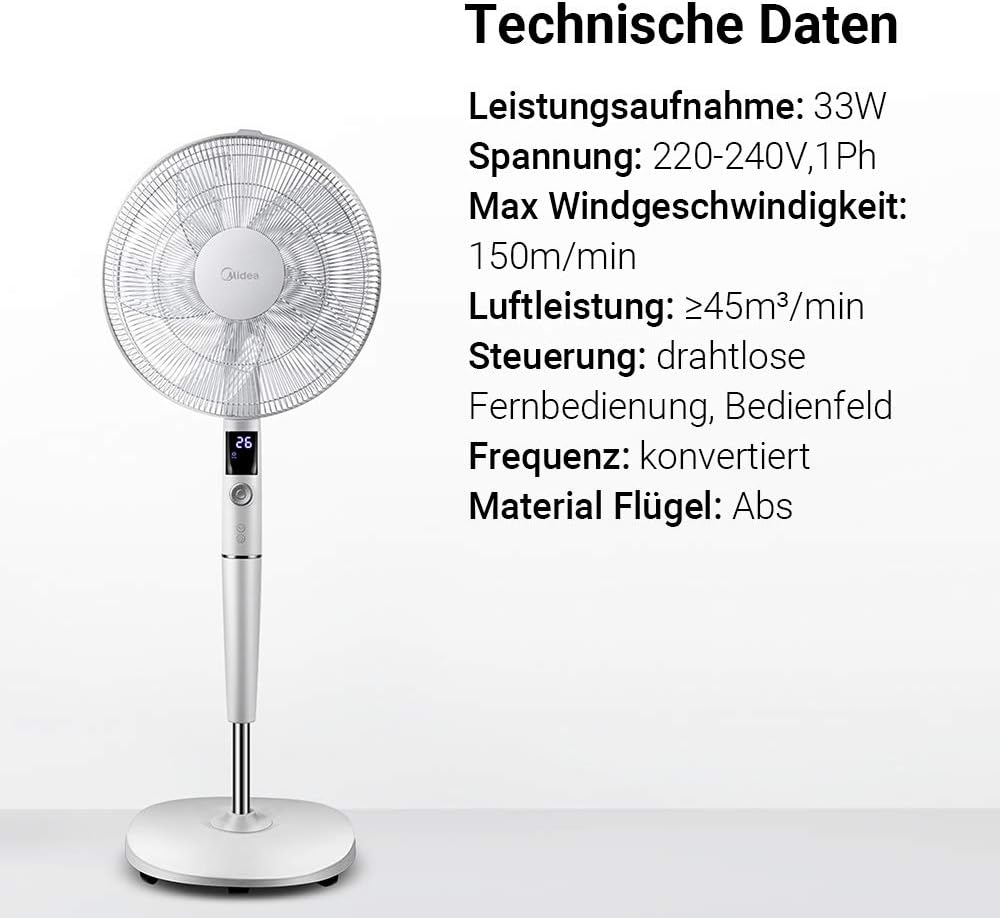
Attēls: A visual representation of the Midea FS40-15AR fan alongside its technical data, including power consumption, voltage, and control methods.
| Funkcija | Detaļas |
|---|---|
| Modeļa numurs | FS40-15AR |
| Zīmols | Midea |
| Tips | DC pjedestāla ventilators |
| Enerģijas patēriņš | 30 vati |
| Voltage | 220-240V |
| Maksimālais vēja ātrums | 150 m/min |
| Gaisa plūsma | ≥45 m³/min |
| Ātrumu skaits | 26 |
| Trokšņa līmenis | 27 Decibels (min) |
| Svārstību leņķis | 80 grādi |
| Taimera funkcija | Līdz 12 stundām |
| Kontroles metode | Wireless Remote Control, On-unit Control Panel |
| Material (Blades) | ABS plastmasa |
| Produkta izmēri (G x P x A) | 45.3 x 40 x 137 cm |
| Svars | 7.8 kg |
| Īpašas funkcijas | Adjustable Height, Tiltable Head, ECO Mode, Sleep Mode |
Garantija un atbalsts
Lai saņemtu informāciju par garantiju un klientu atbalstu, lūdzu, skatiet produktam pievienoto garantijas karti vai apmeklējiet oficiālo Midea vietni. webvietne. Saglabājiet pirkuma čeku kā pirkuma apliecinājumu.
For technical assistance or service inquiries, please contact Midea customer service through their official channels.
- Tiešsaistes atbalsts: www.midea.com/global/support
- Kontaktinformācija: Refer to your regional Midea webvietne ar vietējo kontaktinformāciju.


